Direct answer: a text to video prompt works when it describes one shot the way a director would: who or what is on screen, what happens, how the camera moves, the light, and the sound if the model generates audio. Put style words last. For clips longer than about 10 seconds, split the prompt into timed beats so each part of the clip gets its own action. Try it on Yovid's text to video AI.
Contents
- The six-part formula
- Camera language cheat sheet
- Long clips: write in timed beats
- Writing sound into the prompt
- Four worked examples
- Which model for which shot
- FAQ
The six-part formula
| Part | Question it answers | Example |
|---|---|---|
| Format | What kind of video is this? | "A night commercial for a concept supercar" |
| Subject | Who or what is on screen? | "an orange concept car on a rain-slicked street" |
| Action | What happens, in order? | "headlights flicker on, then the car rolls forward" |
| Camera | How does the camera move? | "low wide-angle orbit, then a slow push-in" |
| Light and look | What does it look like? | "dramatic rim light, streetlights streaking across the glass" |
| Sound | What do we hear? (audio models only) | "a deep engine rumble, rain on the asphalt" |
The order matters less than the coverage. Prompts that skip the camera get a generic slow zoom; prompts that skip the action get a moving postcard.
Camera language cheat sheet
Every model on Yovid reads plain camera terms. These are the ones that change a shot the most:
| Write this | You get |
|---|---|
| slow push-in | the camera moves toward the subject, building focus |
| pull back / reveal | the camera moves away to show the setting |
| low orbit | the camera circles the subject from below, good for products and cars |
| tracking shot | the camera travels alongside a moving subject |
| handheld follow | a chasing, slightly shaky camera behind the subject |
| tilt up | the camera pivots upward, often to end on a face or a skyline |
| macro pass | an extreme close-up gliding over a surface |
| one unbroken take | no cuts; the model keeps one continuous camera move |
Use one or two moves per shot. Three moves in five seconds usually turns into a blur.
Long clips: write in timed beats
Seedance 2.5 and Wan 3.0 can render up to 30 seconds in one generation. A single paragraph rarely fills that time well; the model either rushes the action or loops it. Split the prompt by time instead:
0–10s: a woman sprints out of a doorway onto a busy street.
10–20s: she weaves between cars and pedestrians as taxis brake.
20–30s: she cuts across the crosswalk, the camera chasing her in one unbroken take. Handheld energy.Each beat gets one action. Keep the subject description the same in every beat, or describe it once at the top, so the person does not change halfway through.
Writing sound into the prompt
On models with an audio switch (the Seedance models, Kling 3.0, Kling O3 and Wan 3.0), the soundtrack is generated in the same pass as the picture. Describe sound the way you describe light: as concrete events tied to the action.
- Weak: "cinematic sound design"
- Better: "a deep engine rumble as the headlights come on, tyres hissing on wet asphalt"
If you plan to add music in an editor, switch audio off and leave sound out of the prompt.
Four worked examples
These clips are generations from Yovid's template library. The prompts are their original prompts, shortened to the parts that matter, so you can see the formula at work.
1. Product commercial: the supercar
A night commercial for an orange concept supercar. Low wide-angle orbit around the body, macro passes over the headlights and wet paint, streetlights streaking across the glass, slow push-in on a rain-slicked street. Dramatic rim light.Model: Seedance 2.5 · 16:9 · 1080p · audio on
Format, subject, three camera moves that each have a job, and light. No style adjectives beyond "dramatic", because the camera language already sets the look.
2. Action in one take: the street escape
A continuous one-take 30-second escape scene: a woman sprints out of a doorway onto a busy city street, weaves between cars and pedestrians, and cuts through a crosswalk as taxis brake, the camera chasing behind and swinging around her in one unbroken move.Model: Seedance 2.5 · 16:9 · 30 s · 1080p · audio on
The action is listed in order, and "one unbroken move" tells the model not to cut. The timed-beat version above is the same scene written for tighter control.
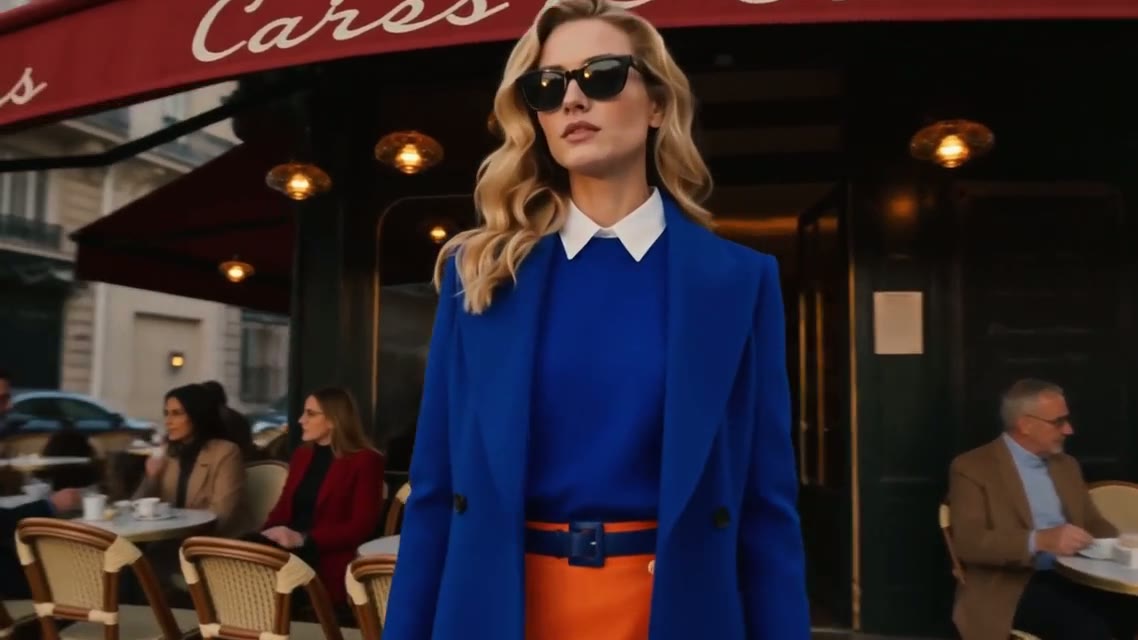
3. A fashion film with a consistent subject
A cinematic Paris fashion film. A model in a cobalt-blue tailored coat over an orange skirt walks past café terraces on a golden-hour boulevard; slow tracking shots, close-ups of sunglasses and fabric in motion. Multi-shot editing with consistent identity, warm film grade.Model: Seedance 2.5 · 16:9 · 30 s · 1080p · audio on
The outfit is described precisely once, and "consistent identity" asks the model to keep her the same across cuts. For a character you will reuse, attach reference images as well; Seedance 2.5 takes up to 30.
4. Sound-led: the juice commercial
A 15-second fruit-juice commercial, no people. 0-2s, extreme macro of a single blueberry in golden light; 2-4s, the berry bursts into a cloud of purple juice; 4-6s, a bottle emerges from the cloud catching the droplets; 6-10s, peach and mango juices swirl into an orange vortex. Energetic splashes, upbeat finish.Model: Seedance 2.5 · 16:9 · 15 s · 1080p · audio on
Two-second beats make a fast commercial rhythm, and "no people" removes a common distraction in product shots.
Which model for which shot
| You need | Start with |
|---|---|
| Up to 30 seconds in one generation | Seedance 2.5 or Wan 3.0 |
| Native 4K | Veo 3.1 Fast (Premium or a credit pack) |
| Sound generated with the picture | Seedance 2.5, Kling 3.0, Kling O3 or Wan 3.0 |
| Fast, physical motion | Kling 3.0, or rerun the prompt on a second model |
| A free first test | Seedance 2.0 Mini on free credits |
The full table, with limits and credit costs for all 14 models, is on the text to video page.
FAQ
How long should a text to video prompt be?
Long enough to cover format, subject, action, camera and light: usually 40 to 80 words for a 5 to 10 second clip. For 15 to 30 second clips, add timed beats rather than more adjectives.
Why does my text to video clip ignore part of the prompt?
Usually there is more action than the clip has time for. Cut to one main action per shot, or move the extra action into its own timed beat.
Do negative prompts work?
Short exclusions such as "no people" or "no on-screen text" usually work. Long lists of things to avoid tend to be ignored, so describe what you want instead.
Can I reuse the same prompt on different models?
Yes. Each model reads motion, faces and physics differently, so running the same prompt on two models is often faster than rewriting it.
Ready to write one? Open text to video AI on Yovid. New accounts get free credits, and free videos carry no watermark.