Yovid
Montage of AI-generated video clips

Google Flow Review: Google’s Veo Filmmaking Studio

Google Flow wraps Nano Banana Pro, Veo 3.1 and Gemini Omni into an agent-led canvas with free daily credits. Here is what it does well, where users get stuck and how Yovid differs.

The short version

Should you use Google Flow?

Worth a try, since starting is free. Google Flow is the filmmaking studio Google built, first shown at Google I/O on May 20, 2025 to replace VideoFX. It runs Google models only (Gemini Omni, Nano Banana Pro, Veo 3.1), adding an agent, clips built from frames or ingredients, edits you describe in words and Flow Tools you make yourself. Every Google account receives 50 credits daily; Google AI plans, priced from $4.99 up to $199.99 monthly, add between 200 and 25,000 more. Reviews are thin: 3.8 from 96 App Store ratings, and Trustpilot posts about blocked prompts and credits lost on failed renders. If you want Seedance and Kling beside Veo, or credits without a subscription, Yovid offers both and refunds failed runs.

Nora

NoraYovid editor

Details about Google Flow last checked , using Flow’s About page, Google’s AI plan list, the Google One terms and the May 2025 launch post.

Maker
Google, built by Google Labs and Google DeepMind; introduced May 20, 2025 (Google I/O)
Ratings
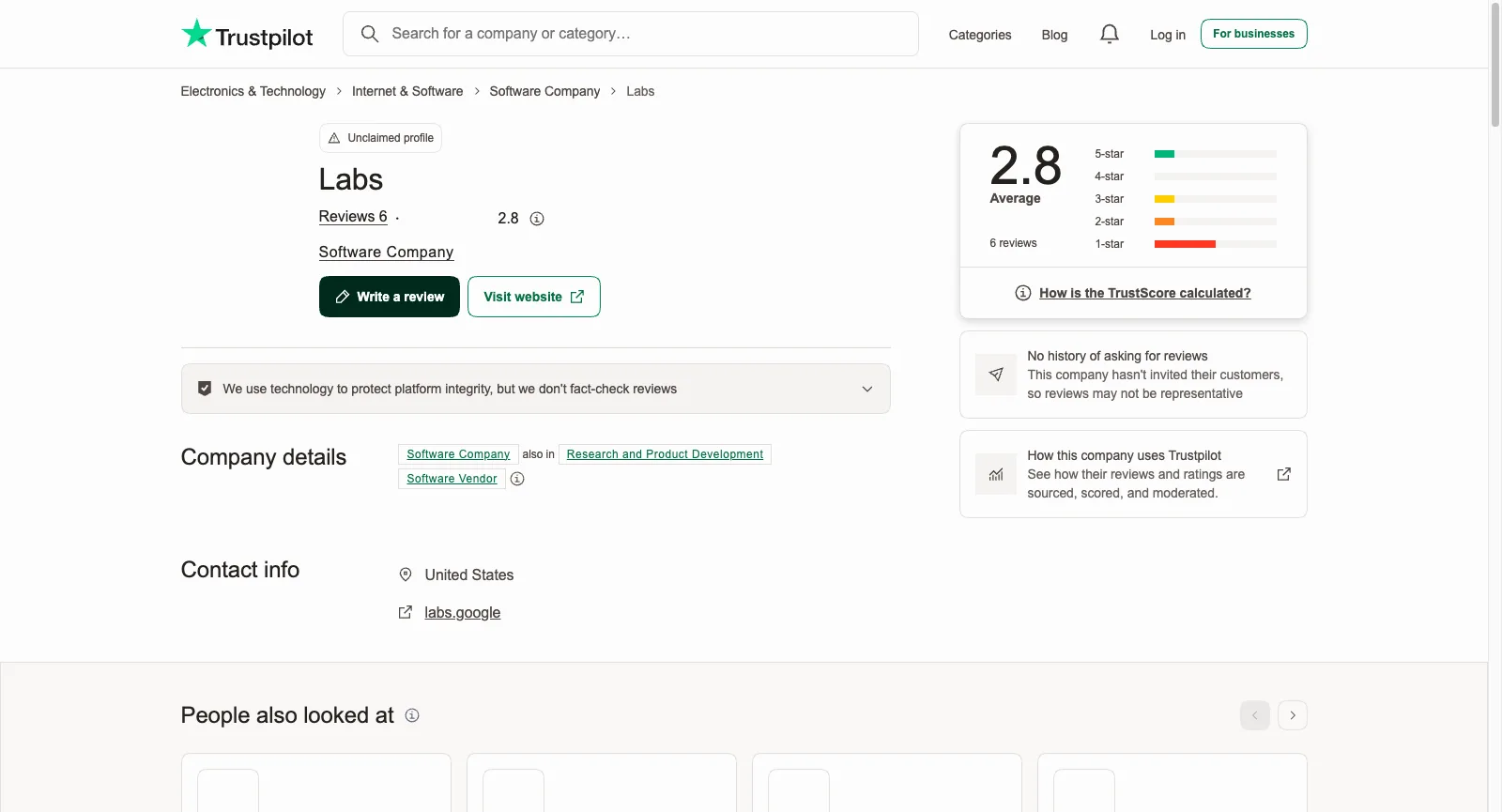
App Store (US): 3.8 from 96 ratings. Trustpilot: 2.8 on labs.google (6 reviews), 3.2 on flow.google.com (1 review)
Free tier
Any Google account: 50 credits every day
Cheapest plan
Google AI Plus at $4.99 a month, adding 200 Flow credits monthly
Refunds
Set by whoever sold you the plan (Google One terms); after cancelling, access lasts to the end of the period

What You Get in Google Flow

Flow is one project canvas wrapped around Google’s own image and video models, with planning help, in-place editing and home-made tools layered on top. Each section covers a part Google leads with on its About page, then the closest thing Yovid offers.

Google’s Own Model Lineup

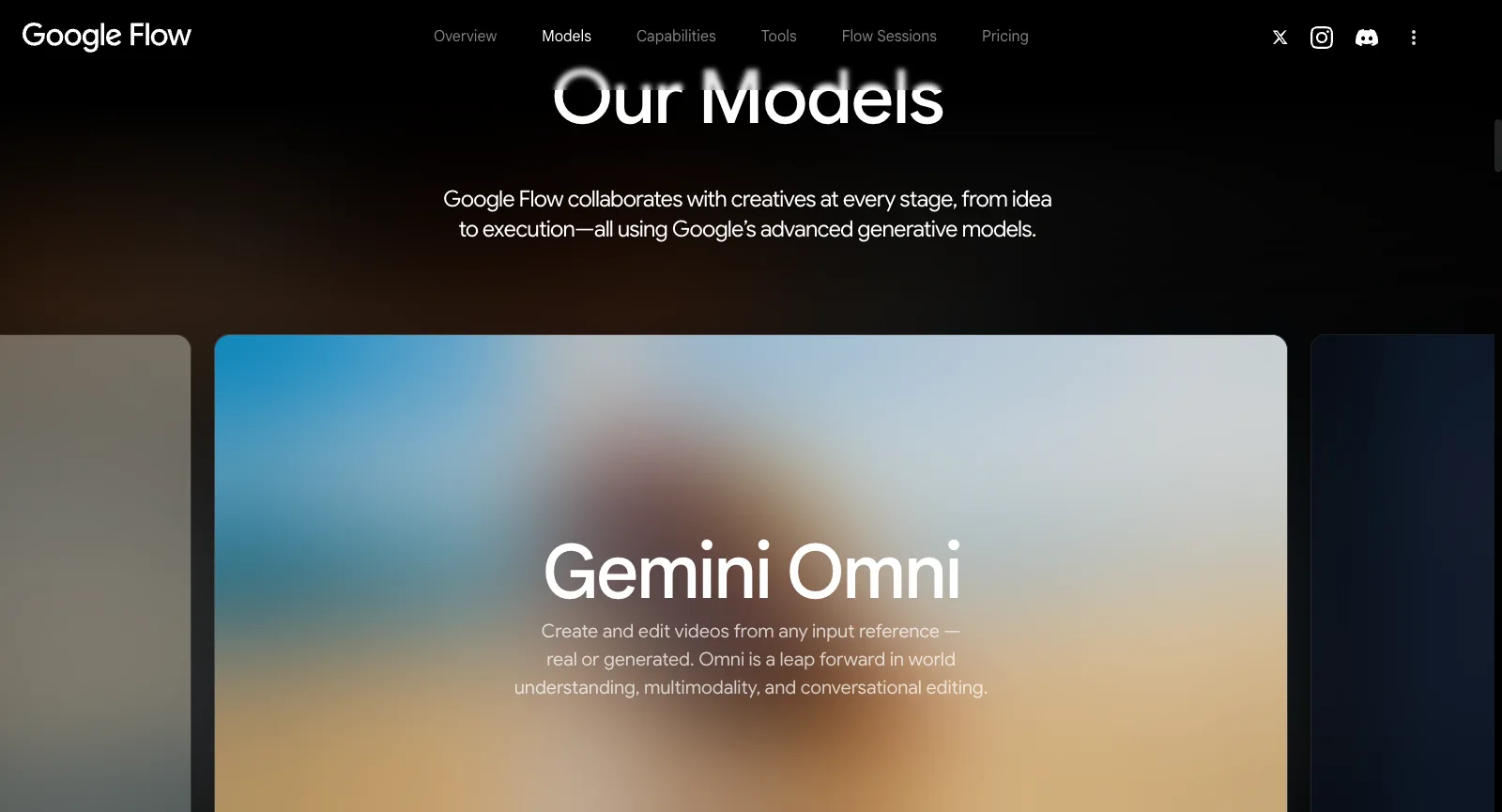
Three Google families make up the Models section. Veo 3.1 generates video with sound and is pitched on realism, believable physics and close prompt following. Gemini Omni both makes and edits clips, starting from whatever reference you hand it, filmed or generated. Nano Banana covers images and is sold on keeping a subject consistent and drawing legible text. Signed out, the free tier shows Veo 3.1 and Gemini Omni Flash for video, with Nano Banana Pro for pictures.

That makes Flow the most direct route to Veo with Google’s editing built around it. The trade-off is choice: there is no Seedance, Kling or other outside model to test the same prompt against.

Mountain scene from a Veo 3.1 clip generated on Yovid

The Yovid way

Yovid runs Veo 3.1 as well, in Fast and Pro, inside the same composer as Seedance 2.5, Kling 3.0, Wan 3.0 and MiniMax H3, and prices every run before you start it.

See Veo 3.1 on Yovid
flow.google.com/about while signed out: Our Models, where a Gemini Omni card describes making and editing clips from any reference
Captured from flow.google.com/about while signed out, October 17, 2026.

A Gemini-Powered Planning Agent

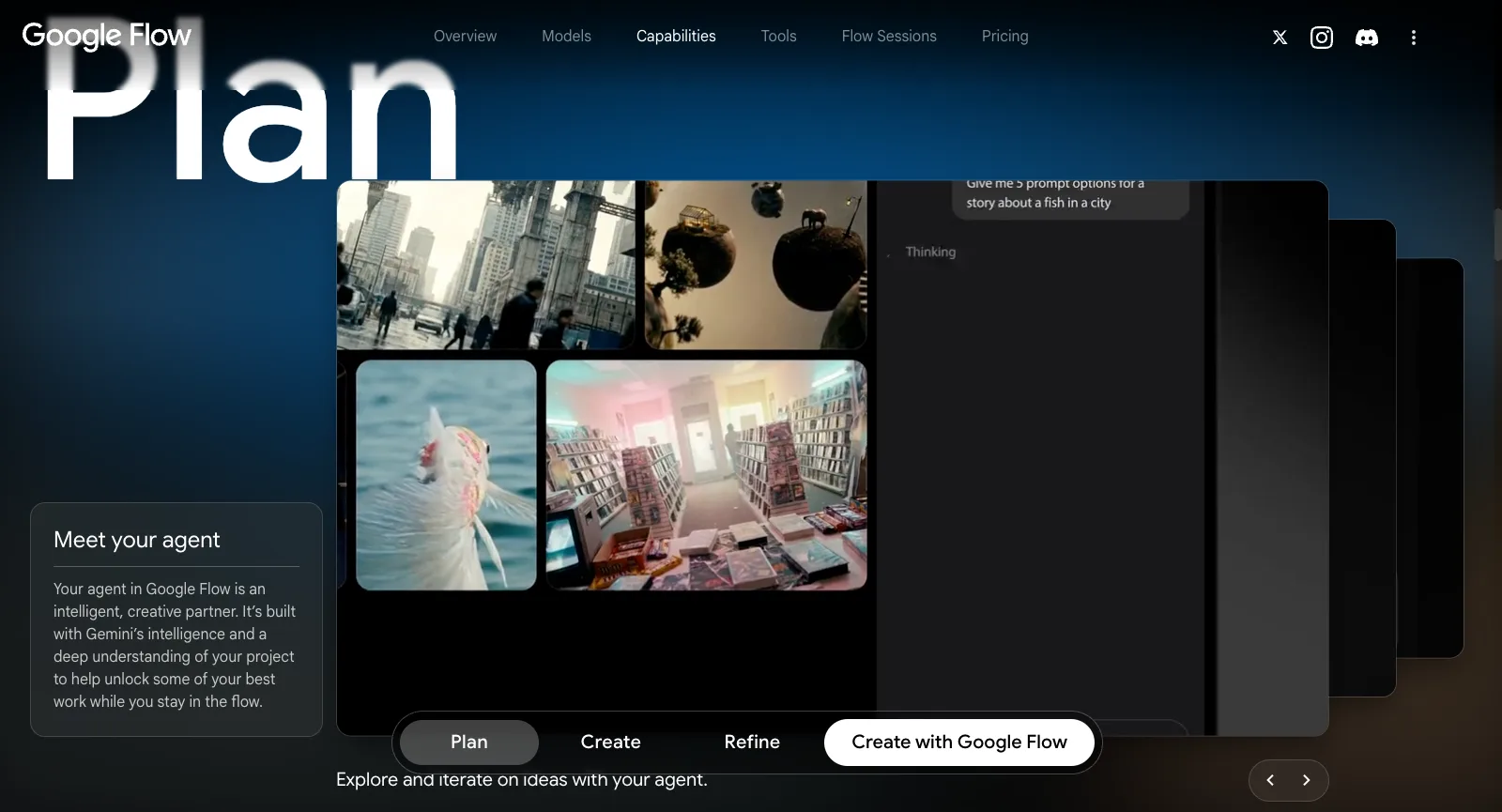
Google presents the agent as a creative partner that knows your project and draws on Gemini. In the About page demo, someone requests five different prompts for a tale of a fish wandering through a city, and the suggestions land as scenes on the canvas.

Free accounts can use it. Plus and Ultra promise higher and highest access, yet the pricing section gives no actual numbers for either.

Lantern-lit fantasy frame from a clip in the Yovid showcase

The Yovid way

Yovid has no agent. For a starting point, its showcase lists clips made on Yovid with the exact prompt behind each one.

Browse the showcase
flow.google.com/about while signed out: the Plan step titled Meet your agent, a chat request for story prompts beside the scenes it produced
Captured from flow.google.com/about while signed out, October 17, 2026.

Starting Clips from Text, Frames or Ingredients

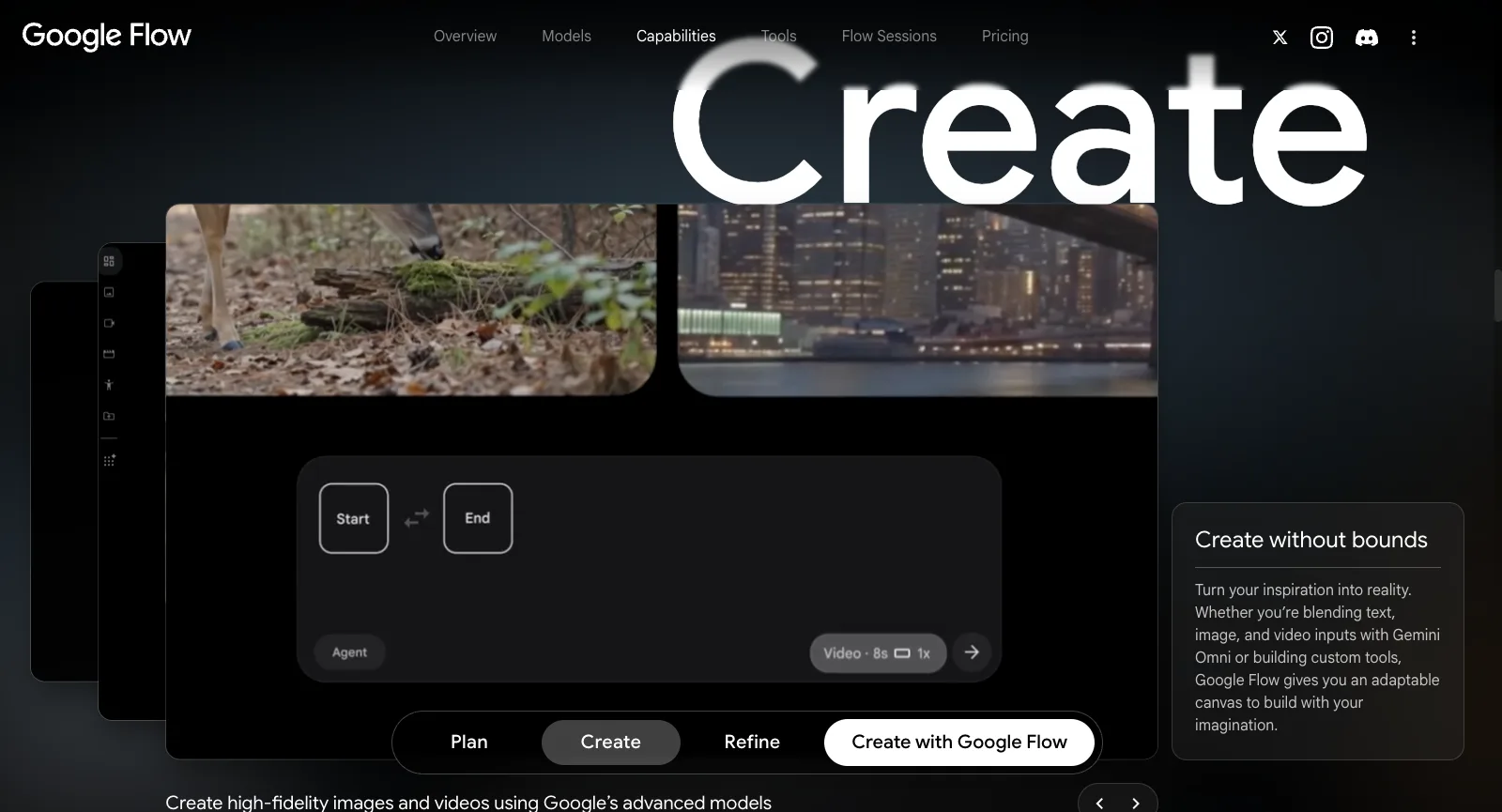
Even the free tier lists four ways in. Text to Video starts from words alone, and Video Extension lengthens a clip you already have. Frames to Video animates from an opening image to a closing one, while Ingredients to Video turns a handful of reference pictures into one scene; Scenebuilder sits next to them. In the Create demo, Start and End frame slots appear above an 8-second length setting.

Google also says Gemini Omni can combine written, image and video input in one request, and the iPhone app lets you film with the live camera or pull from your camera roll.

Panda clip made with image to video on Yovid

The Yovid way

On Yovid, image to video begins from your photo as the first frame plus a line about the motion; Seedance 2.5 can also follow reference pictures, clips and sound together in a single run.

Open image to video
flow.google.com/about while signed out: Create without bounds, with slots for a start and an end frame and an 8-second length
Captured from flow.google.com/about while signed out, October 17, 2026.

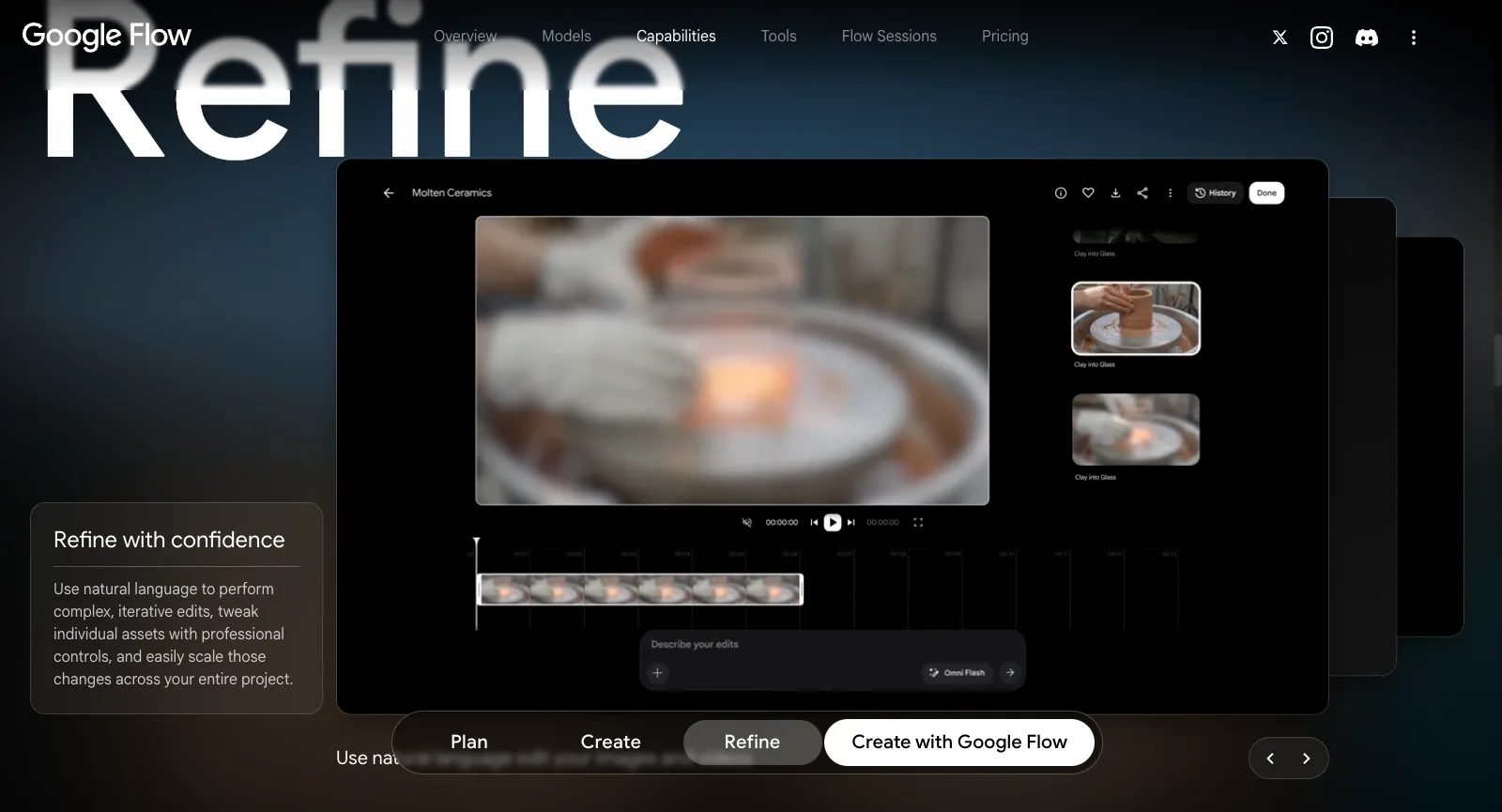
Refine: Edit by Describing the Change

Refine is where Flow parts ways with most generators. You can write edits in everyday language, adjust one asset with finer controls, or push a single change through the whole project. The demo shows a clip on a timeline, earlier takes in a history panel and an edit prompt powered by Omni Flash. Free users get this video-to-video editing too.

In practice you keep improving the shot you already have instead of rolling the dice on a fresh generation.

Vineyard frame from a clip edited with video to video on Yovid

The Yovid way

Yovid’s video to video takes a clip you upload and reworks it from a written instruction, so a nearly right take can be adjusted rather than regenerated.

Open video to video
Signed-out view of flow.google.com/about: Refine with confidence, showing an edit prompt box under a clip and its timeline
Captured from flow.google.com/about while signed out, October 17, 2026.

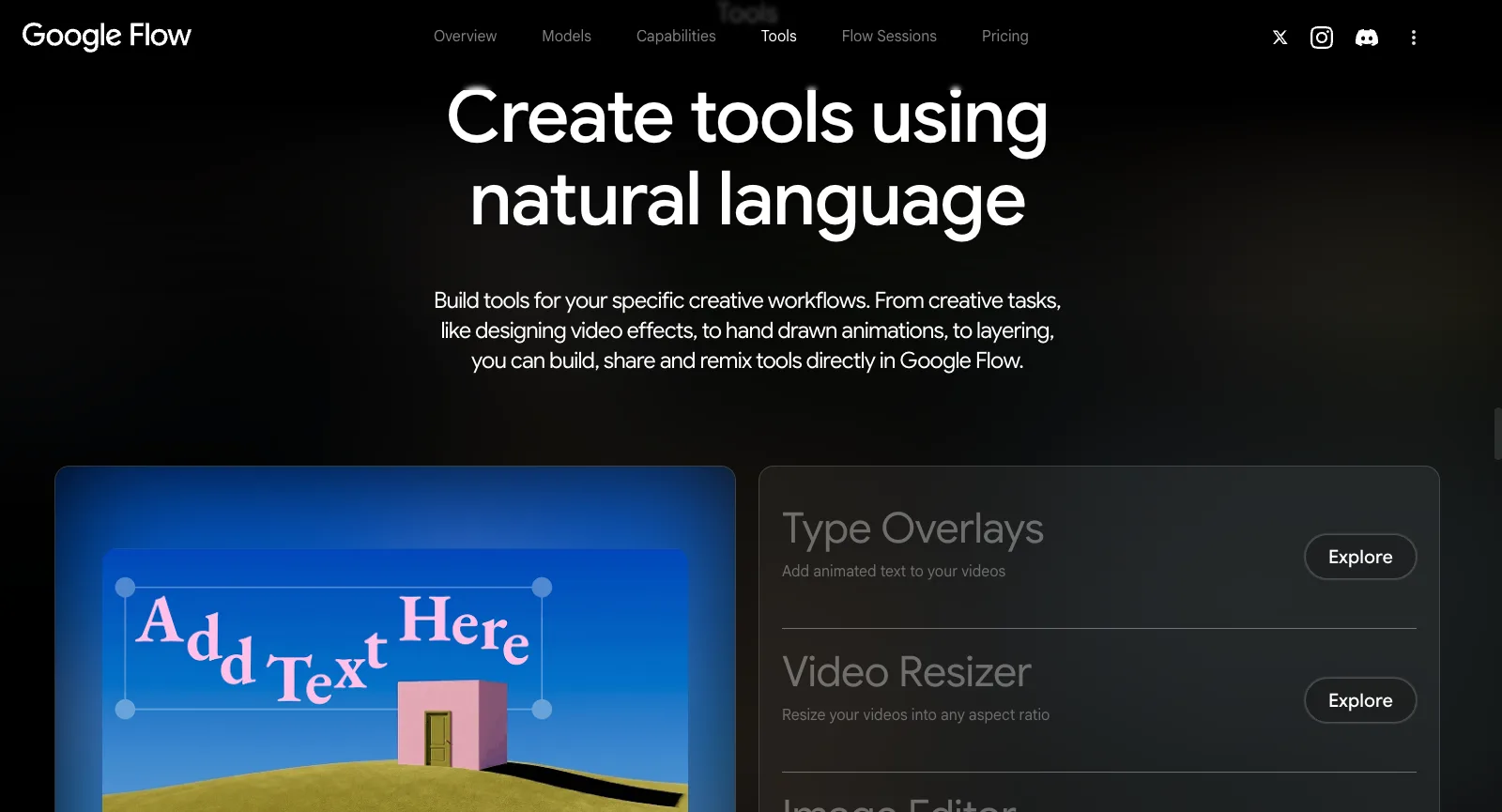
Flow Tools You Describe into Existence

A Flow Tool is a small utility you create by explaining what it should do; afterwards you can share it or let other people remix it. Google ships a set of its own: Scout360 for 360-degree scenes, Grid Architect, Storyboard Studio, Mockup, Type Overlays for moving text, Character X-ray, Shader Effects, Video Resizer and a layered Image Editor.

Anyone on the free tier can use tools; making new ones needs Google AI Plus or higher. Yovid has nothing comparable.

Airship frame from an AI Canvas project on Yovid

The Yovid way

The nearest Yovid gets is AI Canvas: place image and video steps on one board and chain them, so one result feeds the next step.

Try AI Canvas
Tools block on flow.google.com/about, signed out: Google’s pitch for making tools in plain words, with cards for Video Resizer and Type Overlays
Captured from flow.google.com/about while signed out, October 17, 2026.

Recurring Characters, Avatars and Upscaling

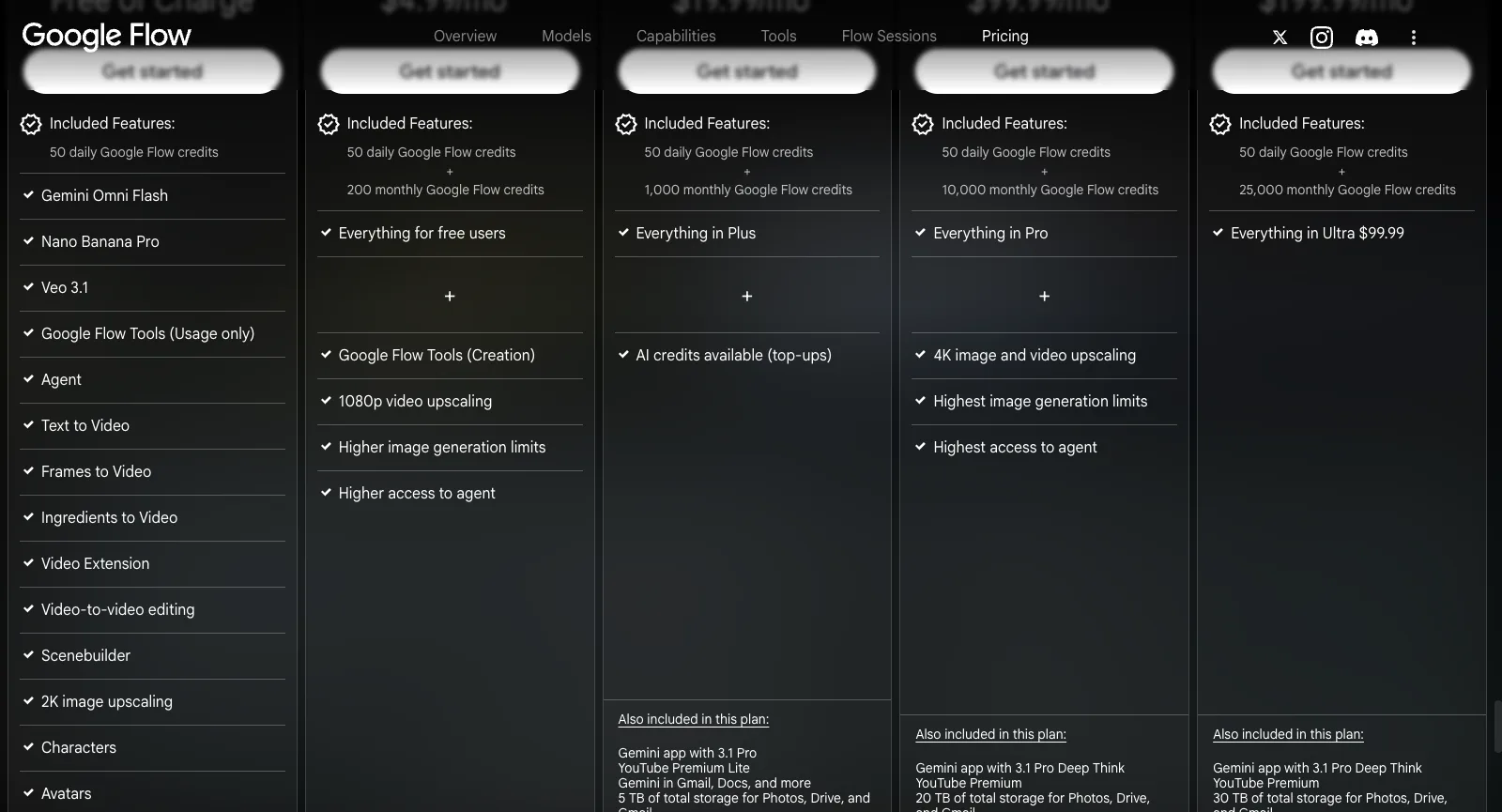
Every tier, the free one too, comes with Characters, Avatars and Scenebuilder. Upscaling depends on the plan: images to 2K for free users, video to 1080p from Google AI Plus, and both images and video to 4K on Google AI Ultra.

Because the cast lives on the same canvas as the shots, a character can carry through a sequence without a separate tool. Yovid has no character library or avatars; with Seedance 2.5 you pass reference images instead.

Window scene from a clip run through the Yovid video upscaler

The Yovid way

Yovid’s video upscaler enlarges and sharpens a finished clip in one step, and the image upscaler does the same for stills.

Open the video upscaler
Signed-out pricing section on flow.google.com: a feature list by plan, with Characters, Avatars and Scenebuilder for free users and 4K upscaling reserved for Ultra
Captured from flow.google.com/about#pricing while signed out, October 17, 2026.

Who Runs Google Flow and Where It Came From

Google unveiled Flow during its I/O conference on May 20, 2025, calling it an AI filmmaking tool designed around Gemini, Veo and Imagen, and the successor to VideoFX, a Google Labs experiment that came before it. Product leads from Google Labs, Google DeepMind and Google Creative Lab signed the announcement, and at first only US subscribers to Google AI Pro and Ultra could get in.

Flow now sits at flow.google.com under the label “AI creative studio”, and signing in with a Google account unlocks its free tier. Paying means buying one of Google’s AI plans; those also cover the Gemini app, cloud storage and more of Google’s services. Google says it is open to adults (18+) in over 140 countries and territories, and an iPhone app arrived in September 2026.

Yovid is an independent multi-model platform instead: one composer for Seedance, Kling, Veo, Wan and MiniMax H3 video plus image models such as GPT Image 2.5, Nano Banana and Seedream 5.0, with AI Canvas, upscalers and an API, credit prices on screen before each run and pay-once packs.

Who Google Flow Suits

Google’s FAQ pitches Flow at anyone exploring visual ideas, whether films, music videos or new kinds of art. It fits best when Google’s models and editing are all you need; if you want to pick between models from different labs, a multi-model generator will serve you better.

Short-film directors

Assemble scenes out of frames or ingredients, lengthen takes, and keep the same people on screen with Characters and Avatars.

Music video makers

Music videos are named in Flow’s FAQ, while Flow Music, a separate Google product, starts at $8 a month.

Concept artists

Get directions from the agent, render stills in Nano Banana Pro, then animate the strongest ones with Veo 3.1 as motion tests.

Existing Google AI subscribers

If you already pay for a Google AI plan for Gemini and storage, between 1,000 (Pro) and 25,000 (top Ultra) Flow credits a month come with it.

Phone-first creators

Shoot or import footage on the iPhone app, leave renders running while you do something else, and pick the project up later in the browser.

Creative technologists

Describe a utility in plain words, such as an effect, a resizer or a storyboard helper, and share it as a Flow Tool.

What Google Flow Users Say

Reviews of Flow are scarce. Google keeps no Trustpilot profile of its own for it, so we read everything on the two unclaimed ones, labs.google and flow.google.com (7 reviews across all languages), plus the 34 newest US App Store reviews. Fifteen of those 34 rated Flow four or five stars, usually because it finally runs on a phone; another fifteen gave one or two, usually over failed generations and credits that don’t last. App Store reviews cannot be linked one by one, so only Trustpilot reviews are cited below, and a single review may support more than one theme.

App Store (US)

3.8 / 5

96 ratings · Google Flow for iPhone from Google LLC, out since September 2026

Open the source

Trustpilot: labs.google

2.8 / 5

6 reviews · Unclaimed Google Labs profile; Flow started as a Labs project

Open the source

Trustpilot: flow.google.com

3.2 / 5

1 review · Unclaimed; its single review is one star

Open the source
Trustpilot page for Labs (labs.google), signed out: a 2.8 average across 6 reviews, profile unclaimed and no record of review invitations
Captured from trustpilot.com/review/labs.google while signed out, October 17, 2026.

Praise that keeps coming up

  1. 01

    Praise is rare, and mostly on the App Store

    Trustpilot holds a single five-star review, and it is just two words. A three-star reviewer who makes fitness videos says the quality generally satisfies them, and the newest top-rated App Store reviews welcome being able to use Flow from a phone.

Recurring complaints

  1. 01

    Harmless prompts blocked as policy breaches

    The most detailed complaint: prompts the reviewers consider technical or innocent get flagged as breaking Google’s rules, including a static shot of two characters, an anatomy drawing in a stylized look, and a garment shown on no one at all.

    How Yovid handles it

    Seedance models on Yovid have a relaxed mode that retries a wrongly blocked prompt for 10% more credits; banned content is still refused and a pass is not guaranteed. Veo, Kling, Wan and MiniMax H3 sit in the same composer if one model keeps saying no.

  2. 02

    Credits lost to errors and uneven results

    Reviewers describe generations that stop with an error. One says 700 credits went by without a single video whose voice stayed consistent; another put €240 into Flow and says it never once produced a video without errors.

    How Yovid handles it

    When a Yovid run fails, its credits come back, and the price of every run is shown before it starts. A finished clip you don’t like is still charged, so try new prompts at short lengths and low resolution first.

  3. 03

    Output that needs a second pass

    One free-tier user trying Flow for reels says clips often had to be fixed by hand or remade entirely, and that they are now shopping for alternatives.

    How Yovid handles it

    Yovid’s video to video reworks an uploaded clip from a written instruction rather than starting over, and Seedance 2.5 accepts reference pictures, clips and sound together; the cost of each run appears on screen first.

  4. 04

    Credit allowances that run dry

    Even a mostly happy reviewer wants bigger credit limits, and lately App Store reviewers complain that video credits disappear fast.

    How Yovid handles it

    Yovid sells pay-once packs from $29.90 that need no subscription, and Premium includes one 7-day window per account of free Seedance 2.5 and 2.0 clips, up to 10 s and 1080p each, in a free queue.

We read these ratings and reviews on October 17, 2026. Nobody has claimed either Trustpilot profile, Trustpilot records no review invitations from Google, and the labs.google profile reviews other Google Labs projects as well. The App Store score counts US ratings alone. Reviews are paraphrased, never quoted; the links lead to each reviewer’s full text.

Google Flow Pricing in 2026

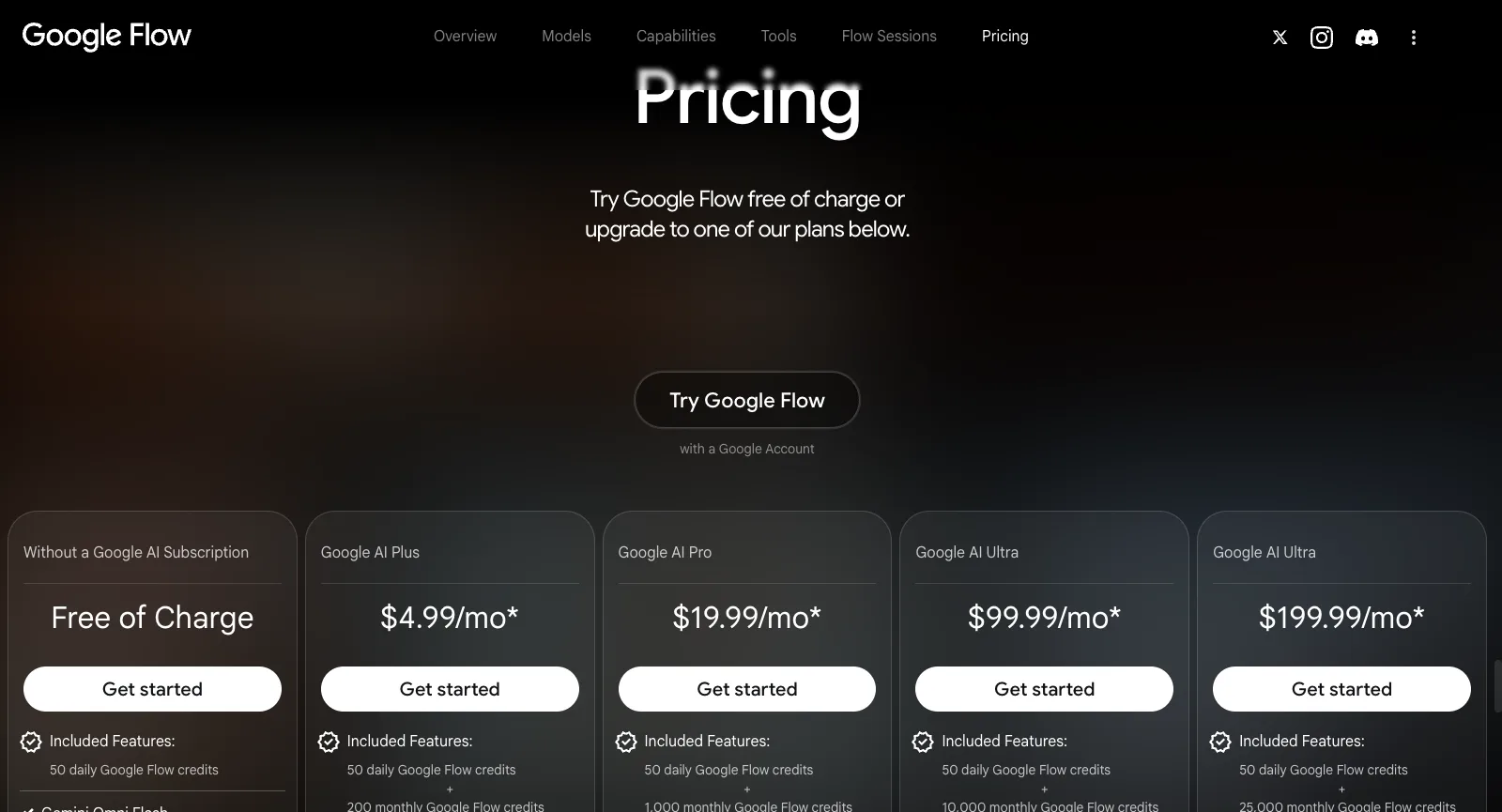
To pay for Flow you subscribe to a Google AI plan, and that subscription also covers the Gemini app, extra cloud storage and more of Google’s services. Besides the 50 free credits each day, paid tiers add a monthly batch, and what an image or clip costs depends on the model you pick. Here are Google’s tiers next to Yovid’s.

Pricing on flow.google.com while signed out: free, then Google AI Plus at $4.99, Pro at $19.99 and Ultra at $99.99 or $199.99 a month, each with its Flow credits
Captured from flow.google.com/about#pricing while signed out, October 17, 2026.
FreeGoogle FlowAny Google account gets 50 credits every day, covering Gemini Omni Flash, Veo 3.1, Nano Banana Pro and the agent; Flow Tools can be used but not builtYovidFree starter credits after registering, no card needed; entry models only (Seedance 2.0 Mini and older), max 720p
Entry tierGoogle FlowGoogle AI Plus, $4.99 a month: 200 Flow credits monthly on top of the daily 50, building your own Flow Tools, video upscaling to 1080pYovidLite at $14.90 a month, or $13 a month paid yearly, for 100 credits a month. Every video model except MiniMax H3; Seedance renders at 720p, other models at up to 1080p. Commercial rights come with yearly billing only
Middle tierGoogle FlowGoogle AI Pro, $19.99 a month: 1,000 Flow credits monthly plus the daily 50, 5 TB of storage, the Gemini app and paid top-ups of AI creditsYovidPro at $29 a month, or $14.50 a month paid yearly, for 200 credits a month. Seedance at 1080p, other models at up to 2K, commercial rights included
Top tiersGoogle FlowGoogle AI Ultra: $99.99 buys 10,000 Flow credits a month and $199.99 buys 25,000; images and video upscaled to 4KYovidPremium at $149 a month, or $99 a month paid yearly, for 1,300 credits a month, output up to 4K and priority support
Seedance 2.5Google FlowNot available; Flow sticks to Google’s models (Veo 3.1, Gemini Omni, Nano Banana)YovidIncluded in every paid plan and every pack: clips run up to 30 s with sound rendered alongside, guided by reference pictures, clips or audio. Output is 720p on Lite and 1080p on Pro, Premium and packs
Cost per videoGoogle FlowDepends on whether you make an image or a video and on the model; the FAQ sends you to the help center for per-model costs instead of listing themYovidThe composer shows each model’s credit price before you generate
Unlimited videoGoogle FlowNone; every tier is limited to its 50 daily credits plus any monthly allowanceYovidPremium only: one 7-day window per account of free Seedance 2.5 and 2.0 clips (10 s max, up to 1080p), in a free queue
Credits without a planGoogle FlowNot possible: AI credit top-ups start at Google AI Pro, and unused AI credits can be lost if you cancelYovidPay-once packs from $29.90 for 200 credits up to $999 for 8,000, no renewal, commercial rights included
RefundsGoogle FlowWhoever sold you the plan sets the refund policy (Google One terms); after cancelling you keep access until the billing period endsYovidRefundable within 3 days of buying (packs too) if none of that order’s credits were spent; payment fees (max 4% + $1.50) are kept, and automatic renewals cannot be refunded

Flow figures come from the Pricing section of flow.google.com/about and Google’s AI plans pages, read on October 17, 2026. They are monthly US prices, and Google warns that prices differ by market. Rules on refunds and credits follow the Google One terms (version of October 1, 2026). Yovid figures match yovid.ai/pricing.

Google Flow, Yovid and Higgsfield Compared

They start from different places: Google Flow is Google’s studio for its own models, Yovid is a multi-model generator with prices shown up front, and Higgsfield mixes hosted models with cinematic tools of its own.

Built aroundGoogle FlowGoogle’s own studio: Veo 3.1, Gemini Omni and Nano Banana Pro plus an agent, Scenebuilder, edit-by-description and Flow ToolsYovidOne composer for Seedance, Kling, Veo, Wan and MiniMax H3 video and for image models, plus AI CanvasHiggsfieldAn agent, Genjutsu, AI Influencer and Cinema Studio on top of many hosted models
Seedance 2.5Google FlowNot available; Google models onlyYovidFrom Lite: sound-on clips as long as 30 s, 720p on Lite and 1080p on Pro, Premium and packsHiggsfieldPlus and above; Starter only gets the Mini and Fast versions of 2.0
Other video modelsGoogle FlowVeo 3.1 and Gemini Omni Flash, nothing elseYovidVeo 3.1, Kling 3.0, MiniMax H3 and Wan 3.0HiggsfieldIts own models plus Veo, Kling, Wan, Sora, Grok and Hailuo
Unlimited videoGoogle FlowNone; 50 credits a day plus each plan’s monthly allowanceYovidPremium: one 7-day window of free Seedance 2.5 and 2.0 clips per accountHiggsfieldPlus and Ultra: a week of Wan 3.0 and Kling 3.0; business plans add Seedance 2.5
Credits without subscribingGoogle FlowNo; top-ups begin at Google AI ProYovidYes: packs from $29.90, usable for 180 days to a yearHiggsfieldNo; packs are sold to subscribers and last 90 days
Refund windowGoogle FlowThe seller decides, under the Google One termsYovid3 days on new purchases with none of their credits used; renewals excludedHiggsfieldFirst purchase only, within 7 days and before any credits are used

Google Flow details were read on Flow’s site, Google’s plan pages and the Google One terms on October 17, 2026; Higgsfield details were read on October 14, 2026.

Why Some Google Flow Users Move to Yovid

Those who switch tend to want several labs’ models in one place, or to buy video generation without taking out a Google AI plan.

  1. 01

    Seedance and Kling alongside Veo

    Yovid puts Seedance 2.5 and 2.0 in the same composer as Veo 3.1, Kling 3.0, Wan 3.0 and MiniMax H3. Lite ($13 a month on yearly billing) already runs Veo, Kling and Seedance 2.5, so if one model turns a prompt down you can hand it to another. Flow has Google’s models and nothing else.

  2. 02

    Credits without a subscription

    Packs start at $29.90, need no plan, stay valid for 180 days to a year and include commercial use and 1080p Seedance. On Flow, buying extra AI credits requires Google AI Pro or above, and unused AI credits can be lost once a plan is cancelled.

  3. 03

    A free Seedance week on Premium

    Premium ($99 a month on yearly billing) comes with one 7-day window per account of free Seedance 2.5 and 2.0 clips, as many as 11 ten-second clips at 720p, and failed runs never cost credits. Flow sells no unlimited tier; every plan is capped by its daily and monthly credits.

When Google Flow is still the better call

  • You already subscribe to Google AI Ultra or Pro for YouTube Premium, Gemini or storage, which makes Flow’s credits effectively free.
  • Gemini Omni’s edit-by-description, the agent, Scenebuilder or home-made Flow Tools are central to how you work.
  • Fifty free credits a day on Google’s models cover your needs, and you have no use for models from other labs.

More Google Flow Alternatives

Eight other tools worth a look. For each we list the lowest-priced paid plan, before tax, as its official pricing page showed it on October 13, 2026. The plans buy very different amounts of video, so read them as a shortlist rather than a ranking.

Higgsfield

Hosts outside models next to in-house tools (Soul images, Ads Studio, Cinema Studio, AI Influencer), offers team plans and prices Seedance 2.0 and Kling 3.0 per 5-second block.

Pick it for: Its in-house studios, or cheap Kling 3.0: roughly 7 credits buys 5 seconds at 720p.

Skip it for: Full Seedance on a budget: the Starter tier stops at Seedance 2.0 Fast and 2.0 Mini.

Cheapest paid plan: Starter at $19 a month (same monthly or yearly) for 270 credits; the free tier just says “Limited use”.

Read our Higgsfield breakdownTheir pricing page

Pollo AI

A marketing-minded hub: dozens of third-party models plus its own Pollo models, template apps, an agent, Marketing Studio, an MCP server, an API and phone apps.

Pick it for: Maximum model choice; while its 60% subscriber discount lasts, its Seedance clips cost less than Yovid’s on most plans.

Skip it for: Buying credits with no subscription, or keeping unused plan credits: they lapse each cycle.

Cheapest paid plan: Lite at $15 a month, $12 paid yearly, for 400 credits.

Read our Pollo AI breakdownTheir pricing page

Runway

Built around Runway’s in-house Aleph, Act-Two and Gen-4.5, adding sound effects, voices and music, upscaling to 4K, and guest models like Kling and Seedance.

Pick it for: Projects where editing matters as much as generating.

Skip it for: Lots of clips on the cheapest tier: Runway itself says the 625 Standard credits buy roughly 52 s of Gen-4.5 output.

Cheapest paid plan: Standard at $15 a month, $12 paid yearly, for 625 credits; the free plan gives 125 credits once.

Their pricing page

Kling AI

Kuaishou’s own app for Kling, including Kling 3.0 Omni and 3.0 with sound, Motion Control, 4K video and a developer platform.

Pick it for: Kling-only users who want to buy straight from the model maker.

Skip it for: Anyone who needs Seedance, which appears on neither its pricing page nor its home page.

Cheapest paid plan: Standard: $6.99 for month one, $8.80 a month after that or $79.20 a year, with 660 credits a month.

Their pricing page

Hailuo AI (MiniMax)

MiniMax’s first-party app for Hailuo and MiniMax H3, with Hailuo Agent and Omni Reference (as many as 12 reference images); paid tiers also unlock Sora 2 and Veo 3.1.

Pick it for: People who like MiniMax’s models and per-second pricing.

Skip it for: Seedance work: no Seedance model is listed for sale, and trial credits only run Hailuo models.

Cheapest paid plan: Standard at $10.50 a month on sale that day, or $8.40 paid yearly, for 1,000 credits.

Their pricing page

Luma Dream Machine

Home of Ray3.2 for video and Uni-1 for images, Luma Agents and connectors for tools like Frame.io and Figma; its credit table also prices Seedance 2.0 Mini, 2.0 and 2.5.

Pick it for: Design teams after Ray3.2 output and agents inside the tools they already use.

Skip it for: Low-cost testing: no free plan is listed and the cheapest tier is $25 a month.

Cheapest paid plan: Plus at $30 a month, $25 paid yearly, for 10,000 credits with commercial use.

Their pricing page

PixVerse

Runs PixVerse’s V6 (with native audio) and real-time R2, plus Lip Sync, Canvas, Agent and an API; the two newest Seedance versions unlock from the Pro tier.

Pick it for: Fast social clips on free daily credits: 60 at sign-up, then 30 a day, capped at 540p.

Skip it for: Cheap Seedance: the Standard tier only runs PixVerse models and maxes out at 720p.

Cheapest paid plan: Standard at $10 a month, $8 paid yearly, for 1,200 credits per 30 days plus 60 daily.

Their pricing page

Vidu

Vidu’s in-house Q3 and Q4 plus real-time Vidu S, with a developer API, Vidu Agent and Reference to Video.

Pick it for: Reference-driven clips on Vidu models; on paid tiers Q4 at 540p uses 2 credits per second.

Skip it for: Seedance, which its pricing page does not offer.

Cheapest paid plan: Standard at $10 a month, $8.25 paid yearly, for 800 credits.

Their pricing page

Questions People Ask

Straight answers on Google Flow, based on what we checked on October 17, 2026.

What do people make with Google Flow?
AI video and images, using Google’s models only: Veo 3.1 and Gemini Omni for clips, Nano Banana Pro for stills. Typical projects include concept art, music videos, social posts and short films, begun with a prompt, a pair of opening and closing frames or some reference ingredients, then edited by describing the change.
Can you use Google Flow for free?
Yes, within limits. Each Google account receives 50 Flow credits a day, enough to try Gemini Omni Flash, Veo 3.1, Nano Banana Pro and the agent. More credits come with a paid Google AI plan: 200 a month on Plus ($4.99), 1,000 on Pro ($19.99), and 10,000 or 25,000 on Ultra ($99.99 or $199.99). Those were the US prices on October 17, 2026.
What does one Google Flow video cost in credits?
The pricing section doesn’t say. Flow’s FAQ explains that costs differ between images and video and from model to model, and points to a per-model table in the help center, so we quote no per-video figure. Google’s terms also state that the product shows the credit cost of each action and that Google may change it.
Can I get a refund from Google Flow?
You pay for Flow with a Google AI plan, which puts refunds under the Google One terms: the policy of whoever sold you the plan applies (Google Play, for example), and cancelling keeps your access until the current billing period ends. Unused AI credits can be lost on cancellation, and consumer protection law where you live may add rights.
Is Seedance or Kling available in Google Flow?
No. Flow lists Google’s models only: Veo 3.1, Gemini Omni and Nano Banana. To run Kling, Seedance 2.5, MiniMax H3 or Wan alongside Veo, pick a platform that hosts several labs, such as Yovid or Higgsfield.
Which Google Flow alternative is best for video?
If you want Seedance without a subscription, Yovid: Seedance 2.5 from Lite upward, pay-once packs from $29.90, a credit price shown before every run, and Veo, Kling, Wan and MiniMax H3 in the same composer. If you would rather have a cinematic toolkit on top of many models, Higgsfield is the nearest fit.
Is Yovid affiliated with Google?
No. Yovid is run independently and has no tie to Google; it simply offers Veo among several model families, next to Seedance, Kling and others. Google, Google Flow, Gemini and Veo belong to Google, and Seedance to ByteDance; the names appear here only to describe and compare the products.

Beyond one model maker Write the shot, choose the model