Your clip ends, the story doesn’t. Upload the footage, write what happens next, and Yovid continues the shot on Seedance 2.5 with the same characters, set and light, plus sound to match.
Extend it, don’t regenerate it
Re-rolling a whole clip to win two more seconds risks losing the take you liked. An extension keeps the footage you have and adds new footage after it: Seedance 2.5 reads your clip, carries on from its final moment and hands back a fresh segment to drop in right after the original. Use it when a shot needs a longer hold for the edit, when a reaction is missing, or to grow a scene a few seconds at a time.
Something inside the clip is wrong
Replace a product, rebuild the backdrop or give the footage a new look while the camera move and pacing hold.
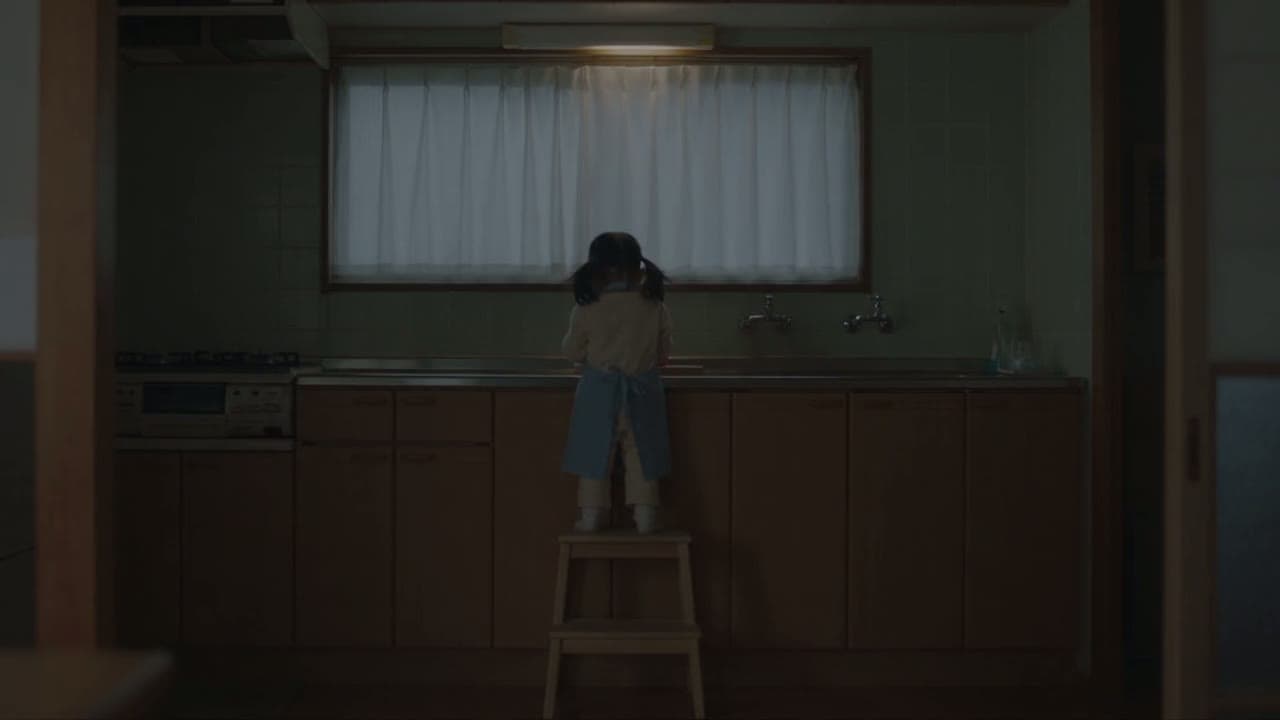
In ByteDance Seed’s Seedance 2.5 example the source ends with the mother at the kitchen door. The extension opens on that same moment and plays on as the girl turns toward her, while the clothes, the step stool and the tomatoes on the board stay exactly where they were.
Example prompt: Extend @Video 1. Keep the characters, kitchen, clothing and prop positions. The mother stops at the kitchen doorway, hair a little messy, and asks softly in Chinese, "Xiao Cheng?" (Seedance 2.5 · 16:9 · 12s)
Change it instead with the same upload
Your wording picks the mode. Start with “Extend” and Seedance 2.5 adds time; write a change such as “replace” or “change the background” and it edits the footage you uploaded instead, keeping the camera move. Here a park walk becomes a French vineyard with wine glasses in hand.
Example prompt: Change the background to a vineyard in France, replace the coffee in their hands with red wine glasses, change her outfit to a floral wrap dress with a small shoulder bag. Keep everything else unchanged. (Seedance 2.5 · 16:9 · 20s)
What an extension costs: credits by resolution
Calculated with the same formula the generator charges with, so these figures follow any rate change.
Seedance 2.5 video extension credits per billed second and for three example jobs at 480p, 720p and 1080p, with the plans that can use each resolution
Resolution
Credits per billed second
5 s clip + 5 s new
10 s clip + 10 s new
8 s clip + 30 s new
Available on
480p
2.12
21
42
81
Lite, Pro, Premium and credit packs
720p
4.58
46
92
174
Lite, Pro, Premium and credit packs
1080p
10.21
102
204
388
Pro, Premium and credit packs
An extension bills the seconds you upload plus the seconds you add, at Seedance 2.5’s reference-clip rate and before plan discounts. Trimming the source to the part the continuation needs saves credits. The extend mode is not on free credits; failed generations are not charged.
Use cases
When a clip needs more time
A longer hold for the edit
Add the extra beat a cut needs, so the shot breathes before the next one instead of ending mid-move.
Stories built in steps
Extend, review, extend again: each segment continues the last, so a scene can grow well past one generation.
The missing reaction
Let the scene continue into the reply, the look back or the punchline that the original take cut off.
Dialogue that keeps going
Write the next line in quotes and name the speaker; the new segment carries the voices and room tone forward.
Yes. Give Seedance 2.5 on Yovid a source between 2 and 30 seconds long and it writes another 4–30 seconds that carry on from the final moment, keeping the subject, set, light and grade, with sound to match.
How do I extend a video on Yovid?
Open the generator, pick Seedance 2.5, attach your clip and start the prompt with “Extend @Video 1”, followed by what happens next. Choose the new length and a resolution, check the credit cost and generate. Join the result after the original in any editor.
Which model extends videos?
Seedance 2.5, the only model on Yovid with a dedicated extend mode. Other models can use a clip as a reference for motion or style, but they generate a new shot rather than continuing yours.
Is my original clip part of the result?
No. You get the new segment, which begins where your clip ends, so the two cut together as a single uninterrupted take. Keeping them separate means you can re-roll the extension while your source stays as it is.
How much does a video extension cost?
Extensions are billed on the uploaded seconds plus the new seconds at Seedance 2.5’s reference-clip rate, before plan discounts. The table on this page shows the credits for three typical jobs at each resolution, and the composer shows the exact figure before you generate.
Can I extend a video for free?
Not with free credits: the extend mode is part of Seedance 2.5, available on every paid plan and credit pack. Free credits do cover image and text to video on the entry models, and no plan adds a watermark.
How long can the extension be?
A single run adds between 4 and 30 seconds, and the source may last up to 30 seconds. To go further, feed the new segment back in as the source and run another extension.
Can I extend in 1080p?
1080p is available on Pro and Premium plans and with credit packs; on Lite, Seedance 2.5 tops out at 720p. At any resolution, the extension keeps your clip’s aspect ratio.



 Seedance 2.5