Yovid
Montage of AI-generated video clips

LTX Studio AI Video Review

Lightricks pitches LTX Studio as one place to take a film from a script through storyboards to a pitch deck. Here is what it does, what its users report, what it costs and when Yovid is the simpler pick.

The short version

Should you pay for LTX Studio?

It depends on what you make. LTX Studio comes from Facetune maker Lightricks, and it is built for planning a whole film or ad: a script is split into scenes, Elements keep the cast consistent, and the board can leave as a PDF pitch deck. Every tier includes LTX-2.5, the in-house model; Kling and Seedance 2.0 unlock on Standard at $35 a month, Veo 3.1 only on the $125 Pro plan. On Trustpilot it scores 1.6 across 79 reviews, mostly about refunds denied past 1,200 credits and allowances that vanish after a few renders. For single clips, Yovid’s Lite plan already covers Seedance 2.5, Kling 3.0, Veo 3.1 and Wan 3.0, and Yovid’s credit packs never renew.

Nora

NoraYovid editor

Details about LTX Studio last checked , using its pricing page and plan comparison, the refund policy, the LTX help center and the page for its LTX-2.5 model.

Maker
Lightricks Ltd. (Facetune, Videoleap); public to all since August 20, 2024
Trustpilot
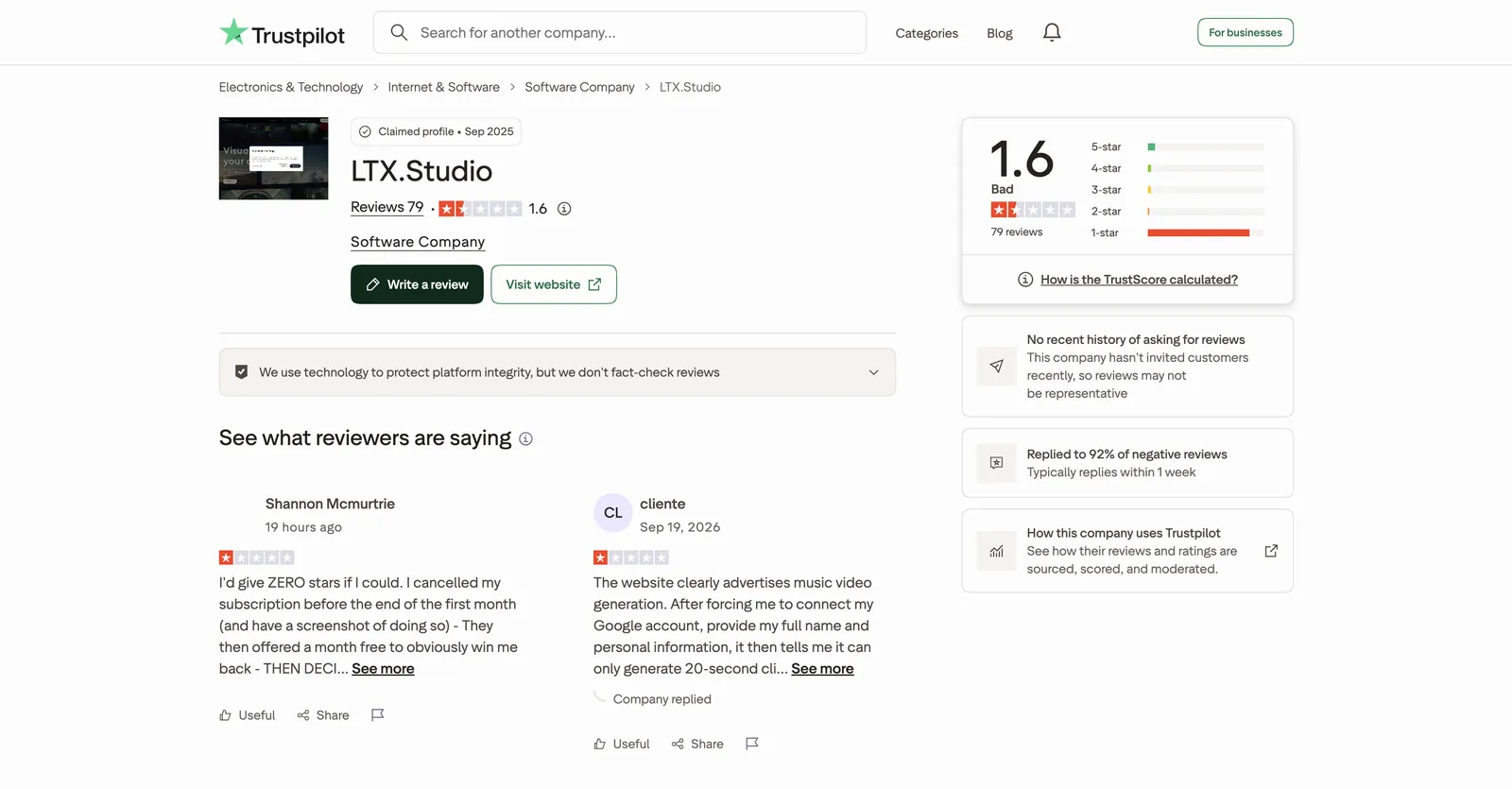
1.6 out of 5 from 79 reviews; profile claimed by the company
Free credits
800, granted once and never topped up; personal projects only, and withheld in some regions
Cheapest plan
Lite: $15 monthly, or $12 a month on yearly billing, for 8,000 monthly credits
Refund rule
First subscription only, within 14 days, with 1,200 credits or fewer spent

What LTX Studio Can Do

LTX Studio aims at a finished piece rather than one-off clips, so its tools cover planning as much as generating. Below are the six areas its own pages push hardest, each paired with the closest thing on Yovid.

Lightricks Models Plus Kling, Seedance 2.0 and Veo

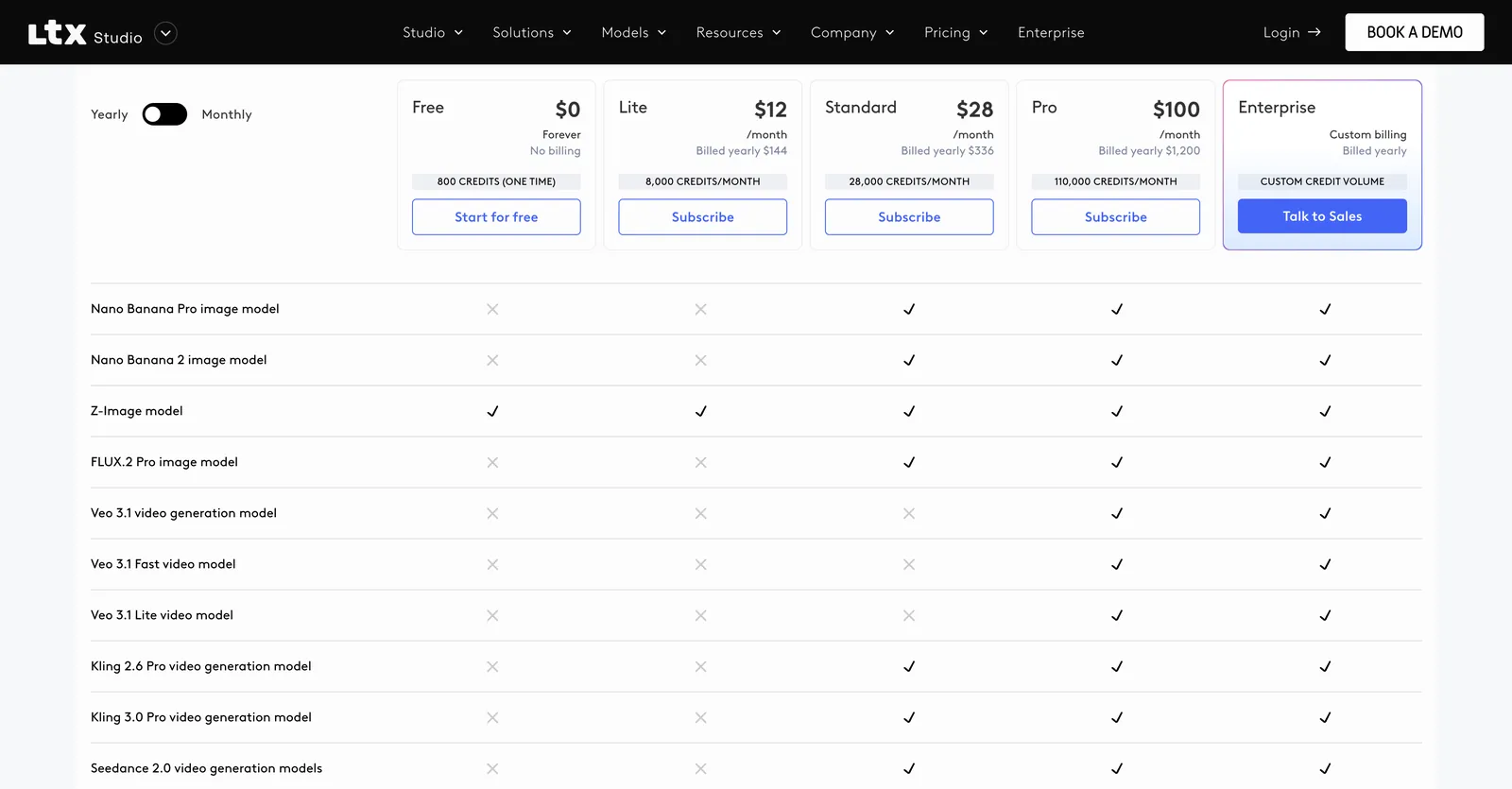
In the plan comparison we read on October 19, 2026, even the free tier gets the LTX-2.3 and LTX-2.5 video models along with Z-Image for stills. Moving up to Standard brings in Seedance 2.0, Kling 3.0 Pro and 2.6 Pro, FLUX.2 Pro, ChatGPT Images 2.0, Nano Banana Pro and Nano Banana 2. All three Veo 3.1 variants (regular, Fast and Lite) are kept for Pro and Enterprise.

Seedance 2.5 appears nowhere on that list, and LTX reserves the right to swap or retire models whenever it likes, with no promise that a given one stays.

Climbing scene from a clip on the Yovid models page

The Yovid way

Yovid lists every model it runs on one page, Seedance 2.5 and 2.0, Veo 3.1, Kling 3.0, MiniMax H3 and Wan 3.0 among them, and shows the credit price before each generation.

See every model
Plan comparison on the LTX Studio pricing page: Seedance 2.0, Kling, FLUX.2 and Nano Banana rows ticked from Standard, the Veo 3.1 rows only from Pro
Captured from ltx.io/studio/pricing while signed out, October 19, 2026.

Gen Space: Camera Paths, Keyframes and References

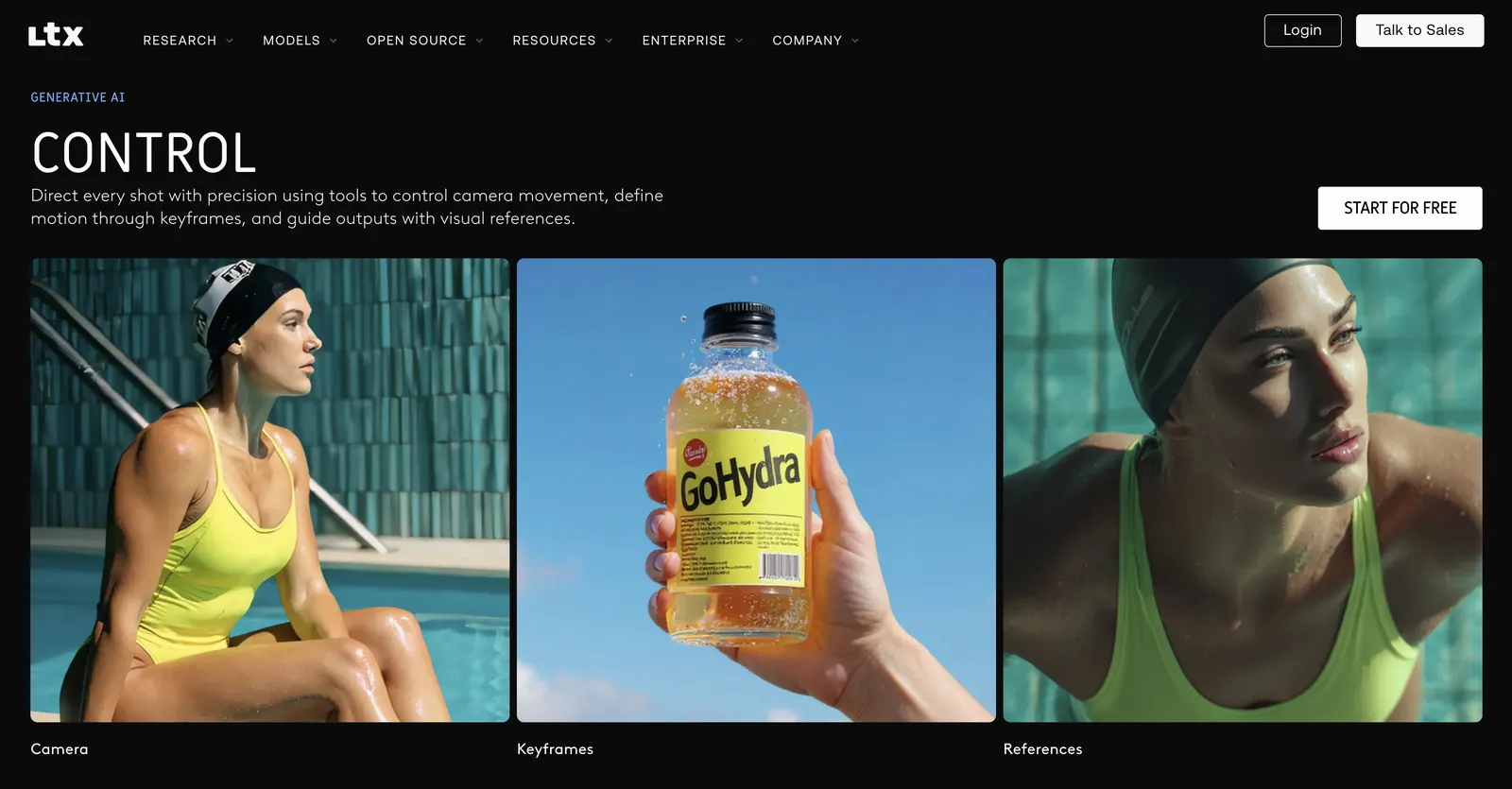
Gen Space is where clips actually get made. Prompts, reference pictures or a mix of both feed four modes: text, image, audio and video in, video out. Its Control tools plot the camera path, pin motion to keyframes and point the model at visual references, while Style presets cover everything from cinematic looks to pencil sketch.

Shots are short by design. The LTX FAQ says a single shot lasts 3–20 seconds, with the exact cap set by the model; anything longer gets assembled from several shots on the Timeline.

Panda still from a Yovid image-to-video clip

The Yovid way

On Yovid, set a still as the opening frame and write the movement you want; Seedance 2.5 can also read picture, clip and sound references within the same run.

Open image to video
LTX Studio home page scrolled to its Control section, with example tiles labelled Camera, Keyframes and References
Captured from ltx.io/studio while signed out, October 19, 2026.

Elements for a Steady Cast and Props

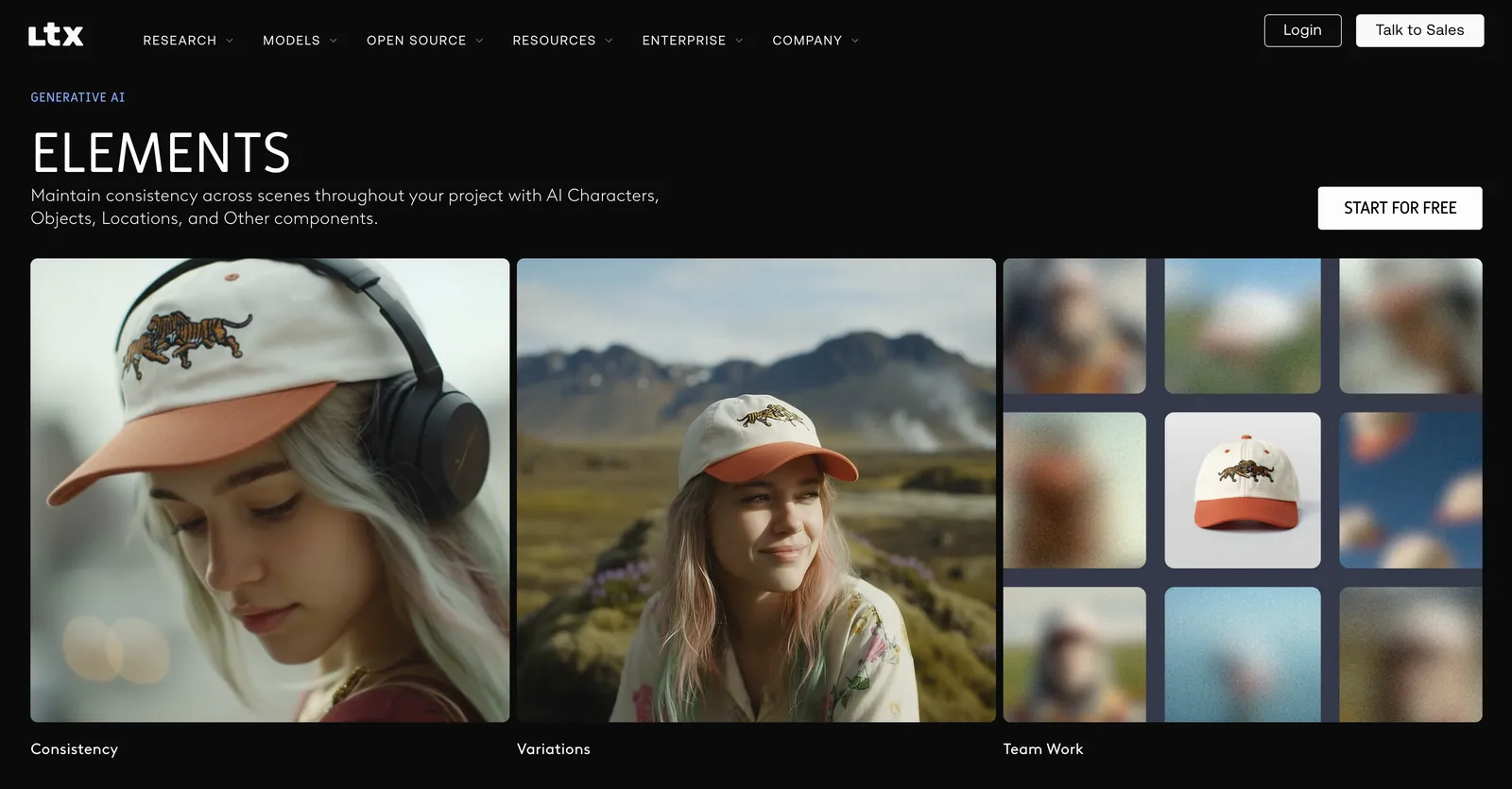
Elements is how LTX Studio tackles continuity. Characters, props, locations and other building blocks are saved to a project and dropped into later scenes; the demo follows one young woman and her embroidered cap through different settings, next to variation and teamwork examples.

Keeping Elements is a Standard-and-up feature. Free and Lite accounts can still generate, but cannot store an Element for reuse.

Suitcase scene, Seedance 2.5 on Yovid

The Yovid way

Yovid has no saved-asset library, but Seedance 2.5 takes picture, clip and audio references together, so every new clip can follow the same face or product.

Open Seedance 2.5
Elements section on the LTX Studio home page: the same woman and tiger-embroidered cap across tiles labelled Team Work, Variations and Consistency
Captured from ltx.io/studio while signed out, October 19, 2026.

Script Breakdown, Storyboards and Pitch Decks

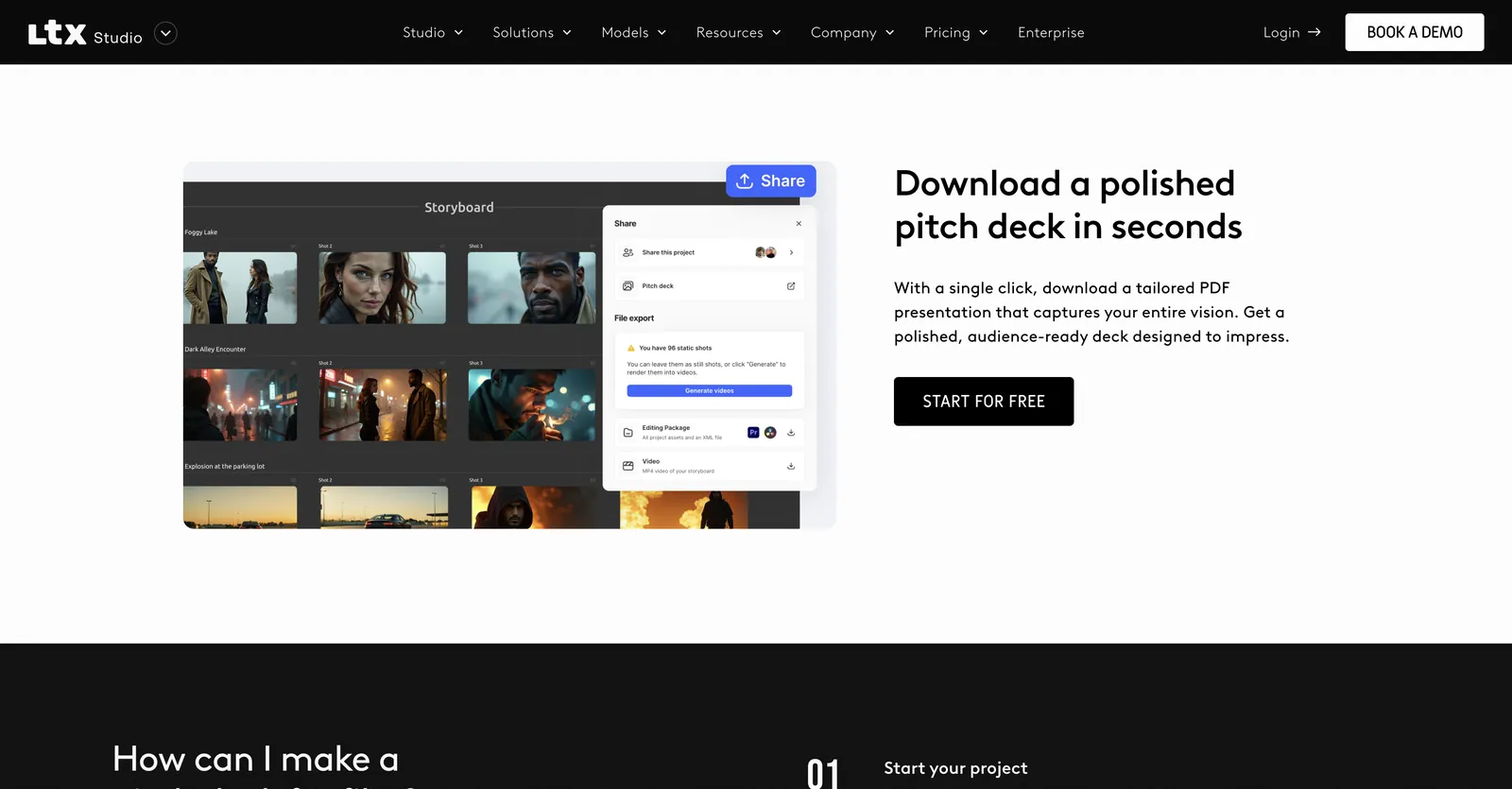
A project can begin from an image, a video, a script or just a loose concept. Hand it a script and LTX Studio breaks the text into scenes and shots and lifts out the characters and objects; the Dynamic Storyboard, Sound Design and Timeline Editor tools then carry it toward a cut. Boards export as MP4, and one click produces a downloadable PDF pitch deck.

Free users get blank storyboards only, while Pitch Decks and AI Storyboards start at Standard. That planning layer is the clearest thing LTX Studio has that typical generators, Yovid among them, lack.

Airship frame from an AI Canvas board on Yovid

The Yovid way

Yovid has no script breakdown or deck export. The nearest fit is AI Canvas: lay out image and video steps on one board and chain them, so a key frame flows straight into a clip.

Try AI Canvas
LTX Studio pitch-deck page: a storyboard of night scenes beside a Share panel offering a pitch deck, an editing package or a video file
Captured from ltx.io/studio/platform/pitch-deck-generator while signed out, October 19, 2026.

LTX-2.5, an Open-Weights Model You Can Self-Host

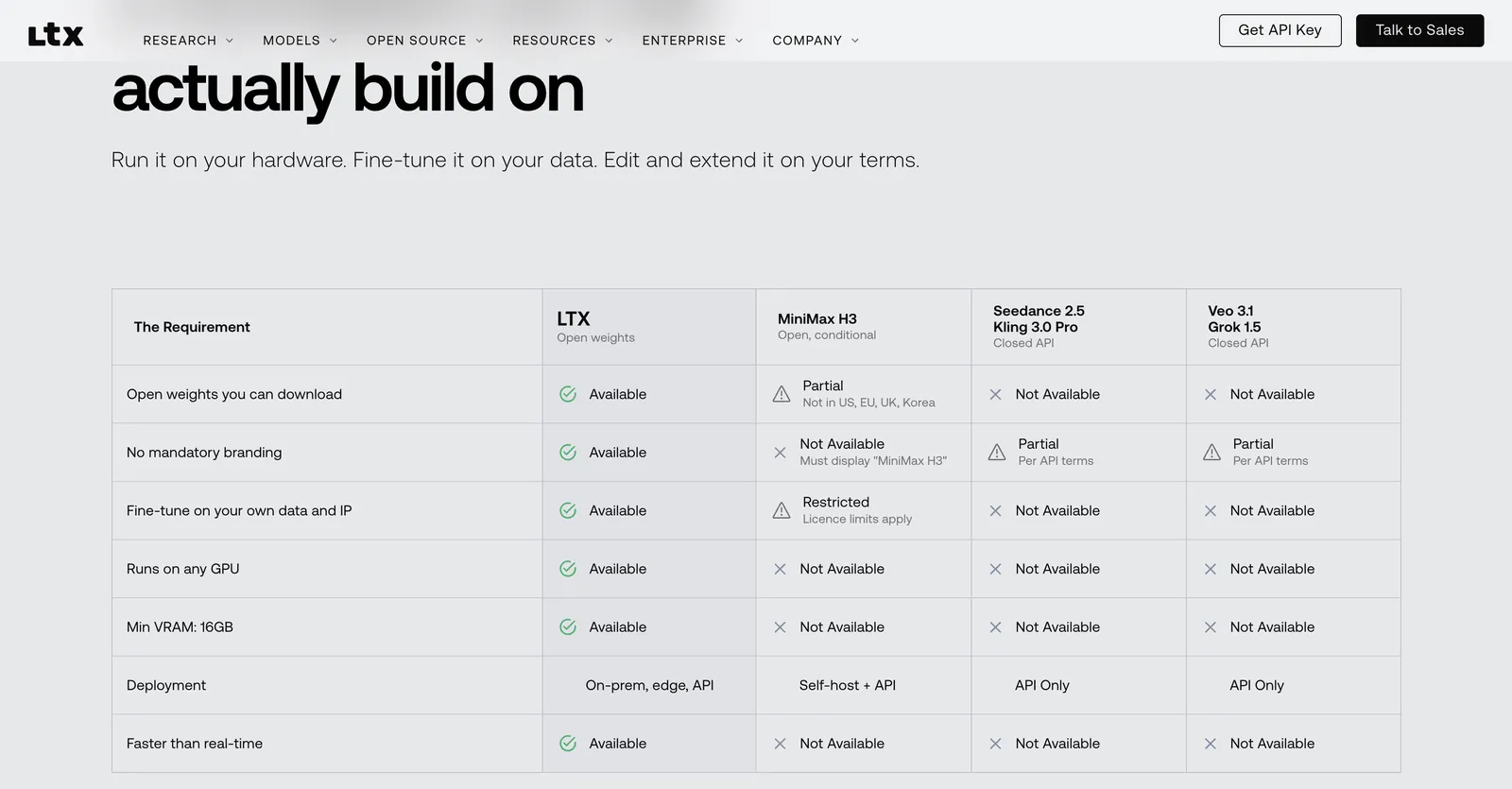
On August 11, 2026, Lightricks shipped LTX-2.5 with a new diffusion video decoder, a Gemma 4 12B text encoder, native multishot and automatic clip length. The weights can be downloaded from the model page and cost nothing while your annual recurring revenue stays under $10M; the same page sets the model against closed rivals including Veo 3.1, Kling 3.0 Pro and Seedance 2.5.

There are three ways to use it: inside LTX Studio, over the LTX API, or on your own machine through LTX Desktop, Lightricks’ open-source editor (last updated October 9, 2026).

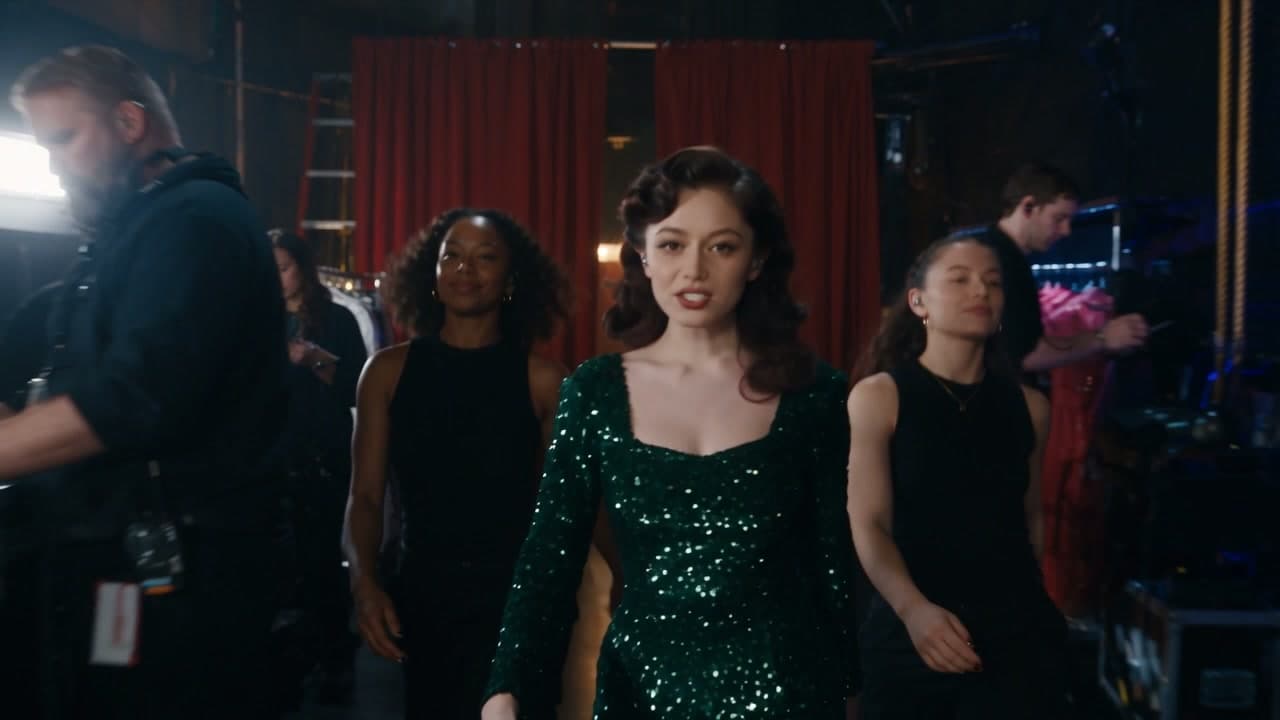
Concert scene from a 30-second Seedance 2.5 take on Yovid

The Yovid way

Yovid is hosted only, so there is nothing to install or fine-tune. In exchange, Seedance 2.5 makes clips as long as 30 seconds, sound included, on every paid plan from Lite.

Open Seedance 2.5
LTX-2.5 model page with a table setting LTX’s open weights against Seedance 2.5, Veo 3.1, Kling 3.0 Pro and MiniMax H3
Captured from ltx.io/model/ltx-2-5 while signed out, October 19, 2026.

Finishing Tools: Flows, HDR and Upscaling

Even the free tier lists an SDR-to-HDR enhancer, Audio-to-Video, Video-to-Video Control and node-based Flows for automation. Lite adds editing tools and upscaling for images and video, Standard opens the advanced Flows, and Pro lets three people collaborate on a project.

October 2026 brought post-production extras built around the LTX model, among them native HDR in EXR, Layout to Render and AlphaGen mattes, pitched at teams that composite and grade.

Vineyard frame from a Yovid video-to-video edit

The Yovid way

Yovid’s video to video edits footage you upload: build a new background, swap a product or extend the shot. The video upscaler can then sharpen the finished file.

Open video to video

Who Makes LTX Studio and Where It Fits

Lightricks, founded in 2013 and best known for Facetune, Photoleap and Videoleap, makes LTX Studio. The product started as a waitlist-only beta for AI storyboarding. On August 20, 2024 Lightricks opened it to everyone, launched a free tier alongside paid plans, and said its creator community already counted more than 35,000 people.

LTX Studio now sits under the broader LTX banner at ltx.io, beside LTX Desktop, the LTX API and the open LTX models. It works in a desktop browser and has no phone app. Lightricks says it is available in over 70 countries, though free credits are withheld in some regions.

Yovid takes a different shape: no planning suite, just one composer for many labs’ models (Seedance, Veo, Kling, MiniMax H3 and Wan for video; GPT Image, Nano Banana and Seedream for stills), plus AI Canvas, upscalers and an API, with credit prices visible before every run.

Who LTX Studio Is For

Lightricks names creative teams, advertisers and filmmakers as its audience. It earns its price when a project runs from script through storyboard to pitch; if you mainly want cheap one-off clips from several models, a plain multi-model generator will usually cost less.

Directors selling an idea

Break a script down into scenes, frames and a PDF deck to win approval before a camera rolls.

Agencies and in-house brand teams

LTX sells packages aimed at brand studios and agencies; commercial rights begin at Standard, and Enterprise adds brand controls.

Compositing and grading crews

Run footage through video-to-video control, SDR-to-HDR and the AlphaGen and HDR tools before it goes to comp and color.

Studios building on a model

Fine-tune LTX-2.5’s open weights and run them on your own servers, free below $10M in yearly revenue, or have Enterprise train a custom model.

Collaborating teams

Three collaborators per project on Pro; Enterprise lifts the cap and adds SSO plus GDPR, ISO and SOC 2 compliance.

Hobbyists kicking the tires

Try blank storyboards, camera moves and LTX-2.5 with the 800 free credits, for personal projects only.

LTX Studio Reviews on Trustpilot

We read every one of the 77 reviews shown on LTX Studio’s Trustpilot page, written in Portuguese, Italian, French, Spanish and English. Sixty-nine give one or two stars, driven mainly by refunds blocked by the 1,200-credit cap, balances drained after a handful of clips and renewals nobody expected; only six give four or five stars. Some reviews feed more than one theme below.

Trustpilot

1.6 / 5

79 reviews · profile claimed by the company, which has answered 92% of its negative reviews

Open the source
Trustpilot page for LTX.Studio with a 1.6 TrustScore over 79 reviews, a claimed profile and answers to 92% of its negative reviews
Captured from trustpilot.com/review/ltx.studio while signed out, October 19, 2026.

Praise that keeps coming up

  1. 01

    Lifelike footage once prompts are dialed in

    The longest five-star review describes clips of elderly locals of an Italian town and of an Asian city that looked close to real once the reviewer learned how to prompt, cutting wasted time and credits; it also thanks the team for a quick reply. One four-star reviewer just likes the tool and is surprised the overall score is so low.

Recurring complaints

  1. 01

    Refunds denied after a brief trial

    The complaint we saw most: people asking for their money back inside the 14-day window, only to hear that a few minutes or an hour of testing had already crossed the 1,200-credit threshold. Reviewers argue that is not enough use to judge the product.

    How Yovid handles it

    No card is needed for Yovid’s sign-up credits, so you can try the entry models before paying. A purchase, packs included, stays refundable for 3 days provided none of its credits were spent; payment fees (max 4% + $1.50) are kept and renewals are excluded.

  2. 02

    Balances drained in a few clips

    Reviewers report spending between 900 and 2,700 credits to get a single five-second render worth keeping, burning 1,000 credits on a simple storyboard, and running dry after a handful of short clips, with no reliable way to see the price beforehand.

    How Yovid handles it

    Yovid prints the credit price on screen before you generate, and a run that fails hands its credits back. A finished clip that disappoints still costs its credits, so test new prompts at short lengths and lower resolution first. Pack credits stay valid for 180 days to a year.

  3. 03

    Unexpected renewals and annual charges

    Some were billed after cancelling; one says checkout turned an intended monthly plan into a year-long one; another cancelled days ahead of renewal and was charged anyway.

    How Yovid handles it

    Yovid’s packs, from $29.90, are single payments that never renew, and you can cancel a subscription from your account whenever you like.

  4. 04

    Faces and voices that drift between shots

    Reviewers describe characters whose face, hair or outfit shifts from one shot to the next, stray extra limbs, and lip sync and voices that never settle, with credits going on re-renders.

    How Yovid handles it

    Seedance 2.5 on Yovid reads audio, video and image references together, so you can give every clip the same face or product to follow; video to video reworks an uploaded clip instead of starting over, and the credit cost is shown first.

  5. 05

    Music videos capped at 20 seconds

    Music-video makers say they only discovered after paying that a clip tops out at 20 seconds.

    How Yovid handles it

    On Yovid, Seedance 2.5 clips run up to 30 seconds with sound on every paid plan from Lite up, and Yovid’s video to video can lengthen an uploaded clip.

We read the rating and reviews on October 19, 2026. The company has claimed the profile and answers most negative reviews, yet Trustpilot shows no recent record of it inviting customers to review, which leaves a small, self-selected sample. We summarize instead of quoting; follow each link for the reviewer’s full words, some of them in Portuguese.

LTX Studio Pricing in 2026

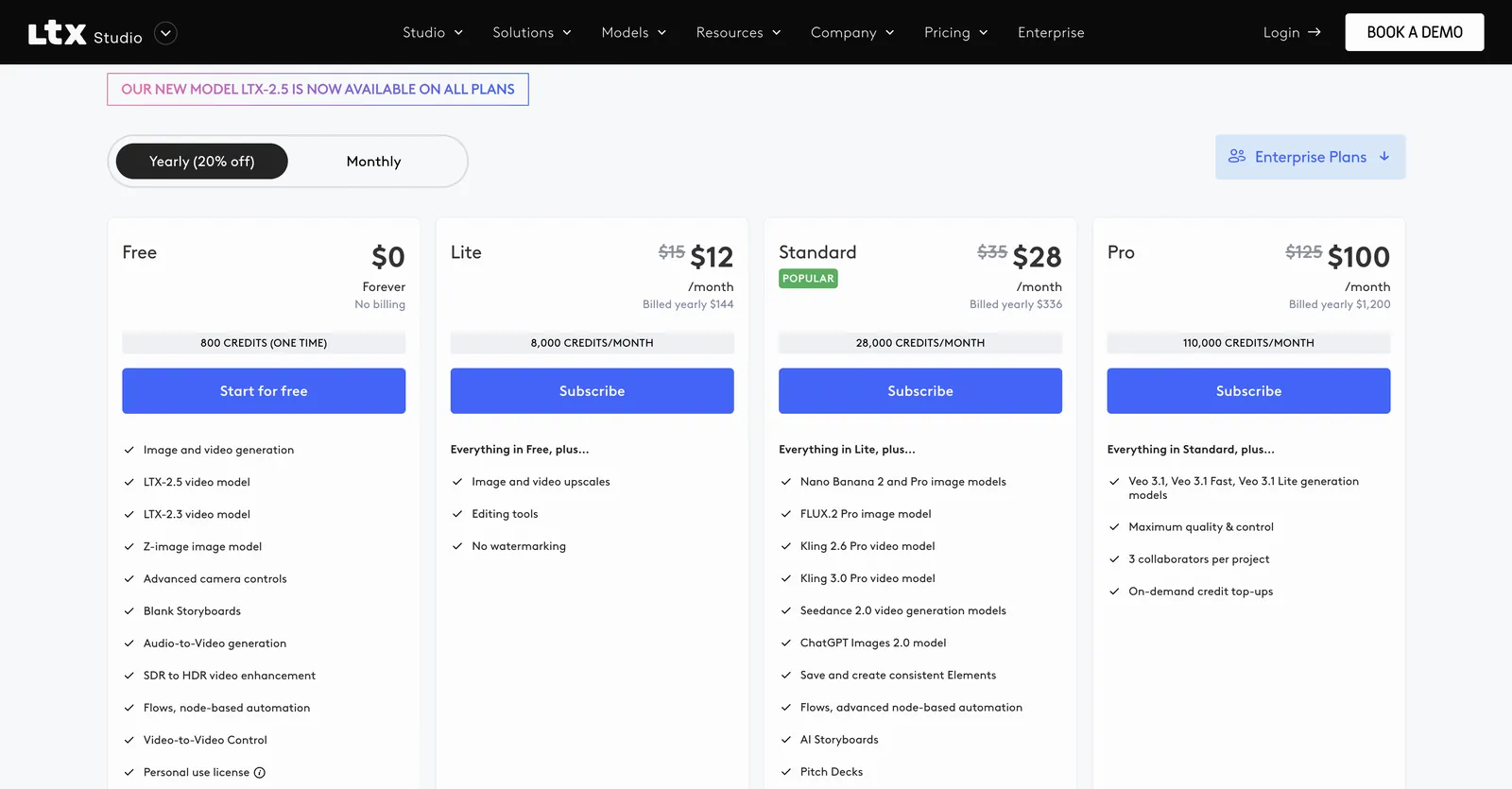
Beyond the free tier, LTX Studio offers three self-serve plans, each payable monthly or yearly (yearly saves 20%), plus Enterprise. Credits arrive monthly on every plan, yearly ones included, and each action draws from them according to model, length and quality. Here is how its plans line up against Yovid’s.

LTX Studio pricing with yearly billing selected: Free at $0 (800 credits, one time), then Lite at $12, Standard at $28 and Pro at $100 a month
Captured from ltx.io/studio/pricing while signed out, October 19, 2026.
FreeLTX Studio800 credits once, which neither expire nor refill; covers LTX-2.5, LTX-2.3, Z-Image, blank storyboards and camera moves; for personal use, and not offered in some regionsYovidFree starter credits after registering, no card needed; entry models only (Seedance 2.0 Mini and older), max 720p
Entry tierLTX StudioLite: $15 a month, or $12 a month on annual billing ($144 a year); 8,000 monthly credits, no watermark, upscaling and editing tools; for personal useYovidLite at $14.90 a month, or $13 a month paid yearly, for 100 credits a month. Every video model except MiniMax H3; Seedance renders at 720p, other models at up to 1080p. Commercial rights come with yearly billing only
Middle tierLTX StudioStandard: $35 a month, or $28 a month on annual billing ($336 a year); 28,000 monthly credits, Seedance 2.0, Kling, FLUX.2, Nano Banana, Elements and AI Storyboards; commercial use allowedYovidPro at $29 a month, or $14.50 a month paid yearly, for 200 credits a month. Seedance at 1080p, other models at up to 2K, commercial rights included
Top tiersLTX StudioPro: $125 a month, or $100 a month on annual billing ($1,200 a year); 110,000 monthly credits, Veo 3.1 and three collaborators per project. Enterprise: credits by agreementYovidPremium at $149 a month, or $99 a month paid yearly, for 1,300 credits a month, output up to 4K and priority support
Seedance 2.5LTX StudioNot offered; Standard and above list Seedance 2.0 onlyYovidIncluded in every paid plan and every pack: clips run up to 30 s with sound rendered alongside, guided by reference pictures, clips or audio. Output is 720p on Lite and 1080p on Pro, Premium and packs
Cost per clipLTX StudioNot published; charges depend on the action, its length and quality, and the in-app balance updates afterwardsYovidEach model’s credit price is displayed in the generator ahead of every run
Unlimited videoLTX StudioNo unlimited tier; every plan stops at its monthly creditsYovidPremium only: one 7-day window per account of free Seedance 2.5 and 2.0 clips (10 s max, up to 1080p), in a free queue
Credit expiryLTX StudioEach cycle starts a fresh monthly allowance and unused credits lapse, yearly billing includedYovidEach month’s plan credits are good for 30 days; pack credits are good for 180 days (Starter) or a full year (larger packs)
Credits without a planLTX StudioNo; per the help center, one-time top-ups are only for Pro++ users with nowhere left to upgradeYovidPay-once packs from $29.90 for 200 credits up to $999 for 8,000, no renewal, commercial rights included
RefundsLTX StudioA full refund is possible for 14 days after the first subscription if 1,200 credits or fewer were used; only once per account, requested by email after cancellingYovidRefundable within 3 days of buying (packs too) if none of that order’s credits were spent; payment fees (max 4% + $1.50) are kept, and automatic renewals cannot be refunded

LTX Studio figures come from ltx.io/studio/pricing as of October 19, 2026; prices are in USD wherever you are and exclude tax. The rules on credits and refunds come from LTX’s help center articles and the refund policy PDF Lightricks last revised on August 20, 2024. Yovid figures match yovid.ai/pricing.

LTX Studio vs Yovid vs Higgsfield

Three different bets: LTX Studio is a production studio wrapped around Lightricks’ own model, Yovid is a multi-model generator with prices on screen, and Higgsfield mixes many labs’ models with cinematic tools of its own.

Built aroundLTX StudioLightricks’ planning studio: LTX-2.5 with Elements, storyboards, pitch decks and a timelineYovidOne composer for Seedance, Kling, Veo, Wan, MiniMax H3 and image models, plus AI CanvasHiggsfieldHosted models from many labs, an agent, AI Influencer, Genjutsu and Cinema Studio
Seedance 2.5LTX StudioMissing; the Standard tier and above get Seedance 2.0YovidLite and up, clips as long as 30 s, sound included; 720p on Lite, 1080p on Pro, Premium and packsHiggsfieldPlus and up; Starter only gets the Mini and Fast versions of Seedance 2.0
Other video modelsLTX StudioStandard adds Kling 3.0 Pro, Kling 2.6 Pro and Seedance 2.0; Pro adds Veo 3.1YovidVeo 3.1, Kling 3.0, MiniMax H3 (not on Lite) and Wan 3.0HiggsfieldVeo, Sora, Kling, Grok, Wan, Hailuo and its own
Unlimited videoLTX StudioNone; monthly credits lapse at the end of every cycleYovidPremium: one 7-day window of free Seedance 2.5 and 2.0 clips per accountHiggsfieldWan 3.0 and Kling 3.0 for 7 days on Plus and Ultra; business plans add Seedance 2.5
Credits without a subscriptionLTX StudioNo; top-ups exist only for Pro++YovidYes: packs from $29.90, good for 180 days to a yearHiggsfieldNo; subscriber-only packs that last 90 days
Refund windowLTX Studio14 days on a first subscription, at most 1,200 credits usedYovid3 days per purchase if none of its credits were spent; renewals excludedHiggsfield7 days on a first purchase, with no credits used

LTX Studio details come from its own product, policy and pricing pages (October 19, 2026); Higgsfield details from its pages on October 14, 2026.

Why Some LTX Studio Users Move to Yovid

Those who leave tend to want partner models, Seedance 2.5 included, on an entry plan, or credits that survive past month-end.

  1. 01

    Partner models on the entry plan

    Yovid Lite ($13 a month billed yearly) runs every video model except MiniMax H3, so Seedance 2.5, Kling 3.0, Wan 3.0 and Veo 3.1 are all there from the first paid tier. LTX Studio holds Kling and Seedance 2.0 back until Standard and Veo 3.1 until Pro, and does not list Seedance 2.5 at all.

  2. 02

    Credits you buy once and keep

    Packs begin at $29.90 and require no subscription; they stay valid 180 days to a year, with commercial rights and 1080p Seedance. On LTX Studio, credits reset monthly even on yearly billing, top-ups are limited to Pro++, and commercial use only starts at Standard.

  3. 03

    A free Seedance week on Premium

    Premium ($99 a month billed yearly) includes one 7-day window per account of free Seedance 2.5 and 2.0 clips, as many as 11 ten-second clips at 720p, and failed runs give their credits back. LTX Studio offers nothing unlimited; every tier ends where its monthly credits do.

When LTX Studio is still the better call

  • Your work starts from a script and ends in a pitch: storyboards, a timeline, PDF decks and saved Elements all under one roof.
  • You want to fine-tune LTX-2.5’s open weights or host them yourself, run them offline in LTX Desktop, or you need SOC 2 and SSO from Enterprise.
  • Several people edit the same project: Pro allows three collaborators on each project, and Enterprise has no cap.

More LTX Studio Alternatives

Eight other tools to weigh up. Each starting price is the lowest paid plan listed on that tool’s own pricing page on October 13, 2026, before tax. Plans buy very different amounts of output, so use this as a shortlist rather than a ranking.

Higgsfield

Hosts outside models next to in-house tools (Soul images, Ads Studio, Cinema Studio, AI Influencer), offers team plans and prices Seedance 2.0 and Kling 3.0 per 5-second block.

Pick it for: Its in-house studios, or cheap Kling 3.0: roughly 7 credits buys 5 seconds at 720p.

Skip it for: Full Seedance on a budget: the Starter tier stops at Seedance 2.0 Fast and 2.0 Mini.

Cheapest paid plan: Starter at $19 a month (same monthly or yearly) for 270 credits; the free tier just says “Limited use”.

Read our Higgsfield breakdownTheir pricing page

Pollo AI

A marketing-minded hub: dozens of third-party models plus its own Pollo models, template apps, an agent, Marketing Studio, an MCP server, an API and phone apps.

Pick it for: Maximum model choice; while its 60% subscriber discount lasts, its Seedance clips cost less than Yovid’s on most plans.

Skip it for: Buying credits with no subscription, or keeping unused plan credits: they lapse each cycle.

Cheapest paid plan: Lite at $15 a month, $12 paid yearly, for 400 credits.

Read our Pollo AI breakdownTheir pricing page

Runway

Built around Runway’s in-house Aleph, Act-Two and Gen-4.5, adding sound effects, voices and music, upscaling to 4K, and guest models like Kling and Seedance.

Pick it for: Projects where editing matters as much as generating.

Skip it for: Lots of clips on the cheapest tier: Runway itself says the 625 Standard credits buy roughly 52 s of Gen-4.5 output.

Cheapest paid plan: Standard at $15 a month, $12 paid yearly, for 625 credits; the free plan gives 125 credits once.

Their pricing page

Kling AI

Kuaishou’s own app for Kling, including Kling 3.0 Omni and 3.0 with sound, Motion Control, 4K video and a developer platform.

Pick it for: Kling-only users who want to buy straight from the model maker.

Skip it for: Anyone who needs Seedance, which appears on neither its pricing page nor its home page.

Cheapest paid plan: Standard: $6.99 for month one, $8.80 a month after that or $79.20 a year, with 660 credits a month.

Their pricing page

Hailuo AI (MiniMax)

MiniMax’s first-party app for Hailuo and MiniMax H3, with Hailuo Agent and Omni Reference (as many as 12 reference images); paid tiers also unlock Sora 2 and Veo 3.1.

Pick it for: People who like MiniMax’s models and per-second pricing.

Skip it for: Seedance work: no Seedance model is listed for sale, and trial credits only run Hailuo models.

Cheapest paid plan: Standard at $10.50 a month on sale that day, or $8.40 paid yearly, for 1,000 credits.

Their pricing page

Luma Dream Machine

Home of Ray3.2 for video and Uni-1 for images, Luma Agents and connectors for tools like Frame.io and Figma; its credit table also prices Seedance 2.0 Mini, 2.0 and 2.5.

Pick it for: Design teams after Ray3.2 output and agents inside the tools they already use.

Skip it for: Low-cost testing: no free plan is listed and the cheapest tier is $25 a month.

Cheapest paid plan: Plus at $30 a month, $25 paid yearly, for 10,000 credits with commercial use.

Their pricing page

PixVerse

Runs PixVerse’s V6 (with native audio) and real-time R2, plus Lip Sync, Canvas, Agent and an API; the two newest Seedance versions unlock from the Pro tier.

Pick it for: Fast social clips on free daily credits: 60 at sign-up, then 30 a day, capped at 540p.

Skip it for: Cheap Seedance: the Standard tier only runs PixVerse models and maxes out at 720p.

Cheapest paid plan: Standard at $10 a month, $8 paid yearly, for 1,200 credits per 30 days plus 60 daily.

Their pricing page

Vidu

Vidu’s in-house Q3 and Q4 plus real-time Vidu S, with a developer API, Vidu Agent and Reference to Video.

Pick it for: Reference-driven clips on Vidu models; on paid tiers Q4 at 540p uses 2 credits per second.

Skip it for: Seedance, which its pricing page does not offer.

Cheapest paid plan: Standard at $10 a month, $8.25 paid yearly, for 800 credits.

Their pricing page

Questions People Ask

Straight answers on LTX Studio, based on what we checked on October 19, 2026.

What do people use LTX Studio for?
Planning and producing AI video end to end. A script or concept becomes scenes, shots and a storyboard; Elements hold characters steady; a timeline handles the cut; and pitch decks export as PDFs. Lightricks’ LTX-2.5 sits next to Seedance 2.0, Kling, Veo and several image models, mostly for ads, films and brand content.
Can you use LTX Studio for free?
To a point. New accounts receive 800 credits a single time, for personal projects, and they are not replaced once used; some regions get no free credits at all. On October 19, 2026, Lite cost $15, Standard $35 and Pro $125 monthly; paid annually they work out to $12, $28 and $100 a month.
Will LTX Studio refund a subscription?
Rarely. Its refund policy grants a single full refund in the first 14 days after you first subscribe, provided your usage stayed at or under 20 minutes of compute, which the pricing FAQ equates to 1,200 credits. To claim it, cancel and write to support; approved money comes back within 14 business days. Past that point, cancelling simply stops the next renewal.
What is the longest video LTX Studio can make?
Per the LTX FAQ, one shot lasts anywhere from 3 to 20 seconds, and the model sets the cap. Trailers, shorts and other longer pieces are built by joining shots on the Timeline.
Can LTX Studio run Seedance or Kling?
On paid tiers, yes. Standard and above include Seedance 2.0 plus Kling 3.0 Pro and 2.6 Pro, with Veo 3.1 joining on Pro. On October 19, 2026 the pricing page did not list Seedance 2.5. If you also want Seedance 2.5, Wan or MiniMax H3 beside Kling and Veo, a multi-model service such as Yovid or Higgsfield covers that.
Which LTX Studio alternative is best for single clips?
If you mostly need individual clips rather than a storyboard pipeline, Yovid: Seedance 2.5 from Lite, Kling, Veo, Wan and MiniMax H3 in one composer, pay-once packs from $29.90, and the credit price on screen before each run. Higgsfield is the nearest multi-model option if you also want cinematic tools.
Is Yovid part of Lightricks or LTX Studio?
No. Yovid is an independent platform. Lightricks, LTX and LTX Studio, along with the model names on this page, belong to their owners and appear here only to describe and compare the products.

No storyboard needed Start with a single shot