
Seedance 1.5 Pro Free Online AI Video Generator
ByteDance’s first Seedance model to render sound together with the picture, and the least expensive Seedance with audio on Yovid. Write a prompt, or bring a first frame and optionally a last one, and get 4 to 12 seconds at 480p, 720p or 1080p. Start creating with Seedance 1.5 Pro on Yovid.
Seedance 1.5 Pro runs inside Yovid’s free AI video generator, next to Kling, Veo and Wan, on one credit balance.
Seedance 2.5 is live
AI video clips up to 30 seconds with image, video, and audio references.
Kling 4.0
Kling's latest AI video model, now in the Yovid AI video generator.
Veo 3.1
Google's AI video model with native audio.

GPT Image 2.5
OpenAI's image model for creating and editing images.
AI Image Upscaler
Sharpen and enlarge images for cleaner exports.
AI Canvas
Chain image and video steps on one visual board.
Ways Into a Seedance 1.5 Pro Clip



Why Pick Seedance 1.5 Pro on Yovid
- Sound Rendered in the Same Pass: Speech, effects and music come out of the same generation as the frames, at no extra cost.
- Free Credits Cover It, Without a Watermark: An entry model: free accounts run it at 480p or 720p, and the download is clean.
- The Lowest Rate of Any Seedance With Sound: 0.6 credits a second at 480p and 1.2 at 720p, about half of Seedance 2.0 Mini’s rate.
- Animate a Photo, or Pin Both Ends of the Shot: Attach a first frame, add a last frame if you want one, and 1.5 Pro plans the motion between them.
- Settings in One Table: Six frame shapes plus adaptive, three resolutions, 4 to 12 seconds, and a prompt of up to 2,000 characters.
Sound Rendered in the Same Pass
Before December 2025 every Seedance clip was silent, and a voice or a door slam had to be laid in later. Seedance 1.5 Pro was the release that changed that: it renders the audio track together with the frames, so a footstep or a spoken line lands where the motion is.
Sound is switched on when you open the composer. Turn it off for a clip you plan to score yourself; the credit charge does not change either way. Describe what should be heard near the end of the prompt, and put any spoken words in quotation marks.
| Default | Sound onOne switch in the composer turns it off for a single generation. |
|---|---|
| What it renders | Dialogue, sound effects, ambience and music |
| Price with sound | UnchangedA clip costs the same credits with or without audio. |
| Earlier Seedance | SilentSeedance 1 Pro Fast, also on Yovid, makes picture only. |
Free Credits Cover It, Without a Watermark
Seedance 1.5 Pro sits in Yovid’s entry tier, which means the credits a new account receives at sign-up can be spent on it straight away, no card required. Free and Lite accounts can pick 480p or 720p; 1080p opens up on Pro, on Premium, or with any one-time credit pack.
Free-plan videos are saved without a watermark, so a draft you like can go straight into an edit.
| Who can run it | Free, Lite, Pro, Premium and every credit pack |
|---|---|
| Free and Lite | Up to 720p |
| 1080p | Pro, Premium or a credit pack |
| Watermark | None, on every plan |
| Generations at once | One on Free and LitePro runs 4 in parallel, Premium 8. |
The Lowest Rate of Any Seedance With Sound
Among the Seedance versions on Yovid that produce audio, 1.5 Pro charges the fewest credits per second at every resolution it shares with them: a 5-second 480p take is 3 credits and a full 12-second 720p clip is 14. Only the silent Seedance 1 Pro Fast costs less.
That makes it the practical place to rehearse an idea. Run a handful of short 480p versions, keep the wording that works, and render the final one here at 1080p or carry the prompt over to Seedance 2.0 or 2.5.
| 480p | 0.6 credits per second3 credits for 5 seconds, 7 for 12. |
|---|---|
| 720p | 1.2 credits per second6 credits for 5 seconds, 14 for 12. |
| 1080p | 2.6 credits per second13 credits for 5 seconds, 31 for 12. |
| Frames and sound | No surchargeA first or last frame and the audio track are included. |
| Subscriptions | Fewer credits per secondLite, Pro and Premium pay less than the credit-pack rates above. |
Animate a Photo, or Pin Both Ends of the Shot
A first frame fixes the look of the opening second: the subject, the light, the framing. Add a second picture as the last frame and the model also has to arrive somewhere, which is how you get a controlled reveal, a day-to-night change or a product turning to face the camera.
Every resolution stays available when you start from a picture, including 1080p on plans that allow it, and the frames add nothing to the credit charge. 1.5 Pro does not take reference images or reference clips; for a face, outfit or product that must carry over from several photos, use Seedance 2.0 Mini or 2.0.
| First frame | JPEG, PNG or WebPUp to 10 MB per image. |
|---|---|
| Last frame | OptionalGoes with a first frame; the clip ends on it. |
| Resolution from a frame | 480p, 720p or 1080p |
| Reference images or clips | Not supportedSeedance 2.0 Mini takes up to 9 images and 3 clips. |
Settings in One Table
Pick the frame shape before writing, so the action is composed for it: 9:16 for phone feeds, 21:9 for a letterbox look, 4:3 or 3:4 for something closer to a print. Adaptive lets the model choose the shape from the prompt or your first frame. The composer opens on 16:9, 480p and 5 seconds.
| Length | 4 to 12 seconds5 seconds by default. |
|---|---|
| Resolution | 480p, 720p or 1080p480p by default. |
| Aspect ratio | 16:9, 9:16, 1:1, 4:3, 3:4, 21:9 or adaptive |
| Inputs | A prompt alone, an opening picture, or opening and closing pictures |
| Prompt | Up to 2,000 characters |
| Sound | On by default, can be turned off |
| Output | MP4 |
Who Gets the Most from Seedance 1.5 Pro
Short clips with sound at a price low enough to try things suit these people best:
- Prompt writers: Several cheap 480p takes of the same idea, so the wording is settled before credits go into a longer or sharper render.
- Creators on the free plan: Vertical 9:16 clips with a voice or ambience for Reels, Shorts and TikTok, without paying for a plan first.
- Small shops: A product photo as the first frame, turned into a short moving shot with room sound.
- Storyboard and animatic makers: A first and a last frame from the board, with the in-between move rendered up to 12 seconds.
- Teachers and explainers: A short scene with a line of narration to open a lesson or a slide deck.
Seedance 1.5 Pro vs 2.0 Mini, 1 Pro Fast, 2.0 Fast and 2.5
Every row except “Best for” is read from the settings each model offers in Yovid’s generator today, so the lengths, limits and credits match what the composer will charge.
| Feature / Model |  Seedance 1.5 Pro | Seedance 2.0 Mini | Seedance 1 Pro Fast | Seedance 2.0 Fast | Seedance 2.5 |
|---|---|---|---|---|---|
| Longest clip | 12 s | 15 s | 12 s | 15 s | 30 s |
| Top resolution | 1080p | 720p | 1080p | 1080p | 1080p |
| Aspect ratios | 16:9, 9:16, 1:1, 4:3, 3:4, 21:9 | 16:9, 9:16, 1:1, 4:3, 3:4, 21:9 | 16:9, 9:16, 1:1, 4:3, 3:4, 21:9 | 16:9, 9:16, 1:1, 4:3, 3:4, 21:9 | 16:9, 9:16, 1:1, 4:3, 3:4, 21:9 |
| Reference images | — | 9 | — | 9 | 30 |
| Reference videos | — | 3 | — | 3 | 10 |
| Credits for 5 s at 720p | 6 | 13 | 10 | 19 | 31 |
| Best for | Cheap clips with sound from text or frames, up to 1080p. | Free-plan clips up to 15 s with reference images and clips. | Silent motion tests at the lowest rate. | Seedance 2.0 inputs and 1080p, with a shorter wait than 2.0. | 30-second takes, big reference sets, edit and extend. |
Credits are base credit-pack rates for a 5-second clip at 720p and follow Yovid’s live pricing; subscribers pay less per second.
Seedance 1.5 Pro: Strengths and Limits
What it does well for the price, and when a newer Seedance is worth the extra credits.
Strengths
- Price: The fewest credits per second of any Seedance with audio on Yovid.
- Free plan: Runs on sign-up credits at 480p or 720p, with clean downloads.
- Sound included: Dialogue, effects and music rendered with the picture, at the same price as a silent clip.
- 1080p from a frame: Starting from a photo keeps every resolution, unlike Seedance 2.0 Fast.
Limits
- No references: No reference images or clips, so a character cannot be pinned from several photos.
- Length: 12 seconds per clip; the 2.0 models reach 15 and Seedance 2.5 reaches 30.
- No edit or extend: Changing or continuing an existing video is a Seedance 2.5 feature on Yovid.
- Older model: Two releases behind Seedance 2.5; use 2.0 or 2.5 for multi-shot scenes and characters held by reference images.
Seedance 1.5 Pro on Yovid: Modes and Credits
Ways to start a Seedance 1.5 Pro clip
Each mode is a tab in the same composer; the links open it with Seedance 1.5 Pro already picked.
- Text to video
- Image to video (first frame)
- First and last frame
- Sound generated with the picture
Seedance 1.5 Pro credits by resolution and length
Read from the live model settings on Yovid, before any plan discount. One credit costs the same whichever model you pick; packs and plans are on the pricing page.
| Resolution | 5 s | 10 s | 12 s |
|---|---|---|---|
| 480p | 3 credits | 6 credits | 7 credits |
| 720p | 6 credits | 12 credits | 14 credits |
| 1080p | 13 credits | 26 credits | 31 credits |
How to Use Seedance 1.5 Pro on Yovid
- Step 1
Open it in the composer
The generator link on this page arrives with Seedance 1.5 Pro selected; in the model menu it sits under ByteDance.
- Step 2
Describe the shot and its sound
Write what happens and what is heard. Attach a first frame, and a last frame if the clip should end on a set picture.
- Step 3
Choose the settings and generate
Set the length, frame shape and resolution, check the credit quote, generate, then download the MP4.
Seedance 1.5 Pro Starter Prompts
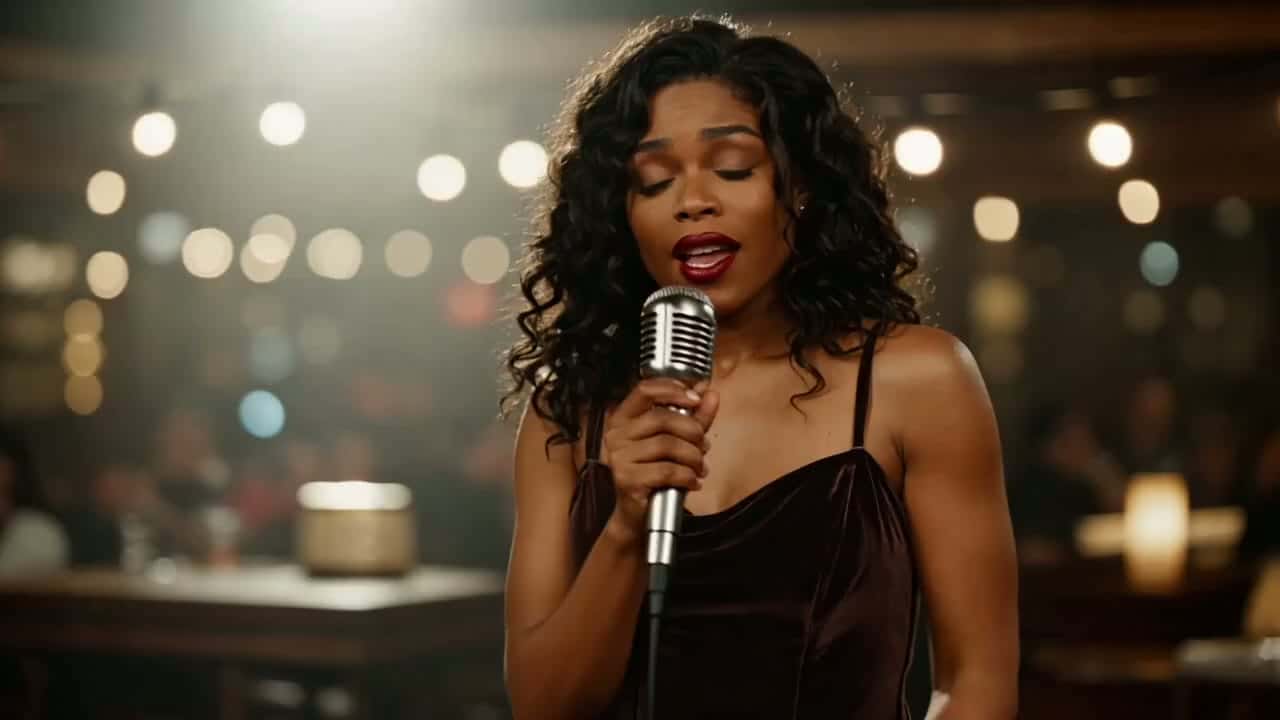
Prompts we wrote for 1.5 Pro, each with the sound spelled out. The first is written for a shot like ByteDance’s jazz-bar clip, not its original prompt; the other cards have no sample clip yet. Attach your own picture before running the frame prompts.
Late set at the jazz bar
Text to video · 8 sTry this promptA smoky jazz bar late at night, warm bulbs out of focus behind the stage. A singer with long curly hair in a dark velvet dress holds a vintage chrome microphone and sings a slow ballad with her eyes half closed. The camera drifts in from a medium shot to a close-up of her face. Sound: her voice, a soft upright bass and brushed drums, glasses clinking at the tables.
Ramen stall in the rain
Text to video · 10 sTry this promptNight, a narrow street ramen stall under a red paper lantern while light rain falls. The cook lifts noodles from a steaming pot and lets them drop into a bowl, then slides it across the counter to a customer in a wet raincoat. Static side angle at counter height. Sound: rain on the canvas awning, boiling water, the cook saying “Here you go, careful, it’s hot.”
Bring a product photo to life
First frame · 6 sTry this promptUse the attached photo as the first frame. The product stays centred and sharp while the camera makes a slow half orbit to the right and soft morning light slides across its surface. Nothing else in the frame changes. Sound: quiet room tone and one gentle chime at the end.
From dusk to lights on
First + last frame · 12 sTry this promptStart on the first frame, a quiet street of small shops at dusk, and end on the last frame, the same street after dark with every window lit. Keep the camera locked off. People pass on the pavement, and the shop lights switch on one by one from left to right. Sound: evening traffic, footsteps, a bicycle bell.
More Seedance and Video Models on Yovid
Guides for Seedance 1.5 Pro
Which Seedance versions are free, image-to-video prompts that work, the full model comparison and the API limits.
FAQs
What is Seedance 1.5 Pro?
Is Seedance 1.5 Pro free to use?
How many credits does a Seedance 1.5 Pro clip cost?
Does Seedance 1.5 Pro make videos with sound?
Can I turn a photo into a video with Seedance 1.5 Pro?
Does Seedance 1.5 Pro accept reference images or videos?
Seedance 1.5 Pro or Seedance 2.0 Mini: which should I use?
How is Seedance 1.5 Pro different from Seedance 2.0 and 2.5?
Can I use Seedance 1.5 Pro through the Yovid API?
Can I use Seedance 1.5 Pro videos commercially?

A Clip with Sound for a Few Credits
Write the scene, say what it should sound like, and let Seedance 1.5 Pro render both together, on free credits if you like.
Create with Seedance 1.5 Pro