Yovid
Montage of AI-generated video clips

Adobe Firefly Review for AI Video and Images

Adobe’s generative app sets its own licensed-data models beside Kling, Veo, Runway and Luma, all paid for in monthly credits. Here is what works, what annoys users, and where Yovid differs.

The short version

Should you pay for Adobe Firefly?

It depends on what you make. Adobe Inc. launched Firefly in March 2023, and the app now produces pictures, clips, audio and vectors in a browser or on iPhone and Android. Adobe’s in-house models, which learn from licensed and public domain material, share the menu with partners like Kling 3.0, Nano Banana, Luma Ray3.14, GPT Image, Runway Gen-4.5 and Veo 3.1. A few generations a day are free; subscriptions start at $9.99 a month (2,000 credits) and top out at $199.99 (50,000), and leftover credits never carry into the next month. Trustpilot gives firefly.adobe.com 1.8 on 28 reviews. For video work, Yovid pairs Seedance 2.5 with Kling, Veo and Wan, and sells credit packs you pay for once.

Nora

NoraYovid editor

Details about Adobe Firefly last checked , using Adobe’s Firefly product page, the plan comparison, Adobe’s credits FAQ and the US subscription terms.

Operator
Adobe Inc., headquartered in San Jose, California; customers beyond North America and Japan sign with Adobe Systems Software Ireland Limited
Ratings
US App Store: 4.7 from 11K ratings. Trustpilot, unclaimed firefly.adobe.com page: 1.8 across 28 reviews
Free tier
A daily allowance of image, video and audio generations, with models such as Luma Ray3.14 and Nano Banana; it resets each day
Cheapest plan
Firefly Standard with 2,000 monthly credits: $9.99 billed monthly, $8.49 per month with a yearly commitment, or $83.99 prepaid for the year
Refunds
Most plans: your money back when you cancel inside 14 days of the first purchase; after that, yearly plans cost a fee or are not refunded

What You Get with Adobe Firefly

Firefly first shipped in 2023 as image models built into Adobe’s software. It is now an app of its own, where Adobe’s models sit in one menu with models licensed from Luma, Runway, Kling, OpenAI, Google and more. Below are the pieces people subscribe for, each followed by the closest thing on Yovid.

Video from Firefly Video, Kling, Veo, Runway and Luma

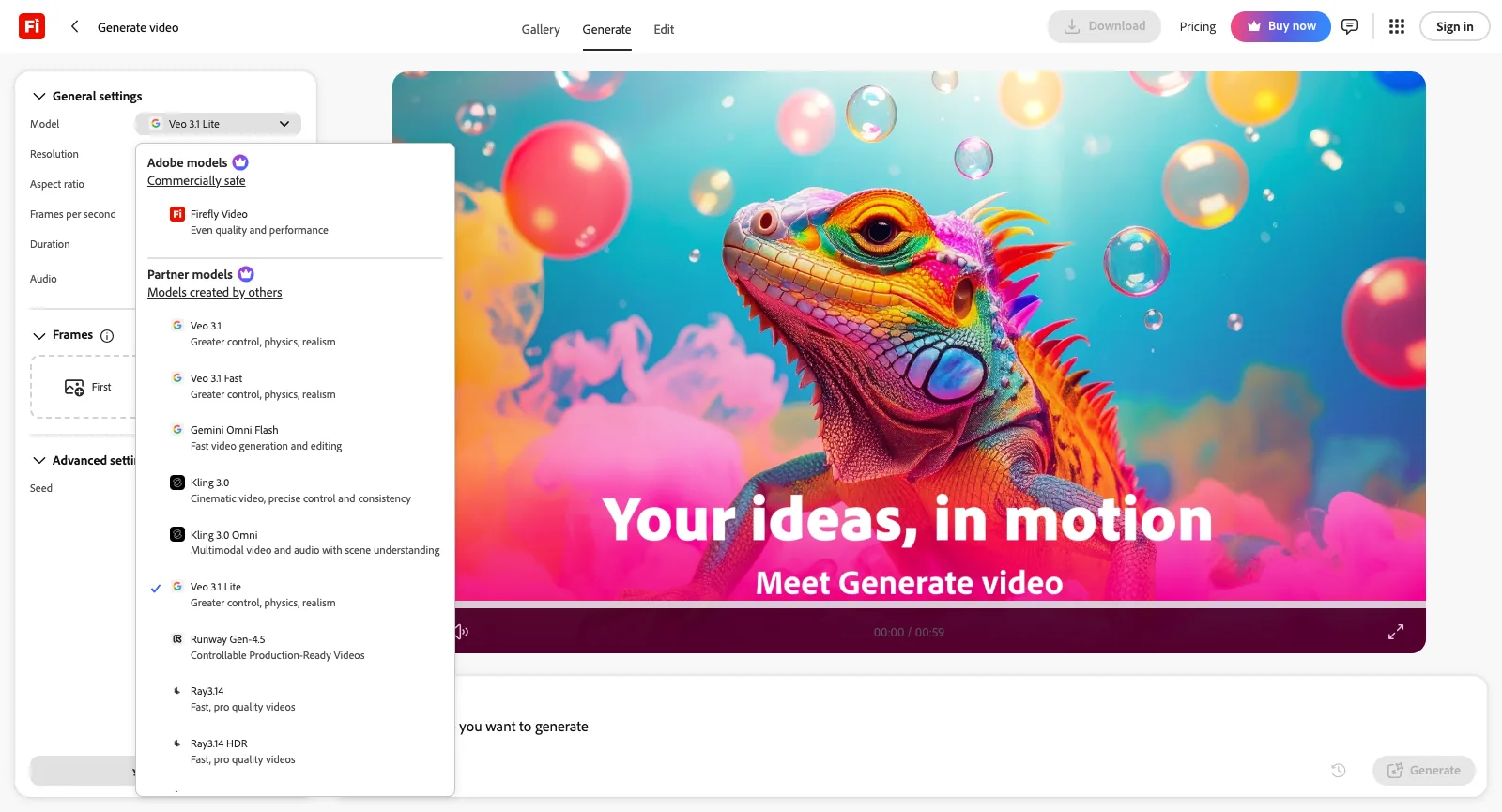
Signed out on October 21, 2026, the Generate video model picker opened with Firefly Video, Adobe’s in-house model, tagged as commercially safe. The partner list below it held Kling 2.5 Turbo, Kling 3.0 and its Omni variant; Veo 3.1 in Lite, Fast and standard form; Gemini Omni Flash; Runway Gen-4.5; and five Luma options (Ray2, Ray3, Ray3 HDR, Ray3.14 and Ray3.14 HDR). Veo 3.1 Lite was preselected, with 720p or 1080p, landscape 16:9 or vertical 9:16, lengths of 4 to 8 seconds, a sound toggle and slots for a first and last frame.

ByteDance’s Seedance 2.0 also shows up on Adobe’s partner-model help page, for individual plans only, yet it was missing from the signed-out picker. Every clip draws generative credits. Firefly Video takes 20 a second at 540p, 50 at 720p and 100 at 1080p; with Seedance 2.0, 480p costs 40 a second, 720p costs 90 and 1080p costs 180.

Seedance 2.5 frame generated on Yovid

The Yovid way

Yovid’s composer puts Wan 3.0, Kling 3.0, MiniMax H3 and Veo 3.1 beside Seedance 2.5 and 2.0, and prices each run before you press Generate. A Seedance 2.5 clip can last up to 30 seconds, sound included.

Open Seedance 2.5
Signed-out Generate video page on firefly.adobe.com with its Model list expanded: Firefly Video as the Adobe model, then partner entries such as Runway Gen-4.5, Ray3.14, Veo 3.1, Kling 3.0 Omni and Gemini Omni Flash
Captured from firefly.adobe.com/generate/video while signed out, October 21, 2026.

Images from Firefly Image 5, GPT Image and Nano Banana

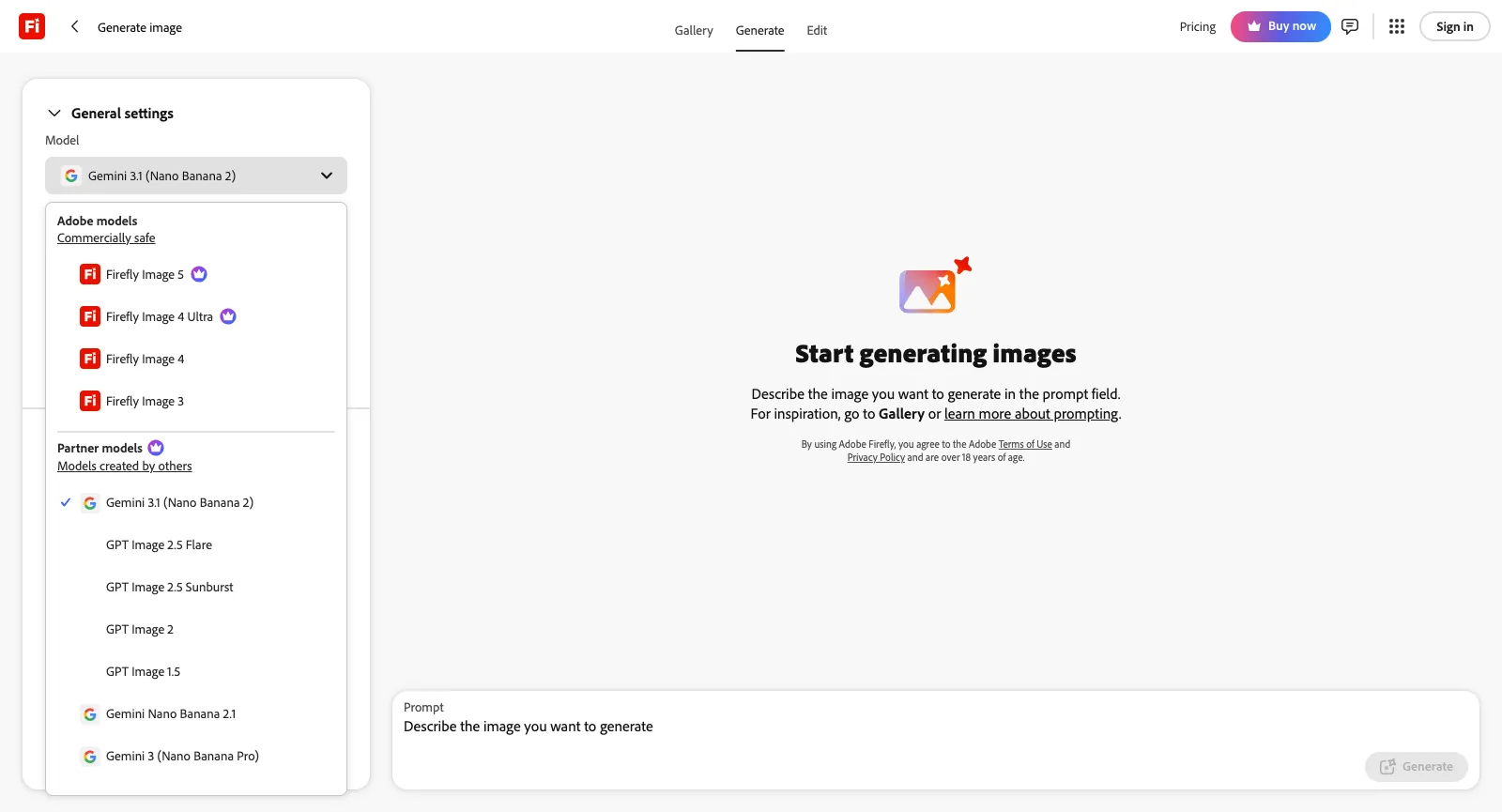
Adobe’s side of the Generate image list covers Firefly Image 3, Image 4, Image 4 Ultra and Image 5. The partner side starts with the default, Nano Banana 2 (Gemini 3.1), then Nano Banana Pro and Nano Banana 2.1; GPT Image 1.5, 2 and the 2.5 Flare and Sunburst versions; FLUX1.1, FLUX.1 Kontext and FLUX.2 [pro]; HUMAIN Image 1; and Runway Gen-4 Image.

You can leave the frame on Auto or choose one of 14 ratios between 1:8 and 8:1, pick a size from 512 up to 4K, attach as many as six reference pictures, and use Google Search to ground what comes out. On any paid plan, standard generations with Firefly Image 3 or 4 are unlimited; a partner image costs 5 to 80 credits, depending on the model, per Adobe’s table.

Fashion image created with the Yovid image generator

The Yovid way

On Yovid, the image generator offers Seedream 5.0, GPT Image 2.5 and Nano Banana, and Pro and Premium come with a year (365 days) of unlimited stills on the supported models.

Open the image generator
Signed-out Generate image page on firefly.adobe.com with the Model list expanded: Firefly Image 5, 4 Ultra, 4 and 3 as Adobe models, and partner entries including Nano Banana Pro, the GPT Image versions and Gemini 3.1 (Nano Banana 2)
Captured from firefly.adobe.com/generate/image while signed out, October 21, 2026.

A Single Home Box for Pictures, Clips and Fixes

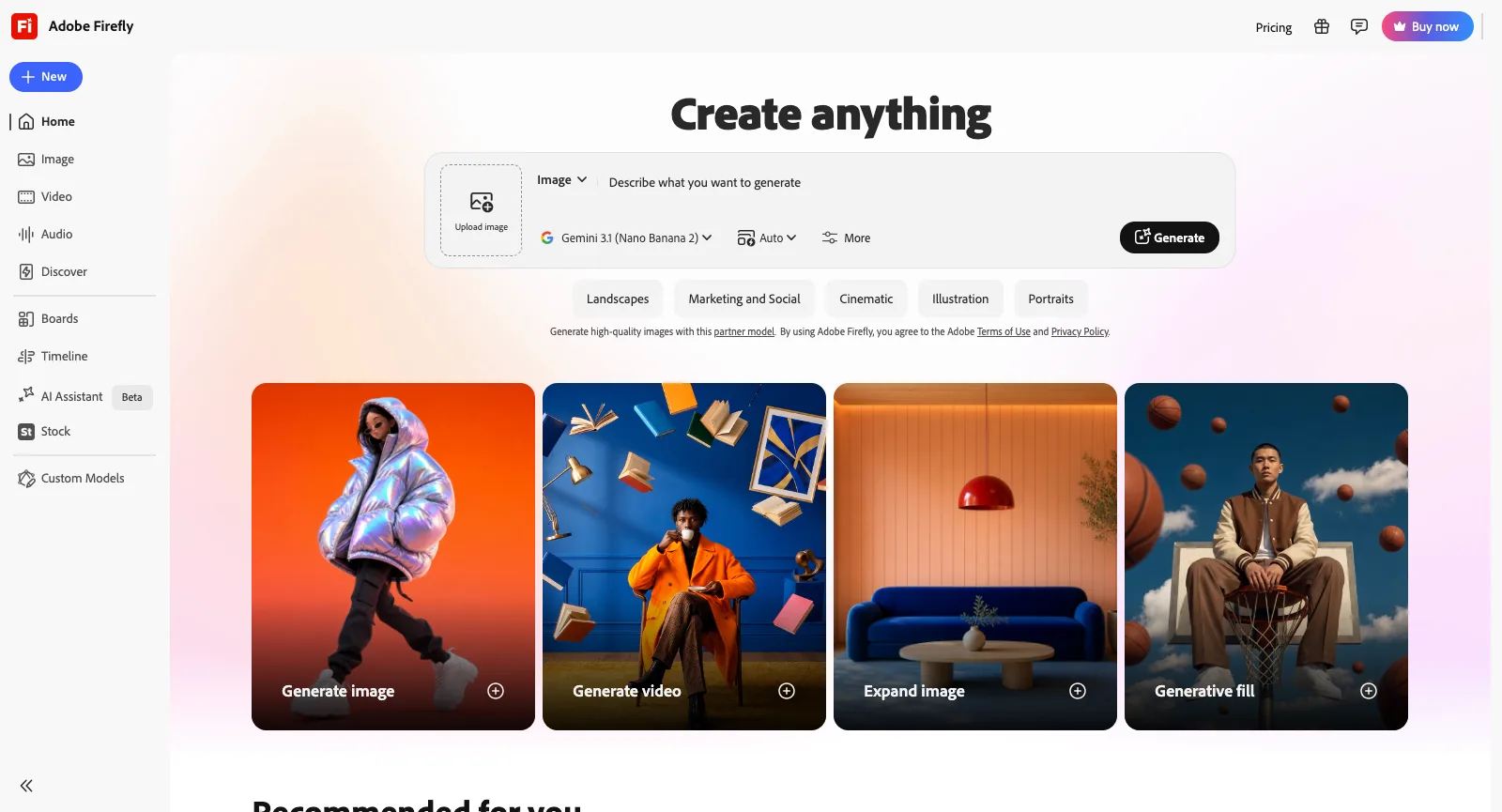
Open firefly.adobe.com and a Create anything field greets you. It flips between image and video, accepts an upload, lets you choose the model and offers style starters such as Cinematic, Landscapes, and Marketing and Social. Cards for Generative fill, Expand image, Generate video and Generate image follow, plus one-click actions to cartoonize, upscale, erase objects, edit by prompt or animate a still.

By Adobe’s count, people have made upward of 18 billion assets with Firefly, and prompts work in over 100 languages. Your work syncs between the browser and the phone apps for iPhone and Android, and it can be handed to Adobe Express, Premiere or Photoshop.

Panda frame from a Yovid image-to-video clip

The Yovid way

Got a still worth animating? On Yovid it becomes the opening frame and your prompt sets the motion; Seedance 2.5 can also follow reference pictures, clips and audio.

Open image to video
Firefly home page while signed out: the Create anything box in Image mode with Gemini 3.1 (Nano Banana 2) chosen, style chips below it, and cards for Generative fill, Expand image, Generate video and Generate image
Captured from firefly.adobe.com while signed out, October 21, 2026.

Timeline Editing, Prompt Edits and Video Upscaling

In Adobe’s pitch, the Firefly video editor is where you cut and reorder clips, change model partway through, redo or lengthen a single segment, and lay in music, narration and effects. Inside the app it is labelled Timeline, and Adobe’s help pages still call the editor a beta.

Adobe’s partner-model page adds two more tools: Upscale Video, powered by Topaz Astra and billed at 5–20 credits per second, and Prompt to Edit Video, which can use Kling 3.0 Omni.

Vineyard frame from a Yovid video-to-video edit

The Yovid way

Yovid has no timeline editor. Its video-to-video mode reworks footage you upload from a prompt while keeping the original structure, and a separate upscaler sharpens finished clips.

Open video to video

Speech, Music, Sound Effects and Dubbing

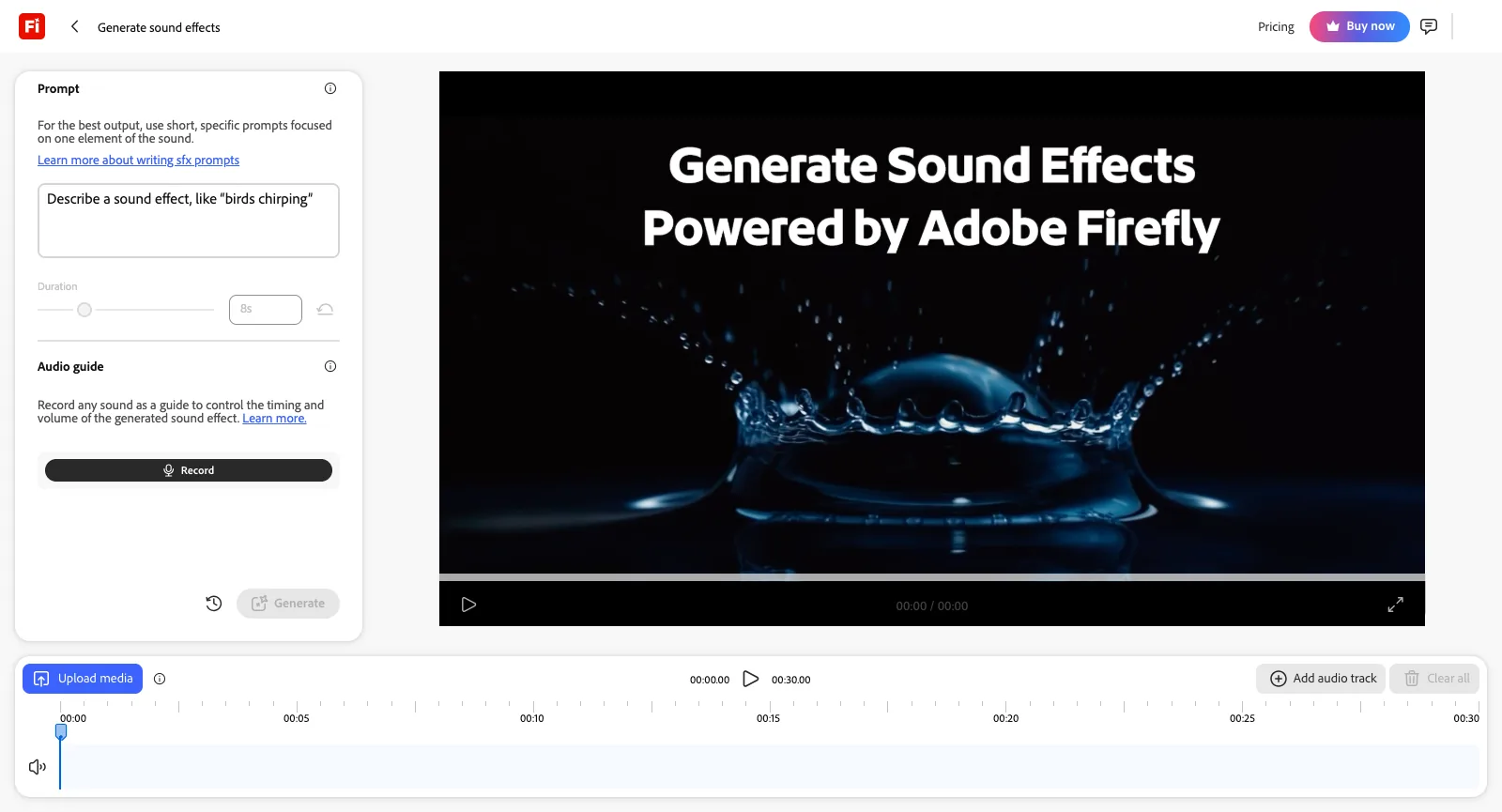
Under Audio, Firefly groups five tools: Translate audio, Enhance speech, Generate music, Generate speech and Generate sound effects. The sound effects workspace wants a short description and a length, optionally a recording of your own voice to time the effect, and places the takes on a 30-second track above a clip you upload. Signed out, it allowed 10 free generations.

Adobe says translation handles over 20 languages while preserving the speaker’s own voice. Paid plans bill 10 credits for each sound effect, 20 for every minute of music and 5 for each translated second; that is how the plans page gets to a monthly ceiling on Standard of 200 effects, or else 6 minutes of translation.

Pharmacy scene from a Seedance 2.5 clip with generated sound

The Yovid way

Yovid has no separate speech, music or dubbing tools. What it does offer is Seedance 2.5, which renders sound in the same pass as the picture.

Hear Seedance 2.5
Generate sound effects in Firefly, signed out: a prompt field, a length slider, a Record button under Audio guide, a player for previews, and the track area offering Add audio track and Upload media
Captured from firefly.adobe.com, Generate sound effects under Audio while signed out, October 21, 2026.

Firefly Boards for Moodboards and Shot Planning

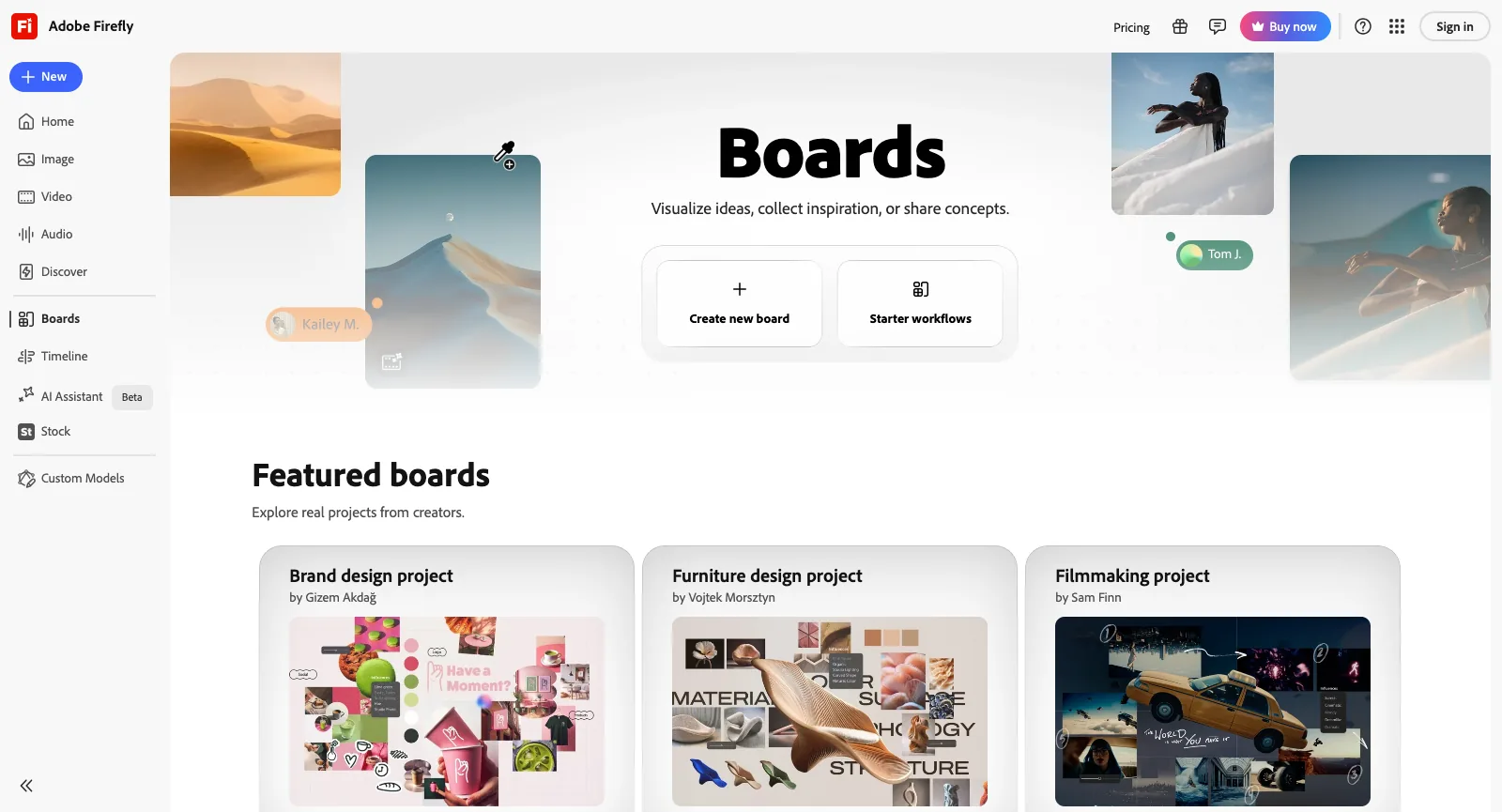
Boards is a collaborative canvas. You start from a starter workflow or an empty board, pull in references, create images and video right on the canvas and arrange the results into storyboards, brand concepts or moodboards. Adobe’s own tip is to run a single prompt on several models and tag each output with its model name before showing it to stakeholders.

Boards itself is unlimited on every paid plan, but each generation inside a board still draws credits at that model’s rate. Signed out, the Boards page featured sample projects for filmmaking, furniture and brand design.

Frame from an AI Canvas project on Yovid

The Yovid way

Yovid’s AI Canvas is a board as well: place image and video steps on it and chain them, so one result becomes the input for the next.

Try AI Canvas
Firefly Boards while signed out: Create new board, Starter workflows, and featured boards for a filmmaking, a furniture design and a brand design project
Captured from firefly.adobe.com/boards while signed out, October 21, 2026.

Licensed Training Data and Content Credentials

According to Adobe, its Firefly models learn from licensed material like Adobe Stock and from works whose copyright has lapsed, and never from what subscribers upload, so their output is meant to be safe for commercial work. Qualifying enterprise customers can buy IP indemnification on top. Each output carries Content Credentials noting that AI was involved.

The partner models come from other companies. To use them you confirm that you are at least 18, and Adobe leaves it to you to decide whether their output is fit for your project. The same credit balance also works in Lightroom, Illustrator, Premiere, Photoshop and Adobe Express.

Who Is Behind Adobe Firefly and How It Is Pitched

Firefly comes from Adobe Inc., headquartered in San Jose, California, the company behind Acrobat, Premiere and Photoshop, which has sold software since 1982. Adobe announced Firefly on March 21, 2023, describing it as a set of generative AI models for creative work, starting with images and text effects and meant to spread into Adobe Express, Creative Cloud and Adobe’s enterprise products. Adobe’s General Terms of Use, in force since October 3, 2025, assign North American users to Adobe Inc. and California law, users in Japan to Adobe KK, and everyone else to Adobe Systems Software Ireland Limited, with Irish law applying.

Adobe sells Firefly to brands and creative teams as the commercially safe option, and also as one roof over outside models: Nano Banana and Veo from Google, GPT Image from OpenAI, FLUX from Black Forest Labs, plus Kling, Runway, Luma, ElevenLabs and Topaz. From Firefly Pro upward, the standalone plans also bundle Adobe Express Premium and Photoshop on the web and on phones.

Yovid is an independent multi-model platform with a narrower brief. One composer runs Seedance 2.5 and 2.0, Wan 3.0, Veo 3.1, MiniMax H3 and Kling 3.0 for video, and models such as Seedream 5.0, Nano Banana and GPT Image 2.5 for stills, next to AI Canvas, image and video upscalers and an API. Each run shows its credit price first, and credit packs are sold without a subscription. It has no audio suite and no timeline editor.

Who Gets the Most from Adobe Firefly

Firefly is designed around the people below. It slots in neatly if you already live in Adobe software or a brand needs output from licensed training data; if your work is mostly AI video and you want Seedance, a tool built around video will likely serve you better.

Brand and marketing teams

Produce campaign art, social graphics and regional variants on models trained with licensed material, and polish them in Adobe Express.

Retouchers and designers

Repair, extend and tidy photos with Upscale, Remove Object, Expand and Generative Fill, then carry on in Photoshop.

Video editors

Fill gaps with generated B-roll, ambient beds and effects, and lengthen or alter shots before they move to Premiere.

YouTubers and social creators

Turn a photo or a prompt into short clips, covers and thumbnails, in a browser or on an iPhone or Android phone.

Art directors

Gather references on Firefly Boards and line up several models’ takes ahead of a pitch or a shoot.

Localization teams

Dub video and audio into any of 20-plus languages while the original speaker’s voice is kept.

Adobe Firefly User Reviews and Ratings

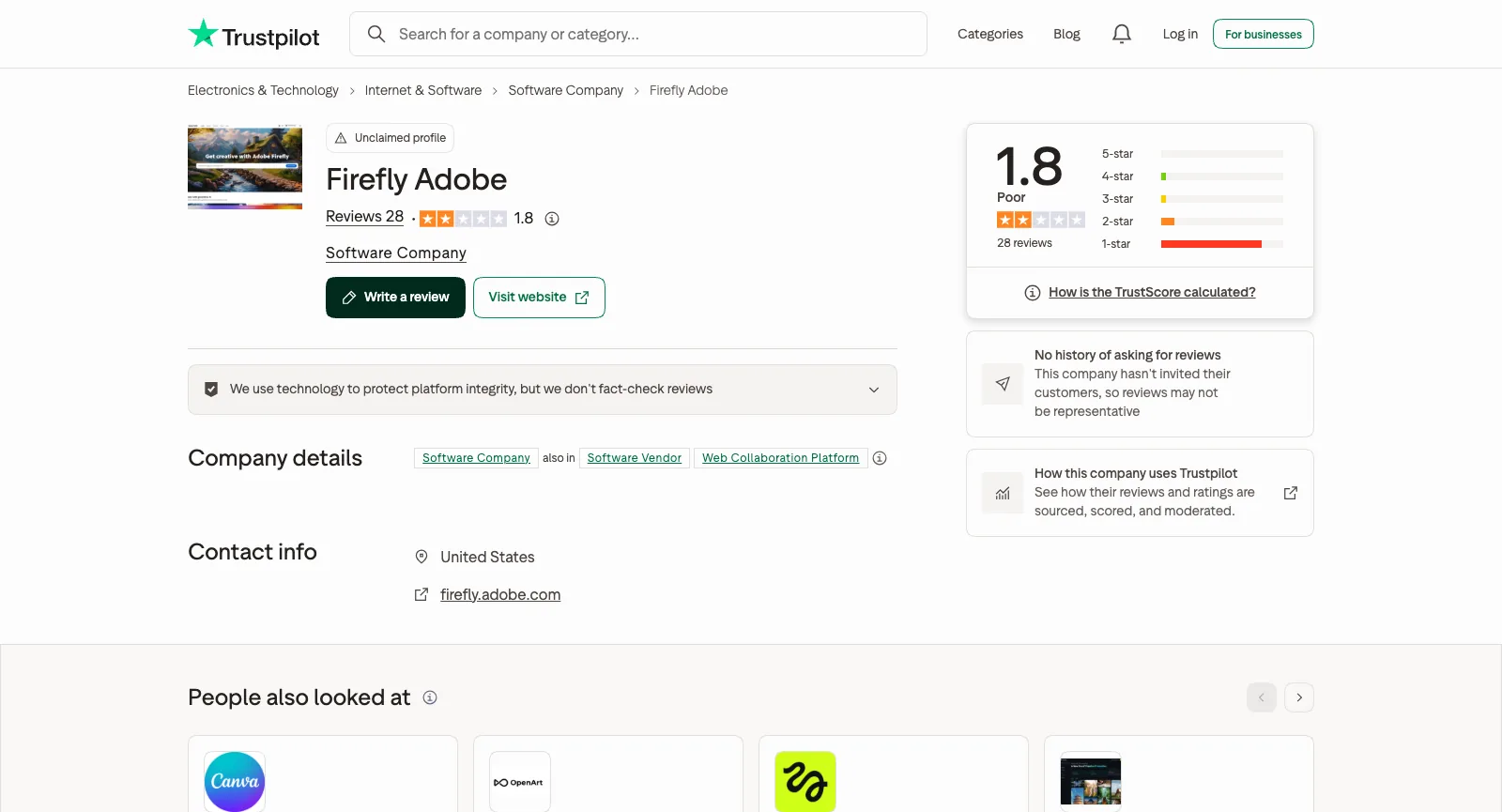
The Trustpilot page for firefly.adobe.com has never been claimed. Its score is 1.8, from 28 reviews: 23 at one star, a single four-star and no five-stars. Adobe’s claimed company profile, which covers every product, is rated 1.1 across 7,541 reviews. Our sample: every one of the 28 Firefly reviews, the 25 that come up when you search Adobe’s main Trustpilot profile for Firefly (any language), and the newest 50 US App Store reviews for the iPhone app. Of those 50, a dozen gave four or five stars and 33 gave one or two, often about the “Slow down” message. App Store reviews cannot be linked one by one, so the themes below cite Trustpilot only, and a single review may support more than one theme.

US App Store

4.7 / 5

11K ratings · iPhone app “Adobe Firefly AI Video & Photo”, published by Adobe Inc., out since June 2025

Open the source

Trustpilot (firefly.adobe.com)

1.8 / 5

28 reviews · not claimed; none of the 24 negative reviews has a reply

Open the source

Trustpilot (www.adobe.com)

1.1 / 5

7,541 reviews · Adobe’s claimed company-wide profile, not Firefly alone

Open the source
Trustpilot page for Firefly Adobe while signed out: unclaimed, a 1.8 TrustScore across 28 reviews, most of them one-star, with no record of review invitations
Captured from trustpilot.com/review/firefly.adobe.com while signed out, October 21, 2026.

Praise that keeps coming up

  1. 01

    Strong at cleaning up still photos

    Someone who retouches product shots gave Firefly four stars, calling it a leading tool for fixing blemishes and improving stills, though weaker on busy scenes. Five-star App Store reviews from recent weeks single out its picture quality and range of art styles.

  2. 02

    Handy next to other Adobe apps

    A longtime Adobe user who pairs Firefly with Express, Premiere and Photoshop finds Adobe unexpectedly strong in this field. Elsewhere, a Creative Cloud subscriber who runs a small business had Firefly voice the greetings on the company phone line.

Recurring complaints

  1. 01

    Errors and “Slow down” blocks

    The top grievance is runs that halt at “Something went wrong” or “try again later”. One person on a Pro Plus trial could not get any partner model to run, and many newer App Store reviews mention a “Slow down” security notice appearing on the day’s very first generation.

    How Yovid handles it

    On Yovid, a run that fails hands its credits back, and other model families sit in the same composer, so a prompt that stalls on one model can go straight to another.

  2. 02

    Credits gone on failed or unusable output

    Reviewers report credits taken for videos that never rendered and for output that disregarded what they asked for. One counted 6 unusable results out of 10 trial runs, each costing 400 credits; a veteran Photoshop user wants a preview before any credits leave the balance.

    How Yovid handles it

    Yovid shows the credit price before every run and returns the credits when a run fails. A finished clip you do not like is still charged, so try new prompts on short, low-resolution settings first.

  3. 03

    Monthly credits that disappear

    Subscribers want unspent credits to roll forward rather than vanish each month, and one adds that even one picture takes ages and eats plenty of credits.

    How Yovid handles it

    Yovid packs start at $29.90, need no subscription, and their credits stay usable for 180 days (Starter) or a full year (larger packs).

  4. 04

    Hard to cancel, billed after cancelling

    Across both Trustpilot profiles, people on trials and on Firefly Standard say the cancel button did nothing, or that payments kept coming after a confirmed cancellation; one says access stopped immediately rather than lasting until the paid month ran out.

    How Yovid handles it

    Yovid packs (from $29.90) are one-off purchases that never renew. Any purchase can be refunded within three days as long as none of its credits were spent, less payment fees capped at 4% + $1.50; renewals cannot be refunded.

  5. 05

    A “free” tool that asks for a plan

    People drawn in by ads for a free video generator say Firefly wanted a subscription before it would generate, or that the free output was too weak to justify paying monthly.

    How Yovid handles it

    No card is needed for Yovid’s sign-up credits, which run the entry models (Seedance 2.0 Mini and older) at up to 720p, and the credit price of any model is on screen before you generate.

We read these ratings and reviews on October 21, 2026. Nobody has claimed the firefly.adobe.com profile, and Trustpilot lists no review invitations from Adobe on it; the www.adobe.com profile spans all of Adobe’s products. The App Store figure covers only the US store. We summarize instead of quoting, so open each link to read the reviewer’s own words.

Adobe Firefly Prices in 2026

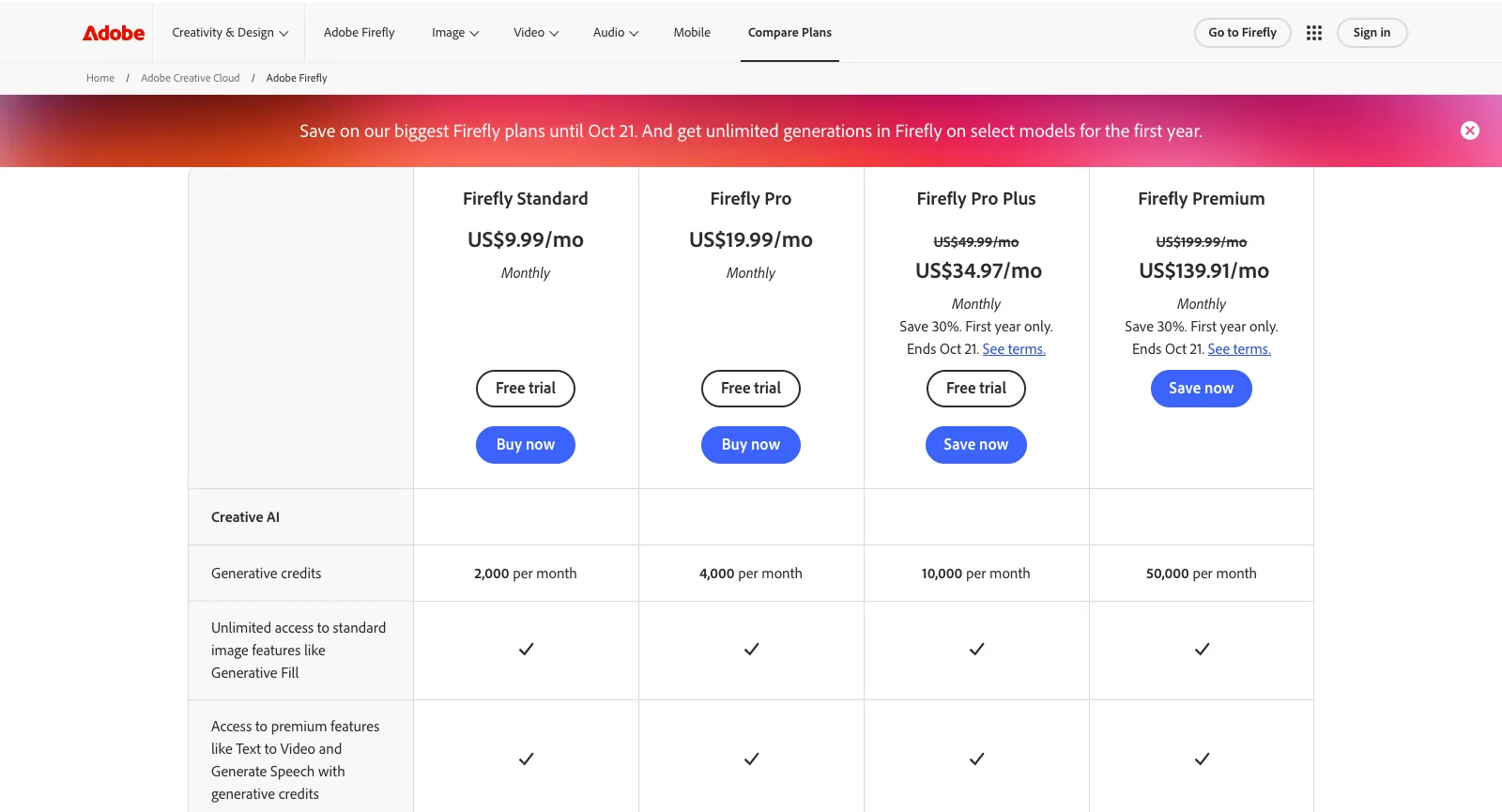
Besides the free tier, Firefly has four plans. Each can be paid month to month, on a yearly commitment billed monthly, or as one payment for the whole year, and credit add-ons are sold by the month too. What a plan buys is a credit budget that resets monthly, along with unlimited use of the standard image tools; partner models, audio and video each spend credits at their own rate. Below, Firefly’s plans sit next to Yovid’s.

US Firefly plans table on adobe.com: Standard at US$9.99 a month with 2,000 credits, Pro at US$19.99 with 4,000, and Pro Plus (10,000) and Premium (50,000) at 30% off the first year until October 21
Captured from adobe.com/products/firefly/plans.html while signed out, October 21, 2026.
FreeAdobe FireflyA daily allowance of image, video and audio generations, with models such as Luma Ray3.14 and Nano Banana; it resets each dayYovidFree starter credits after registering, no card needed; entry models only (Seedance 2.0 Mini and older), max 720p
Entry tierAdobe FireflyFirefly Standard: $9.99 billed monthly, $8.49 per month with a yearly commitment, or $83.99 prepaid for a year; 2,000 monthly credits, the standard image tools without limits, and enough for as many as 20 clips of five secondsYovidLite at $14.90 a month, or $13 a month paid yearly, for 100 credits a month. Every video model except MiniMax H3; Seedance renders at 720p, other models at up to 1080p. Commercial rights come with yearly billing only
Middle tierAdobe FireflyFirefly Pro: $19.99 billed monthly, $16.99 per month with a yearly commitment, or $167.99 prepaid; 4,000 monthly credits, plus Adobe Express Premium and Photoshop on the web and on phonesYovidPro at $29 a month, or $14.50 a month paid yearly, for 200 credits a month. Seedance at 1080p, other models at up to 2K, commercial rights included
Top tiersAdobe FireflyFirefly Pro Plus: $49.99 billed monthly, $41.99 per month with a yearly commitment, or $419.99 prepaid, for 10,000 credits. Firefly Premium: 50,000 credits and the Firefly Video model without limits, at $199.99 billed monthly, $169.99 per month yearly, or $1,679.99 prepaidYovidPremium at $149 a month, or $99 a month paid yearly, for 1,300 credits a month, output up to 4K and priority support
Seedance 2.5Adobe FireflyNot available. Adobe offers Seedance 2.0 on individual plans, priced per second at 40 credits for 480p, 90 for 720p and 180 for 1080pYovidIncluded in every paid plan and every pack: clips run up to 30 s with sound rendered alongside, guided by reference pictures, clips or audio. Output is 720p on Lite and 1080p on Pro, Premium and packs
Unlimited videoAdobe FireflyPremium has no cap on Firefly Video. In the web and mobile apps only, a first-year promotion adds Kling 2.5 Turbo to Pro Plus, and Kling 3.0 plus Veo 3.1 Fast to PremiumYovidPremium only: one 7-day window per account of free Seedance 2.5 and 2.0 clips (10 s max, up to 1080p), in a free queue
Unlimited imagesAdobe FireflyAll paid plans: standard features like Generative Fill, Expand and Firefly Image 3 or 4. From Pro, the first-year promotion adds partner image models such as FLUX.2 Pro and Nano Banana 2YovidPro and Premium: a year of unlimited images on the supported image models
Credits without a planAdobe FireflyNo. Add-on credits are themselves monthly subscriptions, ranging from 2,000 credits at $9.99 a month to 50,000 at $199.99YovidPay-once packs from $29.90 for 200 credits up to $999 for 8,000, no renewal, commercial rights included
Unused creditsAdobe FireflyA plan’s credits start over each month; nothing rolls overYovidEach month’s plan credits are good for 30 days; pack credits are good for 180 days (Starter) or a full year (larger packs)
RefundsAdobe FireflyMost plans: money back in full inside 14 days of the first purchase. Later, a monthly plan cancels without a fee, a yearly plan billed monthly costs 50% of what remains, and a prepaid year gets nothing back (US terms)YovidRefundable within 3 days of buying (packs too) if none of that order’s credits were spent; payment fees (max 4% + $1.50) are kept, and automatic renewals cannot be refunded

Adobe Firefly prices come from adobe.com/products/firefly/plans.html, the plan picker in Adobe’s checkout and its US subscription terms, all read on October 21, 2026; they are pre-tax US figures. That day, first-time US subscribers could take Pro Plus at $34.97 or Premium at $139.91 a month for the first year (30% off, 12-month commitment), in an offer ending October 21, 2026, and Adobe may change which models its first-year unlimited offer covers at any time. Yovid prices are the ones on yovid.ai/pricing.

Adobe Firefly, Yovid and Higgsfield Compared

The three start from different places: Adobe Firefly is the AI arm of a creative suite, with commercially safe in-house models and a long partner list; Yovid is a multi-model generator with prices shown up front; Higgsfield is a multi-model suite built around its own cinematic tools.

Built aroundAdobe FireflyAdobe’s generative app: in-house Firefly models marketed as commercially safe, partner models, Boards and a video editor, with one credit balance across Creative CloudYovidOne composer for Seedance, Kling, Veo, Wan and MiniMax H3 video and for image models such as GPT Image 2.5, plus AI CanvasHiggsfieldMany hosted models plus an agent, AI Influencer, Genjutsu and Cinema Studio
Seedance 2.5Adobe FireflyNot available; on a help page, Adobe lists only Seedance 2.0, for individual plansYovidEvery paid plan and pack: clips as long as 30 s with sound, 720p on Lite and 1080p from ProHiggsfieldFrom Plus; Starter only gets the Mini and Fast versions of Seedance 2.0
Other video modelsAdobe FireflyFirefly Video, Veo 3.1, Gemini Omni Flash, Kling 3.0 plus its Omni variant, Runway Gen-4.5, Luma Ray3.14YovidKling 3.0 with Motion Control, MiniMax H3, Wan 3.0 and Veo 3.1HiggsfieldIts own models plus Kling, Veo, Wan, Sora, Hailuo and Grok
Unlimited videoAdobe FireflyPremium: Firefly Video without limits; for the first year, Kling 3.0 and Veo 3.1 Fast tooYovidPremium: one free 7-day Seedance 2.5 and 2.0 window per accountHiggsfieldPlus and Ultra: 7 days of Wan 3.0 and Kling 3.0; business plans: Seedance 2.5
Credits without subscribingAdobe FireflyNo; add-on credits are a monthly subscription, the smallest being 2,000 credits for $9.99YovidYes: packs from $29.90, paid once and usable 180 days to a yearHiggsfieldNo; packs are for subscribers only and last 90 days
RefundsAdobe FireflyMost plans within 14 days of the first purchase (US terms)YovidWithin three days when the purchase’s credits are untouched; renewals excludedHiggsfieldWithin a week, for a first purchase with no credits used

Adobe Firefly details come from Adobe’s own pricing, product, support and legal pages (October 21, 2026); Higgsfield details from its own pages on October 14, 2026.

Why Some Firefly Users Move to Yovid

Those who switch usually want Seedance for video, or would rather buy video credits once than rent them every month.

  1. 01

    Seedance 2.5 on every paid plan

    Lite, at $13 a month paid yearly, already opens Seedance 2.5 alongside Kling, Veo and Wan; Pro, Premium and the packs render it at 1080p. Firefly offers no Seedance 2.5, and its Seedance 2.0 at 1080p costs 180 credits a second, so a single 10-second clip would use 1,800 credits, nearly all of the 2,000 that Firefly Standard grants each month.

  2. 02

    Credits you buy once

    Packs from $29.90 work without any plan, and every run states its price before it starts. On Firefly, add-on credits are a monthly subscription and plan credits are wiped at the end of each month.

  3. 03

    A free Seedance week on Premium

    Premium ($99 a month paid yearly) includes one 7-day window per account of free Seedance 2.5 and 2.0 clips, as many as 11 ten-second clips at 720p, and failed runs never cost credits. Firefly Premium costs $199.99 a month, and what it makes unlimited is Firefly Video, with Kling 3.0 and Veo 3.1 Fast added during the first year.

When Adobe Firefly is still the better call

  • Brand or client work requires models trained on licensed material, with Content Credentials attached.
  • You already use Express, Illustrator, Premiere or Photoshop and want a single credit balance across all of them.
  • You need speech, music, sound effects and video dubbing in the same place as image and video generation.

More Adobe Firefly Alternatives to Compare

Eight further tools to weigh up. Each starting price is the lowest paid plan, before tax, as the official pricing page showed it on October 13, 2026. The plans buy very different amounts of output, so use the list to narrow your options, not as a ranking.

Higgsfield

Hosts outside models next to in-house tools (Soul images, Ads Studio, Cinema Studio, AI Influencer), offers team plans and prices Seedance 2.0 and Kling 3.0 per 5-second block.

Pick it for: Its in-house studios, or cheap Kling 3.0: roughly 7 credits buys 5 seconds at 720p.

Skip it for: Full Seedance on a budget: the Starter tier stops at Seedance 2.0 Fast and 2.0 Mini.

Cheapest paid plan: Starter at $19 a month (same monthly or yearly) for 270 credits; the free tier just says “Limited use”.

Read our Higgsfield breakdownTheir pricing page

Pollo AI

A marketing-minded hub: dozens of third-party models plus its own Pollo models, template apps, an agent, Marketing Studio, an MCP server, an API and phone apps.

Pick it for: Maximum model choice; while its 60% subscriber discount lasts, its Seedance clips cost less than Yovid’s on most plans.

Skip it for: Buying credits with no subscription, or keeping unused plan credits: they lapse each cycle.

Cheapest paid plan: Lite at $15 a month, $12 paid yearly, for 400 credits.

Read our Pollo AI breakdownTheir pricing page

Runway

Built around Runway’s in-house Aleph, Act-Two and Gen-4.5, adding sound effects, voices and music, upscaling to 4K, and guest models like Kling and Seedance.

Pick it for: Projects where editing matters as much as generating.

Skip it for: Lots of clips on the cheapest tier: Runway itself says the 625 Standard credits buy roughly 52 s of Gen-4.5 output.

Cheapest paid plan: Standard at $15 a month, $12 paid yearly, for 625 credits; the free plan gives 125 credits once.

Their pricing page

Kling AI

Kuaishou’s own app for Kling, including Kling 3.0 Omni and 3.0 with sound, Motion Control, 4K video and a developer platform.

Pick it for: Kling-only users who want to buy straight from the model maker.

Skip it for: Anyone who needs Seedance, which appears on neither its pricing page nor its home page.

Cheapest paid plan: Standard: $6.99 for month one, $8.80 a month after that or $79.20 a year, with 660 credits a month.

Their pricing page

Hailuo AI (MiniMax)

MiniMax’s first-party app for Hailuo and MiniMax H3, with Hailuo Agent and Omni Reference (as many as 12 reference images); paid tiers also unlock Sora 2 and Veo 3.1.

Pick it for: People who like MiniMax’s models and per-second pricing.

Skip it for: Seedance work: no Seedance model is listed for sale, and trial credits only run Hailuo models.

Cheapest paid plan: Standard at $10.50 a month on sale that day, or $8.40 paid yearly, for 1,000 credits.

Their pricing page

Luma Dream Machine

Home of Ray3.2 for video and Uni-1 for images, Luma Agents and connectors for tools like Frame.io and Figma; its credit table also prices Seedance 2.0 Mini, 2.0 and 2.5.

Pick it for: Design teams after Ray3.2 output and agents inside the tools they already use.

Skip it for: Low-cost testing: no free plan is listed and the cheapest tier is $25 a month.

Cheapest paid plan: Plus at $30 a month, $25 paid yearly, for 10,000 credits with commercial use.

Their pricing page

PixVerse

Runs PixVerse’s V6 (with native audio) and real-time R2, plus Lip Sync, Canvas, Agent and an API; the two newest Seedance versions unlock from the Pro tier.

Pick it for: Fast social clips on free daily credits: 60 at sign-up, then 30 a day, capped at 540p.

Skip it for: Cheap Seedance: the Standard tier only runs PixVerse models and maxes out at 720p.

Cheapest paid plan: Standard at $10 a month, $8 paid yearly, for 1,200 credits per 30 days plus 60 daily.

Their pricing page

Vidu

Vidu’s in-house Q3 and Q4 plus real-time Vidu S, with a developer API, Vidu Agent and Reference to Video.

Pick it for: Reference-driven clips on Vidu models; on paid tiers Q4 at 540p uses 2 credits per second.

Skip it for: Seedance, which its pricing page does not offer.

Cheapest paid plan: Standard at $10 a month, $8.25 paid yearly, for 800 credits.

Their pricing page

Questions People Ask

Straight answers on Adobe Firefly, based on what we checked on October 21, 2026.

What can you make with Adobe Firefly?
Pictures, clips and audio. Stills come from Firefly Image 5 or partners like GPT Image and Nano Banana; video from the Firefly Video model, Kling 3.0, Veo 3.1 or Runway Gen-4.5; and the audio tools handle speech, music, sound effects and translated dialogue. Results open in Adobe Express, Premiere and Photoshop, and Boards gathers them into storyboards and moodboards.
Is Adobe Firefly free?
Only in part. Without a plan you still get a daily allowance of image, video and audio generations on models like Luma Ray3.14 and Nano Banana, and it refills every day. Anything beyond that needs a plan: Firefly Standard is $9.99 billed monthly, $8.49 per month with a yearly commitment or $83.99 prepaid for the year, and its 2,000 monthly credits do not carry over.
Can I use Adobe Firefly output commercially?
Adobe says yes for its own Firefly models: their training data is licensed (Adobe Stock, for example) or out of copyright, and what they produce carries Content Credentials. Partner models like Kling, Veo or GPT Image are built by other companies, and Adobe leaves it to you to judge whether their output fits your project.
Can you get a refund from Adobe Firefly?
On most plans, cancelling inside two weeks (14 days) of the first purchase brings a full refund. After that, Adobe’s US terms let a monthly plan end without a fee, staying active until the billing period closes; a yearly plan billed monthly costs 50% of the rest of the commitment, and a prepaid year is not refunded. Credits for failed generations usually come back within minutes, or within 24 hours for video.
Can you use Seedance in Adobe Firefly?
Only the older version. Individual plans can use Seedance 2.0 and its Fast variant, according to Adobe’s partner-model help page; Seedance 2.0 costs 40 credits a second at 480p, 90 at 720p and 180 at 1080p. It was not in the signed-out Generate video list on October 21, 2026, and Seedance 2.5 is not offered at all.
Which Adobe Firefly alternative suits video best?
If you want Seedance without a subscription, Yovid: Seedance 2.5 rendered at 1080p on Pro, Premium and packs, credit packs from $29.90 that never renew, and Kling, Veo, Wan and MiniMax H3 in the same composer. For cinematic studio tools as well, look at Higgsfield, the nearest multi-model option.
Is Yovid affiliated with Adobe?
No. Yovid is run independently and has no tie to Adobe. Adobe and Firefly are Adobe trademarks, and Seedance belongs to ByteDance; we use these names solely to describe and compare the products.

Video first Type a scene, get a clip