Yovid
Montage of AI-generated video clips

Bing Image Creator Review for Free AI Images

Microsoft’s image tool costs nothing and runs on its own MAI-Image models, but you pay in speed limits, strict filters and terms written for fun rather than work. Here is what you get and where Yovid differs.

The short version

Is Bing Image Creator good enough for you?

For a few free pictures, yes. Bing Image Creator, once called Image Creator from Designer, is Microsoft’s no-cost generator at bing.com/images/create. It runs Microsoft’s own MAI-Image-2.5-Flash and MAI-Image-2e models and adds 47 photo templates plus a one-click photo editor. A personal Microsoft account gets 15 fast creations a day, then slower ones up to 200 prompts per 24 hours; Rewards points buy extra speed, and nothing is for sale. Its terms frame it as entertainment and never mention commercial use. Trustpilot’s page for all of Bing scores 1.6 from 632 reviews, and the Image Creator posts there mostly protest filters. For video and paid work, Yovid runs Seedance 2.5 with pay-once packs.

Nora

NoraYovid editor

Details about Bing Image Creator last checked , using bing.com/images/create, the Image Creator FAQ, the Terms of Use and the Bing Video Creator launch post.

Operator
Microsoft, inside Bing Images; the Microsoft Services Agreement and the service’s own Terms of Use both apply
Ratings
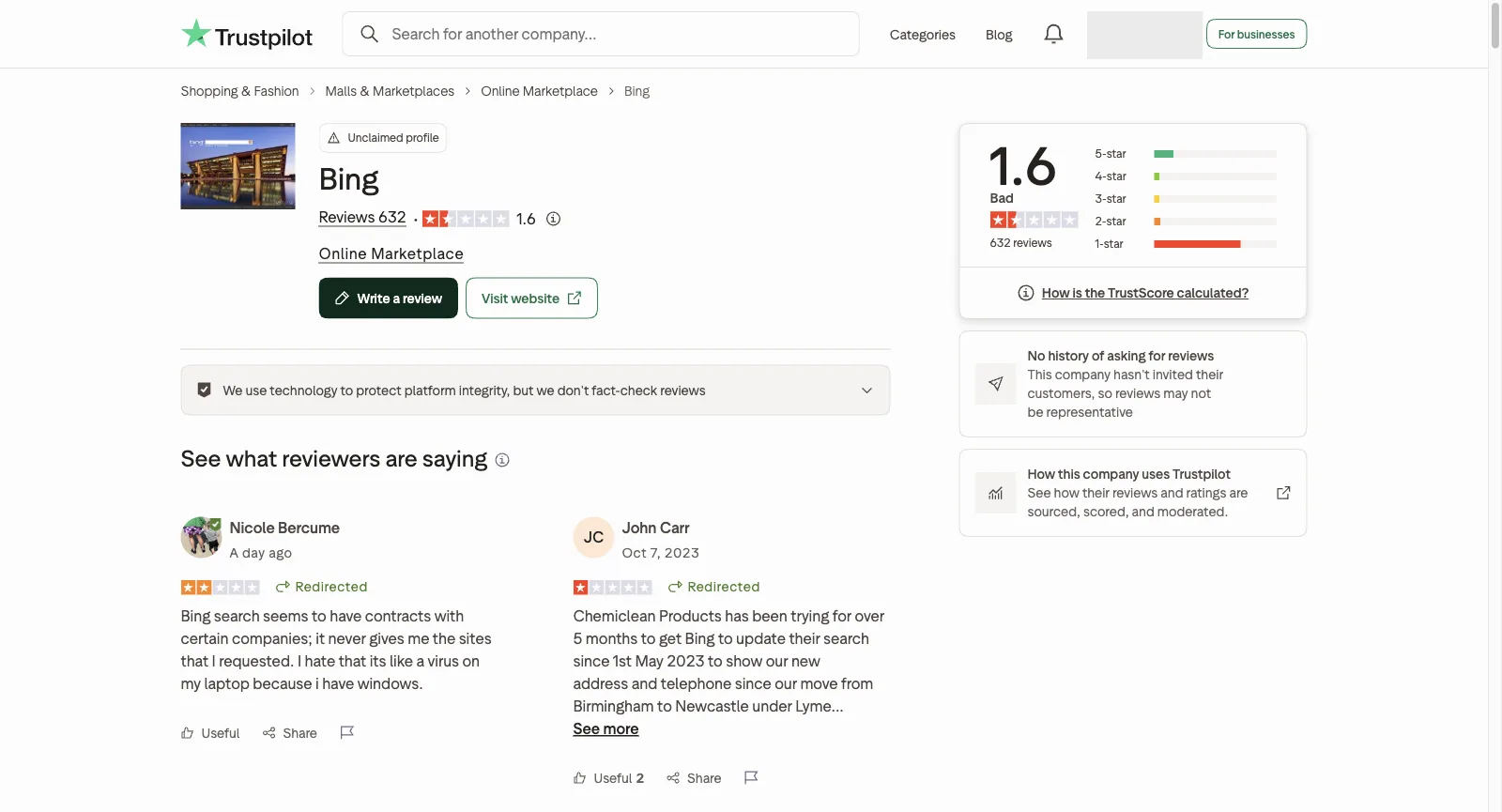
Trustpilot: 1.6 from 632 reviews on the unclaimed www.bing.com page, which is mostly about search
Free tier
15 fast creations a day, then standard speed up to 200 prompts in 24 hours; a personal Microsoft account is required
Paid plans
None; Microsoft Rewards points buy extra fast creations, at a rate shown only after sign-in
Commercial use
Not granted: the terms describe the service as for entertainment and say nothing about business use

What Bing Image Creator Does

Image Creator is a tab of Bing Images, next to search, Inspiration and Collections, and everything in it is free once you sign in with a Microsoft account. These are the parts most people use, each paired with Yovid’s nearest option.

Prompt-to-Image on Microsoft’s MAI-Image Models

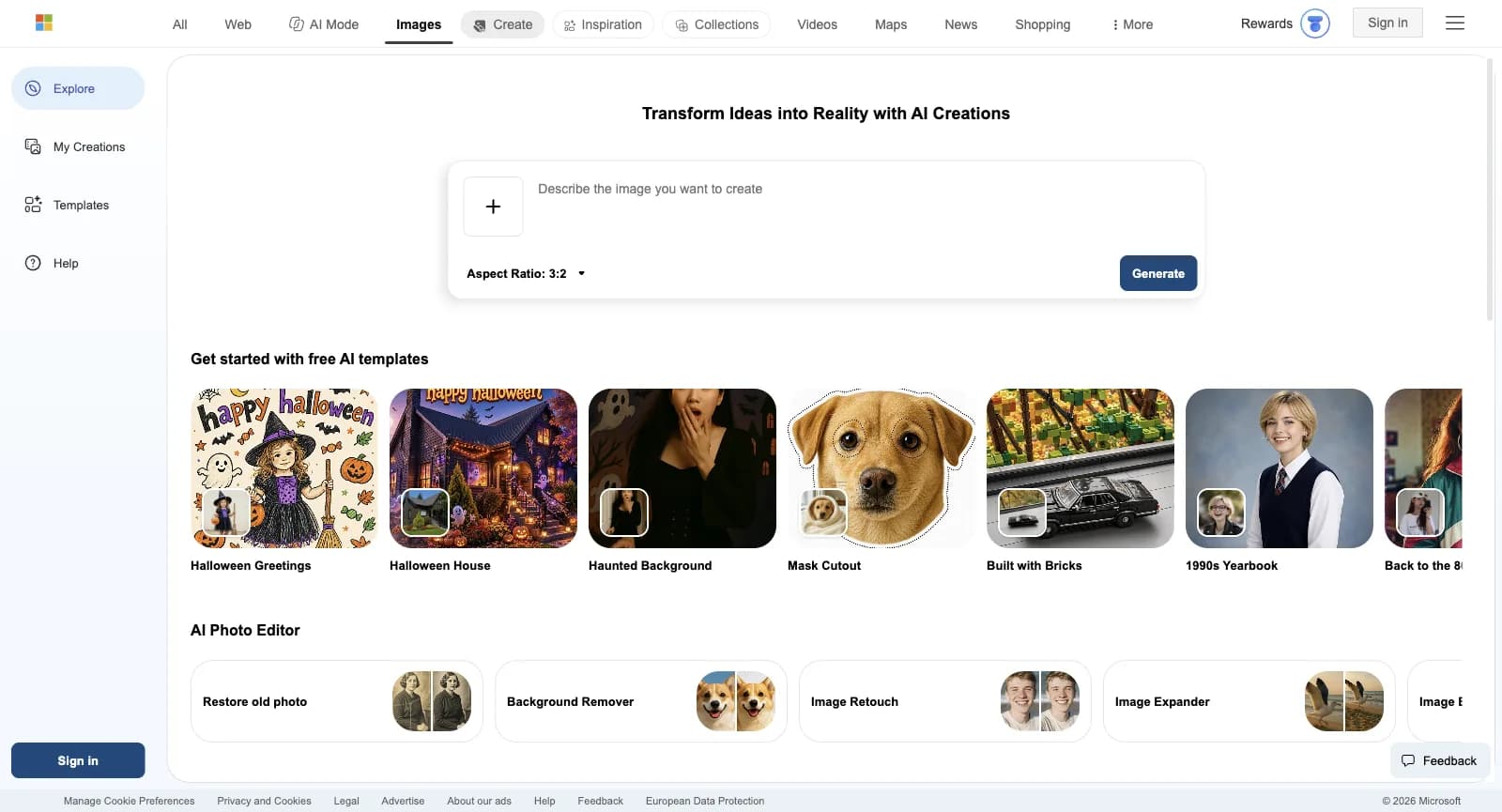
The creator page is a single prompt box with a plus button for uploads and an aspect-ratio menu offering 1:1, 7:4, 4:7, 3:2 and 2:3, with 3:2 preselected. On the check date its FAQ listed two Microsoft models, MAI-Image-2.5-Flash and MAI-Image-2e. One click can return several images yet counts as a single creation, and any upload or edit is handled by MAI-Image-2.5-Flash.

The service began on OpenAI’s DALL-E 3, and the Bing Blog announced GPT-4o for it in August 2025; the FAQ now names only the MAI-Image pair. Prompts work in more than 100 languages, and a prompt close to one used recently may get back a stored “cached image” instead of a fresh render.

Fashion image created with the Yovid image generator

The Yovid way

Yovid’s image generator offers GPT Image 2.5, Seedream 5.0, Nano Banana 2.1 and Nano Banana Pro, with output up to 4K and reference photos for edits. Pro and Premium add a year of unlimited images on the supported models.

Open the image generator
Bing Image Creator signed out: the Describe the image you want to create box with an upload button, Aspect Ratio 3:2 and Generate, a row of free AI templates and the AI Photo Editor tools
Captured from bing.com/images/create while signed out, October 24, 2026.

Bing Video Creator and Its Short Clips

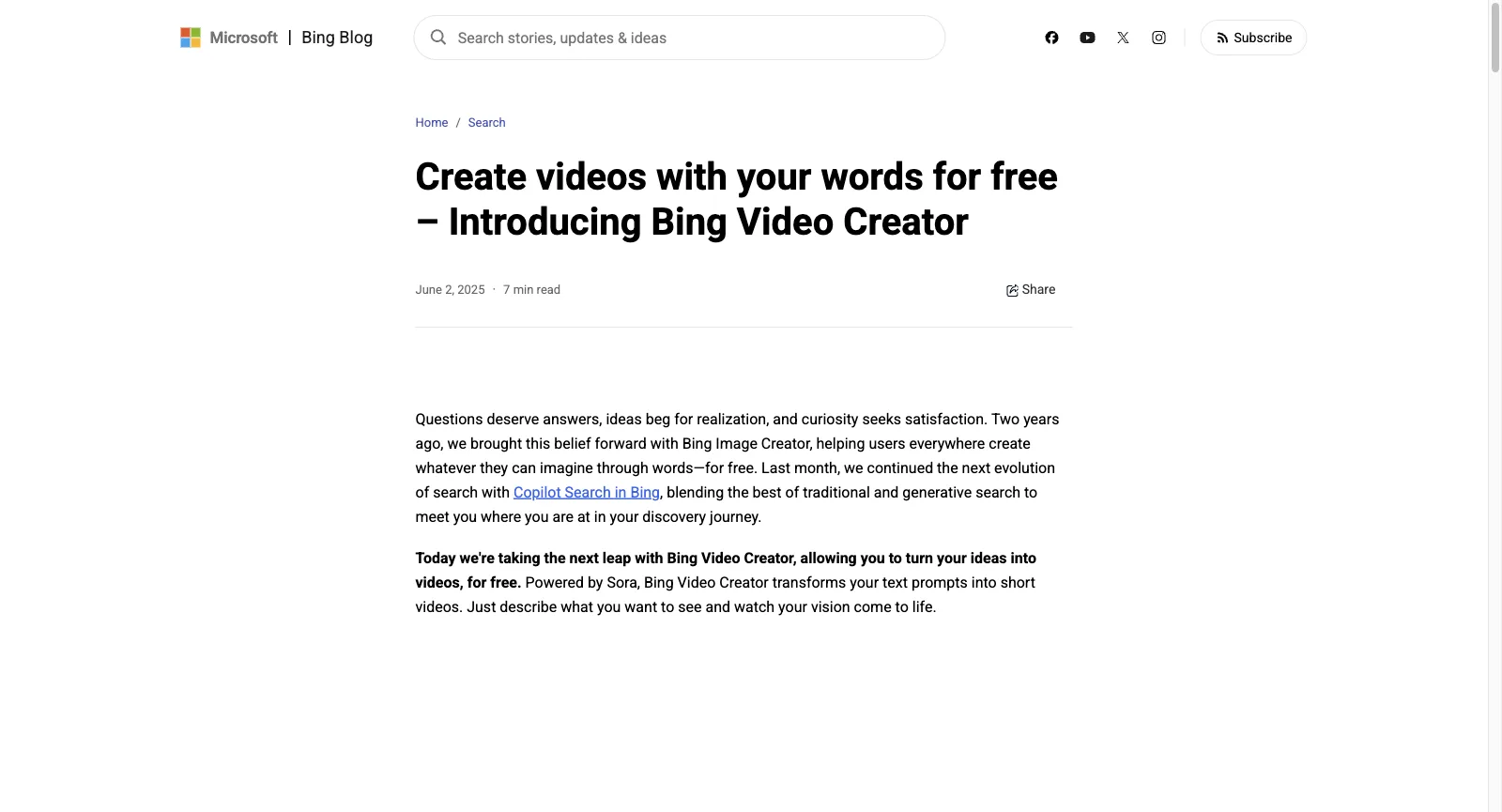
Microsoft introduced Bing Video Creator on June 2, 2025, running on OpenAI’s Sora. At launch it rendered 5-second vertical clips in 9:16, with 16:9 promised later, queued up to three at a time and kept them for 90 days. It opened in the Bing mobile app everywhere except China and Russia, with desktop to come.

Each account got 10 fast creations; after that, a fast video cost 100 Rewards points at launch, or you waited for standard speed. When we checked the signed-out desktop creator, it showed no video option at all, so look in the Bing app before you plan around it.

Still from a Seedance 2.5 clip made on Yovid

The Yovid way

Video is the core of Yovid. Seedance 2.5 is included from Lite ($13 a month paid yearly), with clips of up to 30 seconds and sound in the same render, and Kling, Veo 3.1, Wan 3.0 and MiniMax H3 share the composer.

Open Seedance 2.5
Bing Blog post dated June 2, 2025, introducing Bing Video Creator as a free way to turn words into short videos, powered by Sora
Captured from blogs.bing.com (Bing Video Creator launch post) while signed out, October 24, 2026.

47 One-Click Photo Templates

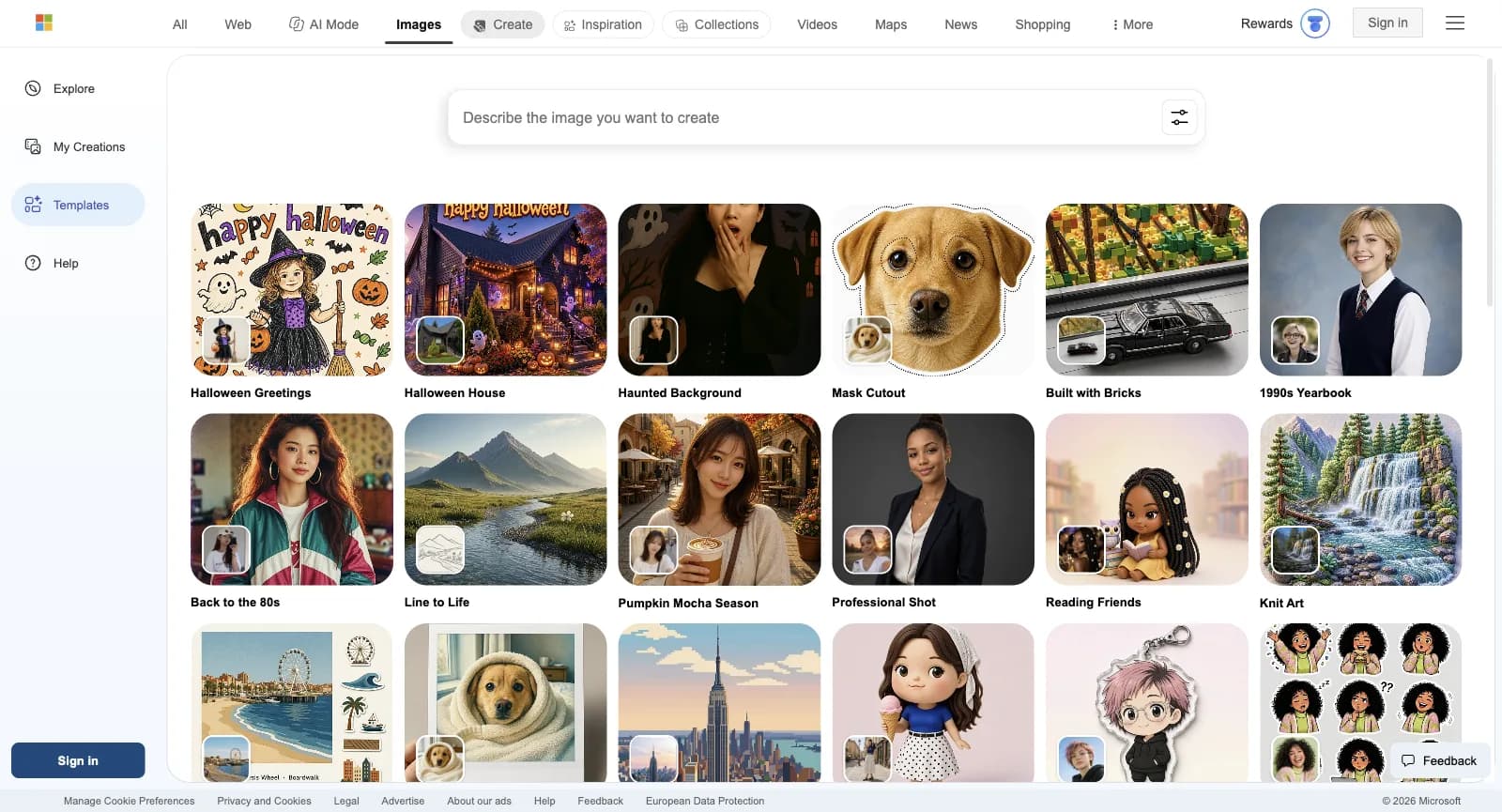
The Templates page held 47 presets on the check date, each shown with a sample result and the photo it started from. They run from seasonal cards such as Halloween Greetings to portrait looks like 1990s Yearbook, Back to the 80s and Professional Shot, plus sticker packs, Vinyl Toy, Clay Buddy, Ukiyo-e Print and Coloring Page.

Templates that restyle a photo need an upload, which comes out of the same daily prompt allowance. Microsoft says uploads are not used to train its models and that images containing faces are deleted after 30 days.

Still photo used as the opening frame of a Yovid image-to-video clip

The Yovid way

Yovid keeps no template gallery. What it can do with your photo is set it in motion: use the picture as the opening frame of an image-to-video clip and describe the movement.

Open image to video
Bing Image Creator Templates page, signed out: Halloween Greetings, Mask Cutout, Built with Bricks, 1990s Yearbook, Back to the 80s, Professional Shot, Knit Art and more presets
Captured from bing.com/images/create/ai-image-generator/templates while signed out, October 24, 2026.

AI Photo Editor for Quick Fixes

A row beneath the templates holds the AI Photo Editor: Restore old photo, Background Remover, Image Retouch, Image Expander and Image Enhancer. Each works on a photo you upload and runs on MAI-Image-2.5-Flash, the model behind every edit in Image Creator.

Edits count toward the 200 prompts allowed per 24 hours, and so does each press of Edit image. The FAQ asks you to upload only photos you own or hold rights to, and pictures of other people only with their consent.

Frame from the Yovid upscaler demo

The Yovid way

For a sharper or larger still, Yovid’s image upscaler works in the browser, and GPT Image 2.5 or Nano Banana can rework a photo you upload as a reference.

Open the image upscaler

Explore More Ideas: Sample Prompts to Borrow

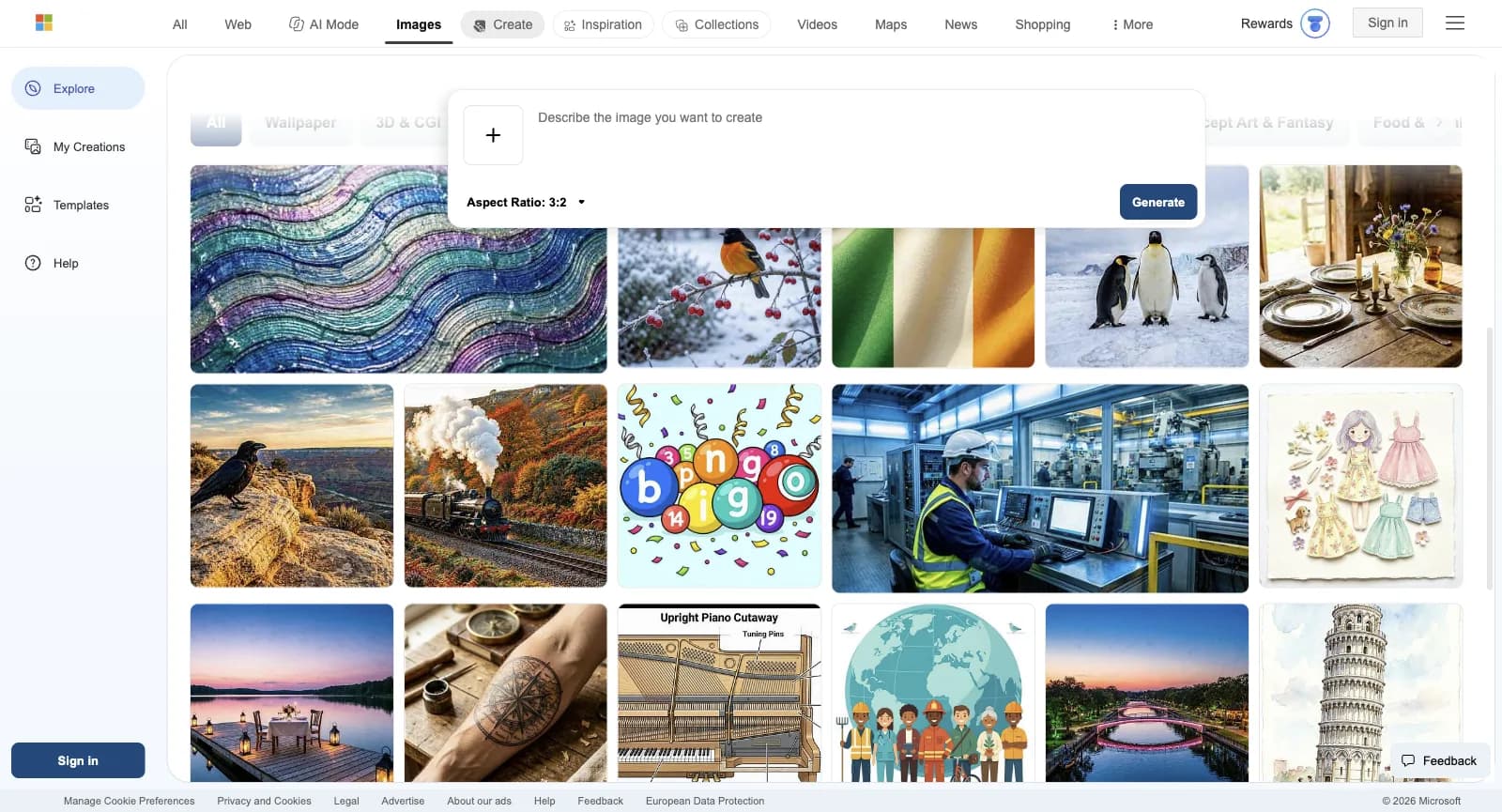
Further down, Explore more ideas fills a grid with sample images sorted into categories such as Wallpaper, 3D & CGI, Anime & Manga, Character Design, Home Decor and Weddings & Celebrations. Choosing one drops its detailed prompt, lens and lighting included, into the box so you can reuse or adjust it.

The FAQ’s tips for writing your own point the same way: state the subject, a few adjectives, an action and a setting, then a style or mood such as “photorealistic” or “digital art”. Creations stay in your history for 90 days unless you delete them sooner.

Frame from a lantern-lit fantasy clip made on Yovid

The Yovid way

Yovid’s showcase does the same for video: every clip in it comes with the prompt that made it, ready to copy and change.

Browse the showcase
Bing Image Creator scrolled to Explore more ideas, signed out: sample images including a wave-pattern wallpaper, an oriole in snow, penguins and an upright piano cutaway, under the pinned prompt box
Captured from bing.com/images/create, Explore more ideas while signed out, October 24, 2026.

Terms, Content Rules and Watermarks

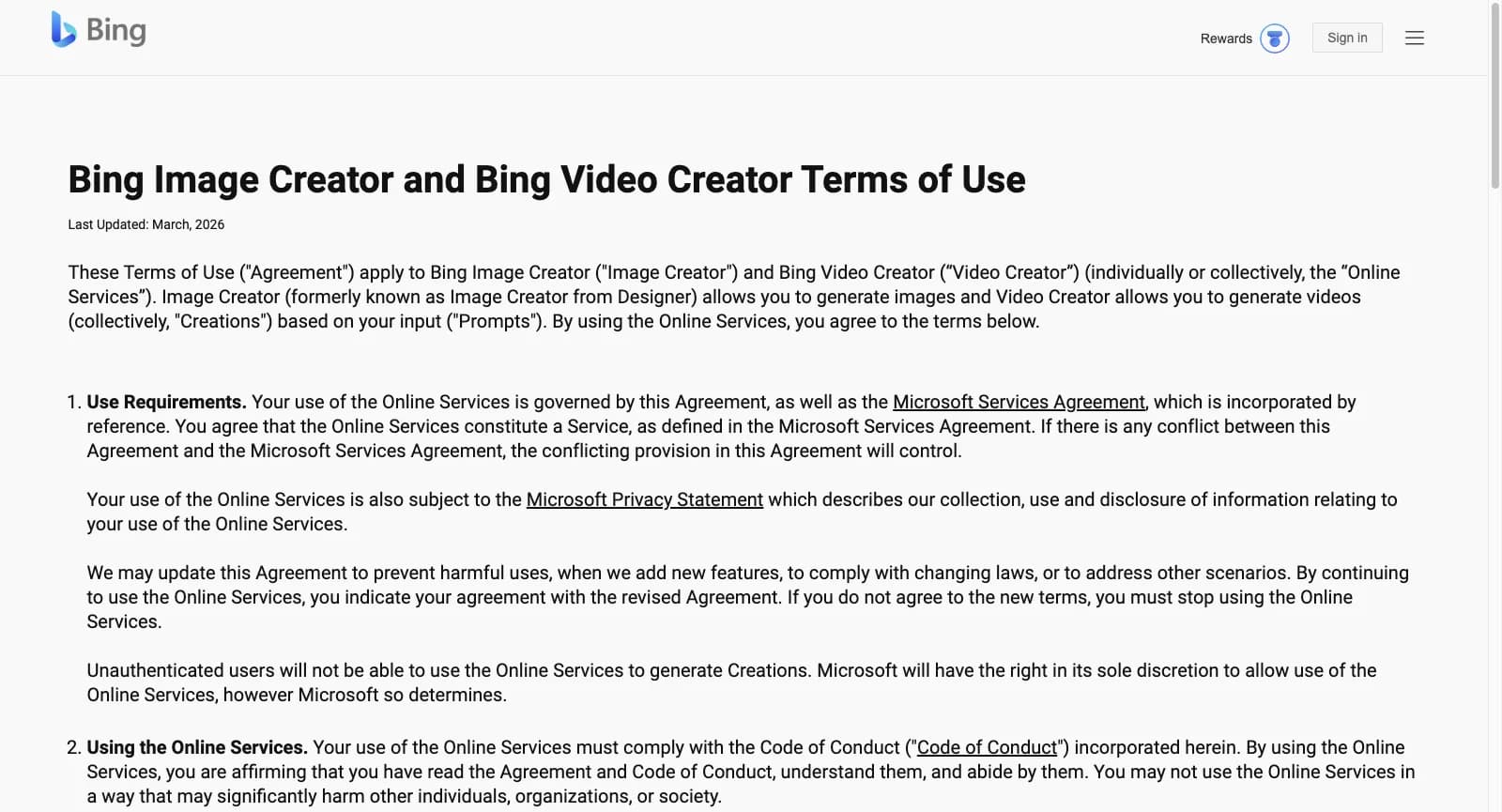
The shared Terms of Use for Image Creator and Video Creator, last updated in March 2026, present both as entertainment services and require a signed-in account. Microsoft takes no ownership of what you make, but you give it and its partners a license to use your prompts and creations, and commercial use is never mentioned. Results are not guaranteed to be unique, so someone else may get a near-identical image.

The Code of Conduct forbids harmful, deceptive and infringing material as well as stripping content credentials; serious or repeated breaches can lead to suspension, and the product itself shows one-hour suspensions for policy violations. A setting stamps a visible watermark on your images if you want one.

Creator holding a camera, from the Yovid pricing page

The Yovid way

Yovid spells out commercial rights per plan: Pro, Premium and every credit pack include them, and so does Lite on yearly billing.

See Yovid plans
Bing Image Creator and Bing Video Creator Terms of Use, last updated March 2026, signed out, opening on the Use Requirements section
Captured from bing.com/new/termsofuseimagecreator while signed out, October 24, 2026.

Where Bing Image Creator Comes From

Bing Image Creator is a Microsoft service that lives inside Bing Images. It answers to the Microsoft Services Agreement and its own Terms of Use, last revised in March 2026. It used to be called Image Creator from Designer, and Microsoft’s 2025 Video Creator announcement places its debut two years earlier, in 2023.

Microsoft treats it as a free perk for Bing and Microsoft Rewards users rather than a creative suite. There is no paid tier, sign-in needs a personal Microsoft account (work and school Entra ID accounts are not supported), and extra speed is bought with Rewards points. Under the hood it has moved from OpenAI’s DALL-E 3 and GPT-4o to Microsoft’s own MAI-Image-2.5-Flash and MAI-Image-2e.

Yovid is an independent service with a free start and paid plans: video models such as Seedance, Kling, Veo, Wan and MiniMax H3 share one composer with image models like GPT Image 2.5, Seedream 5.0 and Nano Banana, and every run shows its credit price first.

Who Bing Image Creator Works For

It fits people who want an occasional free picture without paying or learning a tool. For video, client work or high volume, a dedicated generator usually serves better.

First-time AI users

Try image generation with the Microsoft account you already have: no plan to choose and no card to enter.

Students and teachers

Make illustrations, coloring pages and class visuals, keeping in mind that school accounts cannot sign in.

Card and party makers

Pick seasonal templates such as Halloween Greetings, or sticker packs to share in group chats.

Family photo restorers

Repair an old photo, cut out a background or widen a picture with the AI Photo Editor.

Microsoft Rewards collectors

Spend points earned elsewhere at Microsoft on faster creations instead of waiting.

People learning to prompt

Open the samples in Explore more ideas, read their full prompts and adapt them to your own pictures.

What Users Report About Bing Image Creator

Image Creator has no Trustpilot page of its own. The nearest is www.bing.com: unclaimed, rated 1.6 from 632 reviews, 71% of them one-star, with 64 posted in the past 12 months and no review invitations on record. Nearly all of it is about Bing search, so we searched the reviews for image and video creation and read every match; only about a dozen concern Image Creator or Video Creator. A few like that it is free and the pictures look good; most object to filters that block harmless prompts, results that ignore instructions and suspensions with nobody to ask. Each theme links to sample reviews, and one review can support several themes.

Trustpilot

1.6 / 5

632 reviews · Covers all of www.bing.com, not Image Creator alone; unclaimed; 71% one-star, 16% five-star; no review invitations

Open the source
Trustpilot page for Bing: unclaimed profile, TrustScore 1.6 (Bad) from 632 reviews, mostly one-star, and no history of asking for reviews
Captured from trustpilot.com/review/www.bing.com while signed out, October 24, 2026.

Praise that keeps coming up

  1. 01

    Free, and the pictures look good

    The handful of five-star posts about Image Creator come from people who open Bing only to make pictures and value paying nothing, and from users struck by the quality of what comes back.

Recurring complaints

  1. 01

    Filters that refuse ordinary prompts

    The most frequent Image Creator complaint: prompts rejected over everyday words, from “sword” to a request to change an object’s colour, a filter one reviewer says flags half the language, and a video of a couple hugging on a boat turned down as inappropriate.

    How Yovid handles it

    On Yovid, Seedance 2.0 and 2.5 offer a relaxed content mode that cuts false blocks for 10% more credits; banned content stays blocked and a pass isn’t guaranteed. For stills, you can try the same prompt on another image model in the same generator.

  2. 02

    Results that miss the instructions

    Reviewers say prompts get misread and simple directions ignored, that fixing one detail breaks another, and that some prompts return no image at all.

    How Yovid handles it

    Yovid shows a run’s credit price before you start and gives the credits back if the run fails. A finished image or clip you dislike is still charged, so test new prompts cheaply first.

  3. 03

    Suspensions with no one to ask

    Some were suspended over prompts such as “gorilla”, say the chatbot would not explain the policy, and found that reports to Bing went unanswered.

    How Yovid handles it

    Yovid publishes its money rules: packs never renew, a purchase with untouched credits is refundable within 3 days minus payment fees, failed runs return their credits, and Premium includes priority support.

We read the ratings and reviews on October 24, 2026. The Trustpilot page covers Bing as a whole, is unclaimed and is mostly about search, so only posts about Image Creator or Video Creator are cited. We summarize rather than quote; each link opens the full review.

Bing Image Creator Cost and Limits in 2026

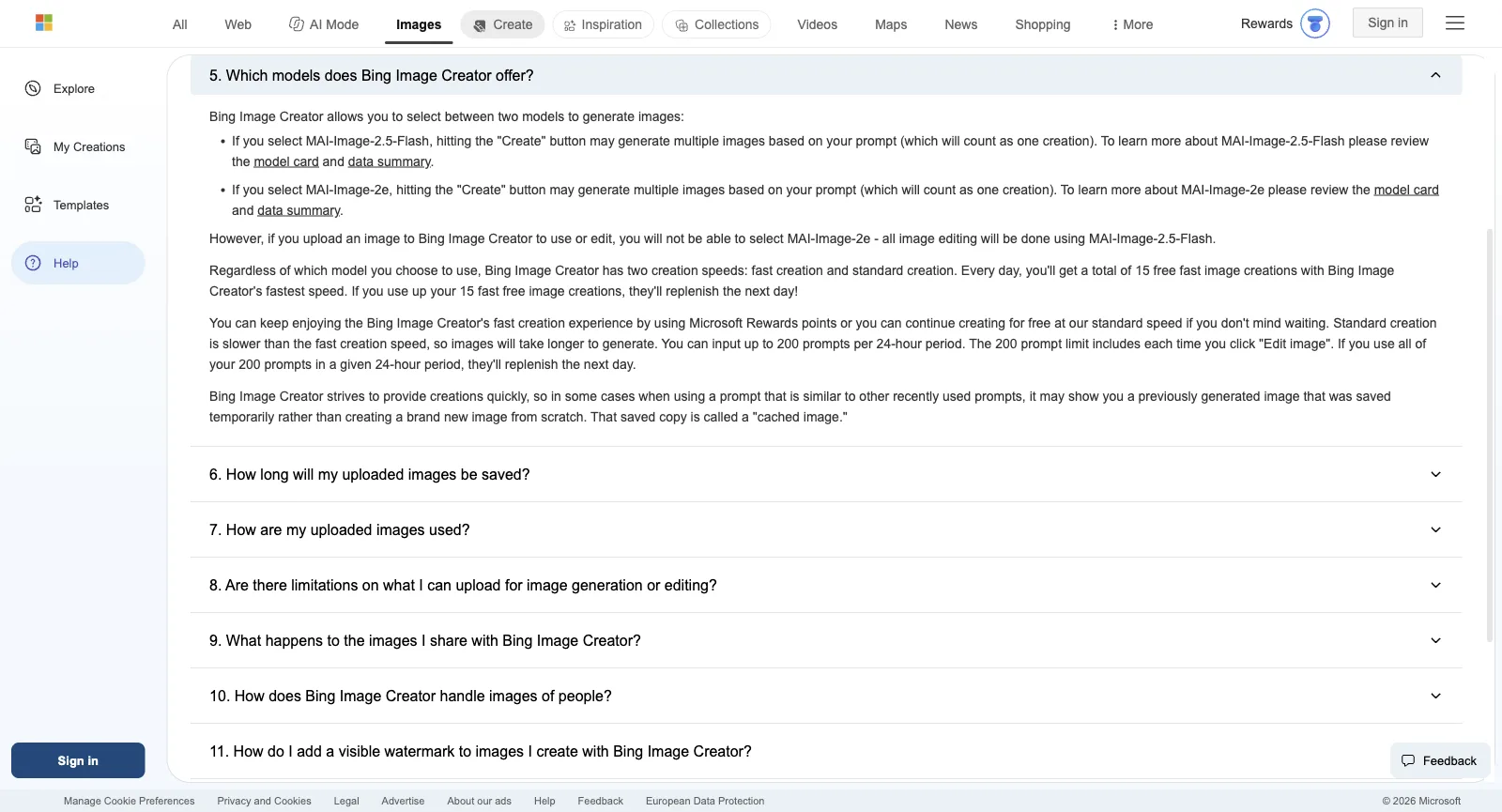
Bing Image Creator has no price list. It is free with a personal Microsoft account, and the FAQ sets the limits: 15 fast creations a day, standard speed afterwards, and Rewards points if you want more speed. Here is how that lines up against Yovid’s plans.

Bing Image Creator FAQ with question 5 open: the MAI-Image-2.5-Flash and MAI-Image-2e models, 15 free fast creations a day, Microsoft Rewards points, standard speed and 200 prompts per 24 hours
Captured from bing.com/images/create/ai-image-generator/faq while signed out, October 24, 2026.
FreeBing Image CreatorEverything, with a personal Microsoft account: 15 fast creations a day, then standard speed, up to 200 prompts in 24 hours, edits includedYovidFree starter credits after registering, no card needed; entry models only (Seedance 2.0 Mini and older), max 720p
Entry tierBing Image CreatorNo plan. Fast creations beyond the daily 15 cost Microsoft Rewards points; the rate per image appears after sign-inYovidLite at $14.90 a month, or $13 a month paid yearly, for 100 credits a month. Every video model except MiniMax H3; Seedance renders at 720p, other models at up to 1080p. Commercial rights come with yearly billing only
Middle tierBing Image CreatorNo subscription exists, and no commercial terms either: the Terms of Use describe the service as for entertainmentYovidPro at $29 a month, or $14.50 a month paid yearly, for 200 credits a month. Seedance at 1080p, other models at up to 2K, commercial rights included
Top tierBing Image CreatorNo higher-resolution, team or business optionYovidPremium at $149 a month, or $99 a month paid yearly, for 1,300 credits a month, output up to 4K and priority support
Seedance 2.5Bing Image CreatorNot offered: pictures come from MAI-Image-2.5-Flash and MAI-Image-2e, and Bing Video Creator launched on SoraYovidIncluded in every paid plan and every pack: clips run up to 30 s with sound rendered alongside, guided by reference pictures, clips or audio. Output is 720p on Lite and 1080p on Pro, Premium and packs
VideoBing Image CreatorBing Video Creator at launch (June 2025): 5-second clips, 10 fast creations, then 100 Rewards points per fast video or standard speed; no unlimited optionYovidPremium only: one 7-day window per account of free Seedance 2.5 and 2.0 clips (10 s max, up to 1080p), in a free queue
Unlimited imagesBing Image CreatorStandard speed costs nothing but stops at 200 prompts per 24 hours, and near-duplicate prompts may get cached images backYovidPro and Premium: a year of unlimited images on the supported image models
Credits without a planBing Image CreatorNone for sale; only Rewards points buy fast creationsYovidPay-once packs from $29.90 for 200 credits up to $999 for 8,000, no renewal, commercial rights included
RefundsBing Image CreatorNothing to refund, since nothing is sold; the terms let Microsoft limit speed or suspend the service whenever it choosesYovidRefundable within 3 days of buying (packs too) if none of that order’s credits were spent; payment fees (max 4% + $1.50) are kept, and automatic renewals cannot be refunded

Bing Image Creator limits come from its FAQ and Terms of Use as of October 24, 2026; it charges nothing in US dollars, and the Rewards-point cost of a fast image appears only after sign-in. The creator page’s sign-in prompt mentioned 10 free fast creations while the FAQ said 15. Video Creator figures are from its June 2, 2025 launch post. Yovid figures match yovid.ai/pricing.

Bing Image Creator, Yovid and Higgsfield Compared

Three different starting points: Bing Image Creator is a free extra inside Microsoft’s search engine, Yovid is a hosted generator for video and images that shows prices up front, and Higgsfield wraps many hosted models in cinematic tools of its own.

Built aroundBing Image CreatorFree image creation inside Bing: MAI-Image models, templates and a photo editor, paid for in waiting time or Rewards pointsYovidOne composer for Seedance, Kling, Veo, Wan and MiniMax H3 video plus image models, with AI Canvas and upscalersHiggsfieldHosted models from many labs, plus Cinema Studio, Genjutsu, AI Influencer and an agent
Image modelsBing Image CreatorMAI-Image-2.5-Flash and MAI-Image-2e, both Microsoft’sYovidGPT Image 2.5, Seedream 5.0, Nano Banana 2.1 and Nano Banana ProHiggsfieldIts own Soul 2.0 beside hosted models such as Nano Banana 2 and Nano Banana Pro
VideoBing Image CreatorBing Video Creator, 5-second Sora clips at launch; no video option on the signed-out desktop pageYovidSeedance 2.5 and 2.0, Kling, Veo 3.1, Wan 3.0 and MiniMax H3HiggsfieldIts own models plus Veo, Kling, Wan, Sora, Grok and Hailuo
Free useBing Image Creator15 fast creations a day, then standard speed up to 200 prompts per 24 hoursYovidSign-up credits with no card, for entry video models (Seedance 2.0 Mini and older) at up to 720pHiggsfield“Limited use”, with a visible watermark on free output
Unlimited imagesBing Image CreatorStandard speed only, capped at 200 prompts per 24 hoursYovidPro and Premium: a year of unlimited images on the supported modelsHiggsfieldPlus: 7 days of Nano Banana 2; Ultra adds 7 days of Nano Banana Pro
Buying more without a planBing Image CreatorNothing is sold; Rewards points buy fast creationsYovidPay-once packs from $29.90, valid 180 days to a yearHiggsfieldNo; packs are for subscribers and lapse after 90 days

Bing Image Creator details come from its creator page, FAQ, Terms of Use and the Bing Blog (October 24, 2026); Higgsfield details from its own pages on October 14, 2026.

Why Some Bing Image Creator Users Move to Yovid

People who switch usually want video, or terms and limits they can build paid work on.

  1. 01

    Longer clips with sound

    Bing Video Creator launched with 5-second vertical clips. Yovid’s Seedance 2.5 runs up to 30 seconds with sound on every paid plan from Lite, and free sign-up credits already cover entry video models at up to 720p.

  2. 02

    Commercial rights in writing

    Pro, Premium and every pack from $29.90 include commercial rights, and Lite does on yearly billing. Bing’s terms frame Image Creator as entertainment, license your creations to Microsoft and are silent on commercial use.

  3. 03

    A free Seedance week on Premium

    Premium ($99 a month paid yearly) adds one 7-day window per account of free Seedance 2.5 and 2.0 clips, up to 11 ten-second clips at 720p, on top of a year of unlimited images on the supported models. Bing stops you at 200 prompts per 24 hours.

When Bing Image Creator is still the better call

  • You need a few images now and then, for personal use, and want to pay nothing.
  • You already collect Microsoft Rewards points and are glad to trade them for speed.
  • One-click templates and photo fixes such as restoring an old picture cover what you do.

More Bing Image Creator Alternatives

Eight paid services to weigh against a free one. Each price is the cheapest paid tier, before tax, as its own pricing page listed it on October 13, 2026. Credit allowances vary widely, so read this as a shortlist, not a ranking.

OpenArt

More than 100 models across audio, image and video (both current Seedance versions included), plus an MCP server, motion sync, lip-sync, Character Builder and Director for shorts and ads.

Pick it for: Character work: consistent characters, motion sync and lip-sync beside the generators.

Skip it for: Client work on the cheapest tier: commercial rights begin at Plus, not Starter.

Cheapest paid plan: Starter at $14 a month, $13 paid yearly, for 4,000 credits.

Their pricing page

Higgsfield

Hosts outside models next to in-house tools (Soul images, Ads Studio, Cinema Studio, AI Influencer), offers team plans and prices Seedance 2.0 and Kling 3.0 per 5-second block.

Pick it for: Its in-house studios, or cheap Kling 3.0: roughly 7 credits buys 5 seconds at 720p.

Skip it for: Full Seedance on a budget: the Starter tier stops at Seedance 2.0 Fast and 2.0 Mini.

Cheapest paid plan: Starter at $19 a month (same monthly or yearly) for 270 credits; the free tier just says “Limited use”.

Read our Higgsfield breakdownTheir pricing page

Pollo AI

A marketing-minded hub: dozens of third-party models plus its own Pollo models, template apps, an agent, Marketing Studio, an MCP server, an API and phone apps.

Pick it for: Maximum model choice; while its 60% subscriber discount lasts, its Seedance clips cost less than Yovid’s on most plans.

Skip it for: Buying credits with no subscription, or keeping unused plan credits: they lapse each cycle.

Cheapest paid plan: Lite at $15 a month, $12 paid yearly, for 400 credits.

Read our Pollo AI breakdownTheir pricing page

Luma Dream Machine

Home of Ray3.2 for video and Uni-1 for images, Luma Agents and connectors for tools like Frame.io and Figma; its credit table also prices Seedance 2.0 Mini, 2.0 and 2.5.

Pick it for: Design teams after Ray3.2 output and agents inside the tools they already use.

Skip it for: Low-cost testing: no free plan is listed and the cheapest tier is $25 a month.

Cheapest paid plan: Plus at $30 a month, $25 paid yearly, for 10,000 credits with commercial use.

Their pricing page

Runway

Built around Runway’s in-house Aleph, Act-Two and Gen-4.5, adding sound effects, voices and music, upscaling to 4K, and guest models like Kling and Seedance.

Pick it for: Projects where editing matters as much as generating.

Skip it for: Lots of clips on the cheapest tier: Runway itself says the 625 Standard credits buy roughly 52 s of Gen-4.5 output.

Cheapest paid plan: Standard at $15 a month, $12 paid yearly, for 625 credits; the free plan gives 125 credits once.

Their pricing page

Kling AI

Kuaishou’s own app for Kling, including Kling 3.0 Omni and 3.0 with sound, Motion Control, 4K video and a developer platform.

Pick it for: Kling-only users who want to buy straight from the model maker.

Skip it for: Anyone who needs Seedance, which appears on neither its pricing page nor its home page.

Cheapest paid plan: Standard: $6.99 for month one, $8.80 a month after that or $79.20 a year, with 660 credits a month.

Their pricing page

PixVerse

Runs PixVerse’s V6 (with native audio) and real-time R2, plus Lip Sync, Canvas, Agent and an API; the two newest Seedance versions unlock from the Pro tier.

Pick it for: Fast social clips on free daily credits: 60 at sign-up, then 30 a day, capped at 540p.

Skip it for: Cheap Seedance: the Standard tier only runs PixVerse models and maxes out at 720p.

Cheapest paid plan: Standard at $10 a month, $8 paid yearly, for 1,200 credits per 30 days plus 60 daily.

Their pricing page

Vidu

Vidu’s in-house Q3 and Q4 plus real-time Vidu S, with a developer API, Vidu Agent and Reference to Video.

Pick it for: Reference-driven clips on Vidu models; on paid tiers Q4 at 540p uses 2 credits per second.

Skip it for: Seedance, which its pricing page does not offer.

Cheapest paid plan: Standard at $10 a month, $8.25 paid yearly, for 800 credits.

Their pricing page
Questions People Ask

Straight answers on Bing Image Creator, based on what we checked on October 24, 2026.

What can you make with Bing Image Creator?
Free AI pictures from a prompt or an uploaded photo: illustrations, wallpapers, greeting cards, stickers and portraits styled by its 47 templates. The AI Photo Editor restores old photos, removes backgrounds, retouches, expands and enhances images. Microsoft’s separate Bing Video Creator, launched on Sora, makes short clips.
Is Bing Image Creator really free?
Yes. A personal Microsoft account gets 15 fast creations a day, then standard-speed creations up to 200 prompts per 24 hours, and the fast allowance refills the next day. No paid plan exists; Microsoft Rewards points can buy extra fast creations at a rate shown after sign-in.
Which model does Bing Image Creator use?
On October 24, 2026 the FAQ named two Microsoft models, MAI-Image-2.5-Flash and MAI-Image-2e, with every edit running on MAI-Image-2.5-Flash. The service started on OpenAI’s DALL-E 3 and added GPT-4o in August 2025, and Bing Video Creator launched on Sora.
Can I use Bing Image Creator pictures commercially?
The terms do not grant it. They call Image Creator and Video Creator entertainment services, leave ownership with you but license your creations to Microsoft, warn that others may get the same or similar images, and promise nothing about third-party rights. For client or business work, pick a tool whose terms include commercial use.
Is Bing Image Creator safe to use?
It is run by Microsoft itself. Uploads are not used to train models, photos with faces are deleted after 30 days, and creations are kept for up to 90. Strict filters can block prompts, and serious or repeated violations can get you suspended. Work and school accounts cannot sign in.
What is a better Bing Image Creator alternative for video?
Yovid: Seedance 2.5 at up to 1080p, pay-once packs from $29.90 with commercial rights, credits back when a run fails, and Kling, Veo, Wan and MiniMax H3 in the same composer. If you also want cinematic studio tools, Higgsfield is the closest multi-model pick.
Is Yovid affiliated with Microsoft or Bing?
No. Yovid is independent. Microsoft, Bing, Bing Image Creator, Seedance and the other names are trademarks of their owners, used here only to describe and compare the products.

Ready for video? Turn your idea into a clip