Yovid
Montage of AI-generated video clips

Meta AI Image and Video Tools Review

Meta AI makes pictures and short clips for free inside apps billions already use, but its caps and terms stay vague. Here is what it does, what users report and where Yovid fits.

The short version

Should creators rely on Meta AI?

For casual pictures, yes; for planned video work, less so. Meta AI is the assistant Meta Platforms builds into meta.ai, its own app, WhatsApp, Instagram and Messenger. Since July 2026 it draws and edits images with Muse Image from Meta Superintelligence Labs, and its Vibes feed turns a few words or a photo into short clips anyone can remix. Everyday use costs nothing up to a daily cap Meta never sizes; paying $7.99 a month for Meta One Core or $19.99 for Premium raises the allowance, with Apple or Google doing the billing. The meta.ai profile on Trustpilot sits at 1.5 from 91 reviews. For directed video, Yovid runs Seedance 2.5, Kling, Veo and Wan, prices each run up front and sells pay-once packs.

Nora

NoraYovid editor

Details about Meta AI last checked , using meta.ai, the Media Generation page, the Meta One plans page and the Muse Image announcement.

Operator
Meta Platforms; the Meta Terms apply, plus AI-specific terms in effect from May 13, 2026
Ratings
Trustpilot shows 1.5 out of 5 on 91 reviews for meta.ai (unclaimed; many reviews concern glasses and accounts)
Free tier
Images made and edited at no cost until a daily cap resets; Meta never states how large the cap is
Cheapest paid plan
Meta One Core at $7.99 a month in the US; Premium costs $19.99, and local prices differ
Refunds
No refund terms from Meta itself: Apple or Google bills the plan, and a cancelled plan runs to the end of the month

What Meta AI Can Make

Meta AI is a general assistant before it is a creative tool: it also researches, shops and writes captions. Below are the image and video parts people weigh against a video generator, each followed by Yovid’s closest answer.

Images Made by Chatting

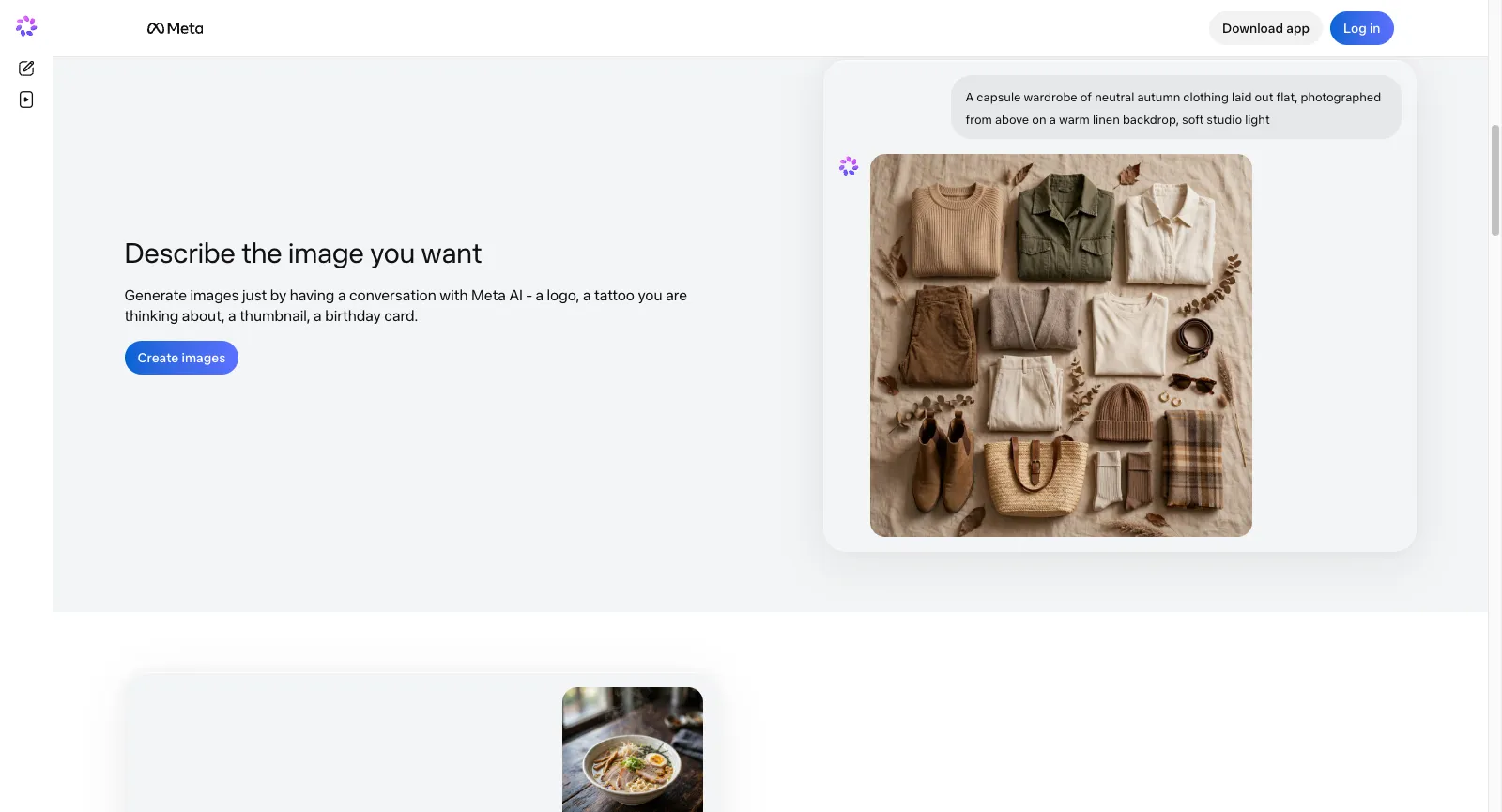
There is no separate studio on meta.ai: the box that answers questions also draws. You type what you need, Meta AI returns a picture, and further messages change it. According to the FAQ on Meta’s Media Generation page, making images requires no subscription anywhere Meta AI runs, from meta.ai and its own app to Messenger, Instagram and WhatsApp, on the web, iPhone or Android alike.

Meta puts its assistant in more than 200 countries, though some tools reach only certain countries and languages. A Help Center article explains that free use runs into a daily ceiling: once you hit it, you either wait for the reset or move to Meta One. How many images that ceiling allows was not stated on any Meta page we read on October 27, 2026.

Fashion still made with the Yovid image generator

The Yovid way

On Yovid you pick the image model yourself, GPT Image 2.5, Seedream 5.0 or Nano Banana 2.1 among them, and see each run’s credit cost first; Pro and Premium add a year of unlimited images on the supported models.

Open the image generator
meta.ai signed out, scrolled to Describe the image you want: a Create images button beside a chat that turned a capsule-wardrobe prompt into a flat-lay photo
Captured from meta.ai (Learn more) while signed out, October 27, 2026.

Photo Edits, Room Restyles and One-Tap Presets

Edits start from a photo you upload plus an instruction. Meta lists taking out objects, replacing backgrounds, switching styles, adding or swapping elements and touching up a single area. With Draw to edit you mark up the picture itself, and Combine your photos folds several shots into one image.

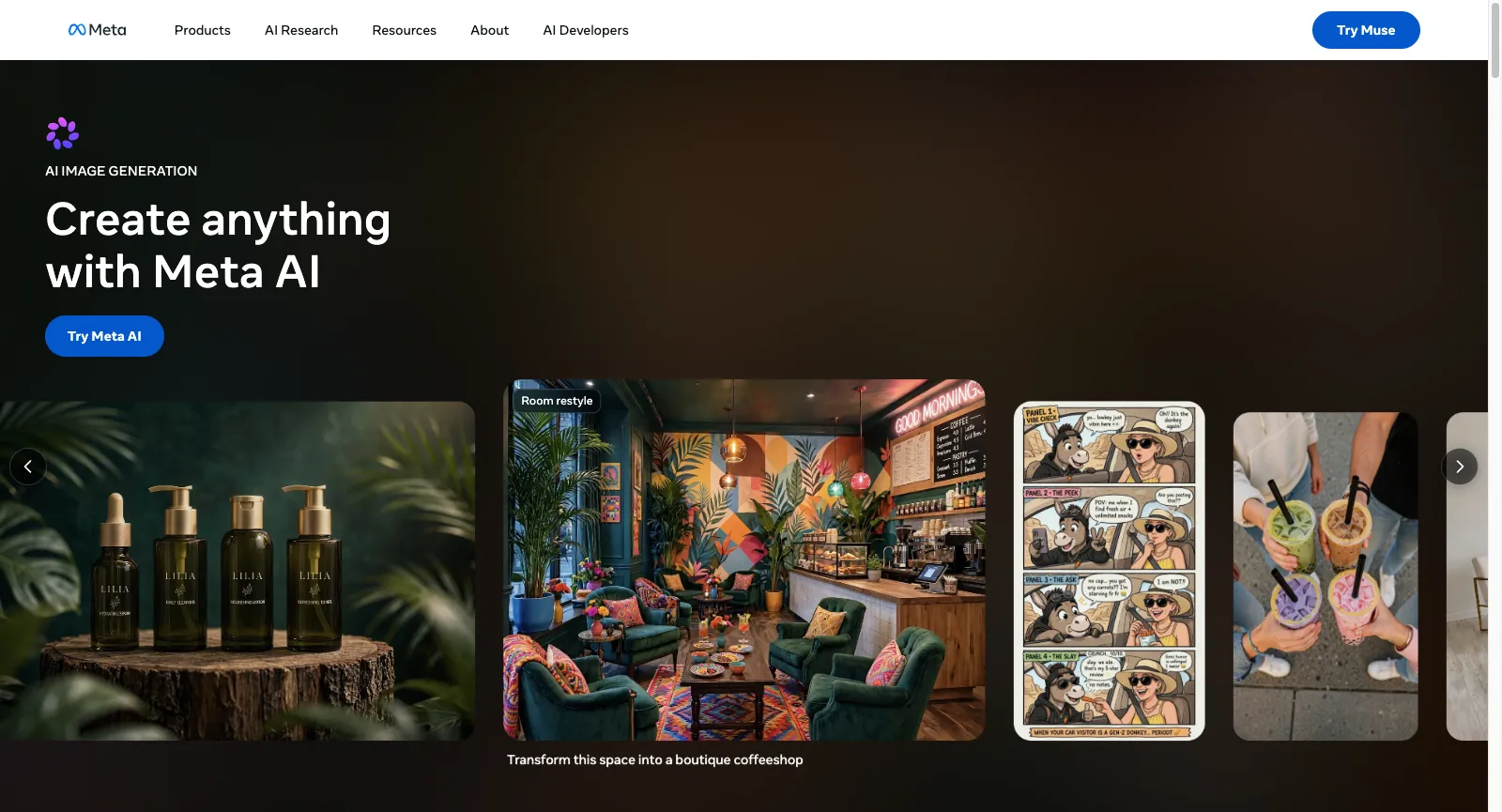
Room restyle reimagines an interior and surfaces products you could buy for it, while presets like Plasticine, Turn me into an action figure and a Japandi room refresh produce a picture in one tap on Meta AI and Instagram. Every AI image also receives Content Seal, an invisible watermark Meta embeds.

Breakfast photo used as the first frame of a Yovid image-to-video clip

The Yovid way

On Yovid an edited still can open a clip: drop it into image to video as the first frame, write the movement you want, and choose the video model that renders it.

Open image to video
Media Generation page on ai.meta.com: the AI IMAGE GENERATION label, Create anything with Meta AI, and a carousel whose Room restyle card reads Transform this space into a boutique coffeeshop
Captured from ai.meta.com/meta-ai/media-generation while signed out, October 27, 2026.

Muse Image, Meta’s Agent-Style Picture Model

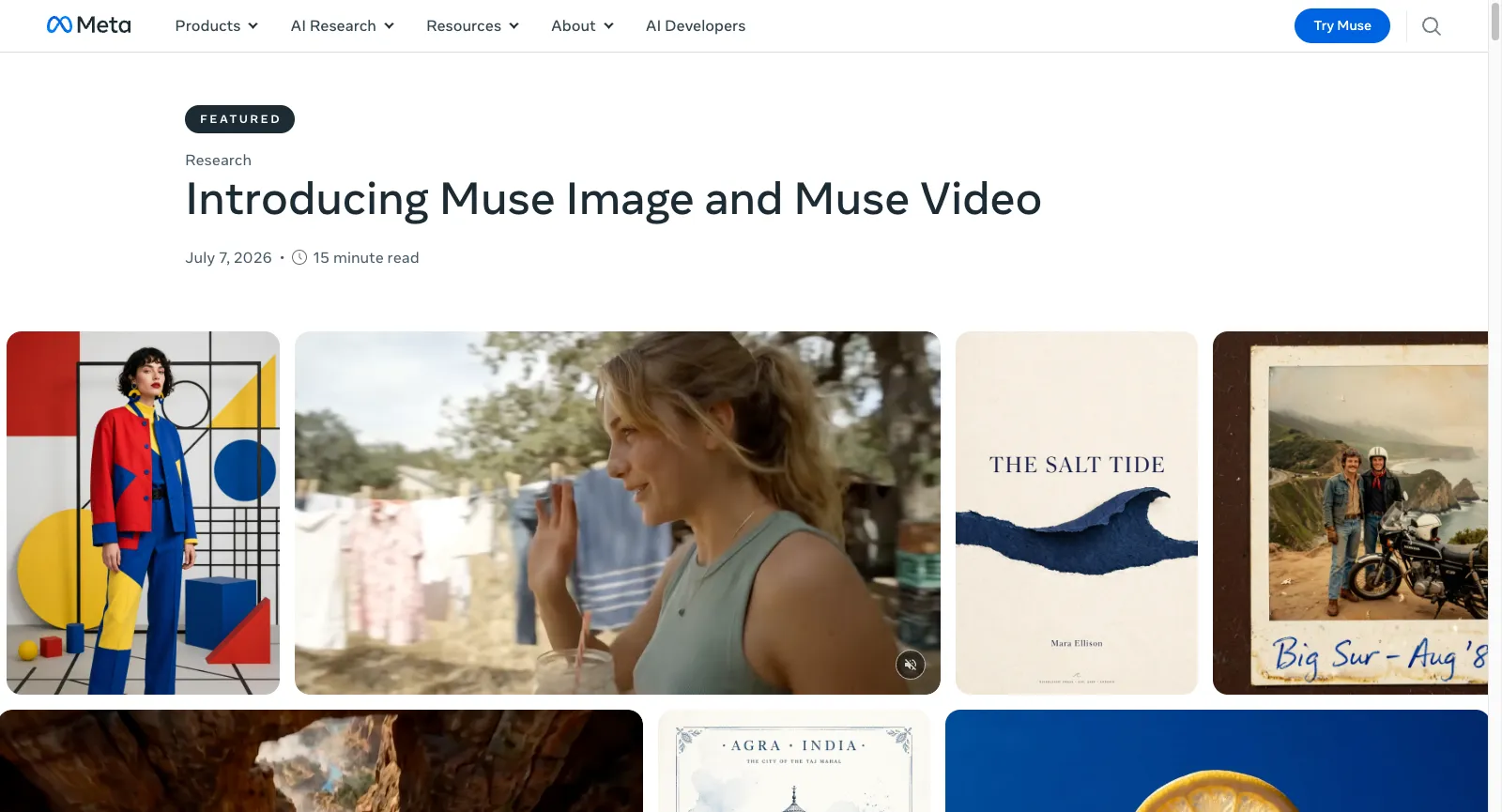
Muse Image arrived on July 7, 2026 as Meta Superintelligence Labs’ first media model. Meta pitches it on close instruction following, precise edits and pictures composed from several references. It behaves like an agent: it may search the web for facts or visual references, write code when a chart or a QR code has to come out exact, and revise its result before showing it.

On launch day it reached the Meta AI app, meta.ai, Instagram Stories in the US and WhatsApp in a handful of countries, with Facebook named as next. For jobs with several steps, say a poster plus a matching social post, it teams up with Muse Spark, the lab’s first model, released in April 2026.

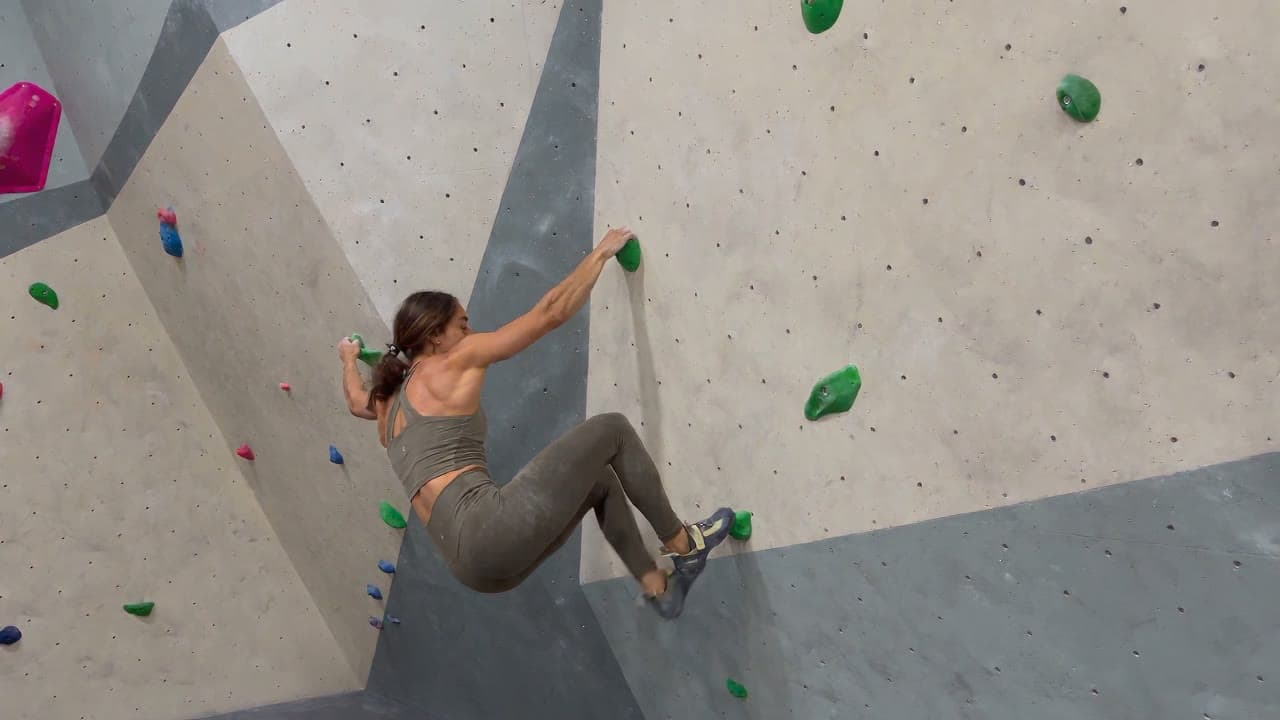
Climbing scene from a clip generated on Yovid

The Yovid way

Yovid does not tie you to one maker: Seedance, Kling, Veo, Wan and MiniMax H3 share one composer, so you can pick the model that suits each shot and see its price before rendering.

Compare the models
The July 7, 2026 post on Meta’s AI blog titled Introducing Muse Image and Muse Video, a 15 minute read, over a grid of sample pictures and one video frame
Captured from ai.meta.com/blog (Muse Image and Muse Video) while signed out, October 27, 2026.

Vibes, a Feed of Short Clips to Make and Remix

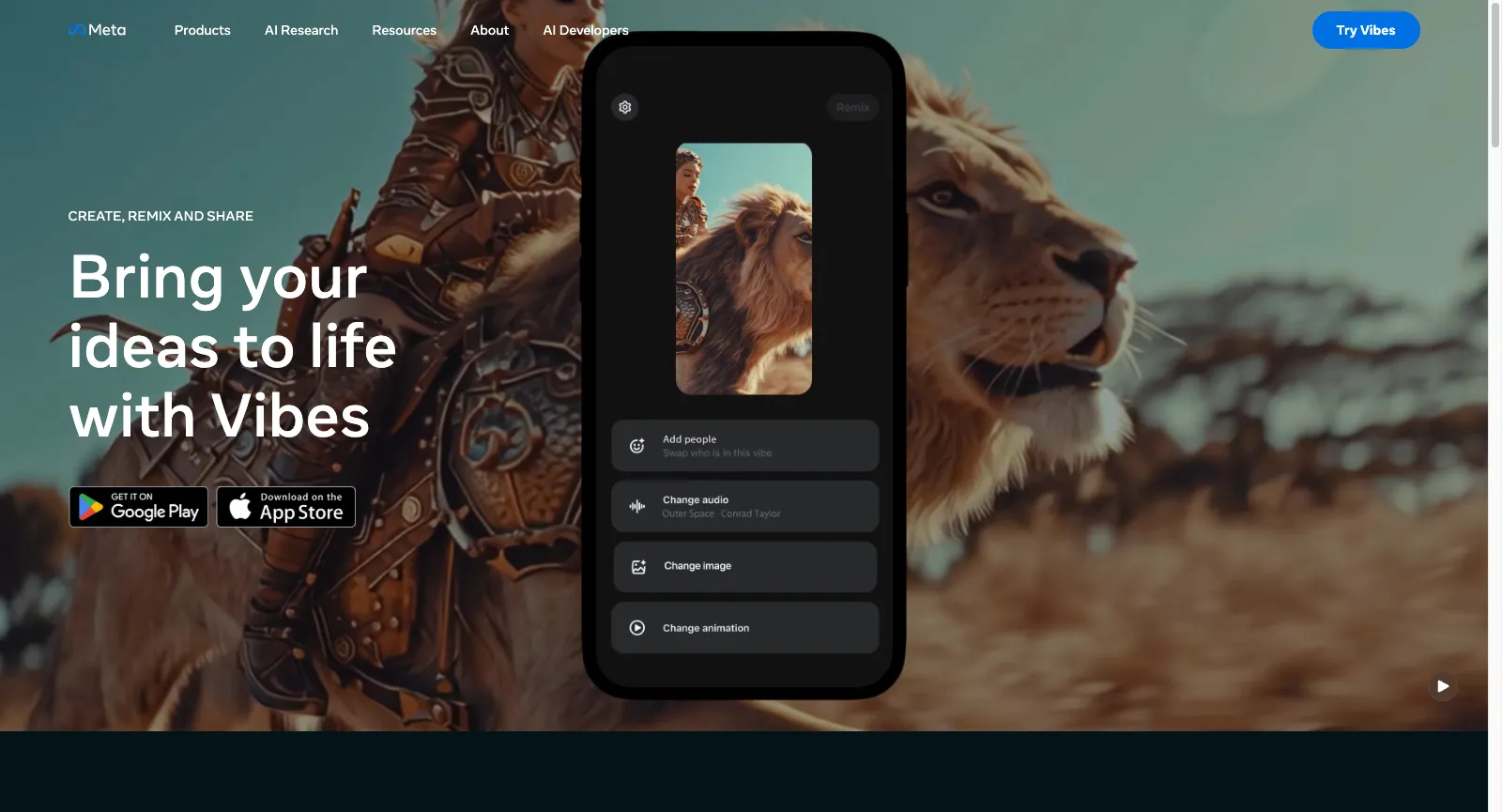
Vibes opened on September 25, 2025, billed as an early preview, in the Meta AI app and at meta.ai. A clip starts from a few words or from one of your photos; you can cast yourself or friends, with a say over when your likeness appears, then layer on lip-synced lines, music, a voiceover or captions.

Every clip in the feed can be remixed. Finished ones go back into the feed, into a DM, or out to Instagram and Facebook Stories and Reels. The Vibes page still lists fuller creation tools for desktop web as coming soon, and Muse Video, shown with sound on July 7, 2026, was announced for Meta AI without a date.

Suitcase scene from a Seedance 2.5 clip made on Yovid

The Yovid way

Yovid is built for clips you direct rather than a feed: from the Lite plan, Seedance 2.5 renders up to 30 seconds with sound in one pass, steered by reference pictures, clips or audio.

Open Seedance 2.5
The ai.meta.com Vibes page headed CREATE, REMIX AND SHARE and Bring your ideas to life with Vibes, next to a phone mock-up with buttons to add people or to change the audio, image or animation
Captured from ai.meta.com/meta-ai/vibes while signed out, October 27, 2026.

An Assistant Built into WhatsApp, Instagram and Messenger

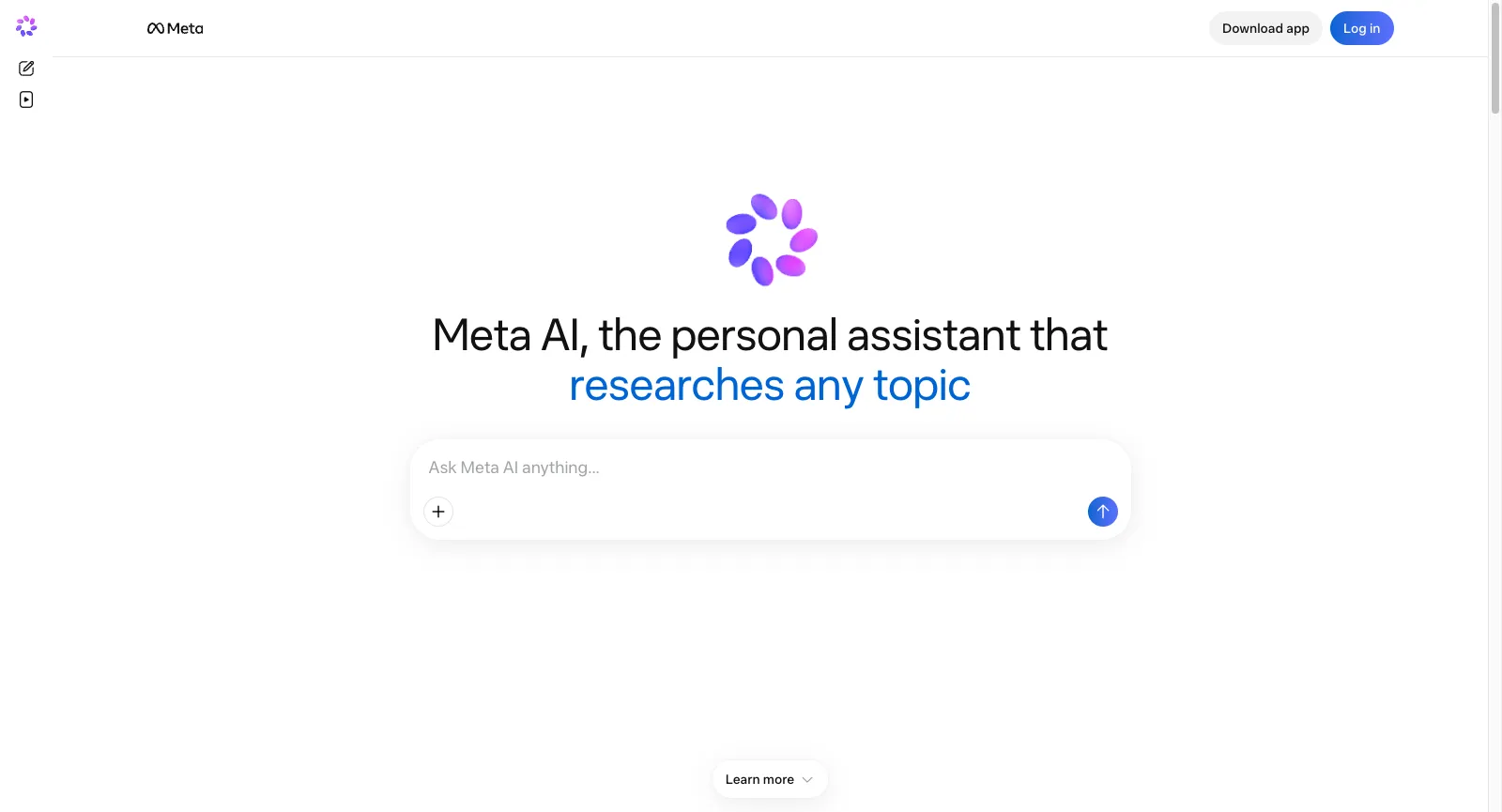
Signed out, meta.ai is little more than one field: Ask Meta AI anything. Pictures are only one use. Meta also promotes it for research write-ups with sources, comparisons of products and Marketplace listings, local tips, Instagram insights for business accounts, and captions for posts, Reels and Stories.

The Meta AI app doubles as the companion app for Meta’s AI glasses. In WhatsApp, Instagram and Messenger the assistant comes built in, and several reviewers object that they have no way to take it out. Meta’s AIs are open to people aged 13 and over.

Barbershop frame from a Yovid text-to-video clip

The Yovid way

Yovid is a single-purpose tool by comparison: write a scene in the text-to-video composer, choose the model and the length, and check the credit price before you render.

Open text to video
meta.ai while signed out: a headline calling Meta AI a personal assistant that researches any topic, one Ask Meta AI anything field, and Download app and Log in at the top
Captured from meta.ai while signed out, October 27, 2026.

Daily Caps, Meta One and the AI Terms

Paying for Core or Premium lifts how much you can use Meta’s more advanced image and video models. Every profile in your Accounts Center draws on the same allowance, which renews each billing cycle, never carries over and cannot be handed to someone else; Meta does not say how big it is. A few Help Center pages still call Meta One a limited test in certain places.

Under the AIs Terms of Service, in effect from May 13, 2026, your prompts remain yours, and you need consent from anyone who appears in a photo you upload. Meta draws on your AI conversations to personalize what you see, ads included, and to improve its AI, and those conversations may be reviewed by software or by people. Commercial use of the outputs is not addressed.

Creator holding a camera, a frame from Yovid’s own media

The Yovid way

Yovid prints the credit price of every run before it starts and spells out what each plan and pack includes; commercial rights come with packs, Pro, Premium and Lite billed yearly.

See Yovid pricing

Who Builds Meta AI and What It Is For

Meta AI is the assistant Meta Platforms ships across its own surfaces: the meta.ai website, the Meta AI app, WhatsApp, Instagram, Messenger and the company’s AI glasses. Its pictures have come from Muse Image since July 2026, a model that works alongside Muse Spark, which Meta Superintelligence Labs released that April.

Meta frames it as a free helper for a mass audience, with making images and video as one feature among many rather than the point. When Meta One launched on September 15, 2026, Meta said everyday Meta AI stays free and that Core and Premium are meant for people who want to generate more images and video. The plans also fold in Facebook Plus, WhatsApp Plus and Instagram Plus, and you buy them inside the mobile apps.

Yovid is an independent multi-model platform aimed at video: Seedance, Kling, Veo, Wan and MiniMax H3 share one composer with image models such as GPT Image 2.5 and Seedream 5.0, next to AI Canvas, image and video upscalers and an API. Every run shows its credit price before it starts, and packs are sold without a subscription. It is not a chat assistant and has no social feed.

Who Meta AI Works Best For

Meta AI fits people who already spend their day in Meta’s apps and want a quick picture or a playful clip without installing anything else. For longer video, clear commercial terms or a volume you can budget for, a tool built for generation will likely serve you better.

Group-chat regulars

Ask for a birthday card, a meme or a sticker idea mid-conversation in WhatsApp or Messenger, with nothing new to download.

Instagram posters

Restyle a selfie, try a preset such as the action-figure look, and post it to Stories with a caption Meta AI suggests.

Remix fans

Scroll through Vibes, put yourself or a friend into someone else’s short clip, and share the result to Reels.

Home planners and shoppers

Photograph a room, ask for a new style and browse matching products, or have Meta AI compare items within a budget.

Small businesses on Meta

Draft post copy, check what performed on Instagram and turn out quick visuals for a product launch or an event.

Owners of Meta’s AI glasses

Set up the glasses in the Meta AI app and touch up the photos and clips they capture.

What Meta AI Users Say in Reviews

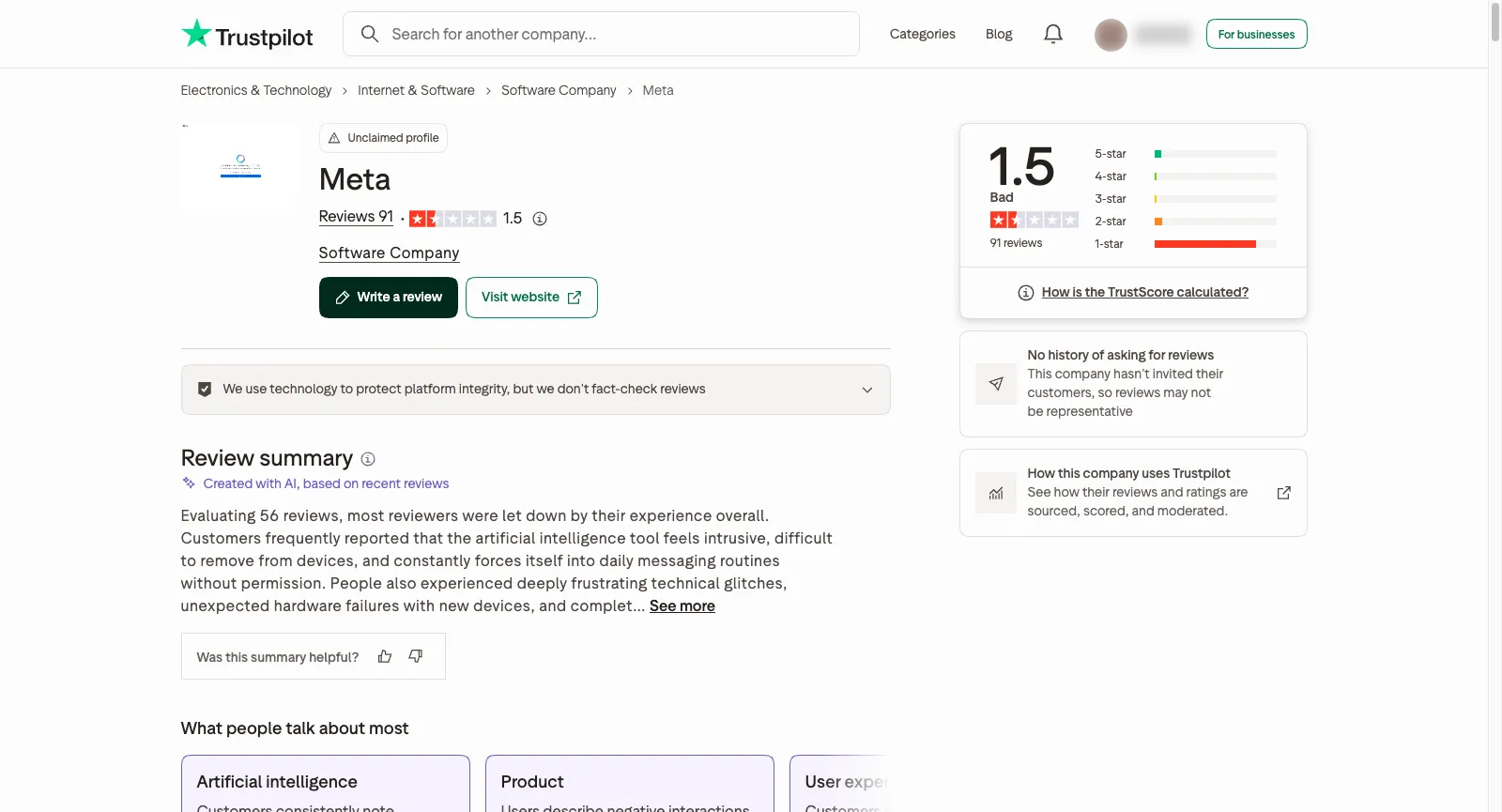
On Trustpilot the meta.ai profile is listed under the name Meta, is unclaimed and scores 1.5 on 91 reviews; 84% give one star, and Meta has no record of inviting reviews. A large share are about Meta’s glasses, locked accounts or Meta AI turning up in WhatsApp uninvited, so we went through the 65 English-language reviews and only cite the ones that discuss Meta AI as a product. The handful of positive ones value it as an everyday helper. On images and video, people complain about edits that ignore the request, watermarks on free output and Vibes errors with nobody to contact. Each theme links to sample reviews, and one review can back more than one theme.

Trustpilot

1.5 / 5

91 reviews · Listed as Meta; unclaimed; 84% one-star and 5% five-star; no record of inviting reviews

Open the source
Trustpilot page for Meta (meta.ai): unclaimed profile, TrustScore 1.5 from 91 reviews, and a note that the company has no history of asking for reviews
Captured from trustpilot.com/review/meta.ai while signed out, October 27, 2026.

Praise that keeps coming up

  1. 01

    Handy as an everyday assistant

    The few happy reviewers write about the assistant rather than the pictures: one used it to research buying a home abroad, another to get through involved tasks, and a third rates it well as long as you keep requests modest.

Recurring complaints

  1. 01

    Edits that ignore the request

    The image complaint we met most: a family meant to be seated came back standing, a face shifted during a simple background change, braided hair turned into crowns, the wrong object vanished, and the image tool sometimes reported that it was down.

    How Yovid handles it

    Yovid shows what a run costs before it starts and returns the credits when a run fails. A finished result you dislike is still charged, so test a new prompt at a short length and low resolution first.

  2. 02

    Watermarks on free pictures and clips

    One reviewer chose Meta AI only because it was free, then dropped it once watermarks started showing on images and videos, which ruled them out for projects.

    How Yovid handles it

    Yovid’s pricing lists watermark-free downloads on every subscription and clean exports on every credit pack; commercial rights come with packs, Pro, Premium and Lite billed yearly.

  3. 03

    Vibes errors and no person to ask

    Adults describe a message saying teens cannot access Vibes that locks them out of the video feed, and others say account trouble ends in automated replies, with no human ever taking the case.

    How Yovid handles it

    On Yovid a run that fails returns its credits automatically, the refund rule is published for every order, and Premium subscribers get priority support.

We read the ratings and reviews on October 27, 2026. The meta.ai profile on Trustpilot is unclaimed and covers Meta’s products in general, so reviews about glasses or accounts are not cited. We summarize rather than quote; follow each link for the reviewer’s own words.

Meta AI Pricing and Limits for 2026

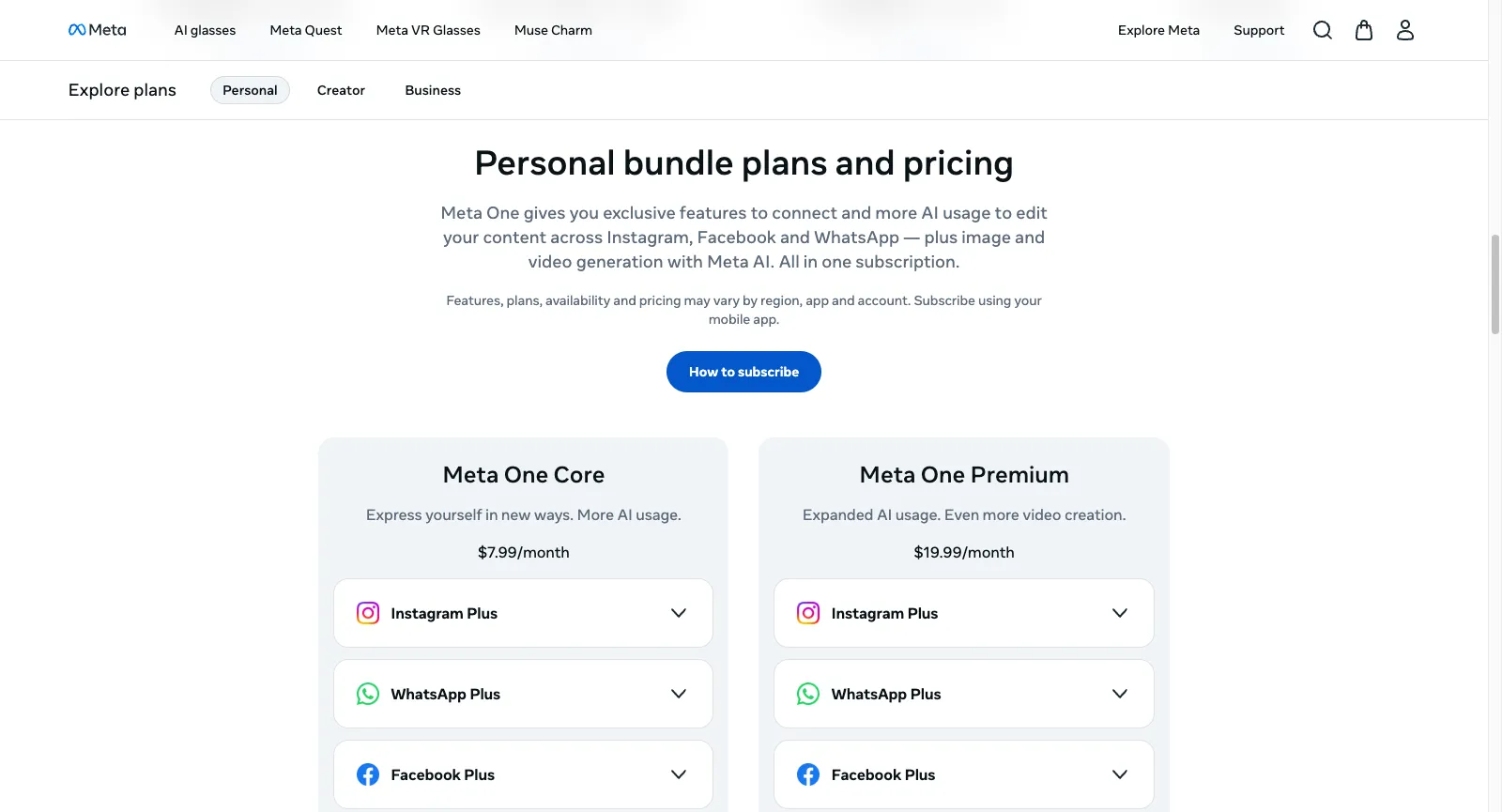
Meta AI on its own costs nothing, up to a daily cap Meta keeps unpublished. Meta One, a monthly subscription you start from Meta’s mobile apps, unlocks more generation; the plans page shows US prices and warns that they differ by country. Below, its options sit next to Yovid’s.

The personal plan cards on meta.com: Core priced at $7.99/month and Premium at $19.99/month, both with Instagram Plus, WhatsApp Plus and Facebook Plus rows to expand
Captured from meta.com/meta-one-plans while signed out, October 27, 2026.
FreeMeta AINo subscription needed to make or edit images; a daily cap applies and resets, and Meta does not give its sizeYovidFree starter credits after registering, no card needed; entry models only (Seedance 2.0 Mini and older), max 720p
Entry tierMeta AIMeta One Core, $7.99 a month: extra AI usage for pictures and video, plus Facebook Plus, Instagram Plus and WhatsApp PlusYovidLite at $14.90 a month, or $13 a month paid yearly, for 100 credits a month. Every video model except MiniMax H3; Seedance renders at 720p, other models at up to 1080p. Commercial rights come with yearly billing only
Middle tierMeta AIMeta One Premium, $19.99 a month: everything in Core with a larger AI allowance and what Meta calls even more video creationYovidPro at $29 a month, or $14.50 a month paid yearly, for 200 credits a month. Seedance at 1080p, other models at up to 2K, commercial rights included
Top tiersMeta AINothing above Premium for individuals; plans for creators and businesses start at $14.99 a month and add extras like a verified badge or Meta Business AgentYovidPremium at $149 a month, or $99 a month paid yearly, for 1,300 credits a month, output up to 4K and priority support
Seedance 2.5Meta AINot available: pictures use Muse Image and Vibes runs on Meta’s own media modelsYovidIncluded in every paid plan and every pack: clips run up to 30 s with sound rendered alongside, guided by reference pictures, clips or audio. Output is 720p on Lite and 1080p on Pro, Premium and packs
Unlimited videoMeta AINot offered; Meta One allowances reset monthly, are never sized publicly and do not roll overYovidPremium only: one 7-day window per account of free Seedance 2.5 and 2.0 clips (10 s max, up to 1080p), in a free queue
Unlimited imagesMeta AINot offered; free use stops at a daily cap and paid use at a monthly oneYovidPro and Premium: a year of unlimited images on the supported image models
Credits without a planMeta AINo: the only way to get more usage is a Meta One subscriptionYovidPay-once packs from $29.90 for 200 credits up to $999 for 8,000, no renewal, commercial rights included
RefundsMeta AINo refund policy from Meta: Apple or Google handles billing; cancel whenever you like and keep access until the period endsYovidRefundable within 3 days of buying (packs too) if none of that order’s credits were spent; payment fees (max 4% + $1.50) are kept, and automatic renewals cannot be refunded

Meta One prices come from the Meta One plans page on October 27, 2026, in US dollars; Meta notes that features, availability and price vary by region, app and account, and that you sign up through the Meta AI, Instagram, Facebook or WhatsApp app. Usage rules come from Meta’s Help Center, checked that day. Yovid figures match yovid.ai/pricing.

Meta AI, Yovid and Higgsfield Compared

Each begins somewhere else: Meta AI is a free helper built into Meta’s apps that can also draw and make short clips, Yovid is a multi-model generator for video and stills that shows prices first, and Higgsfield is a multi-model suite built around its own cinematic tools.

Built aroundMeta AIA free assistant across Meta’s apps, with Muse Image pictures and remixable Vibes clipsYovidOne composer for Seedance, Kling, Veo, Wan and MiniMax H3 plus image models, with AI Canvas and upscalersHiggsfieldHosted models next to its own Cinema Studio, AI Influencer, Genjutsu and an agent
Seedance 2.5Meta AINot availableYovidEvery paid plan and every pack: up to 30 s with sound; 720p on Lite, 1080p on Pro, Premium and packsHiggsfieldFrom Plus; Starter is limited to Seedance 2.0 Mini and 2.0 Fast
Other video modelsMeta AIVibes on Meta’s own media models; Muse Video previewed in July 2026 and announced for Meta AIYovidMiniMax H3, Wan 3.0, Veo 3.1, Kling 4.0 and Kling 3.0 with Motion ControlHiggsfieldIn-house models plus Veo, Kling, Wan, Sora, Grok and Hailuo
Unlimited videoMeta AINone; a daily cap on free use and a monthly one on Meta OneYovidPremium: one 7-day window per account of free Seedance 2.5 and 2.0 clipsHiggsfieldPlus and Ultra: 7 days of Wan 3.0 and Kling 3.0; business plans: Seedance 2.5
Credits without a subscriptionMeta AINo: extra usage only through Meta One at $7.99 or $19.99 a monthYovidYes: packs from $29.90, usable for 180 days to a yearHiggsfieldNo: packs are for subscribers and last 90 days
RefundsMeta AINo policy from Meta; the app store handles requests, and you can cancel any timeYovid3 days from purchase if none of its credits were spent; renewals excludedHiggsfieldFirst purchase only, within 7 days, with no credits spent

Meta AI details: taken from meta.ai, Meta’s product and plan pages and its Help Center (October 27, 2026). Higgsfield details: checked on October 14, 2026.

Why Some Meta AI Users Move to Yovid

People who switch usually want video they can direct, or caps and terms they can plan a project around.

  1. 01

    Clips you direct instead of a feed

    Yovid’s sign-up credits need no card and run the entry video models, Seedance 2.0 Mini and older, at up to 720p; from Lite, Seedance 2.5 renders clips as long as 30 seconds with sound. Vibes is designed around short clips for a social feed, and its fuller desktop tools are still listed as coming soon.

  2. 02

    Prices and rights stated up front

    Every Yovid run shows its credit cost before it starts, and commercial rights come with every pack, Pro, Premium and Lite billed yearly ($13 a month). Meta does not size its free or paid allowances, and its AI terms are silent on commercial use of what you make.

  3. 03

    A free Seedance week on Premium

    Premium ($99 a month billed yearly) includes one 7-day window per account of free Seedance 2.5 and 2.0 clips, as many as 11 ten-second clips at 720p, and failed runs never cost credits. Meta One allowances reset monthly, are never published and do not roll over.

When Meta AI is still the better call

  • You want quick pictures or playful clips inside WhatsApp, Instagram or Messenger at no cost.
  • Remixing other people’s short AI videos and posting them straight to Reels and Stories is the fun part for you.
  • You want Instagram Plus or WhatsApp Plus anyway, so Meta One Core adds little on top.

More Meta AI Alternatives to Compare

Eight other tools worth a look. Each price is the lowest paid tier, before tax, as that service’s own pricing page showed it on October 13, 2026. Credit allowances vary a lot from one to the next, so treat this as a shortlist, not a ranking.

Higgsfield

Hosts outside models next to in-house tools (Soul images, Ads Studio, Cinema Studio, AI Influencer), offers team plans and prices Seedance 2.0 and Kling 3.0 per 5-second block.

Pick it for: Its in-house studios, or cheap Kling 3.0: roughly 7 credits buys 5 seconds at 720p.

Skip it for: Full Seedance on a budget: the Starter tier stops at Seedance 2.0 Fast and 2.0 Mini.

Cheapest paid plan: Starter at $19 a month (same monthly or yearly) for 270 credits; the free tier just says “Limited use”.

Read our Higgsfield breakdownTheir pricing page

Pollo AI

A marketing-minded hub: dozens of third-party models plus its own Pollo models, template apps, an agent, Marketing Studio, an MCP server, an API and phone apps.

Pick it for: Maximum model choice; while its 60% subscriber discount lasts, its Seedance clips cost less than Yovid’s on most plans.

Skip it for: Buying credits with no subscription, or keeping unused plan credits: they lapse each cycle.

Cheapest paid plan: Lite at $15 a month, $12 paid yearly, for 400 credits.

Read our Pollo AI breakdownTheir pricing page

OpenArt

More than 100 models across audio, image and video (both current Seedance versions included), plus an MCP server, motion sync, lip-sync, Character Builder and Director for shorts and ads.

Pick it for: Character work: consistent characters, motion sync and lip-sync beside the generators.

Skip it for: Client work on the cheapest tier: commercial rights begin at Plus, not Starter.

Cheapest paid plan: Starter at $14 a month, $13 paid yearly, for 4,000 credits.

Their pricing page

Runway

Built around Runway’s in-house Aleph, Act-Two and Gen-4.5, adding sound effects, voices and music, upscaling to 4K, and guest models like Kling and Seedance.

Pick it for: Projects where editing matters as much as generating.

Skip it for: Lots of clips on the cheapest tier: Runway itself says the 625 Standard credits buy roughly 52 s of Gen-4.5 output.

Cheapest paid plan: Standard at $15 a month, $12 paid yearly, for 625 credits; the free plan gives 125 credits once.

Their pricing page

Kling AI

Kuaishou’s own app for Kling, including Kling 3.0 Omni and 3.0 with sound, Motion Control, 4K video and a developer platform.

Pick it for: Kling-only users who want to buy straight from the model maker.

Skip it for: Anyone who needs Seedance, which appears on neither its pricing page nor its home page.

Cheapest paid plan: Standard: $6.99 for month one, $8.80 a month after that or $79.20 a year, with 660 credits a month.

Their pricing page

Hailuo AI (MiniMax)

MiniMax’s first-party app for Hailuo and MiniMax H3, with Hailuo Agent and Omni Reference (as many as 12 reference images); paid tiers also unlock Sora 2 and Veo 3.1.

Pick it for: People who like MiniMax’s models and per-second pricing.

Skip it for: Seedance work: no Seedance model is listed for sale, and trial credits only run Hailuo models.

Cheapest paid plan: Standard at $10.50 a month on sale that day, or $8.40 paid yearly, for 1,000 credits.

Their pricing page

Luma Dream Machine

Home of Ray3.2 for video and Uni-1 for images, Luma Agents and connectors for tools like Frame.io and Figma; its credit table also prices Seedance 2.0 Mini, 2.0 and 2.5.

Pick it for: Design teams after Ray3.2 output and agents inside the tools they already use.

Skip it for: Low-cost testing: no free plan is listed and the cheapest tier is $25 a month.

Cheapest paid plan: Plus at $30 a month, $25 paid yearly, for 10,000 credits with commercial use.

Their pricing page

PixVerse

Runs PixVerse’s V6 (with native audio) and real-time R2, plus Lip Sync, Canvas, Agent and an API; the two newest Seedance versions unlock from the Pro tier.

Pick it for: Fast social clips on free daily credits: 60 at sign-up, then 30 a day, capped at 540p.

Skip it for: Cheap Seedance: the Standard tier only runs PixVerse models and maxes out at 720p.

Cheapest paid plan: Standard at $10 a month, $8 paid yearly, for 1,200 credits per 30 days plus 60 daily.

Their pricing page
Questions People Ask

Straight answers on Meta AI, based on what we checked on October 27, 2026.

What can you do with Meta AI?
It is the assistant Meta runs at meta.ai, in its own app and within Messenger, Instagram and WhatsApp. People ask it questions, have it research and compare products, find local spots and write captions, and use it to make or edit pictures by describing them or drawing on a photo. Its Vibes feed generates and remixes short AI clips.
Does Meta AI cost anything?
Not for everyday use. Meta’s FAQ says making images needs no subscription, up to a daily cap that resets; how big that cap is, Meta does not say. For a larger image and video allowance you pay $7.99 a month for Core or $19.99 for Premium, and prices change from country to country.
Which model makes Meta AI’s images?
Muse Image, released on July 7, 2026 as Meta Superintelligence Labs’ first media model. While it works it can browse the web and execute code, it edits with precision, and it builds pictures from several references. Meta previewed Muse Video the same day and said it would reach Meta AI later.
Can I use Meta AI images commercially?
The AIs Terms of Service, in effect from May 13, 2026, leave your prompts in your hands but say nothing that grants commercial use of the outputs. Every AI image also carries Content Seal, Meta’s invisible watermark, and your conversations feed ad personalization and AI training. For paid client work, choose a tool whose terms state commercial rights.
How do I cancel Meta One, and are refunds possible?
Google Play or Apple’s App Store bills Meta One each month, so cancelling happens in that store, under the account you subscribed with. Benefits last until the billing period ends, and unused AI usage does not carry over. Meta has no refund policy of its own; any refund request goes to the app store.
Which Meta AI alternative is better for video?
For video, Yovid: Seedance 2.5 at up to 1080p on Pro, Premium and packs, pay-once packs from $29.90, clean exports with commercial rights on packs, and Kling, Veo, Wan and MiniMax H3 in the same composer, with credits returned when a run fails. If you also want cinematic studio tools, Higgsfield is the nearest multi-model pick.
Is Yovid connected to Meta?
No. Yovid is independent. Meta One, Vibes, Muse, Meta AI, Meta and Seedance belong to their respective owners and are named here only to describe and compare products.

Want more than a quick clip? Direct your next video