Yovid
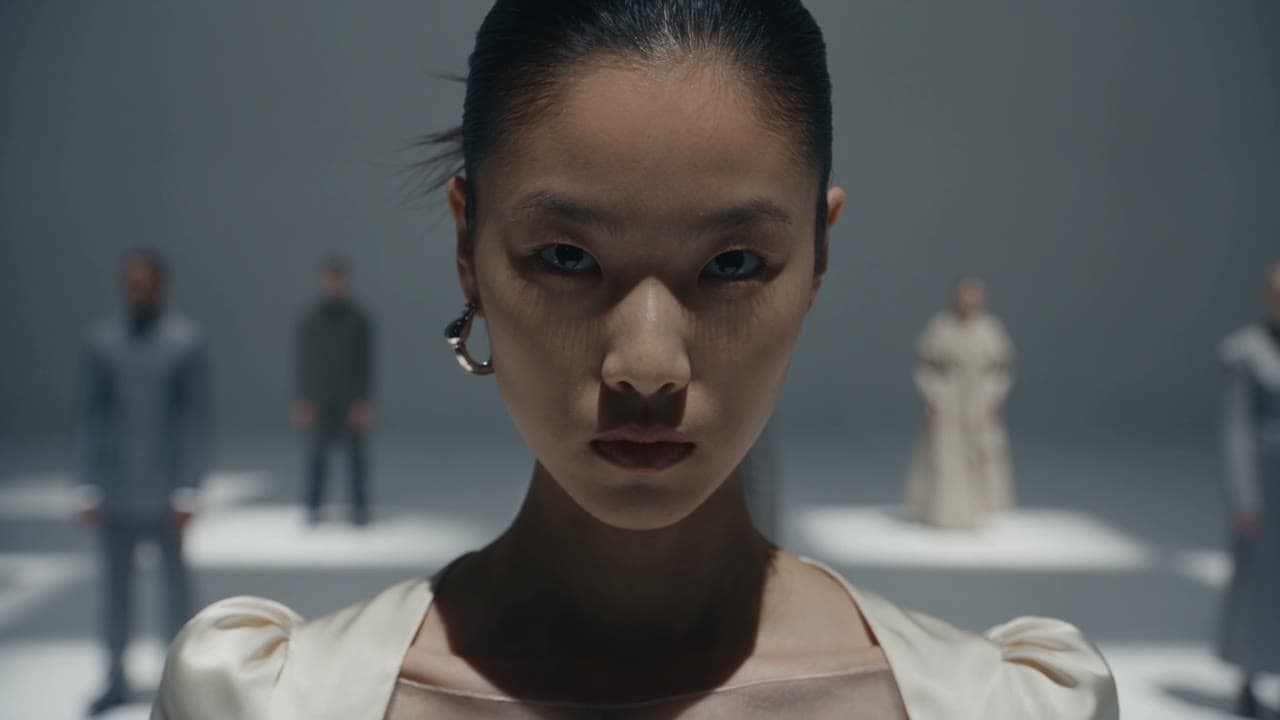
Montage of AI-generated video clips

DomoAI Video Restyle and Animation Review

DomoAI made its name turning footage into anime and now adds Seedance 2.5, avatars and image tools on one credit balance. Here is what works, what reviewers report and where Yovid fits.

The short version

Is DomoAI worth paying for?

Worth it if restyling your own footage is the main job. DomoAI, run from Singapore by DOMOAI PTE. LTD. since 2023 and claiming over 5 million users, turns clips into anime and 40+ other looks, animates stills, swaps characters into reference motion and builds talking avatars. Its Omni Reference tool runs ByteDance’s Seedance 2.5, capped at 720P, alongside MiniMax H3. New accounts get 30 credits, fewer than the 160 a default 5-second Seedance 2.5 clip showed; Basic is $13 a month or $9 on yearly billing, and the credit-free Relax mode starts at Standard. Trustpilot shows 2.2 from 39 reviews. For Seedance at 1080p without a subscription, Yovid sells pay-once packs and returns the credits of failed runs.

Nora

NoraYovid editor

Details about DomoAI last checked , using domoai.app, the pricing page, the Seedance 2.5 page and the refund policy.

Operator
DOMOAI PTE. LTD. of Singapore; its terms, last revised August 13, 2026, fall under Singapore law
Ratings
Trustpilot gives 2.2 out of 5 on 39 reviews; the profile is claimed and 71% of reviews are one-star
Free tier
30 credits at sign-up, watermarked output and no Relax mode
Cheapest paid plan
Basic: 600 credits a month for $13, or $9 a month billed yearly
Refunds
Full refund only on an unused plan; a yearly plan used in month one is charged that month at the monthly price; extra credits are final

What You Get on DomoAI

DomoAI began as a way to turn footage into anime and has since grown into a studio with in-house and outside models. These are the tools people come for, each followed by Yovid’s closest answer.

Omni Reference: Seedance 2.5 and MiniMax H3 from Many Inputs

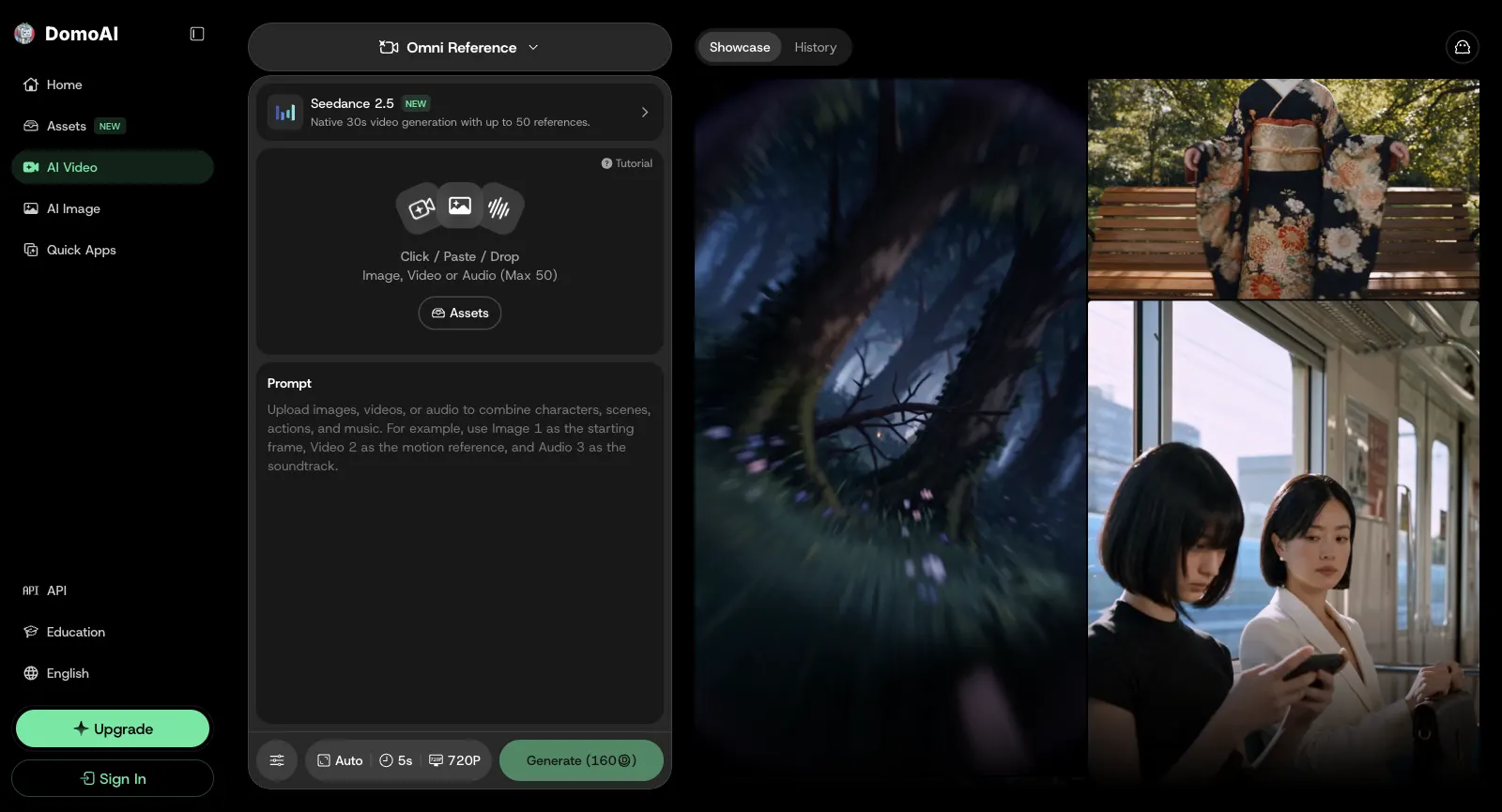
Omni Reference is where DomoAI hosts its outside video models. Pick Seedance 2.5 and you can attach as many as 30 pictures, 10 clips and 10 sound files, tell the prompt what each one is for, optionally pin a first and last frame, and render anywhere from 4 to 30 seconds with sound switched on or off. Output stops at 720P, with 480P as the cheaper setting; for anything sharper, DomoAI sends you to its Video Upscaler.

MiniMax H3 sits in the same panel, listed at 4 to 15 seconds and from 768P to 2K. There is no flat price: the credits move with the number of references, the length and the resolution, and the Generate button shows the total before you commit. The pricing page flags MiniMax H3 and both Seedance versions as Fast-only on every plan, so they never run free in Relax.

Suitcase scene from a Seedance 2.5 clip made on Yovid

The Yovid way

On Yovid, Seedance 2.5 renders up to 30 seconds with sound from reference pictures, clips or audio, at 720p on Lite and 1080p on Pro, Premium and every pack, with the credit price shown before you render.

Open Seedance 2.5
DomoAI Omni Reference while signed out: Seedance 2.5 marked NEW and described as 30-second generation from as many as 50 references, an upload area for image, video or audio files, and Auto, 5s, 720P and a 160-credit Generate button at the bottom
Captured from domoai.app/en/create/omni-reference while signed out, October 29, 2026.

Video to Video: Turning Footage into Anime and Other Styles

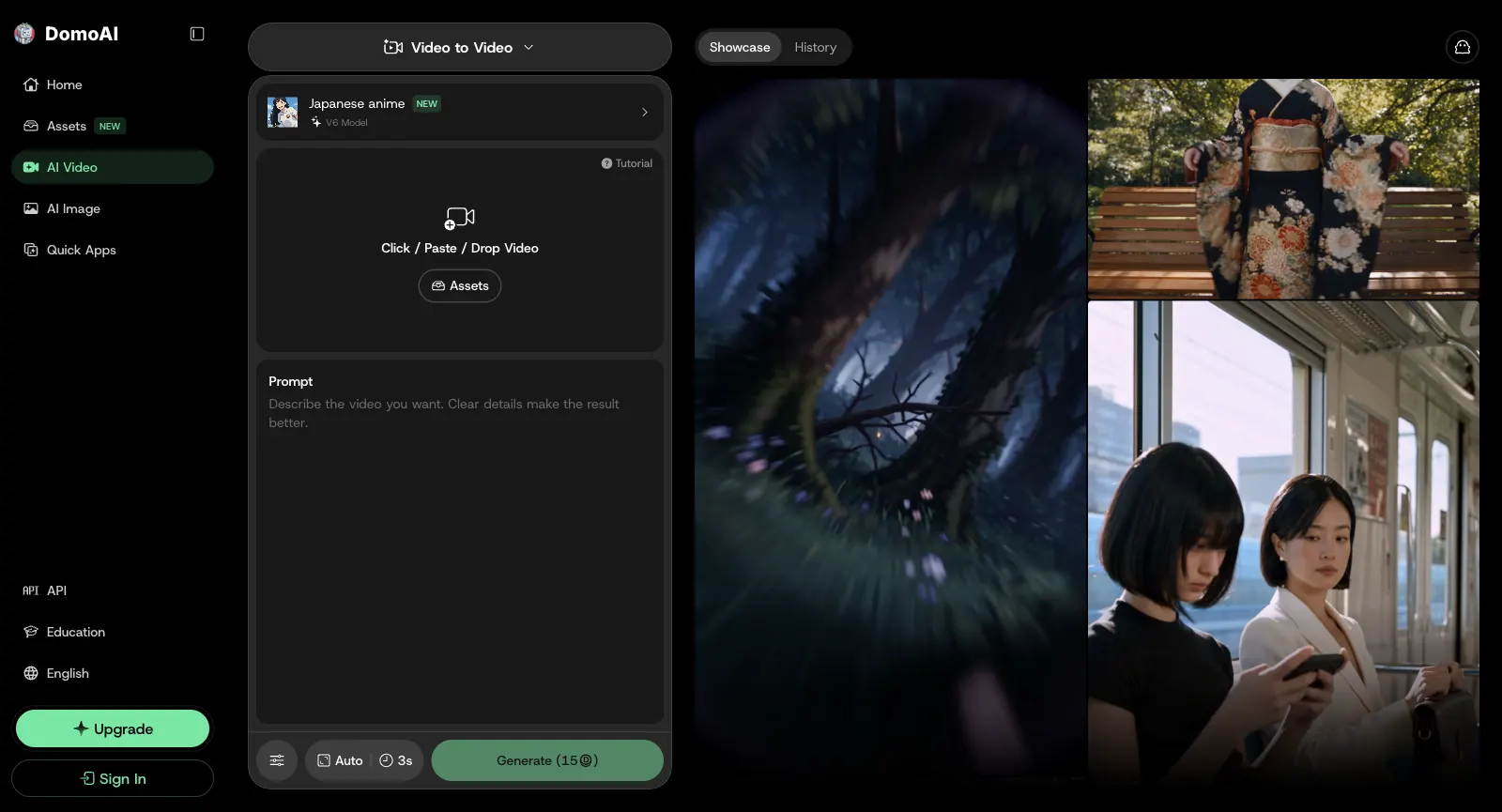
Restyling is what made DomoAI known. You upload footage, choose a look such as Japanese anime, and the movement of the original carries over while the surface changes. Fusion styles go further: describe a look in words or lift it from a reference picture. The About page counts more than 40 styles, over 20 of them anime.

Neighbouring tools cover Lip Sync; Screen Keying, which pulls a subject off its background without masking; and Subject Only, which restyles the main figure and leaves the rest alone. Every plan restyles 3, 5 or 10 seconds at a time and Standard and up can do so in Relax mode, while Pro and Team allow 20 or 30 seconds in Fast mode.

Vineyard frame from a Yovid video-to-video edit

The Yovid way

Yovid’s video to video starts from your own footage as well, but edits instead of applying a preset: swap a product, rebuild the background or change the setting from a reference still and one instruction, on Seedance 2.5, Kling or Wan 3.0.

Open video to video
DomoAI Video to Video while signed out: the Japanese anime style (V6 model) picked, an upload area for one video, the prompt field and a 15-credit Generate button for 3 seconds
Captured from domoai.app/en/create/video while signed out, October 29, 2026.

Image, Text and Keyframes to Video on DomoAI’s Own Models

For stills, Image to Video makes 4 to 15 seconds on Seedance 2.0 or DomoAI’s own 2.5 and 2.4.1. Text to Video works from a prompt on Seedance 2.0 or on DomoAI 2.4 in its Fast and Advanced versions. Frames to Video accepts between 2 and 8 keyframes and animates the gaps between them, or a single start and end frame when you run it on Seedance 2.0.

Relax mode, which charges no credits but can leave you waiting in a queue, opens from Standard upward and covers only DomoAI’s in-house video models. Some jobs stay Fast-only whatever the plan, 10-second Advanced clips among them.

Panda frame from a Yovid image-to-video clip

The Yovid way

On Yovid, image to video uses your still as the opening frame: describe the motion, choose the video model, and see the credit price before you render.

Open image to video
DomoAI’s English home page while signed out: a giant octopus wrecking a city street behind a headline pitching an AI video generator for any idea and style, with Start Creating Free below
Captured from domoai.app while signed out, October 29, 2026.

Character Swaps and Talking Avatars

Character to Video replaces the person in a clip while the original movement stays, for up to 30 seconds a run; the workspace opens on Seedance 2.0 Fast with sound. Basic and Standard are limited to 5- and 10-second swaps, while Pro and Team allow 20 or 30.

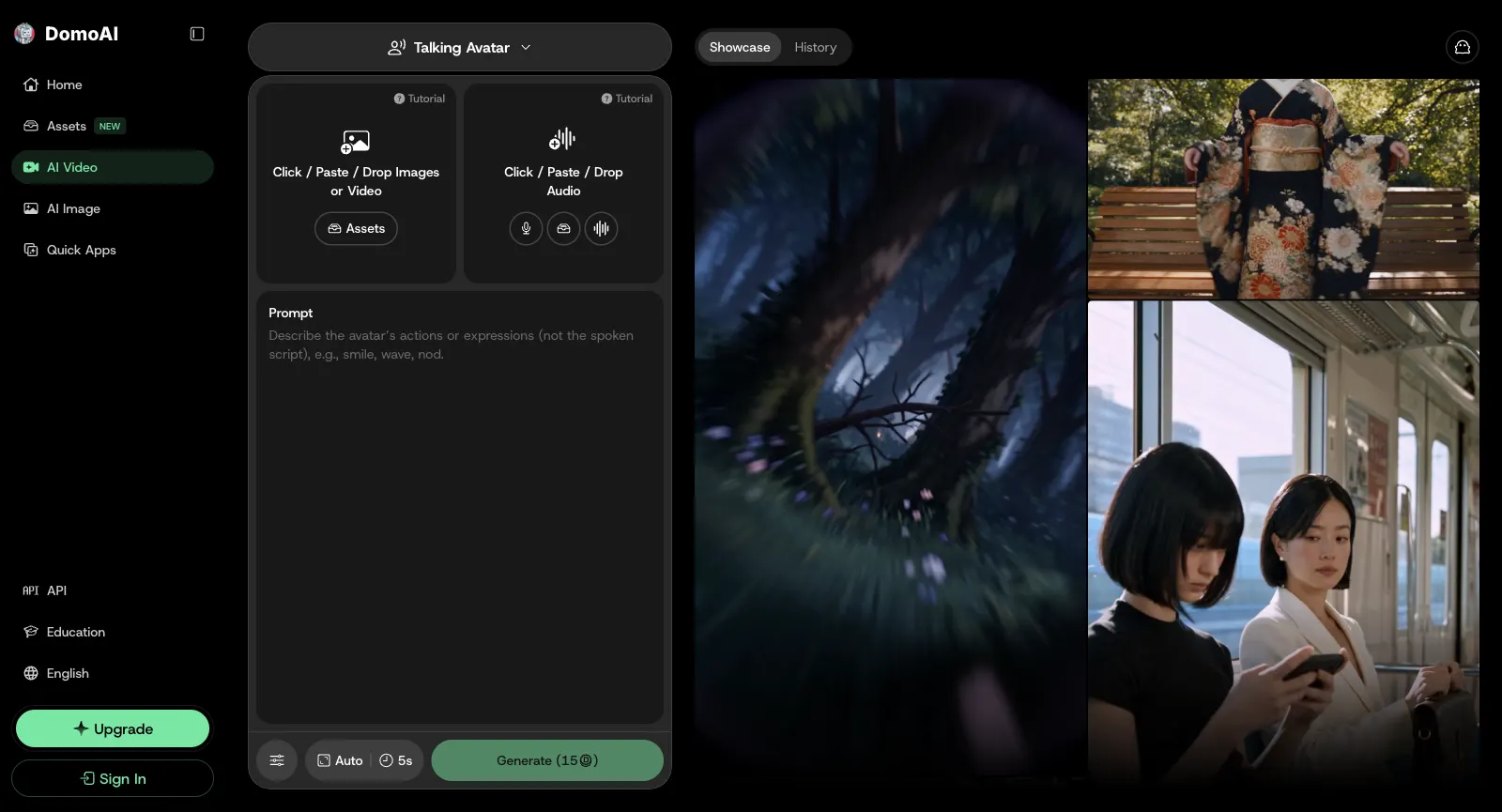
Talking Avatar pairs an image or a video with a voice: upload audio, or type a script for the built-in text to speech or a cloned voice, and the subject talks, in several languages. Basic and Standard avatars run 5–20 seconds; Pro and Team stretch them to a full minute.

Boxing frame from a Kling 3.0 clip made on Yovid

The Yovid way

Yovid has no avatar tool. Its nearest match to a character swap is Kling 3.0 Motion Control: give it a character image and a reference video, and the character performs that movement.

Open Kling 3.0
DomoAI Talking Avatar while signed out: one drop zone for images or video and one for audio, a prompt for the avatar’s gestures such as smile, wave or nod, 5s and Generate (15 credits)
Captured from domoai.app/en/create/talking-avatar while signed out, October 29, 2026.

Image Editing, Upscalers and Quick Apps

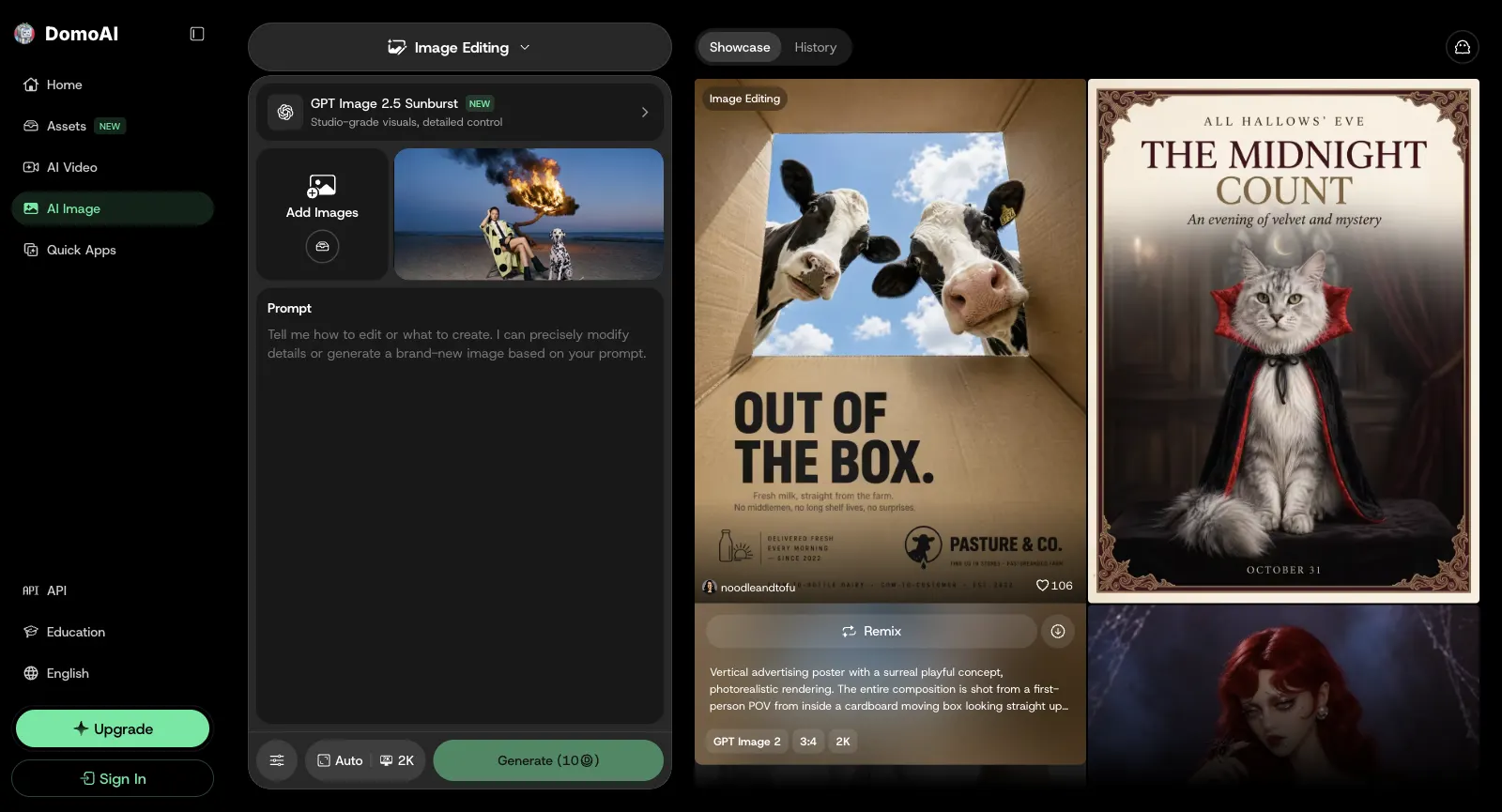
The Image Editing workspace offers three Nano Banana versions (2.1, 2 and Pro) alongside GPT Image 2.5 and GPT Image 2. Upload a photo and say what should change, or ask for a new picture, at up to 4K. DomoAI’s own Anime and Fusion families show up under Text to Image.

Upscalers take video to 4K and stills to 6K. Quick apps handle background removal, face swaps, extending an image past its edges, restoring old photos and making anime cards. From Standard upward, the image models also run without limit in Relax mode.

Fashion image made with the Yovid image generator

The Yovid way

Yovid’s image generator runs GPT Image 2.5, Seedream 5.0, Nano Banana 2.1 and Nano Banana Pro, and Pro and Premium include a year of unlimited images on the supported models; separate upscalers handle stills and clips.

Open the image generator
DomoAI Image Editing while signed out, after the GPT Image 2.5 notice was closed: the GPT Image 2.5 Sunburst model picked, an Add Images tile, the prompt field, 2K and a 10-credit Generate button, beside a showcase of posters
Captured from domoai.app/en/create/image-editing while signed out, October 29, 2026.

Credits, Fast versus Relax, and the Discord Server

Everything on DomoAI is priced in credits. A new account starts with 30, while the default Seedance 2.5 clip in Omni Reference, 5 seconds at 720P, showed 160 on the Generate button, so the sign-up grant cannot pay for one. Top-up credits require a live subscription; they never expire and are used once the monthly allowance, which does not roll over, runs out.

Fast mode grabs a GPU right away and costs credits. Relax mode costs nothing but may queue, and Basic does not include it. DomoAI also runs a Discord server that it says ranks seventh worldwide; its /subscribe command handles billing there. The company adds that uploads are not kept after processing or used for training without permission.

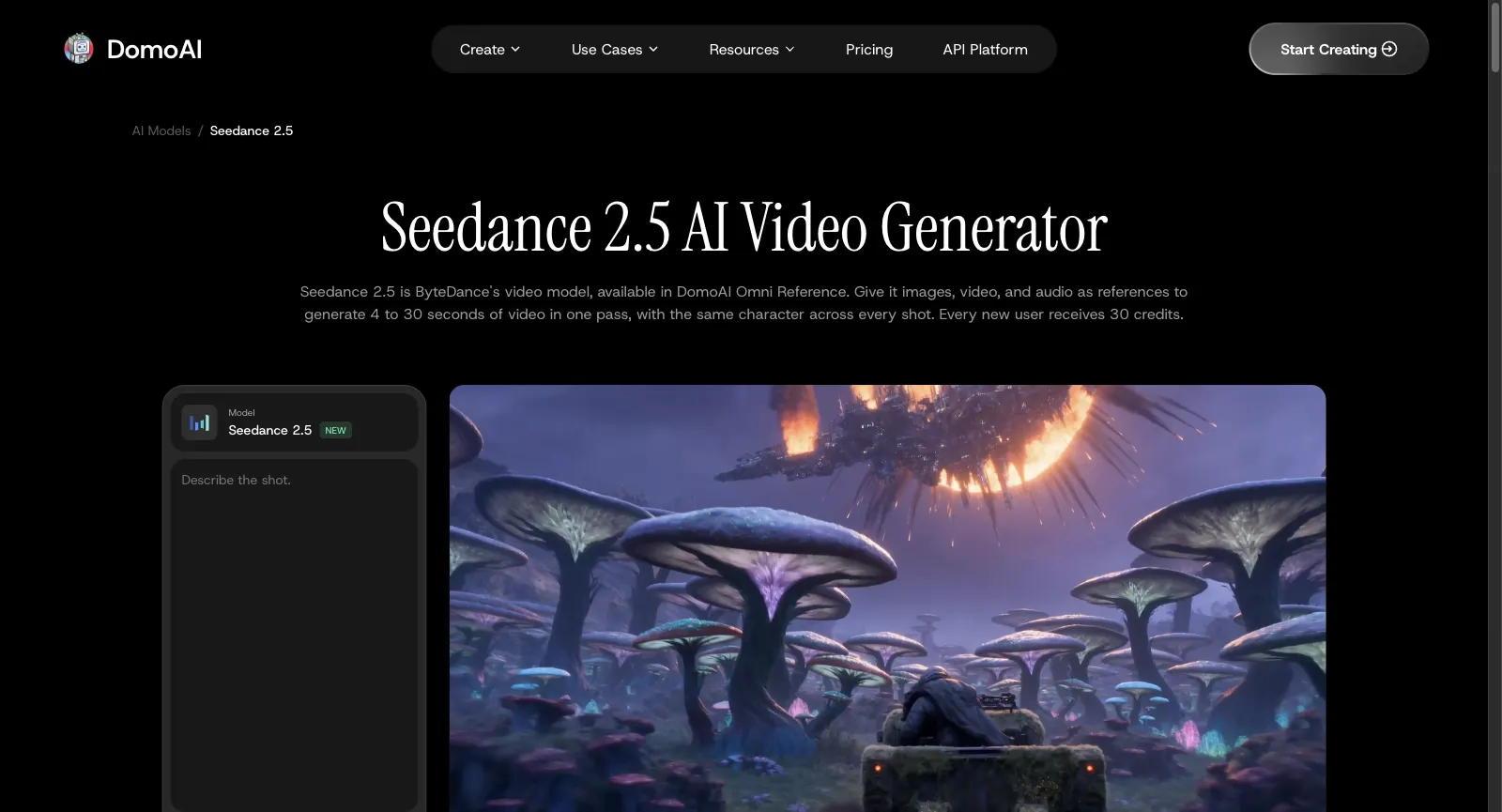
DomoAI’s Seedance 2.5 model page while signed out, headed Seedance 2.5 AI Video Generator: one pass makes 4 to 30 seconds with a consistent character, each new user gets 30 credits, and a Describe the shot box sits below
Captured from domoai.app/en/ai-models/seedance-2-5 while signed out, October 29, 2026.

Who Runs DomoAI and What It Aims to Be

DOMOAI PTE. LTD., a Singapore company, makes DomoAI. It began in 2023 as an AI animation tool and now claims more than 5 million users. Its About page also mentions coverage by a16z and Japan’s TV Asahi, a place among Singapore’s SME 500 companies in 2025, and a Discord community it ranks seventh in the world. The same team sells API access and builds Elymi, an AI companion app.

It pitches itself to creators who animate: anime and VTuber artists, short-drama teams and marketers. In-house models such as DomoAI 2.5 and its style presets sit beside hosted ones, Nano Banana, GPT Image, MiniMax H3 and Seedance 2.5, and everything draws on one credit balance. Its terms let you keep the copyright in what you generate and use it commercially.

Yovid is a separate, independent multi-model platform for video and images: Seedance, Kling, Veo, Wan and MiniMax H3 share one composer with image models such as GPT Image 2.5 and Seedream 5.0, next to AI Canvas, image and video upscalers and an API. Each run is priced before it starts, and packs are sold without a plan. It has no style presets, avatars or face swap.

Who DomoAI Suits Best

DomoAI is aimed at people who restyle footage they shot themselves or need one character to hold steady across clips, and who are fine working on credits. If 1080p Seedance or plan-free credits matter more to you, a generator built around Seedance will likely fit better.

Anime artists and VTubers

Convert live-action clips into anime, or animate an original character from a reference gesture clip plus a voice recording without the design drifting.

Short-drama teams

Load cast sheets, scene frames and lines into Omni Reference so the same faces carry from one shot and episode to the next.

Marketers making UGC-style ads

Build talking presenters and product spots from reference pictures and a script, with the voiceover lip-synced.

Dance-trend creators

Put your own character into the moves of a trending dance clip with Character to Video.

Game studios and modders

Restyle gameplay footage and make character animations and asset art for trailers and posts.

Everyday social creators

Run a clip through one of dozens of presets, tidy a thumbnail with GPT Image or Nano Banana, then upscale the result.

What DomoAI Users Say in Reviews

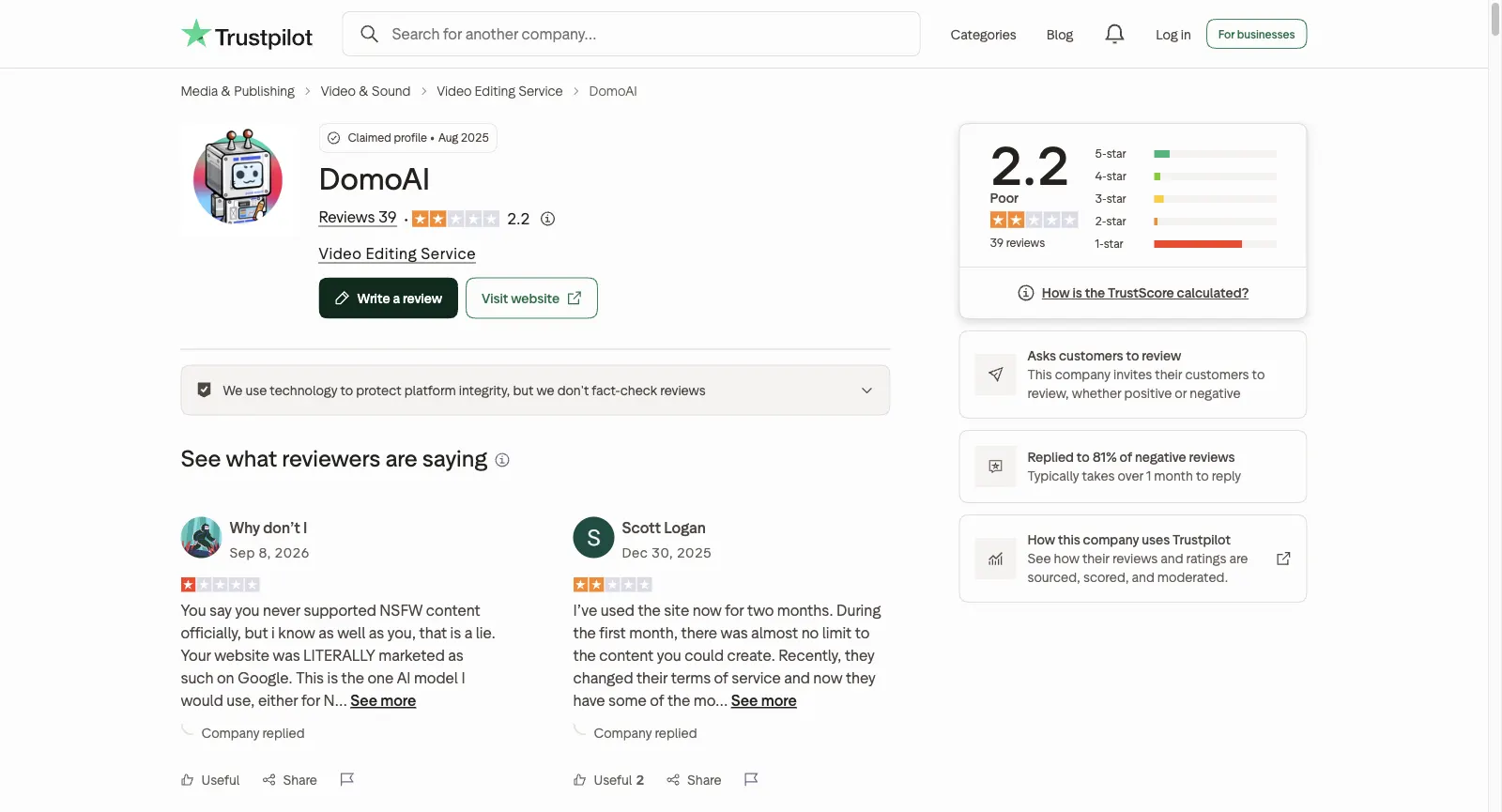
DomoAI claimed its Trustpilot profile in August 2025. The page scores it 2.2 across 39 reviews, where one-star reviews make up 71% and five-star 13%; the company invites customers to review and has answered 81% of negative ones, typically more than a month later. We went through the 33 reviews visible there and set aside those about its affiliate scheme. Most five-star reviews arrived in late November 2025 and praise crisp output, style transfer and value. The low ones describe prompts that are ignored, filters that refuse everyday requests, credits that disappear quickly and refunds that are turned down. Each theme links to sample reviews, and one review can support more than one theme.

Trustpilot

2.2 / 5

39 reviews · Claimed in August 2025; 71% one-star, 13% five-star; invites reviews; replied to 81% of negative reviews

Open the source
Trustpilot page for DomoAI: profile claimed in Aug 2025, TrustScore 2.2 from 39 reviews, labelled Asks customers to review and Replied to 81% of negative reviews
Captured from trustpilot.com/review/domoai.app while signed out, October 29, 2026.

Praise that keeps coming up

  1. 01

    Crisp output, style transfer and value for money

    Happy reviewers describe clean, sharp results delivered quickly, single out style transfer, lip-synced avatars and text to video, and one yearly subscriber says no other site matches the value. A YouTuber giving four stars likes the results but finds the credits expensive.

Recurring complaints

  1. 01

    Results that ignore the prompt

    The product complaint we saw most: animations that go their own way, a subject told to raise a hand who only stands and smiles, unpredictable output in Relax mode, and no chance to fine-tune before paying for a render.

    How Yovid handles it

    Yovid prices each run before it starts and gives the credits back when a run fails. A finished clip you dislike is still charged, so try new prompts at short lengths and low resolution first.

  2. 02

    Filters that refuse everyday prompts

    After the content rules were tightened, reviewers report that harmless requests, space battles or First World War scenes among them, come back flagged as input violations, sometimes after credits were taken, and yearly subscribers feel the plan they prepaid is now useless.

    How Yovid handles it

    If a Seedance prompt is blocked by mistake, Yovid’s relaxed content mode can retry it for 10% more credits; prohibited content stays blocked and a pass isn’t guaranteed. The same prompt can also go to Kling, Veo or Wan without leaving the composer.

  3. 03

    Credits that drain fast

    According to one review, a lone 15-second clip consumed a plan’s entire allowance; others mention constant prompts to buy more and no real free trial before paying.

    How Yovid handles it

    Yovid’s sign-up credits need no card and cover the entry models, Seedance 2.0 Mini and older, at up to 720p, with every run priced first. For more, packs from $29.90 are paid once, never renew and include commercial rights.

  4. 04

    Refunds refused and billing surprises

    Refunds denied after cancelling or held up for weeks, money taken the moment a plan button was pressed without a confirmation step or a clearly shown currency, a payment that went through before a discount code could be applied, and a cancel option reviewers could not find.

    How Yovid handles it

    Yovid’s refund rule is published: within 3 days of buying, packs included, when none of that order’s credits were spent, minus payment fees of at most 4% + $1.50; automatic renewals are not refunded.

We read the ratings and reviews on October 29, 2026. DomoAI has claimed its Trustpilot profile and invites customers to leave reviews; we skip reviews that concern its affiliate scheme. We summarize rather than quote; follow each link for the reviewer’s own words.

DomoAI Prices and Plans for 2026

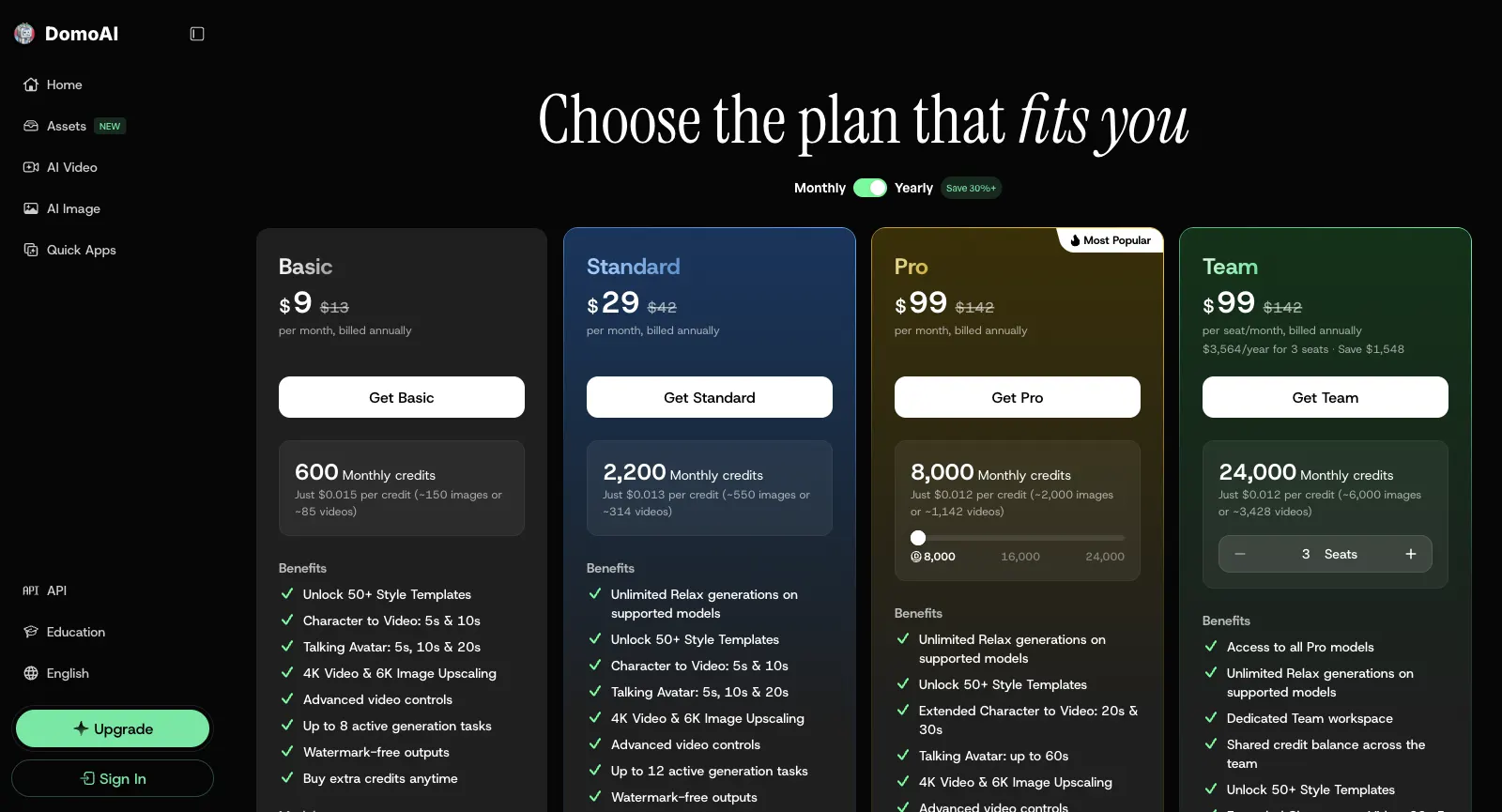
DomoAI sells monthly subscriptions that come with a credit allowance, and paying yearly cuts the price by 30% or more. New accounts get 30 credits, and extra credits can be bought only while a plan is active. Below, its plans sit next to Yovid’s.

DomoAI pricing with the Yearly toggle on, per-month prices: $9 for Basic (600 credits), $29 for Standard (2,200), $99 for Pro (8,000) and $99 a seat for Team (24,000)
Captured from domoai.app/en/pricing while signed out, October 29, 2026.
FreeDomoAI30 credits at sign-up; outputs carry a watermark that only subscribers can drop, and Relax mode is not includedYovidFree starter credits after registering, no card needed; entry models only (Seedance 2.0 Mini and older), max 720p
Entry tierDomoAIBasic: $13 a month, or $9 a month paid yearly, for 600 credits; every model, Seedance 2.5 included, in Fast mode, clean outputs, no Relax modeYovidLite at $14.90 a month, or $13 a month paid yearly, for 100 credits a month. Every video model except MiniMax H3; Seedance renders at 720p, other models at up to 1080p. Commercial rights come with yearly billing only
Middle tierDomoAIStandard: $42 a month, or $29 a month paid yearly, for 2,200 credits plus unlimited Relax generations on supported modelsYovidPro at $29 a month, or $14.50 a month paid yearly, for 200 credits a month. Seedance at 1080p, other models at up to 2K, commercial rights included
Top tiersDomoAIPro: 8,000 credits for $142 a month ($99 paid yearly), scaling to 24,000 for $425 a month. Team costs $142 a seat monthly or $99 yearly, quoted for 3 seatsYovidPremium at $149 a month, or $99 a month paid yearly, for 1,300 credits a month, output up to 4K and priority support
Seedance 2.5DomoAIAll paid plans, always in Fast mode; 4 to 30 s at 480P or 720P, and 160 credits appeared for the default 5 s at 720PYovidIncluded in every paid plan and every pack: clips run up to 30 s with sound rendered alongside, guided by reference pictures, clips or audio. Output is 720p on Lite and 1080p on Pro, Premium and packs
Unlimited videoDomoAIRelax mode from Standard up, on DomoAI’s own video models only; slower, and Seedance and MiniMax H3 always run in Fast modeYovidPremium only: one 7-day window per account of free Seedance 2.5 and 2.0 clips (10 s max, up to 1080p), in a free queue
Unlimited imagesDomoAIRelax mode from Standard up for the GPT Image and Nano Banana modelsYovidPro and Premium: a year of unlimited images on the supported image models
Credits without a planDomoAINo: extra credits need an active subscription, though once bought they never expireYovidPay-once packs from $29.90 for 200 credits up to $999 for 8,000, no renewal, commercial rights included
RefundsDomoAIMonthly plans: a full refund only if unused. Yearly plans: if used in the first month, one month is kept at the monthly rate and the rest returned; after that, nothing. Extra credits are finalYovidRefundable within 3 days of buying (packs too) if none of that order’s credits were spent; payment fees (max 4% + $1.50) are kept, and automatic renewals cannot be refunded

DomoAI prices come from its pricing page on October 29, 2026, in US dollars, on monthly and yearly billing; its terms allow billing in either US or Singapore dollars. Usage limits and refund conditions come from the pricing FAQ and help articles checked that day. Yovid figures match yovid.ai/pricing.

DomoAI, Yovid and Higgsfield Compared

They start from different places: DomoAI is an animation studio that restyles footage and hosts some outside models, Yovid is a multi-model generator for video and stills that shows prices first, and Higgsfield is a multi-model suite built around its own cinematic tools.

Built aroundDomoAIA restyling studio whose Omni Reference, avatars and character swaps share a single credit walletYovidOne composer for Seedance, Kling, Veo, Wan and MiniMax H3 plus image models, with AI Canvas and upscalersHiggsfieldIts own Cinema Studio, Genjutsu, AI Influencer and an agent beside many hosted models
Seedance 2.5DomoAIAll paid plans, always in Fast mode; 4 to 30 s, 480P or 720PYovidEvery paid plan and pack: up to 30 s with sound; 720p on Lite, 1080p on Pro, Premium and packsHiggsfieldPlus and up; Starter only reaches Seedance 2.0 Mini and 2.0 Fast
Other video modelsDomoAIMiniMax H3 and Seedance 2.0 next to its own DomoAI 2.5 and 2.4.1YovidMiniMax H3, Wan 3.0, Veo 3.1, Kling 4.0 and Kling 3.0 with Motion ControlHiggsfieldIn-house models plus Veo, Kling, Wan, Sora, Grok and Hailuo
Unlimited videoDomoAIRelax mode from Standard up, for DomoAI’s own models onlyYovidPremium: one 7-day window per account of free Seedance 2.5 and 2.0 clipsHiggsfieldPlus and Ultra: 7 days of Kling 3.0 and Wan 3.0; business plans: Seedance 2.5
Credits without a subscriptionDomoAINo: extra credits only alongside an active plan; they never expireYovidYes: packs from $29.90, good for 180 days to a yearHiggsfieldNo: subscriber-only packs that last 90 days
RefundsDomoAIFull refund only if unused; yearly plans partly refunded in the first monthYovid3 days from purchase if none of its credits were spent; renewals excludedHiggsfieldFirst purchase only, within 7 days, with no credits used

DomoAI cells: from its site, plans page and help articles (October 29, 2026). Higgsfield details: checked on October 14, 2026.

Why Some DomoAI Users Move to Yovid

Those who switch usually want sharper Seedance output, or a way to buy credits with no plan attached.

  1. 01

    Seedance 2.5 at 1080p

    Yovid renders Seedance 2.5 clips of up to 30 seconds with sound at 720p on Lite and at 1080p on Pro, Premium and every pack. DomoAI caps Seedance 2.5 at 720P, charges for it in Fast mode only and points to its upscaler for anything sharper.

  2. 02

    Packs with no subscription attached

    Pay-once packs start at $29.90, include commercial rights and never renew, and each run shows its credit price first; Lite is $13 a month billed yearly. DomoAI sells extra credits only to people with an active plan.

  3. 03

    A free Seedance week on Premium

    Premium ($99 a month billed yearly) includes one 7-day window per account of free Seedance 2.5 and 2.0 clips, up to 11 ten-second clips at 720p, and failed runs never cost credits. Unlimited Relax generations on DomoAI never include Seedance, only its in-house models.

When DomoAI is still the better call

  • Most of your work is restyling footage you shot into anime or other looks, and you like DomoAI’s presets.
  • Your volume runs on DomoAI’s in-house models, and a slower but unlimited Relax queue on Standard is fine by you.
  • You need talking avatars up to a minute long or character swaps up to 30 seconds.

More DomoAI Alternatives to Compare

Eight more services worth comparing. Each card shows the cheapest paid tier, before tax, taken from that service’s pricing page on October 13, 2026. Allowances per dollar vary widely, so this is a list to start from, not a ranking.

Higgsfield

Hosts outside models next to in-house tools (Soul images, Ads Studio, Cinema Studio, AI Influencer), offers team plans and prices Seedance 2.0 and Kling 3.0 per 5-second block.

Pick it for: Its in-house studios, or cheap Kling 3.0: roughly 7 credits buys 5 seconds at 720p.

Skip it for: Full Seedance on a budget: the Starter tier stops at Seedance 2.0 Fast and 2.0 Mini.

Cheapest paid plan: Starter at $19 a month (same monthly or yearly) for 270 credits; the free tier just says “Limited use”.

Read our Higgsfield breakdownTheir pricing page

Pollo AI

A marketing-minded hub: dozens of third-party models plus its own Pollo models, template apps, an agent, Marketing Studio, an MCP server, an API and phone apps.

Pick it for: Maximum model choice; while its 60% subscriber discount lasts, its Seedance clips cost less than Yovid’s on most plans.

Skip it for: Buying credits with no subscription, or keeping unused plan credits: they lapse each cycle.

Cheapest paid plan: Lite at $15 a month, $12 paid yearly, for 400 credits.

Read our Pollo AI breakdownTheir pricing page

Runway

Built around Runway’s in-house Aleph, Act-Two and Gen-4.5, adding sound effects, voices and music, upscaling to 4K, and guest models like Kling and Seedance.

Pick it for: Projects where editing matters as much as generating.

Skip it for: Lots of clips on the cheapest tier: Runway itself says the 625 Standard credits buy roughly 52 s of Gen-4.5 output.

Cheapest paid plan: Standard at $15 a month, $12 paid yearly, for 625 credits; the free plan gives 125 credits once.

Their pricing page

Kling AI

Kuaishou’s own app for Kling, including Kling 3.0 Omni and 3.0 with sound, Motion Control, 4K video and a developer platform.

Pick it for: Kling-only users who want to buy straight from the model maker.

Skip it for: Anyone who needs Seedance, which appears on neither its pricing page nor its home page.

Cheapest paid plan: Standard: $6.99 for month one, $8.80 a month after that or $79.20 a year, with 660 credits a month.

Their pricing page

Hailuo AI (MiniMax)

MiniMax’s first-party app for Hailuo and MiniMax H3, with Hailuo Agent and Omni Reference (as many as 12 reference images); paid tiers also unlock Sora 2 and Veo 3.1.

Pick it for: People who like MiniMax’s models and per-second pricing.

Skip it for: Seedance work: no Seedance model is listed for sale, and trial credits only run Hailuo models.

Cheapest paid plan: Standard at $10.50 a month on sale that day, or $8.40 paid yearly, for 1,000 credits.

Their pricing page

PixVerse

Runs PixVerse’s V6 (with native audio) and real-time R2, plus Lip Sync, Canvas, Agent and an API; the two newest Seedance versions unlock from the Pro tier.

Pick it for: Fast social clips on free daily credits: 60 at sign-up, then 30 a day, capped at 540p.

Skip it for: Cheap Seedance: the Standard tier only runs PixVerse models and maxes out at 720p.

Cheapest paid plan: Standard at $10 a month, $8 paid yearly, for 1,200 credits per 30 days plus 60 daily.

Their pricing page

Vidu

Vidu’s in-house Q3 and Q4 plus real-time Vidu S, with a developer API, Vidu Agent and Reference to Video.

Pick it for: Reference-driven clips on Vidu models; on paid tiers Q4 at 540p uses 2 credits per second.

Skip it for: Seedance, which its pricing page does not offer.

Cheapest paid plan: Standard at $10 a month, $8.25 paid yearly, for 800 credits.

Their pricing page

OpenArt

More than 100 models across audio, image and video (both current Seedance versions included), plus an MCP server, motion sync, lip-sync, Character Builder and Director for shorts and ads.

Pick it for: Character work: consistent characters, motion sync and lip-sync beside the generators.

Skip it for: Client work on the cheapest tier: commercial rights begin at Plus, not Starter.

Cheapest paid plan: Starter at $14 a month, $13 paid yearly, for 4,000 credits.

Their pricing page

Questions People Ask

Straight answers on DomoAI, based on what we checked on October 29, 2026.

What is DomoAI used for?
Mostly for animating and restyling. People turn their videos into anime or one of 40+ other looks, bring stills to life, drop a character into another clip’s motion, build talking presenters, render from as many as 50 references on MiniMax H3 or Seedance 2.5, and touch up or enlarge pictures.
Can you use DomoAI for free?
Only briefly. A new account gets 30 credits, free-tier outputs carry a watermark, and the default Seedance 2.5 clip alone showed 160 credits. Paid plans cost $13 (Basic), $42 (Standard) or from $142 (Pro) a month, or, billed yearly, $9, $29 and $99 a month, as listed on October 29, 2026. Credit-free Relax mode starts at Standard.
Does DomoAI offer Seedance 2.5?
Yes. Omni Reference offers it on all paid plans, always in Fast mode. Clips run 4 to 30 seconds at 480P or 720P and can draw on as many as 30 pictures, 10 clips and 10 sound files; the price shifts with references, length and resolution, and 160 credits appeared for the default 5-second clip at 720P.
Can DomoAI videos be used commercially?
Yes. The Terms of Service, last updated August 13, 2026, say the copyright in what you generate is yours and that you may use it commercially, provided the use is lawful and respects other people’s rights. Free-tier outputs carry a watermark that only a subscription removes.
Does DomoAI give refunds when you cancel?
Only in narrow cases. You cancel under Profile, Billing, Cancel Plan, or through /subscribe in DomoAI’s Discord, and the plan runs until the period ends. A monthly plan comes back in full only if it went unused. If a yearly plan was used in its first month, DomoAI charges that month at the monthly price and refunds the remainder; later on, nothing is returned, and extra credits never are. Write to [email protected].
Which DomoAI alternative is better for Seedance video?
If Seedance is the point, Yovid: 1080p Seedance 2.5 on Pro, Premium and every pack, packs from $29.90 that never renew, and MiniMax H3, Kling, Veo and Wan beside it in one composer, with the credits of failed runs returned. If you want cinematic studio tools as well, look at Higgsfield.
Is Yovid affiliated with DomoAI?
No. Yovid is independent. Nano Banana, GPT Image, MiniMax, Seedance and DomoAI are the trademarks of their owners and appear here only to describe and compare products.

Ready to direct a scene? Write it, then render it