

Direct answer: Budget AI video credits with one line of math: clips × credits per clip × 1.3 to 1.5, where the extra 30–50% covers retakes. For 20 ten-second clips with sound, that comes to about 310–360 credits on Seedance 2.0 Mini at 480p, 1,590–1,830 on Seedance 2.5 at 720p, 1,300–1,500 on Kling 4.0 at 1080p and 4,680–5,400 on Seedance 2.5 at 1080p, at standard credit-pack rates. Subscriptions charge 10–40% fewer credits for the same clip. The two choices that move the total most are resolution and the number of retakes, not the model name.

Image prompt: Cinematic film still for a small coffee brand ad: a barista's hands pour steamed milk into a ceramic cup, forming latte art on a wooden counter in a sunlit neighborhood cafe, steam rising, morning light through the window, shallow depth of field, 50mm lens, warm natural color grade.
Last verified: 2026-11-24. Every credit figure below was read from the live model settings and price list on that date. Figures marked "estimate" are planning rules of thumb, not prices.
How AI video credits are counted per clip
Most video generators charge credits per second of output, and the rate per second climbs with resolution. Four inputs set the price of one clip:
- Model. Each model has its own rate. Seedance 2.0 Mini is the cheapest here, Seedance 2.5 the most expensive per second.
- Resolution. This is the biggest lever. On Seedance 2.5, a 10-second clip costs 31 credits at 480p, 61 at 720p and 180 at 1080p, so 1080p is almost three times the price of 720p.
- Length. Credits scale almost linearly with seconds. A 5-second Seedance 2.5 clip at 720p is 31 credits, a 10-second one is 61.
- Video references. When you feed a reference clip or ask the model to edit footage, the input seconds are billed on top of the output seconds.
Two things that do not change the price: switching sound off on Seedance 2.5 or Seedance 2.0 Mini (61 credits for a 10-second 720p Seedance 2.5 clip either way), and failed runs, whose credits are returned to your balance.
AI video credits per 10-second clip, by model and resolution
The table shows one 10-second clip with sound. "Credit pack" is the standard rate; Lite, Pro and Premium are monthly subscriptions that take 10%, 30% and 40% off most clips.
| Model and resolution | Credit pack | Lite | Pro | Premium |
|---|---|---|---|---|
| Seedance 2.0 Mini, 480p | 12 | 11 | 8 | 8 |
| Seedance 2.0 Mini, 720p | 25 | 23 | 18 | 17 |
| Seedance 2.5 Flash, 480p | 23 | 21 | 16 | 16 |
| Seedance 2.5, 480p | 31 | 28 | 22 | 22 |
| Seedance 2.5, 720p | 61 | 55 | 43 | 43 |
| Seedance 2.5, 1080p | 180 | Not on Lite | 126 | 124 |
| Seedance 2.5, 4K | 290 | Not on Lite | Not on Pro | 200 |
| Kling 4.0, 720p | 30 | 27 | 21 | 21 |
| Kling 4.0, 1080p | 50 | 45 | 35 | 35 |
Three things stand out once you price a whole project:
- Kling 4.0 at 1080p (50 credits) is cheaper than Seedance 2.5 at 720p (61). If you need 1080p and do not need Seedance 2.5's editing or long reference lists, Kling is the budget 1080p option.
- A Seedance 2.5 480p test costs about half of a 720p final. Testing every clip at 480p before the final adds roughly 50% to a 720p budget, but only about 17% to a 1080p budget.
- Premium is not always the cheapest per clip. On 10-second clips it charges the same as Pro or 1–2 credits less, and on a few very short Mini clips slightly more, so pick Premium for its credit volume and 4K, not for a per-clip saving.
AI video project budget template for 20 clips
Write the project down as rows before you generate anything. One row per clip type:
| Clips | Model | Resolution | Length | Credits per clip | Subtotal |
|---|---|---|---|---|---|
| 20 | Seedance 2.0 Mini | 480p | 10 s | 12 | 240 |
| 4 | Seedance 2.5 | 720p | 10 s | 61 | 244 |
| Before retakes | 484 | ||||
| With 30–50% reserve (estimate) | 629–726 |
The formula behind every row: clips × credits per clip = subtotal. Add the subtotals, then multiply by 1.3 for a project with a clear brief and by 1.5 for a project where the look is still open. The reserve is an estimate from typical retake rates, not a price; tighten it once you know how often your prompts land on the first try.
Three AI video credit budgets for a 20-clip project
The same 20-clip project (ten seconds per clip, sound on) priced three ways. Credits are shown at credit-pack and Pro rates.
| Budget | What you render | Credit pack | Pro | With 30–50% reserve, Pro (estimate) |
|---|---|---|---|---|
| Entry | 20 Seedance 2.0 Mini clips at 480p, then the best 4 again on Seedance 2.5 at 720p | 484 | 332 | 432–498 |
| Standard | 20 Seedance 2.5 clips: a 480p test of each, then a 720p final | 1,840 | 1,300 | 1,690–1,950 |
| High quality | 10 Seedance 2.5 clips (480p draft, 1080p final) and 10 Kling 4.0 clips (720p test, 1080p final) | 2,910 | 2,040 | 2,652–3,060 |
Entry: Seedance 2.0 Mini drafts and a few Seedance 2.5 finals
Use this when most clips are background or social filler and only a few carry the project. Mini handles the volume at 480p or 720p and runs 4–15 seconds per clip, then the strongest four ideas get a 720p Seedance 2.5 render. This is the only tier where most of the work can start on free credits, because Seedance 2.0 Mini is included in the free plan.
Standard: test every clip at 480p, finish at 720p
Here every clip is a Seedance 2.5 clip. The 480p pass (31 credits per clip at pack rates) shows whether the motion, framing and timing work; only clips that pass go on to 720p (61). Skipping the tests saves 620 credits on paper but usually costs more in failed 720p finals.
High quality: 1080p finals with Seedance 2.5 and Kling 4.0
Seedance 2.5's draft mode renders a 480p draft first, then turns the same draft into a 1080p or 4K final, so the content you approved is the content you get. The final is charged at the normal 1080p rate. Kling 4.0 has no draft mode, so its tests are separate 720p renders. Mixing the two models keeps the 1080p total down: ten Kling clips at 1080p cost less than three Seedance 2.5 clips at 1080p.

Image prompt: Cinematic film still, freshly roasted coffee beans tumbling out of a steel drum roaster into a round cooling tray, a small cloud of steam and chaff in the air, warm tungsten light in a small roastery, close-up at counter height, crisp detail on the beans, shallow depth of field.
How to spend fewer AI video credits per clip
- Test short and low. A 4-second Seedance 2.5 test at 480p costs 12 credits at pack rates against 61 for a 10-second 720p clip. Lengthen and upgrade only what works.
- Use draft mode for 1080p Seedance 2.5. Pay 31 credits to see a 10-second 480p draft, then pay for 1080p only on drafts you keep.
- Render the length you will use. If the edit only needs 6 seconds of a shot, a 10-second render wastes 40% of the credits.
- Start from an image. If the look of a shot matters, settle it as a still first and animate that still. A picture is far cheaper to iterate on than a 10-second clip.
- Pick the model per shot. Use Mini for filler, Kling 4.0 for cheaper 1080p, and save Seedance 2.5 for shots that need its editing, extension or reference controls.
- Write one prompt per clip and reuse it. Keeping subject, setting and camera wording fixed across a series cuts the number of retakes.
Here are two prompts from the coffee brand example above. Each is a single 10-second clip that you can test at 480p before the final:
A barista pours steamed milk into a ceramic cup on a wooden counter, forming a leaf of latte art, steam rising in morning window light. Slow push-in at counter height, cafe chatter and the hiss of the steam wand in the background.
Freshly roasted coffee beans tumble out of a steel drum roaster into a round cooling tray, the stirring arm turning them in a cloud of steam. Close-up at counter height, warm tungsten light, the rattle of beans and the hum of the roaster.
What a 20-clip AI video budget costs on Yovid plans
All of the figures above are Yovid credits, and every model in this article draws on the same balance. Prices on 2026-11-24:
| Option | Price | Credits | Credits last |
|---|---|---|---|
| Lite | $14.9 a month, or $13 a month billed yearly | 100 a month | 30 days |
| Pro | $29 / $59 / $89 a month | 200 / 500 / 800 a month | 30 days |
| Premium | $149 / $219 / $299 a month | 1,300 / 2,000 / 3,000 a month | 30 days |
| Credit packs | $29.9 to $999 | 200 to 8,000 | 180 days (Starter) or 365 days |
The free plan adds 5 credits at sign-up, enough for one 4-second 480p Seedance 2.0 Mini test. Matched to the three budgets:
- Entry (432–498 credits at Pro rates): the 500-credit Pro tier, $59 a month or $29.5 a month billed yearly. That is about $3 per finished clip on monthly billing.
- Standard (1,690–1,950 at Pro and Premium rates): the 2,000-credit Premium tier at $219 a month, about $11 per finished clip.
- High quality (about 2,630–3,030 at Premium rates): the 3,000-credit Premium tier at $299 a month, about $15 per finished clip. It covers up to a 48% reserve.
Plan limits matter as much as credits. Lite renders Seedance models up to 720p, Pro up to 1080p and Premium up to 4K. The Starter pack ($29.9 for 200 credits) does not include Kling 4.0; the Creator pack and larger ones do. Subscription credits expire after 30 days, so a project that will take two months fits a credit pack better than a single month of a large plan.
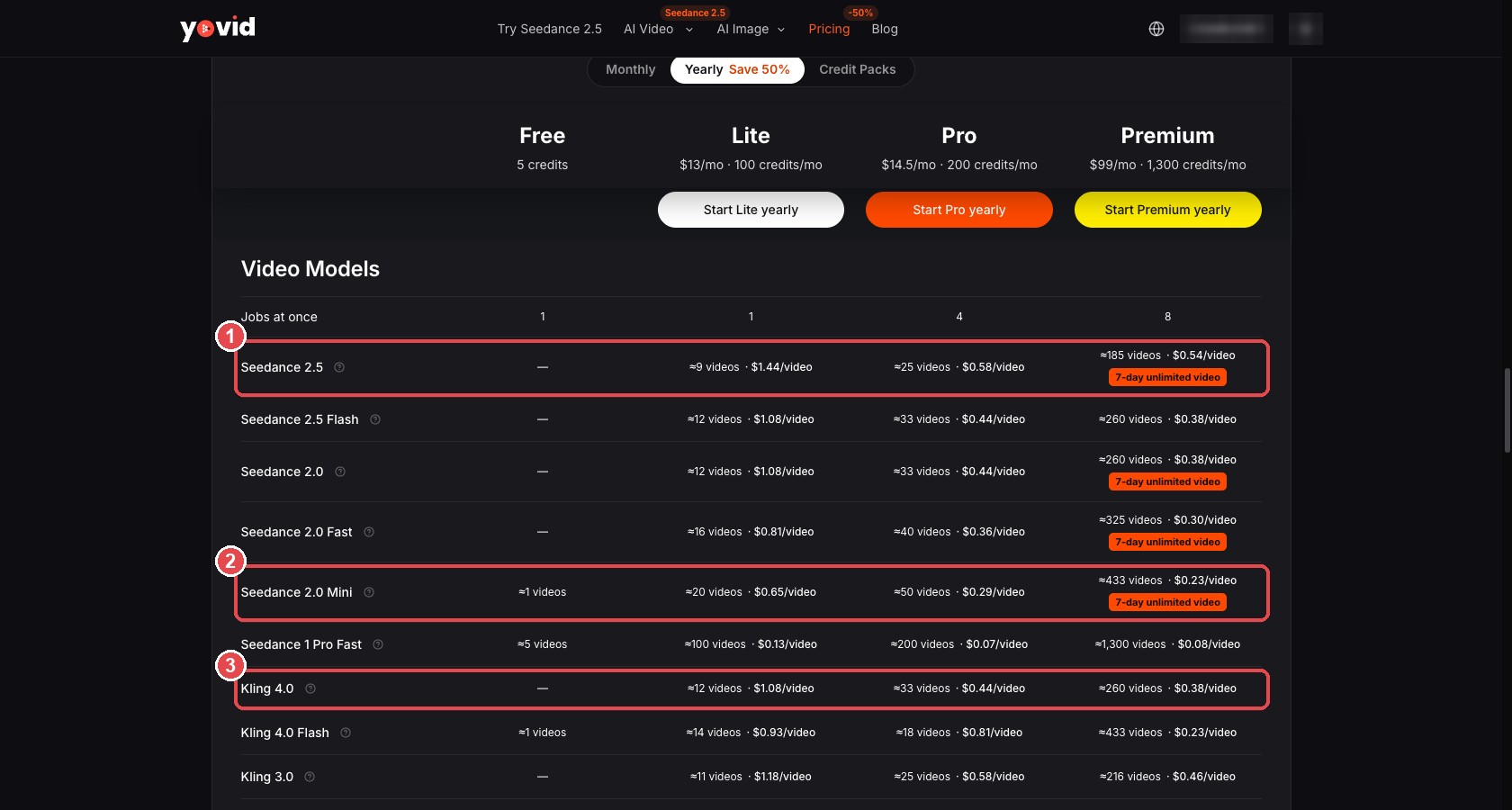
The Compare Plans table on Yovid's pricing page (yearly view, 2026-11-24), with (1) Seedance 2.5, (2) Seedance 2.0 Mini and (3) Kling 4.0 marked. Each cell shows roughly how many short clips a plan's monthly credits cover.
Note that the pricing table counts short default clips, so its "videos per month" figures are much higher than the 10-second clips in this guide. Use the per-clip table above when you budget a real project. For the cost of each model across other platforms, see the AI video generator pricing comparison.
FAQ
How do AI video credits convert to dollars?
On credit packs, one credit costs between $0.125 (the $999 Agency pack) and about $0.15 (the $29.9 Starter pack). Subscription credits cost about the same or less per credit ($0.145 on the 200-credit Pro plan, about $0.115 on Premium), and each clip uses 10–40% fewer of them. A 10-second Seedance 2.5 clip at 720p is 61 credits on a pack, about $7.60–9.10, and 43 credits on Pro, about $6 at the $29 monthly price.
Are credits charged when a generation fails?
No. When a generation fails, the credits reserved for it go back to your balance and you can try again.
Can I get a refund on unused credits?
A new purchase can be refunded within 3 days if none of its credits have been used, minus payment processing fees of up to 4% + $1.50. Automatic renewals are not refundable, so cancel before the renewal date if you do not want the next month.
Should I buy a plan or a credit pack for one project?
Pick a subscription if the project fits in a month: each clip costs fewer credits and Pro or Premium unlock 1080p and 4K for Seedance. Pick a credit pack if the work is spread over several months or you want nothing to renew; pack credits last 180 or 365 days.
Do API calls use the same credit balance?
Yes. The Yovid API charges the same credits as the web app, from the same balance, with no separate API subscription. It covers the Seedance model family.
Plan the credits before the first render
Write the clip list, price each row, add a 30–50% reserve and only then pick a plan. Then run the 480p tests and let them decide which clips earn a 720p or 1080p final. The Seedance 2.5 draft mode guide shows the draft-to-final step in detail, and Pricing & Data collects the other cost breakdowns.
When the budget is set, compare the plans on the pricing page, then open the AI video generator, choose the model from your budget table and paste one of the prompts above.