Seedance 2.5 Flash: 30-Second AI Video Drafts with Sound
Work a video out on Seedance 2.5 Flash before paying for the finished version. Flash starts from the same kinds of input as Seedance 2.5 (a prompt, a first and last frame, reference images and clips, or footage to rework) and returns 4–30 seconds with sound at 480p or 720p, for roughly a quarter fewer credits per second. Once a take is right, send its prompt and files to Seedance 2.5 for 1080p or 4K. Start a Seedance 2.5 Flash draft on Yovid.
Seedance 2.5 Flash is one of 10+ models in Yovid’s AI video generator: run the same prompt on Kling, Veo or Wan to compare.
Seedance 2.5 is live
AI video clips up to 30 seconds with image, video, and audio references.
Kling 4.0
Kling's latest AI video model, now in the Yovid AI video generator.
Kling 4.0 Flash
Kling 4.0's fast tier: 720p clips with sound for fewer credits.
Veo 3.1
Google's AI video model with native audio.

GPT Image 2.5
OpenAI's image model for creating and editing images.
AI Image Upscaler
Sharpen and enlarge images for cleaner exports.
AI Canvas
Chain image and video steps on one visual board.
What Seedance 2.5 Flash Output Looks Like
What You Can Do with Seedance 2.5 Flash on Yovid
- A Full 30 Seconds from One Seedance 2.5 Flash Generation: A single run lasts anywhere between 4 and 30 seconds, which leaves room for several shots instead of one.
- Text to Video on Seedance 2.5 Flash, Shot by Shot: With nothing but a prompt, Flash stages the scene, cuts between the shots you list and adds a soundtrack.
- Sound and Spoken Lines Built into Seedance 2.5 Flash: Flash writes the soundtrack while it renders the picture, so even a rough take arrives with ambience, effects, music or a voice.
- Animate a First and Last Frame with Seedance 2.5 Flash Image to Video: Hand Flash a still to open on and, if you like, a second one to close on; it generates the movement in between.
- Products and Characters Stay Consistent with Seedance 2.5 Flash References: Upload as many as 10 pictures and 5 clips, then spell out in the prompt what Flash should take from each.
- Edit or Extend Existing Footage with Seedance 2.5 Flash: Attach a clip and say in plain words what should change, or ask Flash to carry the scene on beyond its final frame.
- Seedance 2.5 Flash Limits and Options on Yovid: The ranges below are the ones Yovid’s generator accepts for Flash right now.
A Full 30 Seconds from One Seedance 2.5 Flash Generation
Quick tiers usually cut clips short: Kling 4.0 Flash ends at 20 seconds and Seedance 2.0 Fast at 15. Seedance 2.5 Flash keeps the 30-second ceiling of Seedance 2.5, so the rough cut of a whole ad or scene fits into one request. New jobs start at 5 seconds until you change the length.
Segmind’s 20-second test shows what that room buys. One generation holds three shots, each character gets a line to say, and the girl and her kite look the same in the last shot as in the first. Credits grow with every second you ask for, so early tries are better kept short.
Text to Video on Seedance 2.5 Flash, Shot by Shot
A prompt may run to 10,000 characters, enough to give each shot its own length, camera move and sound. While no picture or clip is attached you choose the frame yourself: 16:9, 9:16, 1:1, 4:3, 3:4 or 21:9, or you leave it on Auto.
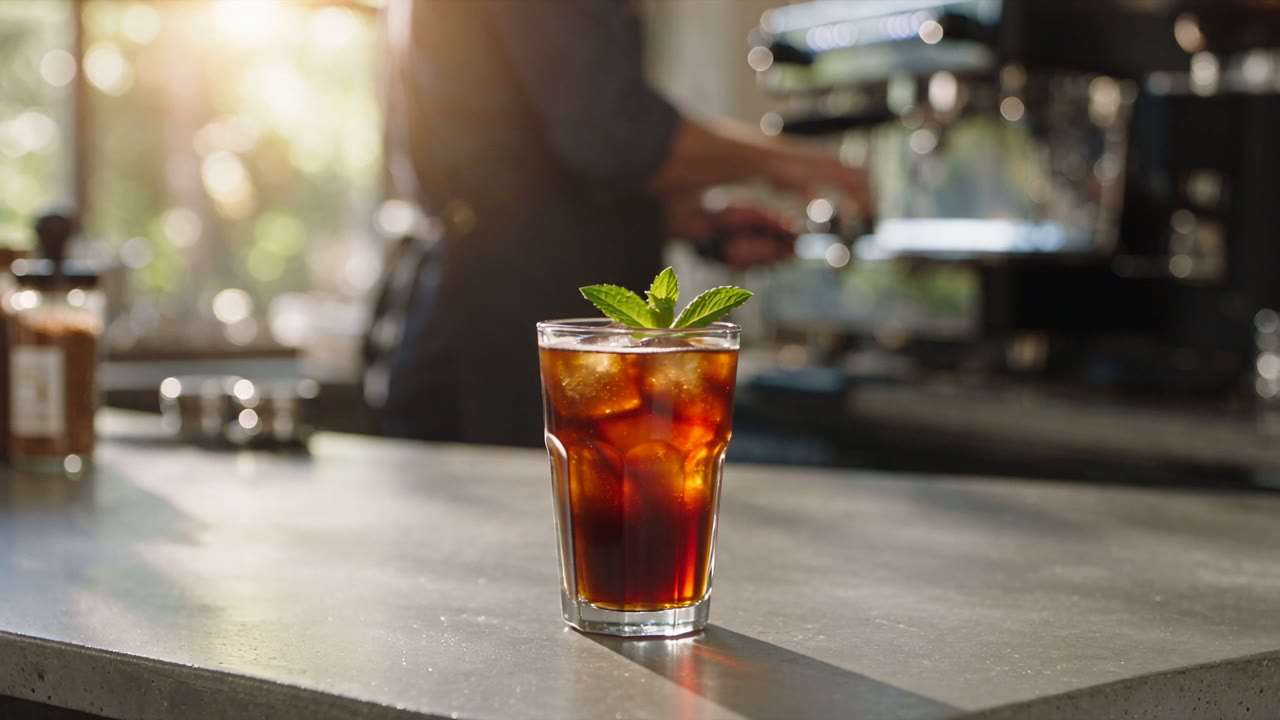
The cold brew spot is raw output from Segmind’s Flash tests and runs 10 seconds. Its prompt called for one 4-second shot followed by two of 3 seconds, and the clip delivers them in sequence: first the pour, next the mint, last a wide view of the cafe.
Sound and Spoken Lines Built into Seedance 2.5 Flash
Audio stays on unless you turn it off, and the credit total is identical in both cases. For speech, put the words in quotation marks inside the prompt and say which character delivers them.
Segmind tried this with a bike mechanic and a single quoted line. In the result she gives the wheel a spin and then speaks, her lips matching the words, while the freewheel clicks and the street hums behind her.
Animate a First and Last Frame with Seedance 2.5 Flash Image to Video
One first frame is enough when only the beginning of the shot matters. Attach a last frame too when the final composition counts, for instance a product that has to finish centred. The picture you upload decides the frame, so the aspect ratio stays on Auto.
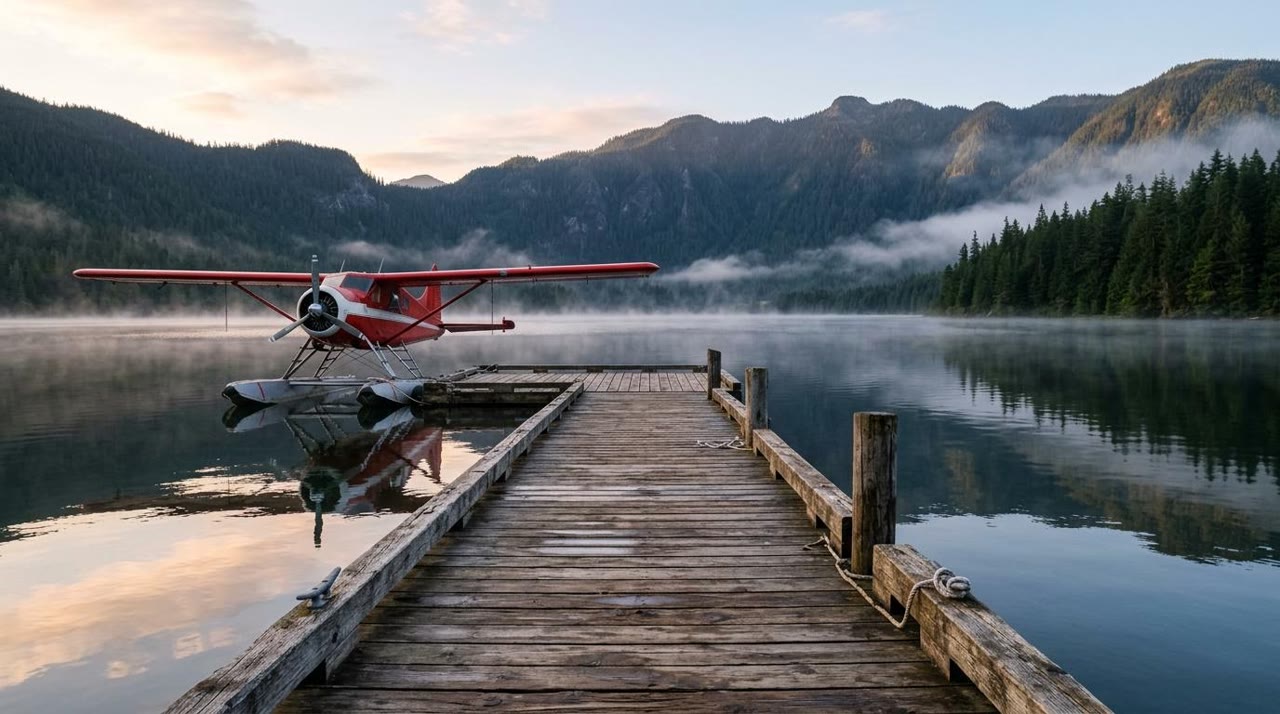
Segmind gave Flash the still shown in the corner: a red seaplane tied up at a wooden dock on a misty mountain lake. Across 8 seconds at 720p the plane taxis out and takes off, and the dock and the peaks stay true to the photo.
| Opening still | Flash output |
|---|---|
 |
Products and Characters Stay Consistent with Seedance 2.5 Flash References
A reference is not a starting frame. It lends its subject (a face, a costume, a pack shot, a location) to a scene that can look entirely different. Type @ in the prompt to tag a file, for example @Image 1 for the product and @Image 2 for the setting. Reference clips, each 2 to 30 seconds long and no larger than 200 MB, pass on a movement or a camera path.
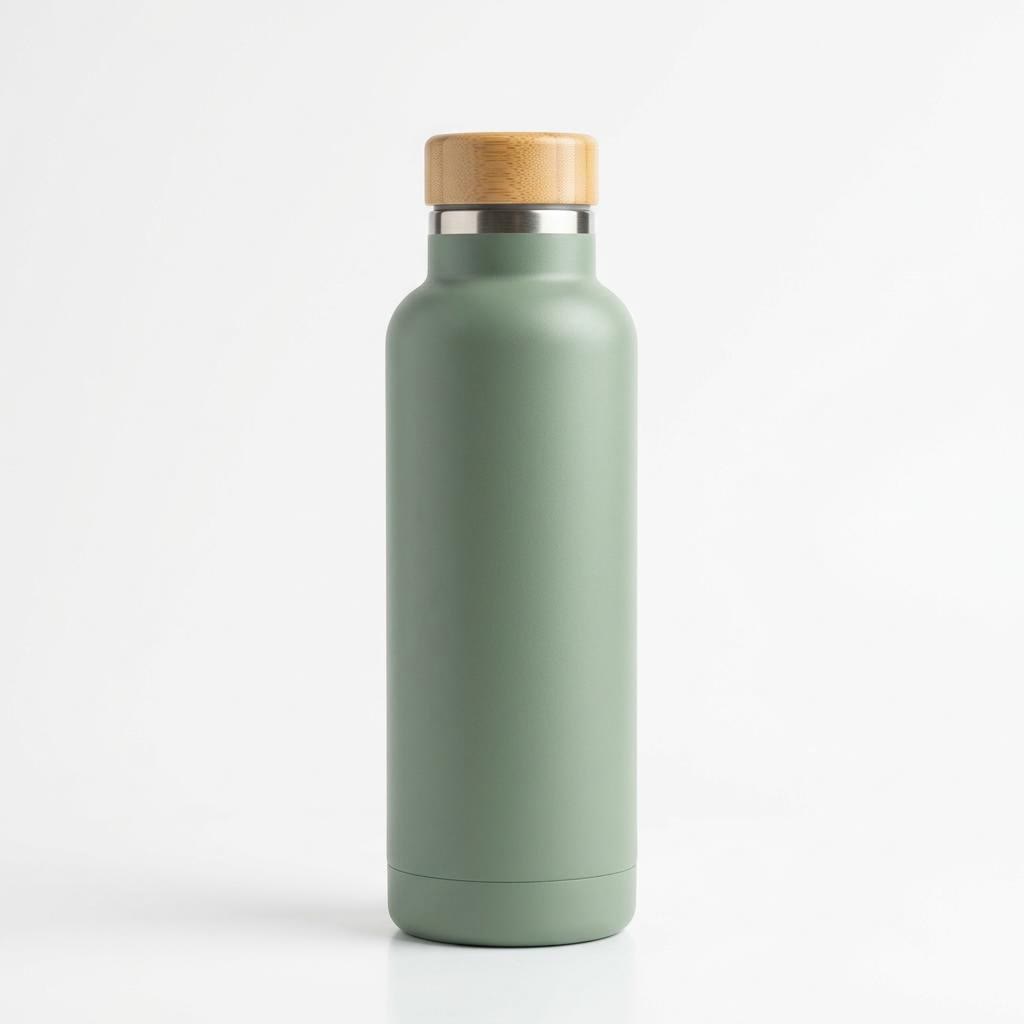
Segmind’s test had one input, the plain product photo in the corner. Flash carried that sage green bottle, silhouette and matte surface intact, into 8 seconds of hiking footage the photo gives no hint of. A project that needs a bigger pool can go to Seedance 2.5, where the limits are 30 images and 10 clips.
| Reference photo | Flash output |
|---|---|
 |
Edit or Extend Existing Footage with Seedance 2.5 Flash
You do not pick a mode: Yovid reads it from your wording. With a clip attached, verbs such as "replace", "remove" or "change the…" are handled as an edit, and "extend" as a continuation. An edit comes back at roughly the length of your upload with everything you left unmentioned intact, while an extension adds the number of seconds you set.
The original here is the dosa vendor clip that also sits in the examples carousel. Segmind asked for two changes in a single prompt, blue string lights and a banana leaf beneath the dosa, and got both; the vendor, his gestures and the pacing are untouched. An 8-second upload returned as 7.7 seconds.
| Original footage | After the edit |
|---|---|
Seedance 2.5 Flash Limits and Options on Yovid
Plan against this list. When a job needs something outside it, such as 1080p or an eleventh reference image, that part belongs on Seedance 2.5.
| Clip length | 4–30 sStarts at 5 s until you change it. |
|---|---|
| Output size | 480p and 720p720p is preselected. 1080p and 4K are on Seedance 2.5. |
| Frame shape | Auto, 16:9, 9:16, 1:1, 4:3, 3:4, 21:9Fixed by your picture when you animate a frame, and by your clip when you edit or extend one. |
| First and last frame | One first frame, plus an optional last frame |
| Reference files | 10 images and 5 clips at mostEach clip 2–30 s long and no larger than 200 MB. |
| Existing footage | Edit or extendAn edit keeps roughly the length of the upload. |
| Prompt length | 10,000 characters at most |
| Audio | Enabled unless you turn it offCovers ambience, effects, music and voices. |
| Billing | Per second of videoThe total appears in the generator before you confirm, and the credits table on this page covers typical lengths. |
Where Seedance 2.5 Flash Fits in a Workflow
Reach for Flash while a project is still changing. Each try costs less than on Seedance 2.5, and the same prompt and files move up with you when it is time for the final.
- Previs for a longer piece: Block out a 20- or 30-second sequence with its cuts and dialogue, and judge the pacing before any high-resolution render.
- Proving a reference set: Check that a mascot, a wardrobe or a pack shot survives from scene to scene with the very images you plan to use for the final.
- Hook and format tests: Produce several openings of one ad, or one idea in landscape, vertical and square, and compare them side by side.
- Storyboard transitions: Give Flash two neighbouring stills from a storyboard and see whether the move between them reads.
- Touch-ups on footage: Swap a prop, shift the lighting or add a few seconds to a clip you already have.
- Clips that stay at 720p: Plenty of social posts and internal reviews never need more than 720p, so the Flash take can be the one you publish.
Seedance 2.5 Flash Compared with Seedance 2.5, 2.0 Fast, 2.0 Mini and Kling 4.0 Flash
Every cell except the last row is read from the settings each model exposes in Yovid’s generator today, so you can choose by length, references and price before you spend a credit.
| Feature / Model |  Seedance 2.5 Flash | Seedance 2.5 | Seedance 2.0 Fast | Seedance 2.0 Mini |  Kling 4.0 Flash |
|---|---|---|---|---|---|
| Longest clip | 30 s | 30 s | 15 s | 15 s | 20 s |
| Top resolution | 720p | 4K | 1080p | 720p | 720p |
| Aspect ratios | 16:9, 9:16, 1:1, 4:3, 3:4, 21:9 | 16:9, 9:16, 1:1, 4:3, 3:4, 21:9 | 16:9, 9:16, 1:1, 4:3, 3:4, 21:9 | 16:9, 9:16, 1:1, 4:3, 3:4, 21:9 | 16:9, 9:16, 1:1, 21:9 |
| Reference images | 10 | 30 | 9 | 9 | — |
| Reference videos | 5 | 10 | 3 | 3 | — |
| Edit or extend an uploaded clip | Yes | Yes | — | — | — |
| Credits for 5 s at 720p | 23 | 31 | 19 | 13 | 9 |
| Best for | Working drafts up to 30 s that use frames, references or footage edits | 1080p and 4K masters, and projects with more than 10 reference images | Seedance 2.0 takes of 15 s or less, up to 1080p | Low-credit Seedance trials of 15 s or less | Kling drafts of up to 20 s from a prompt or a single start frame |
Credits are base credit-pack rates for a 5-second clip at 720p (or the nearest resolution a model offers) and follow Yovid’s live pricing; subscribers pay less per second.
Trade-Offs of Seedance 2.5 Flash
Judged against Seedance 2.5, with both models as Yovid offers them now.
Strengths
- Same toolset: Prompts, first and last frames, reference files, editing and extension all work the way they do on Seedance 2.5.
- 30-second runs: The longest clip matches Seedance 2.5 and outlasts Kling 4.0 Flash (20 s) and Seedance 2.0 Fast (15 s).
- Lower credit rate: Each second costs roughly 25% less than on Seedance 2.5, at 480p and at 720p alike.
- Quicker tier: Flash is the faster of the two Seedance 2.5 models; the actual wait varies with clip length and with how busy the queue is.
- Audio included: Speech, effects and music come with the picture and leave the credit total unchanged.
Limits
- 720p ceiling: There is no 1080p or 4K output; both stay on Seedance 2.5.
- No upgrade path: Seedance 2.5 can turn its own 480p draft into a 1080p or 4K final. A Flash clip cannot be upgraded, so you run the job again on Seedance 2.5.
- Smaller reference pool: The limits of 10 images and 5 clips are a third and a half of what Seedance 2.5 allows.
- A rerun is a new take: Sending a Flash prompt to Seedance 2.5 produces a fresh generation, not a sharper copy of the clip you liked.
Seedance 2.5 Flash on Yovid: Modes and Credits
Ways to start a Seedance 2.5 Flash clip
Each mode is a tab in the same composer; the links open it with Seedance 2.5 Flash already picked.
Seedance 2.5 Flash credits by resolution and length
Read from the live model settings on Yovid, before any plan discount. One credit costs the same whichever model you pick; packs and plans are on the pricing page.
| Resolution | 5 s | 10 s | 30 s |
|---|---|---|---|
| 480p | 12 credits | 23 credits | 69 credits |
| 720p | 23 credits | 46 credits | 138 credits |
How to Draft a Video with Seedance 2.5 Flash on Yovid
- Step 1
Open the composer on Flash
The box at the top of this page already has Seedance 2.5 Flash selected. Inside the video generator you will find it in the model list.
- Step 2
Write the scene and attach what you have
List the shots, the camera moves, the sounds and any dialogue in quotation marks. Add a first frame, a last frame, reference files or a clip to rework when the idea depends on them; a prompt alone is fine too.
- Step 3
Choose seconds and size, then run it
Set a length between 4 and 30 seconds and 480p or 720p, read the credit total the generator shows, and generate. When the draft works and you need 1080p or 4K, repeat it on Seedance 2.5.
A Seedance 2.5 Flash Prompt, Run Three Ways
These clips come from OpenArt’s prompt guide for Seedance 2.5 Flash. OpenArt kept one structured prompt and rewrote nothing but its OPENING line between runs, and every run returned 20 seconds at 720p. Open any version in the generator and swap in your own product and scene.
Opens with the man jogging in
OpenArt guide · 16:9 · 20 sSCENE: A bright kitchen counter in soft morning light. A window behind the counter shows green trees outside. SUBJECT: a matte green insulated water bottle. Show only one bottle. OPENING: 0-5s: The young man jogs into the kitchen, out of breath, and reaches for the bottle. MIDDLE: 5-15s: A hand picks up the bottle, twists open the lid and fills the bottle with water. ENDING: 15-20s: A young man takes a long drink from the uncapped bottle, sets the bottle down, twists, closes the bottle lid, and smiles. The bottle ends centered in the frame. CAMERA: Slow push in during the opening, then a steady medium shot. SOUND: The pour of water and the click of the lid. Light birdsong from the window. No music, no voices. LIMITS: No text on screen, no other logos, no extra bottles.
Source: OpenArt · Seedance 2.5 Flash prompt guide
Try this promptOpens with a sip of warm water
OpenArt guide · 16:9 · 20 sSCENE: A bright kitchen counter in soft morning light. A window behind the counter shows green trees outside. SUBJECT: a matte green insulated water bottle. Show only one bottle. OPENING: 0-5s: The young man sips from a glass of water left in the sun and winces at how warm it is. MIDDLE: 5-15s: A hand picks up the bottle, twists open the lid and fills the bottle with water. ENDING: 15-20s: A young man takes a long drink from the uncapped bottle, sets the bottle down, twists, closes the bottle lid, and smiles. The bottle ends centered in the frame. CAMERA: Slow push in during the opening, then a steady medium shot. SOUND: The pour of water and the click of the lid. Light birdsong from the window. No music, no voices. LIMITS: No text on screen, no other logos, no extra bottles.
Source: OpenArt · Seedance 2.5 Flash prompt guide
Try this promptOpens on the bottle up close
OpenArt guide · 16:9 · 20 sSCENE: A bright kitchen counter in soft morning light. A window behind the counter shows green trees outside. SUBJECT: a matte green insulated water bottle. Show only one bottle. OPENING: 0-5s: Close-up of the bottle on the counter. A drop of water slides down its side. MIDDLE: 5-15s: A hand picks up the bottle, twists open the lid and fills the bottle with water. ENDING: 15-20s: A young man takes a long drink from the uncapped bottle, sets the bottle down, twists, closes the bottle lid, and smiles. The bottle ends centered in the frame. CAMERA: Slow push in during the opening, then a steady medium shot. SOUND: The pour of water and the click of the lid. Light birdsong from the window. No music, no voices. LIMITS: No text on screen, no other logos, no extra bottles.
Source: OpenArt · Seedance 2.5 Flash prompt guide
Try this prompt
Other Video Models You Can Run on Yovid
Further Reading on Seedance 2.5
Longer reads from the Yovid blog for when a draft needs more control.
Questions About Seedance 2.5 Flash
When should I pick Flash over Seedance 2.5?
Who makes Seedance 2.5 Flash, and what does it do?
What is the highest resolution Seedance 2.5 Flash can output?
What does a Seedance 2.5 Flash clip cost in credits?
Which files can I attach to a Seedance 2.5 Flash prompt?
How do I tell Flash to edit a clip instead of extending it?
Will my clip have audio?
Is Seedance 2.5 Flash fast?
Is Yovid run by ByteDance?
Start Your Seedance 2.5 Flash Draft
Sketch the idea in a prompt, attach any stills or footage it depends on, and watch a version with sound before you commit to a final render.
Go to the video generator