
Direct answer: in our tests, Seedream 5.5 is the better Seedream for product images you edit again and again. Over eight rounds it kept the mug's label design intact while swapping its text twice, and it costs less than half of what Seedream 5.0 Pro does per 2K image. It is not better at everything: it skipped one of our eight edits, and on a flat-design infographic Seedream 5.0 Pro followed the brief more closely. Both models got every word of a bilingual café menu right.
Contents
- How we tested
- Results at a glance
- Test 1: eight rounds of edits on one product photo
- Test 2: a bilingual menu and a six-step infographic
- Test 3: a documentary portrait
- Test 4: transparent PNGs from a prompt
- Speed and cost
- Which Seedream to use
- FAQ
How we tested
On November 12, 2026, the day Seedream 5.5 opened, we sent 28 requests to the same model endpoint that Yovid's AI image generator uses. Every image in this post is the first result we got: no reruns, no cherry-picking, no retouching. The side-by-side sheets and the checkerboard behind the transparent images were added afterwards so you can see the results.
- Seedream 5.5 and Seedream 5.0 Pro got identical prompts at 2K.
- The edit test chained eight requests: each round attached the previous result and asked for one change, ending with "Keep everything else exactly the same."
- Transparent output was tested on Seedream 5.5 only, because Seedream 5.0 Pro cannot make a transparent image from a text prompt.
Results at a glance
| Test | Seedream 5.5 | Seedream 5.0 Pro |
|---|---|---|
| 8-round product edit | 7 of 8 edits applied; label design kept | 8 of 8 applied; label redesigned at round 4 |
| Bilingual menu (8 dishes, prices, hours) | No text errors | No text errors |
| Six-step infographic | Text correct; two illustrations made no sense | Text correct; closer to the flat-design brief |
| Documentary portrait | Flat overcast light, as asked | Dramatic sunrise backlight, not asked |
| Transparent PNG | Real alpha channel on 4 of 4 | Not available from a prompt |
| 2K image, upstream price | $0.028 | $0.068 |
| Credits on Yovid, 2K | 2 | 3 |
Test 1: eight rounds of edits on one product photo
This is the use ByteDance built Seedream 5.5 for. We asked both models for the same shop photo: a white pour-over dripper on a white mug labelled "MORI ROASTERS", a jar of beans, linen, morning light. Then we made eight changes, one per round: terracotta glaze on the mug, a walnut table, a sprig of eucalyptus, the label changed to "MORI ROASTERS · KYOTO", a copper kettle in place of the jar, steam from the dripper, warm evening light from the right, and finally the label in Japanese.
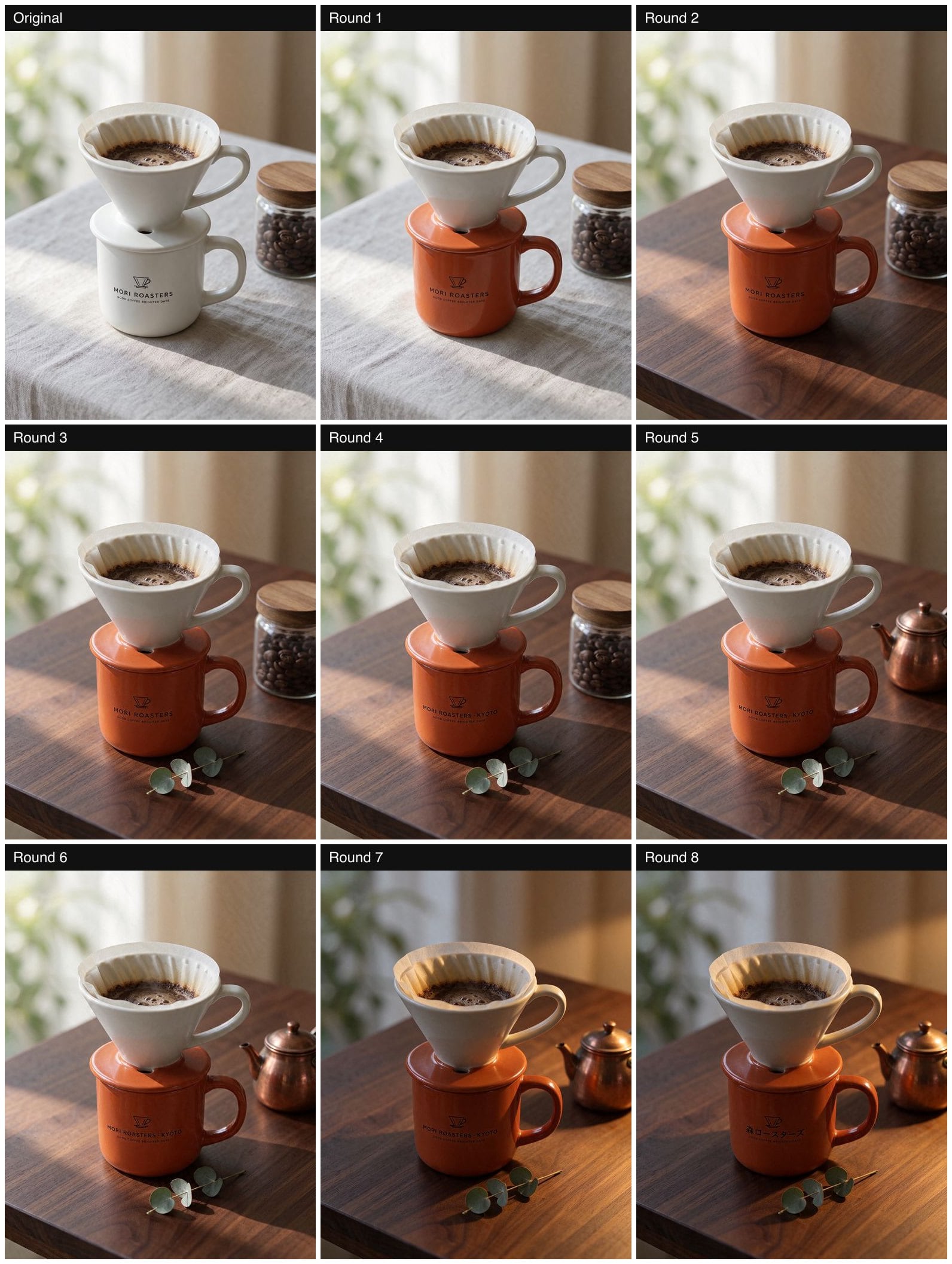
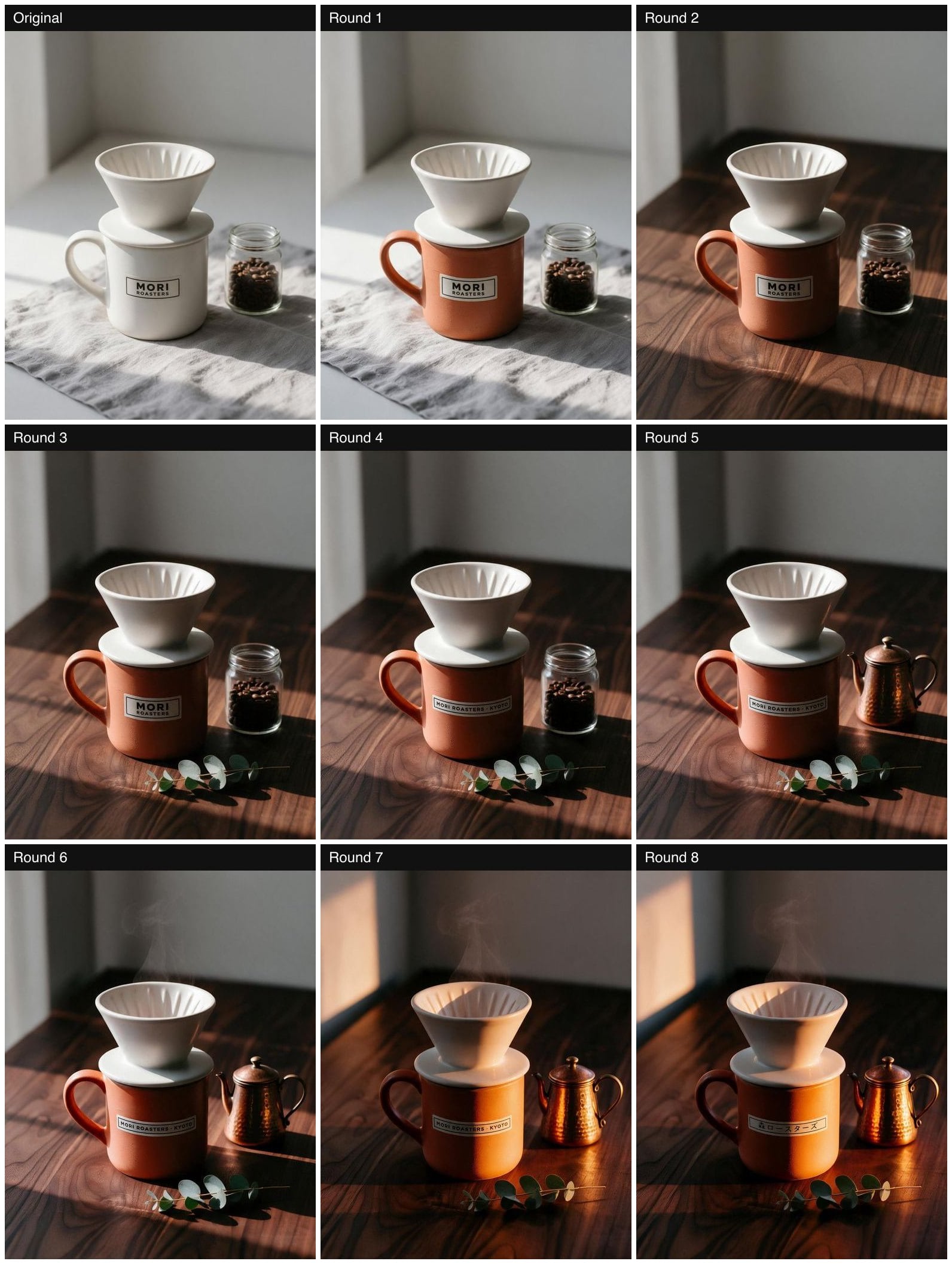
What Seedream 5.5 kept: the camera angle, the dripper, the shape of the mug and the window behind it barely moved in eight rounds. Each edit landed where we asked and nowhere else. The eucalyptus stayed after it was added, the kettle stayed after it replaced the jar, and the terracotta did not drift as later rounds changed the table and the light.
What it missed: round 6 asked for "a thin wisp of steam rising from the dripper." Seedream 5.5 returned the image with no visible steam, and the round still cost a generation. Seedream 5.0 Pro added the steam.
The label is where the two models split. Seedream 5.5 treated the label as a design to preserve: the logo, the letter spacing and the small "GOOD COFFEE BRIGHTER DAYS" line all survived both text changes, and the Japanese came out clean.
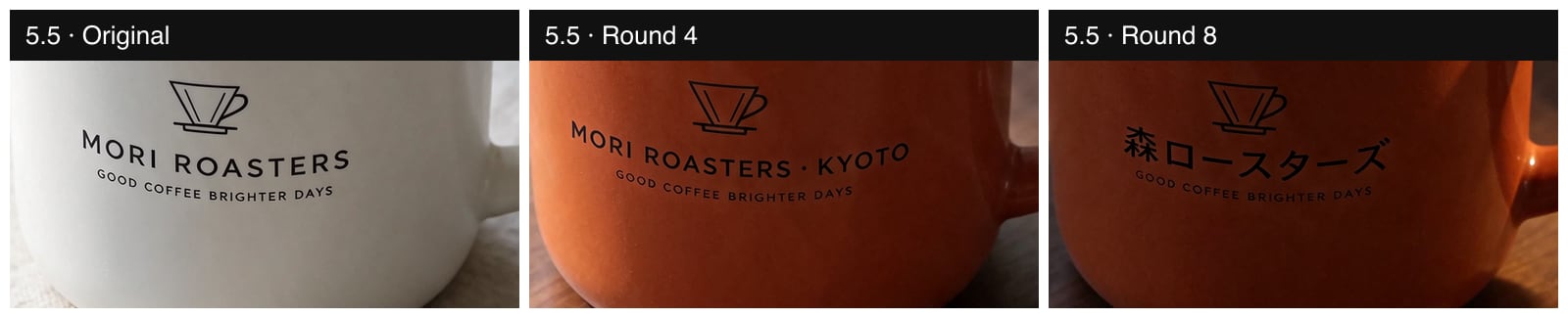
Seedream 5.0 Pro got the words right too, but at round 4 it rebuilt the label: the bold two-line badge became a single long strip. For a brand asset that is a redesign, not an edit.

Seedream 5.0 Pro's whole frame also grew darker and more contrasty round by round, so by round 8 it looked like a different shoot. The evening-light round explains part of that, but the shift had started well before it.
Test 2: a bilingual menu and a six-step infographic
We gave both models a chalkboard menu with a Chinese and English title, eight dishes with prices and a line of opening hours, all spelled out in the prompt.
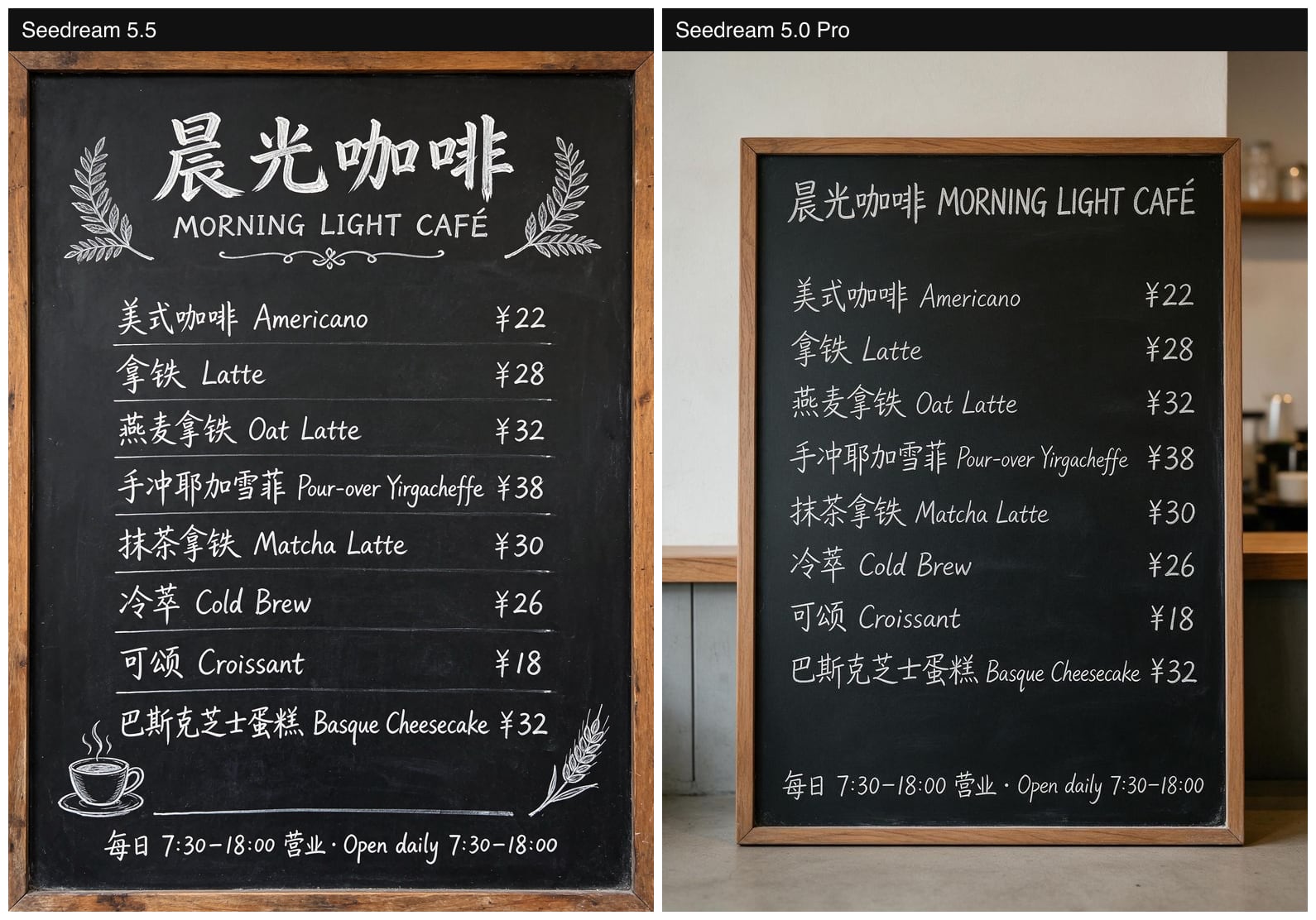
Both got every character, letter and price right, including "Pour-over Yirgacheffe" and "巴斯克芝士蛋糕". Seedream 5.5 filled the frame with a designed board: a large Chinese title, a subtitle, ruled lines and chalk decorations. Seedream 5.0 Pro put a plainer board in a café scene, which is less useful if you want the menu itself.
The infographic was a closer contest. We asked for six numbered steps in a flat-design 2×3 grid.
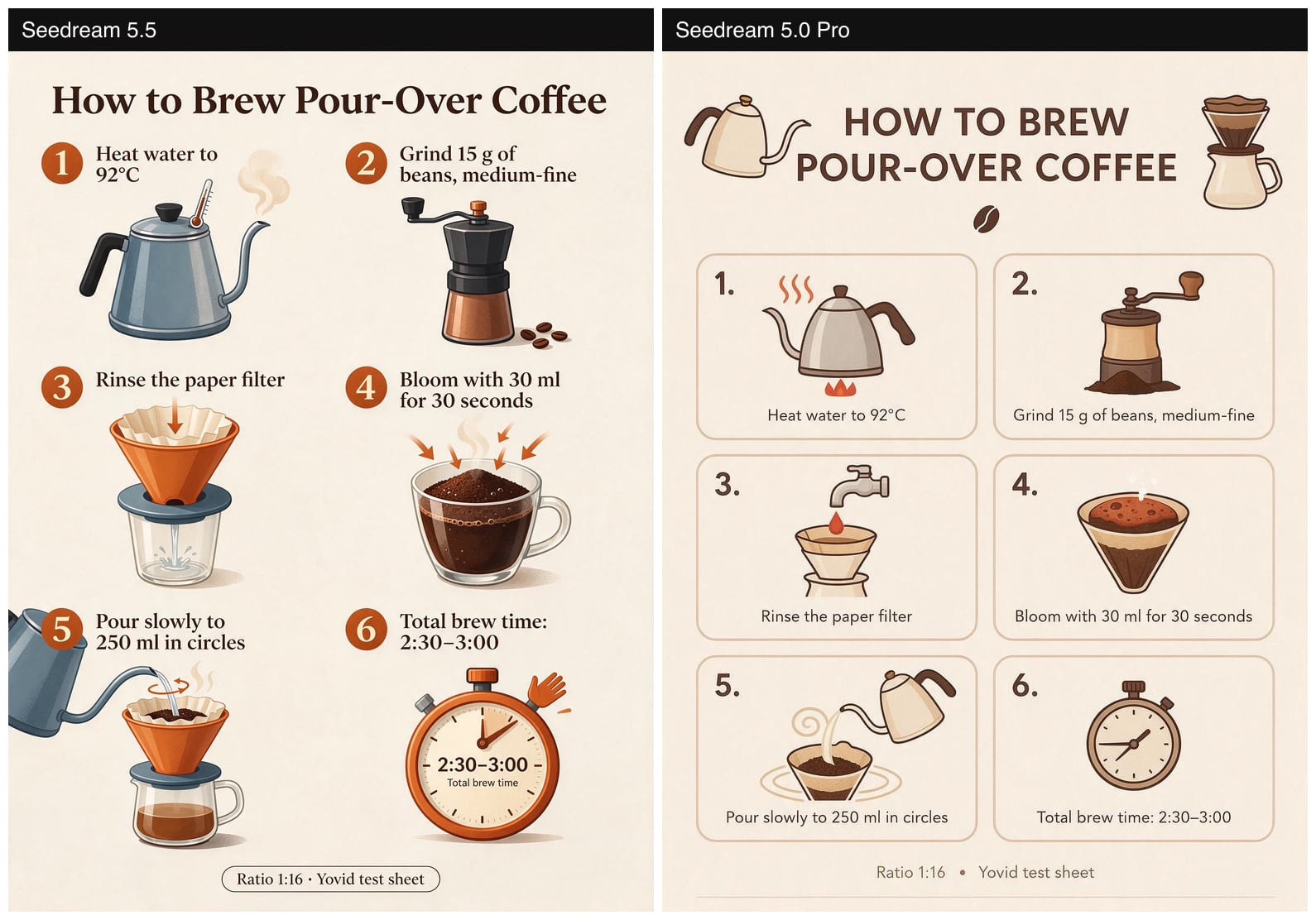
Again both captions were word-perfect, temperatures and times included. But Seedream 5.5 drew a semi-realistic illustration rather than flat design, showed the bloom step as grounds sitting in a glass mug, cut the kettle in step 5 off the edge, and gave the timer a cartoon hand. Seedream 5.0 Pro followed the brief: flat icons in tidy cards. If the text matters more than the pictures, either works. If the layout is the brief, check Seedream 5.5's illustrations before you publish.
Test 3: a documentary portrait
ByteDance says Seedream 5.5 makes photos look less polished and less obviously generated. We asked for a fisherman mending a net on a pier at dawn, "overcast soft light", "no retouching".
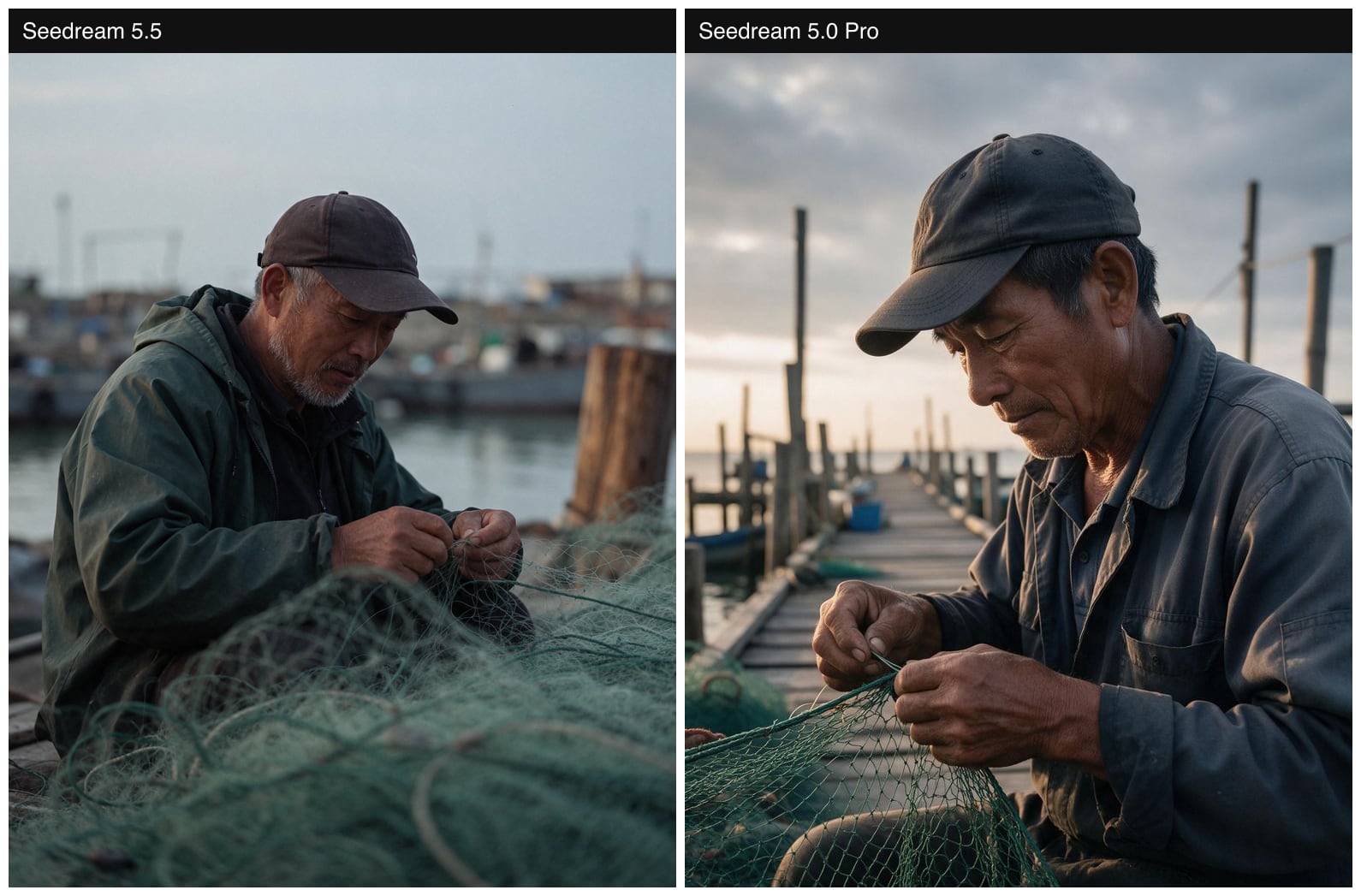
Seedream 5.5 followed the light we described: flat grey sky, muted colour, visible grain, a face that looks photographed rather than lit. Seedream 5.0 Pro produced a striking image, but with a glowing sunrise and crisp rim light that the prompt did not ask for. Which one you prefer is taste. Which one followed the prompt is not.
Test 4: transparent PNGs from a prompt
We set the background to transparent and asked for four things that are hard to cut out: a die-cut sticker, a fluffy white Samoyed, a glass perfume bottle and a flat app icon. All four came back as PNGs with a real alpha channel. We counted the pixels.
| Image | Fully transparent | Semi-transparent | Fully opaque |
|---|---|---|---|
| Sticker | 58.3% | 0.4% | 41.3% |
| Samoyed | 63.6% | 4.0% | 32.4% |
| Perfume bottle | 66.1% | 0.4% | 33.5% |
| App icon | 7.2% | 0.6% | 92.2% |
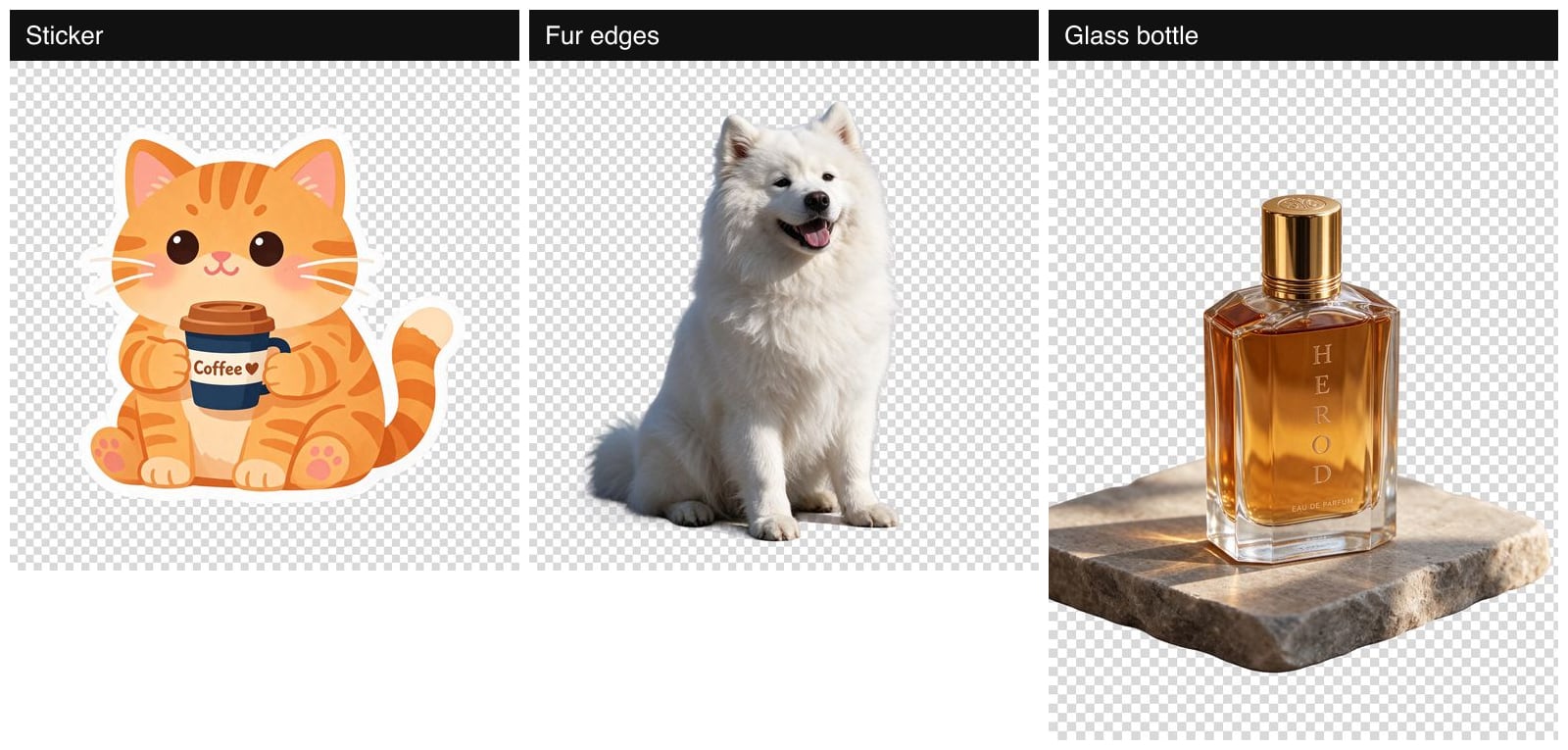
- Sticker and icon: clean edges, ready to drop onto a layout.
- Fur: almost 4% of the pixels are semi-transparent, and on the checkerboard they show up as soft fur edges that fade into the background instead of ending in a hard cut. That is the hardest edge for background removal tools, and it is good here.
- Glass: this is the catch. The background around the bottle is transparent, but the glass itself is fully opaque in the alpha channel. It looks see-through because the model painted it that way, so a different background will not show through it. The model also put the bottle on a stone slab nobody asked for. For transparent glass, describe the object only and check the result on a dark background.
Speed and cost
Times are from a single afternoon, with both edit chains running at the same time, so treat them as a rough guide.
| Seedream 5.5 | Seedream 5.0 Pro | |
|---|---|---|
| 2K text to image | 19–55 s | 44–67 s |
| Edit round with one reference | 26–127 s, 69 s on average | 73–143 s, 101 s on average |
| Upstream price, 2K | $0.028 | $0.068 |
| Upstream price, 2K edit with one reference | $0.035 | $0.070 |
| Credits on Yovid, 2K | 2 | 3 |
| The full 9-image edit chain on Yovid | 18 credits | 27 credits |
On Yovid, Seedream 5.5 costs 1 credit per image at 1K or 1.5K and 2 credits at 2K. Each attached reference image is billed by the provider, so a request with several references can cost more: with ten references, it is 4 credits at 1K or 1.5K and 5 at 2K. The Generate button shows the exact price before you run it. All 28 test images together cost about $1.35 upstream.
Which Seedream to use
- Product photos you will revise many times: Seedream 5.5. It keeps the rest of the picture still and preserves label designs when you change their words. Check each round, because it can quietly skip an edit.
- Stickers, icons and cut-outs: Seedream 5.5, with the background set to transparent. Avoid relying on it for see-through glass.
- Menus and signs with Chinese and English text: either. Seedream 5.5 lays the text out more like a designer would.
- A layout or illustration style spelled out in detail: try Seedream 5.0 Pro as well. It followed our flat-design brief more closely.
- 3K or 4K output: neither. Seedream 5.5 and 5.0 Pro stop at 2K, so use Seedream 5.0 Lite.
FAQ
Is Seedream 5.5 better than Seedream 5.0 Pro?
For repeated edits, natural-looking photos and transparent output, yes in our tests, and it costs less per image. For following a detailed layout or illustration style, Seedream 5.0 Pro did better on our infographic. Both were perfect on text.
How good is Seedream 5.5 at multi-round editing?
Over eight chained edits on one product photo, it applied seven and kept the composition, objects and label design stable throughout. It ignored the request to add steam, so look at every round before you build on it.
Can Seedream 5.5 render Chinese and English text?
Yes. It reproduced a bilingual menu of eight dishes, their prices and the opening hours without a single error, and it swapped an English label for Japanese cleanly. Seedream 5.0 Pro also made no text errors in the same tests.
Does Seedream 5.5 make real transparent PNGs?
Yes. With the background set to transparent, all four of our tests returned PNGs with a real alpha channel, including soft fur edges. Glass and other see-through objects come out opaque in the alpha channel, though.
How much does Seedream 5.5 cost on Yovid?
1 credit per image at 1K or 1.5K and 2 credits at 2K. Reference images add to the price, and the Generate button always shows the total.
Can I use Seedream 5.5 to split a poster into layers?
Not on Yovid yet. Layer splitting is a separate Seedream 5.5 model that Yovid does not offer; the generator creates and edits flat images.
Want to run your own test? Open the AI image generator, pick Seedream 5.5, and start with one image and one change per round.