Direct answer: Pick the model by the shot, not by the product. For a looping listing video made from your own product photo, use Kling 4.0 image to video: it takes a first frame plus an optional last frame, renders 720p or 1080p, and clips can be as short as 3 seconds. For a vertical ad with a voiceover or a spoken line, use Seedance 2.5, which renders sound with the picture, runs 4 to 30 seconds and lets you switch sound off. For hands-on unboxing clips in 9:16, go back to Kling 4.0 text to video. For a slow macro pass over material and stitching, Wan 3.0 renders 1080p clips of 2 to 30 seconds. The five prompts below cover a listing loop, an ad spot, an unboxing, a detail close-up and a lifestyle scene, each with its model, ratio and length.
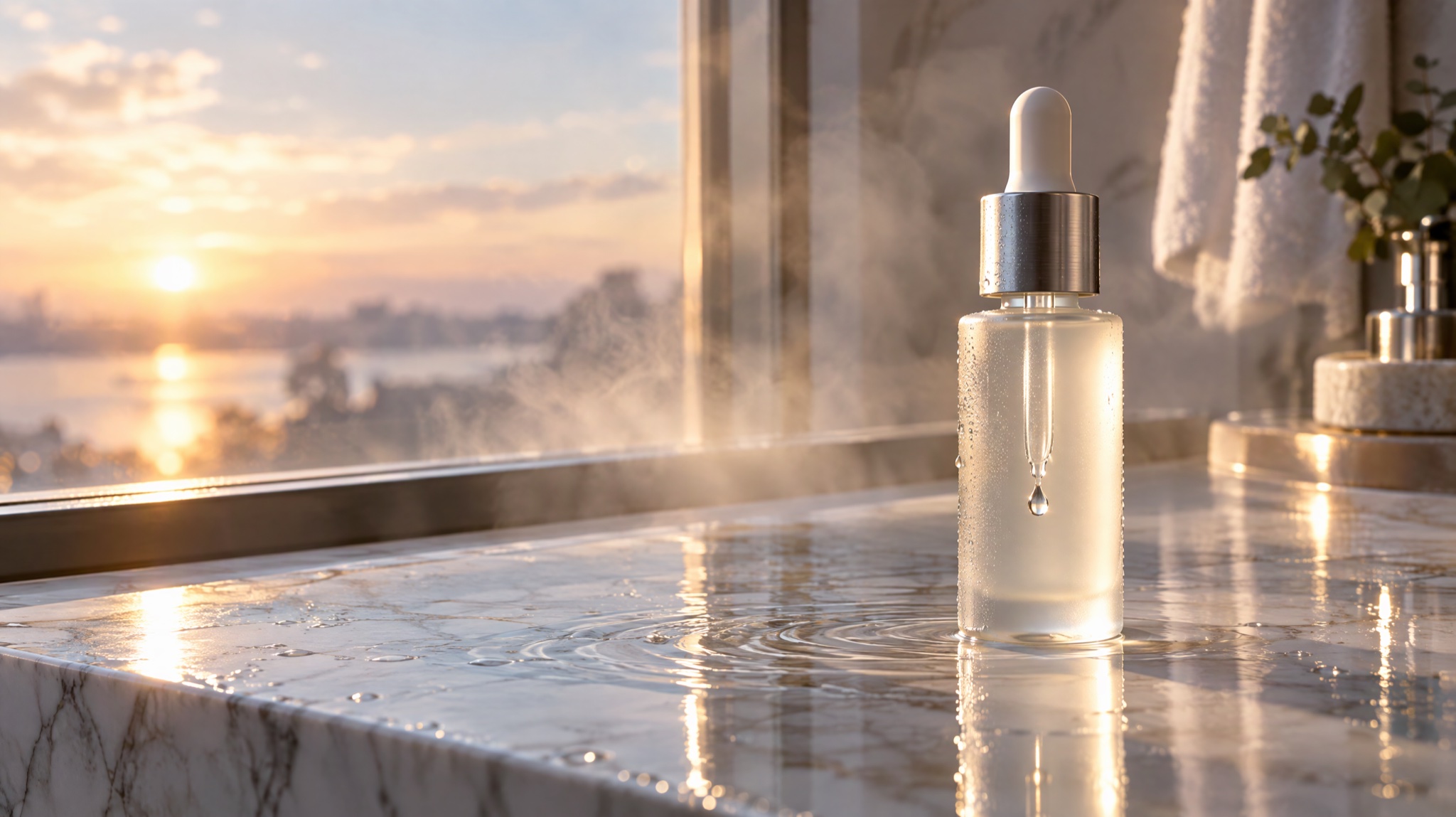
Image prompt: Cinematic still from a premium product commercial, a frosted glass serum bottle with a brushed silver dropper on a wet white marble ledge beside a bathroom window at sunrise, soft morning light across the glass, a single clear droplet in mid-air beside the dropper tip, gentle ripples on the marble, steam hazing the background, shallow depth of field, realistic reflections, plain unlabeled bottle, widescreen composition with the bottle on the right third.
Last verified: 2026-11-21. Lengths, resolutions, inputs and credits come from Yovid's generator settings on the same day.
AI product video scenes and what each one needs
Most product videos are one of five shots. Each has a different job, so each needs a different frame shape, length and sound plan.
| Scene | Where it runs | Ratio | Length | Sound |
|---|---|---|---|---|
| Listing loop | Product page, marketplace gallery | 1:1, or the shape of your product photo | 5 s | Not needed |
| Vertical ad spot | TikTok, Instagram Reels, YouTube Shorts | 9:16 | 10 s | Voiceover and music |
| Unboxing | Social feeds, product page | 9:16 | 10 s | Paper, packaging, clicks |
| Detail close-up | Product gallery, website header | 16:9 | 8 s | Quiet room tone |
| Lifestyle use scene | Ads, landing pages | 16:9 | 8 s | Ambience and one short line |
Two rules hold for all five. Give each clip one action and one camera move, because a product video that tries to show everything ends up blurring the product. And describe what moves (light, camera, hands, liquid) rather than what the product is made of, because the model invents the motion while the product should stay as it is.
5 AI product video prompts to copy
Each prompt uses a sample product. Swap in your own product's color, material and setting, and keep the rest of the structure.
1. Which AI product video prompt works for an e-commerce listing loop?
Model: Kling 4.0, image to video · Ratio: follows your photo, so crop it to 1:1 first · Length: 5 s · Quality: 1080p
The matte black wireless headphones rest on a white turntable that rotates slowly through a quarter turn against a seamless light grey backdrop. The camera stays locked at product height. Soft key light from the left and a thin rim light trace the ear cups, and a faint reflection moves across the glossy base. The headphones keep their exact shape, color and stitching. No text, no people, no background music.
Upload a clean photo of the product as the first frame. For a seamless loop, upload the same photo as the last frame as well, so the clip ends exactly where it started and the player can repeat it without a jump.
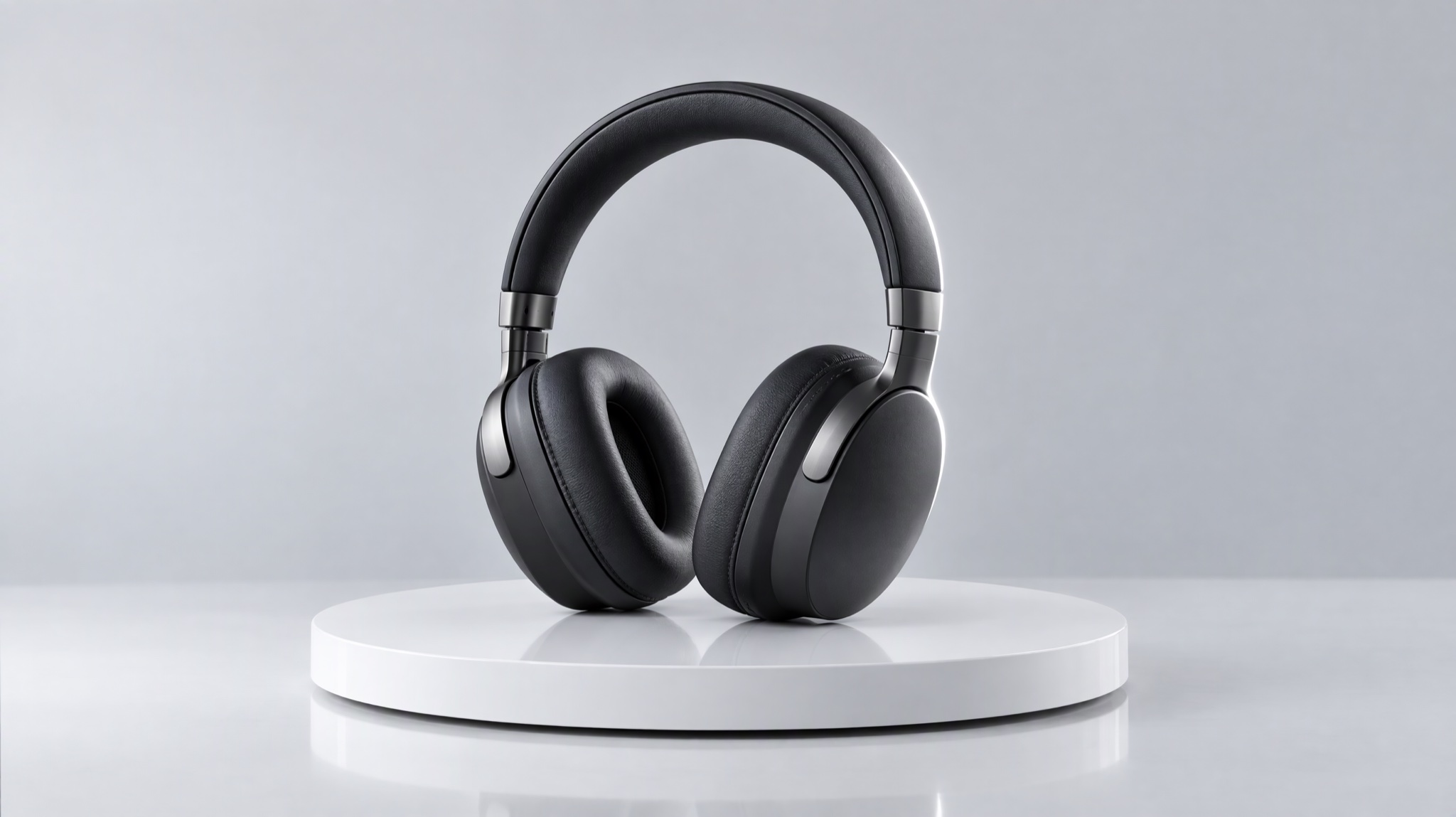
Image prompt: Studio product photograph, matte black over-ear wireless headphones resting on a white turntable against a seamless light grey backdrop, soft key light from the left, a gentle rim light outlining the ear cups, a faint reflection on the glossy base, camera at product height, crisp detail on the cushion stitching and brushed metal hinges, clean minimal e-commerce look, centered composition, no brand marks.
2. How do you write an AI product video ad with a voiceover?
Model: Seedance 2.5, text to video · Ratio: 9:16 · Length: 10 s · Quality: 720p · Sound: on
- 0–3sClose-up of a hand setting a frosted glass serum bottle with a silver dropper on a wet white marble sink, soft sunrise light through a bathroom window
- 3–7sSlow push-in as a single clear drop falls from the dropper onto the back of a hand, the skin catching the warm light
- 7–10sThe bottle stands alone in sharp focus while a calm female voice says, "Ten seconds, every morning." Soft piano and running water underneath, no other voices
Timed beats keep each action inside its slot, so the line lands on the final shot instead of over the drop. Put the spoken words in quotation marks and keep them short enough to say in about three seconds. The hero image above shows the look this prompt aims for.
3. How do you prompt a clean AI unboxing video?
Model: Kling 4.0, text to video · Ratio: 9:16 · Length: 10 s · Quality: 720p
Top-down view of two hands opening a kraft paper box on a light oak desk. The lid lifts to reveal a silver smartwatch nested in grey felt. The hands lift the watch out, turn it toward the camera, and the screen lights up with a soft glow. Natural window light from the upper left, shallow depth of field. Sound: tissue paper crinkling, cardboard rustling and a quiet click as the strap closes. No music.
Kling 4.0 always renders sound, so say what the clip should sound like instead of leaving it to chance. Many feeds start muted, so the picture has to work on its own too: keep the hands slow and the product in the center of the frame.
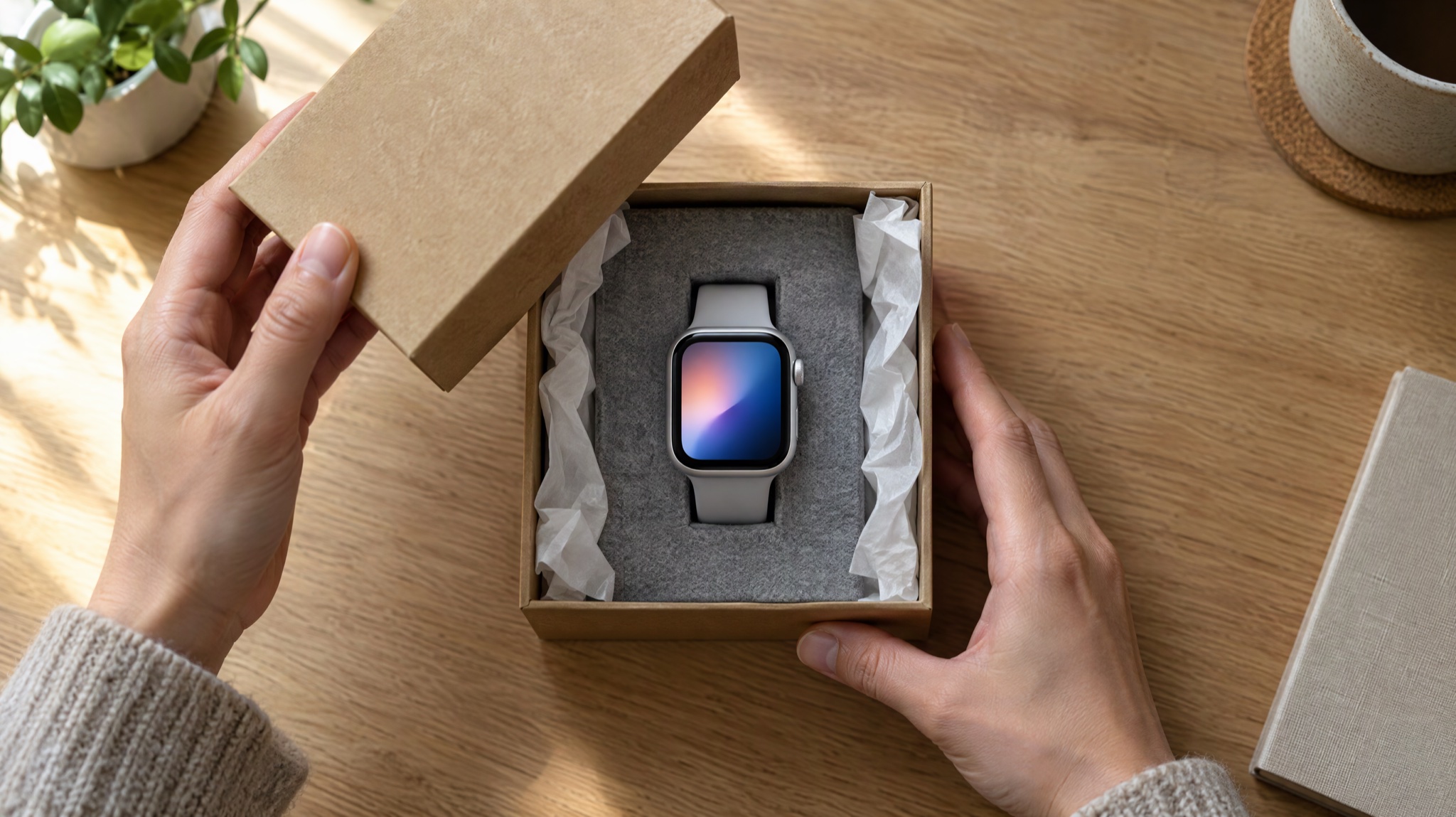
Image prompt: Top-down photograph of two hands opening a kraft paper gift box on a light oak desk, the lid lifted to reveal a silver smartwatch nested in soft grey felt, crumpled white tissue paper at the edges, natural window light from the upper left, soft shadows, shallow depth of field, warm tactile mood, watch face glowing with an abstract gradient, box with no logo.
4. Which AI product video prompt shows material and stitching up close?
Model: Wan 3.0, text to video · Ratio: 16:9 · Length: 8 s · Quality: 1080p · Sound: on or off
Extreme macro shot gliding slowly across the brushed leather of a tan handbag, revealing even saddle stitching, a polished brass buckle and the grain of the hide. Warm raking light from the side picks out every texture. Shallow depth of field, with focus pulling gently from the stitching to the buckle. Quiet room tone and a soft leather creak as the strap shifts.
One slow camera move is enough for a close-up. Name the materials you want the viewer to notice, and light from the side, because flat front light hides texture.
5. How do you show a product in use in an AI lifestyle video?
Model: Seedance 2.5, text to video · Ratio: 16:9 · Length: 8 s · Quality: 720p · Sound: on
A young woman in a sunlit kitchen pours coffee from a matte green insulated bottle into a ceramic mug, and steam rises. She takes a sip, smiles toward a friend off camera and says, "Still hot from this morning." Medium shot with a gentle handheld feel, warm natural light, a kettle ticking and birdsong through the open window.
When the bottle has to be your real bottle, run this as image to video with a photo of it as the first frame. The clip then follows the photo's frame shape, so shoot or crop the photo at 16:9 before you upload it.
Best model for each AI product video shot
| Shot | Best model | Why |
|---|---|---|
| Product photo loop | Kling 4.0, image to video | First and last frame, 720p or 1080p, clips from 3 s |
| Ad with voiceover or music | Seedance 2.5 | Sound rendered with the picture, 4 to 30 s, sound can be switched off |
| Unboxing and hands | Kling 4.0, text to video | 9:16, 3 to 30 s, sound on every clip |
| Texture and detail at 1080p | Wan 3.0 | 1080p, 2 to 30 s, sound can be switched off |
| Person using the product and speaking | Seedance 2.5 | Speech and ambience in one pass, up to 30 s |
| A silent clip | Seedance 2.5 or Wan 3.0 | Both have a sound switch; Kling 4.0 always adds sound |
Kling 4.0. Best for: product photo loops and unboxing clips up to 30 seconds, with control over the first and last frame. Not for: silent output, since every Kling 4.0 clip comes with sound, or 4:3 and 3:4 frames (it offers 16:9, 9:16, 1:1 and 21:9).
Seedance 2.5. Best for: ads with a voiceover, a spoken line or music, single takes up to 30 seconds, and 480p drafts before a final render. Not for: 1080p tests on a tight budget, because its 1080p rate is far higher than its 720p rate (see the credit table below).
Wan 3.0. Best for: 1080p detail shots and clips you may want without sound. Not for: 21:9 banners (it offers 16:9, 9:16, 1:1, 4:3 and 3:4).
AI product video sizes, length and sound by platform
Choose the frame shape before you write the prompt, because image-to-video clips take their shape from the first frame.
- 9:16 for TikTok, Instagram Reels and YouTube Shorts.
- 1:1 for product pages and feed posts where a square tile fits the layout.
- 16:9 for website headers, YouTube and presentations.
Keep each shot to 5 to 10 seconds and cut several shots together in an editor rather than asking for one long clip that does everything. Many feeds start videos muted, so every shot should make sense without sound; add the voiceover or music for viewers who turn it on.
How do you make a product first frame with Nano Banana?
If you have no clean product photo, generate one with Nano Banana 2.1 at the ratio you plan to publish, then upload it as the first frame of an image-to-video run. The Nano Banana prompts for product shots give 30 studio and lifestyle setups to start from, and the image-to-video prompt examples show how to write motion for a still. A generated frame can change labels, buttons or proportions, so when exact details matter, use a real photo of your product instead.
What each AI product video prompt costs in credits on Yovid
Here is what the five prompts cost on Yovid at the settings listed above, read from the generator's own pricing on 2026-11-21.
| Prompt | Model and settings | Credit pack | Lite | Pro | Premium |
|---|---|---|---|---|---|
| 1. Listing loop | Kling 4.0, 5 s, 1080p | 25 | 23 | 18 | 17 |
| 2. Vertical ad | Seedance 2.5, 10 s, 720p | 61 | 55 | 43 | 43 |
| 3. Unboxing | Kling 4.0, 10 s, 720p | 30 | 27 | 21 | 21 |
| 4. Detail close-up | Wan 3.0, 8 s, 1080p | 38 | 34 | 27 | 26 |
| 5. Lifestyle scene | Seedance 2.5, 8 s, 720p | 49 | 44 | 34 | 33 |
| All five once | 203 | 183 | 143 | 140 |
Plan figures are for monthly billing; Premium figures are for subscriptions started now. Running all five once costs about $27 on the Creator credit pack ($49.90 for 375 credits) and fits inside one month of Pro ($29 a month for 200 credits). Lite ($14.90 a month for 100 credits) covers about half of the set. Kling 4.0 needs a paid plan or the Creator pack or larger; the Starter pack ($29.90 for 200 credits) covers Seedance 2.5 and Wan 3.0 but not Kling models. A 5-second 720p test of prompt 1 costs 15 credits on a pack, so check the motion there before you pay for 1080p.
Resolution also depends on the plan. Lite renders Seedance models at up to 720p and other models at up to 1080p, Pro goes to 1080p on Seedance and 2K on others, and Premium goes up to 4K on the models that offer it. Credit packs keep each model's own resolution options.
To use Yovid as an AI product video generator, pick the model named in the prompt, set the ratio, length and quality, paste the prompt and press Generate; the credit cost shows on the button before anything is spent. For prompt 1, start from the image-to-video generator and upload your photo as the first frame. Plan details are on the pricing page.
FAQ
Can an AI product video keep my product looking exactly the same?
Not with a guarantee. Starting from a real photo as the first frame keeps the shape and color much closer than a text description, and Kling 4.0 also accepts a last frame. Small print, logos and fine patterns are the first details to drift, so check every frame before you publish and rerun the clip if something changes.
Can my brand logo appear in an AI product video?
A logo that is already in your first-frame photo can survive slow, simple motion, but small marks often warp. If the logo has to be exact, add it as an overlay in your editor after generation, and only use logos you have the rights to. The prompts in this guide ask for no text so the model does not invent marks of its own.
Can I use AI product videos for commercial work?
On Yovid, commercial use is included with Pro and Premium (monthly or yearly), with Lite on yearly billing and with every credit pack. Monthly Lite does not include it. Read the terms shown at checkout if a project needs a specific right confirmed.
How much does one AI product video cost?
On a credit pack the five prompts here cost 25 to 61 credits each, and Lite, Pro and Premium charge less per clip. At the Creator pack's price of about $0.13 per credit, that is roughly $3.33 for the listing loop and $8.12 for the 10-second Seedance 2.5 ad.
Is there a free AI product video generator option?
Only for Seedance 2.0 Mini. New accounts get 5 free credits, enough for one 4-second 480p Mini clip, and the no-sign-up trial makes one watermarked 4-second 480p Mini clip. Seedance 2.5, Kling 4.0 and Wan 3.0 need a paid plan or a credit pack.
Make your first AI product video
Pick the scene closest to your product, copy its prompt, change the product, colors and setting, and run a short 720p test before the final render. For more step-by-step guides, browse Video Workflows.
When you are ready to try the prompts, open the free AI video generator and choose the model named above. The free part covers Seedance 2.0 Mini test clips only; Kling 4.0, Seedance 2.5 and Wan 3.0 use paid credits.