

Direct answer: Seedance 2.5, Veo 3.1, MiniMax H3, Wan 3.0 and Kling 4.0 all generate sound together with the picture, so a first cut doesn't need a separate audio tool. All five can produce speech, sound effects and music from the prompt. The bigger differences are length and control. Seedance 2.5, Wan 3.0 and Kling 4.0 run up to 30 seconds, MiniMax H3 stops at 15, and Veo 3.1 stops at 8. Seedance 2.5 and Wan 3.0 have a Sound switch, while Veo 3.1, MiniMax H3 and Kling 4.0 always render with sound. If the dialogue has to be in a specific language, start with Kling 4.0 or MiniMax H3, because those vendors publish a language list. Wan 3.0 is the cheapest of the group, from 1.2 credits per second on Yovid.

Image prompt: Cinematic film still of two adult friends talking across a small wooden table in a quiet cafe beside a rainy window. One is mid-sentence with a hand slightly raised, the other listens with a small smile. Steam rises from two ceramic cups. Warm tungsten light, rain streaks on the glass, blurred street lights outside, shallow depth of field, 35mm look. Plain walls, no signs and no lettering anywhere in the frame.
Which AI video models generate sound
Last verified: 2026-11-08
| Model | Sound | Dialogue | Sound effects | Music | Longest clip | Top resolution on Yovid | Credits per second on Yovid |
|---|---|---|---|---|---|---|---|
| Seedance 2.5 | Yes, Sound switch, on by default | Yes | Yes | Yes | 30 s | 1080p on Pro, Premium or a credit pack; Lite stops at 720p | 3.05 at 480p, 6.1 at 720p, 15.1 at 1080p |
| Veo 3.1 Fast | Yes, always on | Yes | Yes | Yes, when prompted | 8 s | Up to 4K on Premium or a Creator-size pack | 3 at 720p or 1080p, 10 at 4K |
| Veo 3.1 Pro | Yes, always on | Yes | Yes | Yes, when prompted | 8 s | 1080p | 8 |
| MiniMax H3 | Yes, always on | Yes | Yes | Yes | 15 s | 2K on Pro, Premium or a credit pack | 4.55 |
| Wan 3.0 | Yes, Sound switch, on by default | Yes | Yes | Yes | 30 s | 1080p | 1.2 at 480p, 2.4 at 720p, 4.8 at 1080p |
| Kling 4.0 | Yes, always on | Yes | Yes | Yes | 30 s | 1080p | 3 at 720p, 5 at 1080p |
| Seedance 2.0 Mini | Yes, Sound switch, on by default | Yes | Yes | Yes | 15 s | 720p | 1.16 at 480p, 2.5 at 720p |
Credits are base credit-pack rates. Lite, Pro and Premium subscribers pay 10%, 30% and 40% less, and the Generate button shows the exact cost before you start. At base rates, an 8-second clip costs 19 credits on Wan 3.0 at 720p, 24 on Veo 3.1 Fast or Kling 4.0 at 720p, 36 on MiniMax H3 at 2K, 49 on Seedance 2.5 at 720p and 64 on Veo 3.1 Pro.
Free sign-up credits reach only the entry models, and Seedance 2.0 Mini is the only one in this table: 5 credits buy one 4-second 480p clip. Seedance 2.5, MiniMax H3 and Wan 3.0 work with any paid plan or credit pack. Kling 4.0 and Veo 3.1 Fast need a paid plan or a Creator-size pack or larger. Veo 3.1 Pro needs a paid plan. Full details are on the pricing page.
The Sound control sits in the parameter row under the prompt. It only appears on models that let you turn sound off.
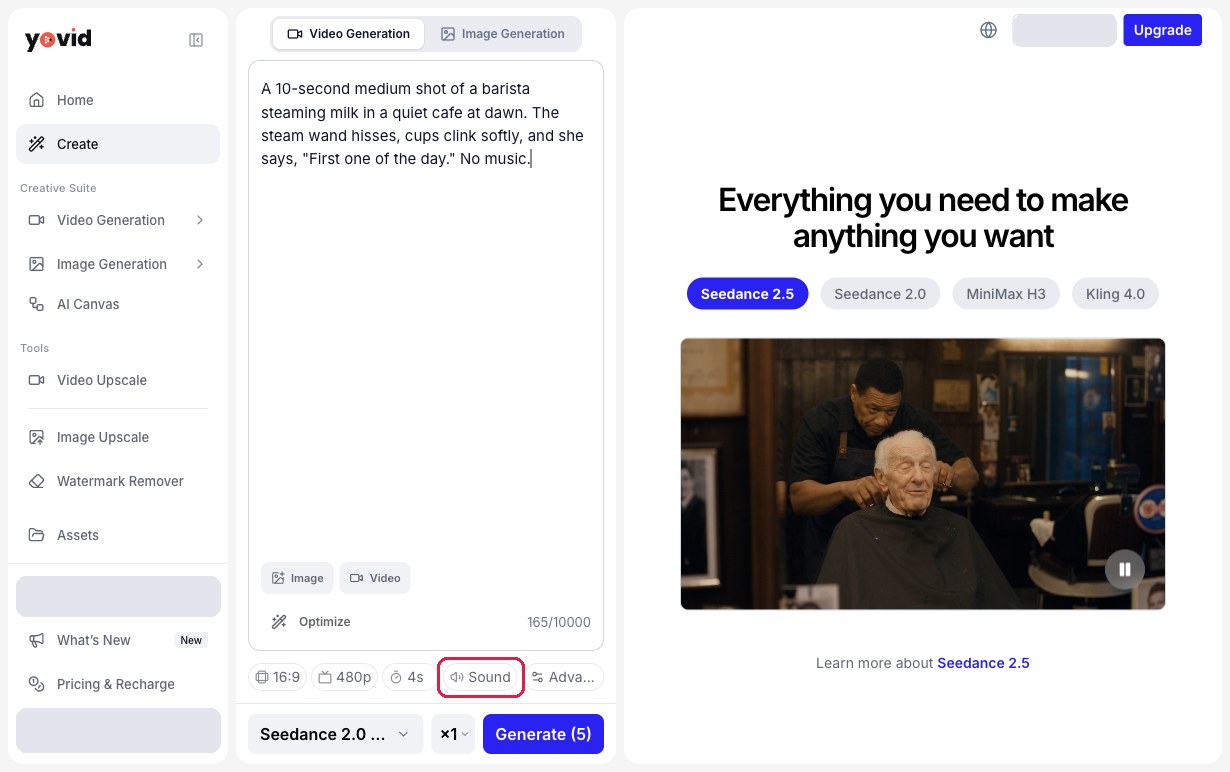
The Yovid video workspace with the Sound control outlined. Account details are hidden.
What each model does with sound
Seedance 2.5
ByteDance Seed describes Seedance 2.5 as an audio and video joint generation model. Its launch notes say voices stay with the right characters in multi-character shots, sound and picture stay in sync across long clips, and unrequested background music is kept down. You get one finished clip with its soundtrack, so whatever the prompt says about sound shapes what you hear.
On Yovid a clip runs 4 to 30 seconds, with sound on by default and the same price either way. ByteDance's launch notes don't give a list of dialogue languages. For wording that works, see the Seedance 2.5 sound and music prompts.
Best for: long single takes where the sound has to change along with the scene. Not for: cheap first tests, since 720p costs more than twice what Wan 3.0 charges.
Veo 3.1
Google's documentation lists audio as always on for Veo 3.1 and Veo 3.1 Fast. Its prompting guide covers three kinds of sound: dialogue in quotes, sound effects described directly and ambient noise described as a soundscape. Music has no section of its own, but Google's sample prompts ask for it in plain words and it works the same way.
Yovid offers 4, 6 or 8 seconds, and both 1080p and 4K render at 8 seconds only. There is no Sound switch. Veo 3.1 Fast goes up to 4K on Premium or a Creator-size pack, and Veo 3.1 Pro stops at 1080p.
Best for: short, polished clips built around one spoken line or one effect. Not for: anything longer than 8 seconds in a single generation.
MiniMax H3
MiniMax says H3 models voice, sound effects and music jointly and outputs everything in stereo. Its open-source notes list stable dialogue in 11 languages: Arabic, Chinese, English, French, German, Italian, Japanese, Korean, Portuguese, Russian and Spanish. Sample prompts mark spoken lines by language and describe music and effects in ordinary sentences.
On Yovid, H3 runs 5 to 15 seconds at 2K only, which needs Pro, Premium or a credit pack. Sound can't be switched off. MiniMax's own API takes reference audio, but Yovid doesn't offer it for H3.
Best for: short, sharp shots with speech in one of the listed languages. Not for: clips over 15 seconds or footage you want silent.
Wan 3.0
Alibaba's documentation says Wan 3.0 outputs dialogue, background music and sound effects along with the picture, with audio on by default. Alibaba also says plainly that audio texture is still improving, which is worth remembering before you treat a Wan soundtrack as final.
On Yovid, clips run 2 to 30 seconds at 480p, 720p or 1080p, and the price is the same with sound on or off. That makes it the easy choice for long drafts where you want to hear the timing without spending much.
Best for: long, low-cost drafts with sound. Not for: a finished mix where audio quality is the main thing being judged.
Kling 4.0
Kling's user guide says audio comes out in two-channel stereo and that speech goes in quotation marks. It lists nine dialogue languages: Chinese, English, Japanese, Korean, Spanish, Portuguese, German, French and Hindi. The same guide warns that background music may appear by default, so write "no music" when you don't want it.
On Yovid, Kling 4.0 runs 3 to 30 seconds at 720p or 1080p with sound always on. Kling lists 4K on its own platform, but Yovid stops at 1080p for this model. Kling 4.0 Flash also carries sound on every clip, at 720p, 3 to 20 seconds, for 1.8 credits per second.
Best for: dialogue in a named language across a longer clip. Not for: silent exports or 4K output on Yovid.
One prompt to compare them
The table above comes from each vendor's published documentation and the model settings on Yovid. It shows what each model is built to do, and your scene may still sound different. To hear the difference, paste the same prompt into two or three models. This one fits inside Veo 3.1's 8-second limit.
An 8-second medium shot of a barista steaming milk in a quiet cafe at dawn. The steam wand hisses, cups clink softly, and she says to the camera, "First one of the day." Soft acoustic guitar plays very low under the room.
Listen for three things: whether the line lands on her lips, whether the hiss starts when the steam starts, and whether the guitar stays under the room. Open the text-to-video generator, pick a model and set the length to 8 seconds.
Which model to pick by scene
| What you need | Start with | Why |
|---|---|---|
| Dialogue | Kling 4.0 or MiniMax H3 | Both vendors publish dialogue languages |
| Ambience and effects | Seedance 2.5 or Veo 3.1 | ByteDance tunes against stray music; Google documents ambient prompts |
| Music | MiniMax H3 or Wan 3.0 | Both vendors describe music as part of the output |
| Long clips with sound | Seedance 2.5, Kling 4.0 or Wan 3.0 | Up to 30 seconds in one generation |
| Lowest cost | Wan 3.0 | 2.4 credits per second at 720p |
These are starting points drawn from the vendors' documents. Copy one of the prompts below and try it on the models in that row.
Dialogue
An 8-second close-up of two friends at a small cafe table beside a rainy window. The woman leans in and says, "You kept the letter?" The man nods and answers, "Every single one." Quiet room tone and rain on the glass, no music, no subtitles.
Ambience and effects

Image prompt: Cinematic film still of a small wooden fishing harbor at dawn in light fog. An adult in a yellow oilskin coat coils wet rope on a dock while gulls circle above and small waves lap against moored boats. Soft pale pink and steel blue light, mist over the water, wet timber in crisp detail, wide shot, 35mm look. Unmarked boats with blank hulls, no signs and no lettering anywhere in the frame.
An 8-second wide shot of a small fishing harbor at dawn in light fog, a worker coiling wet rope on a wooden dock. Water lapping against moored boats, gulls calling in the distance, the creak of a rope under tension. Ambient sound only, no music, no voices.
Music
An 8-second slow push-in on a street guitarist playing under a warm lamp on an empty plaza at night. A gentle fingerpicked melody, unhurried and warm, strings squeaking softly under her fingers, a light breeze in the background. No singing, no subtitles.
If your model has no sound
A few older models on Yovid, such as Seedance 1 Pro Fast, have no sound option. You can either add audio afterwards in a video editor, using music and voice you have the rights to, or render the shot again on a model that makes sound. The AI video models page lists what is available. The same editor route works when you switch sound off on Seedance 2.5 or Wan 3.0 because you plan to score the clip yourself.
More side-by-side data is in model comparisons, including AI video models compared.
FAQ
Which AI video model handles dialogue best?
No vendor publishes a dialogue benchmark that compares these models, so public data can't name a winner. Kling 4.0 and MiniMax H3 are the two with published language lists, which makes them the safest place to start. Put the spoken line in quotes and run it on both.
Does sound cost extra?
Not on Yovid. Seedance 2.5 and Wan 3.0 cost the same with sound on or off. Veo 3.1, MiniMax H3 and Kling 4.0 always include sound in their per-second price.
Can I upload my own audio?
Not in the Yovid browser composer. The Yovid API accepts audio references for Seedance 2.5 only: up to 10 MP3 or WAV files, 2 to 30 seconds each and 30 seconds combined, with 15 MB or less per file. MiniMax and Alibaba accept reference audio on their own APIs, and Kling takes voice profiles on its own platform, but Yovid doesn't offer those inputs for those models.
Can I turn the sound off?
On Seedance 2.5, the Seedance 2.0 family and Wan 3.0, yes, with the Sound switch. Veo 3.1, MiniMax H3 and Kling 4.0 always render with sound, so mute or replace the track in your editor if you don't need it.
What languages do these models speak?
Kling 4.0 lists Chinese, English, Japanese, Korean, Spanish, Portuguese, German, French and Hindi. MiniMax H3 lists Arabic, Chinese, English, French, German, Italian, Japanese, Korean, Portuguese, Russian and Spanish. The Google, ByteDance and Alibaba pages checked for this article don't publish a dialogue language list for Veo 3.1, Seedance 2.5 or Wan 3.0, so test your language with a short clip first.
To try one of these prompts, open the Yovid AI video generator, pick the model from the table and paste the prompt. Seedance 2.0 Mini runs on free sign-up credits, and the other models in the table need a paid plan or credit pack.